Anthropic dropped Claude Design on April 23, 2026, and the design world is buzzing. The initial examples of UI mockups and slick product concepts are impressive, and if you're a professional creator, you're right to be curious. But you also know the real work starts after the 'wow' moment. How do you get consistent, professional results from a powerful new tool like this? The answer isn't about finding a magic prompt—it's about changing your process entirely.
Yes, Claude Design is a big deal. But it won’t solve your biggest problem.
Let's be clear: the technology behind Claude Design is a significant step forward. The ability to generate complex visual assets from text is getting better at an astonishing rate. You've likely seen the demos and thought about how you could use it for rapid wireframing or creating social media visuals. The potential is real.
However, that potential runs headfirst into the non-negotiable demands of professional creative work: consistency, brand alignment, and scalability. Your job isn't to create one cool image. It's to create a dozen assets for a campaign that all feel like they came from the same brand. It's to take a concept and apply it across different formats and products. This is where a raw, prompt-based model becomes a bottleneck. The question quickly changes from “What can this do?” to “How can I make it do what I need, again and again?”
The 'perfect prompt' is a myth that wastes your time
The immediate reaction to a new model like Claude Design is a frantic search for prompt guides. The belief is that if you can just find the right combination of 200 words, you'll unlock perfect results every time. This is a trap. Relying on complex, single-shot prompts for production work is like playing a creative lottery. You might hit the jackpot once, but you can't build a campaign on it.
Think about the last time you tried this. You write a detailed paragraph describing a scene, the lighting, the mood, and the exact product placement. You get back three variations, and none of them are quite right. One has the wrong color palette, another misunderstands the composition, and the third looks like a different product entirely. So you tweak a few words, run it again, and get a completely new set of random outcomes. This isn't a professional process; it's frustrating guesswork that burns through time and energy.
Brand control is the first casualty. How do you ensure the model uses your specific hex code for a background color? How do you enforce a consistent photographic style or typographic treatment? A single text prompt offers very little leverage over these critical details. It’s an instruction given with hope, not with precision.
Shift from prompting to producing with a structured workflow
The professional alternative to prompt hunting is a structured workflow. Instead of packing all your instructions into one massive, hopeful paragraph, a workflow breaks the creative process down into a series of deliberate, independent choices. It’s the difference between giving a chef a vague wish for “something tasty” and giving them a detailed recipe with specific ingredients and steps.
In a platform like MyUP AI, a workflow is a guided process. It asks you for specific inputs—brand colors, product names, style preferences, background elements—as separate fields. Each input acts as a hard constraint on the AI, removing the guesswork and forcing the output to align with your specific goals. This method is inherently more predictable, repeatable, and scalable.
This structured approach is the key to moving from generating single assets to building entire campaigns. Once you have a workflow dialed in, you can swap out one variable—like the product name or hero color—and reliably generate a new, on-brand asset without starting from scratch. It’s how you can efficiently create a complete brand kit with AI, not just a one-off logo.
Example: A production workflow for a product campaign
Let's make this concrete. Imagine you need to generate a series of images for a new skincare line. Using a generic prompt in a raw tool might look like this: “A minimalist studio photograph of a luxury vitamin C serum bottle, with fresh orange slices and green leaves nearby, soft morning light, on a clean white marble surface, high-end commercial aesthetic.” You’ll get something interesting, but probably not exactly what you need.
Now, consider a workflow. Our 'Product Photography Campaign' template doesn't ask for a paragraph. It asks for specific fields:
- Product Name: Radiant Glow Vitamin C Serum
- Core Ingredient: Orange Slices
- Background Style: White Marble Slab
- Lighting: Soft & Bright
- Brand Color Accent: #FDB813
By providing these details as separate inputs, you are guiding the AI with precision. The workflow assembles these constraints into a set of instructions the model can actually follow, dramatically increasing the odds of getting a production-ready image on the first try. You can then easily swap 'Orange Slices' for 'Avocado' to create a shot for your next product in the line, and the style remains consistent. You can try this exact process with our Product Photography Campaign template. Workflow code: #myup-i7tv-whrn.
Product Photography Campaign
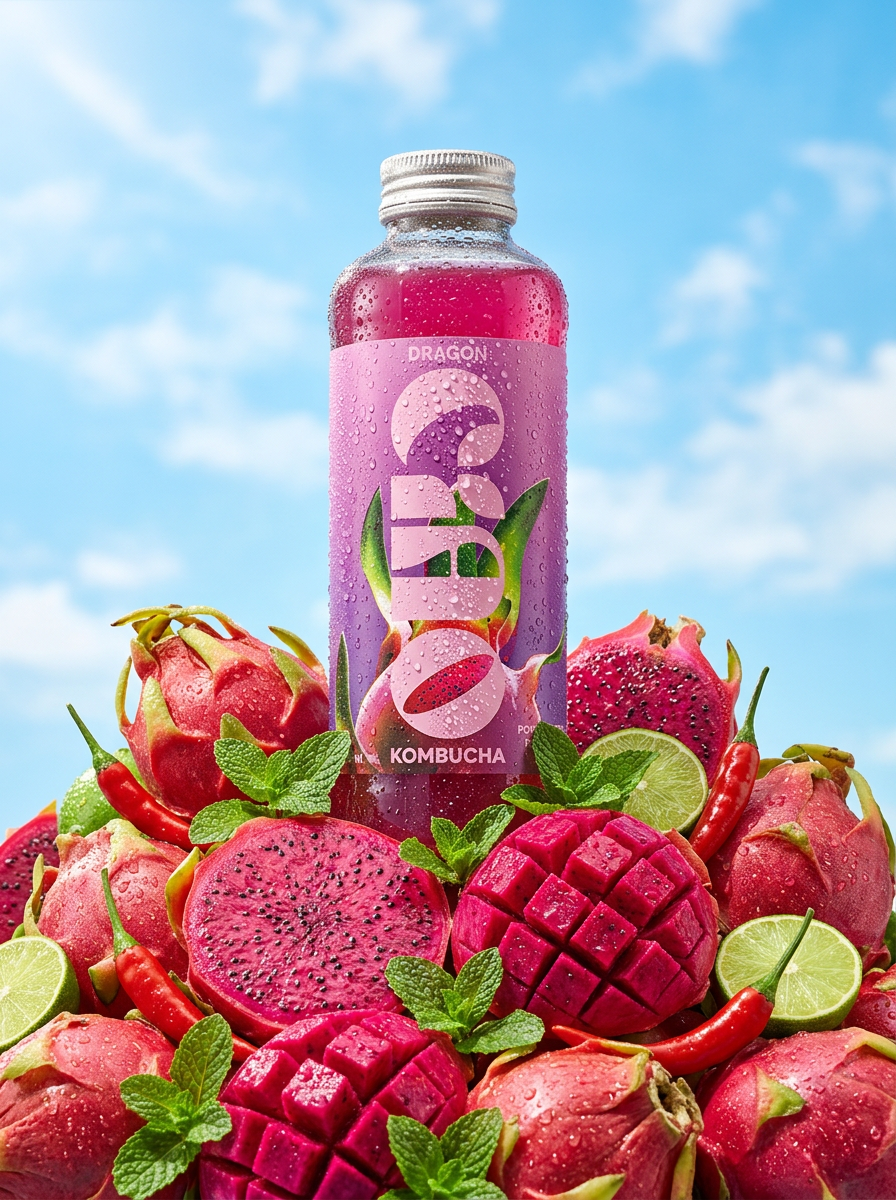
Give your drinks or cosmetics that ice-cold, sun-drenched look. It drops your product into a mountain of fresh fruit, capturing towering low-angle hero shots and macro details of glistening condensation under a bright blue sky.
Regenerate using your own assets.
When to explore with prompts vs. when to execute with workflows
This isn't to say that raw, powerful models like Claude Design have no place in a professional toolkit. They absolutely do—but their strength lies in exploration, not execution. When you're in the early stages of a project, mood boarding, or just trying to find a new visual direction, the randomness of a single prompt can be a powerful creative partner. It can show you possibilities you hadn't considered.
The moment the brief is approved and you need to deliver specific, on-brand assets against a deadline, the game changes. That's the crossover point. Exploration ends and execution begins. For execution, you need reliability and control. You need a system that guarantees your brand guidelines are met and that you can produce consistent variations at scale. This is especially true for complex, sequential visuals, where the consistency of an AI storyboard generator depends entirely on a structured, repeatable process.
Your next asset is a workflow away
The arrival of powerful models like Anthropic's Claude Design is exciting, but it also clarifies the real challenge for creators. The problem is no longer about generating an image; it's about systematically generating the right image, every single time. Chasing the perfect prompt is an inefficient detour from that goal.
The future of professional AI creation is in systems that tame the raw power of these models and channel it through structured, repeatable workflows. It’s about building a creative engine, not just getting lucky with a prompt. If you're ready to stop guessing and start producing, it's time to embrace a workflow-first approach. Your brand consistency and your deadlines will thank you.
