
If you're a founder, consultant, or marketer, you understand the pressure of maintaining a strong personal brand on LinkedIn. You also know how time-consuming it can be to consistently publish insightful content. Perhaps you even tried LinkedIn's new native AI assistant, rolled out in April 2026, hoping for a magic bullet. And, like many, you probably found its output a bit… generic. It's a useful starting point, but it often lacks the nuanced voice, strategic depth, and visual flair needed to truly stand out. That's where a smarter AI workflow comes in.
So, you tried LinkedIn’s new AI assistant. Here’s what it can’t do.
The recent introduction of LinkedIn's native AI assistant has certainly validated the widespread need for help with content creation. However, its limitations quickly become apparent for professionals focused on building a distinctive personal brand. While it can draft a quick post, it struggles with replicating your unique voice, planning a week's worth of cohesive content, or integrating compelling visuals. The result is often content that sounds like it could have been written by anyone, which is counterproductive when your goal is to establish authority and trust. This is the precise gap MyUP AI aims to fill: moving from basic AI assistance to a fully integrated content engine that works for you.
The 30-minute workflow: from one idea to a week of content
Imagine turning a single industry observation into five distinct, high-quality LinkedIn posts, including a visually rich carousel, all within half an hour. This isn't about generating boilerplate text; it's about building a repeatable system that leverages AI to amplify your insights and maintain your authentic voice. Our workflow guides you through four clear steps, transforming your content creation from a weekly chore into a streamlined, strategic process. You'll move from ideation to drafting, visual planning, and final touches, ensuring every post reinforces your personal brand effectively.
Step 1: Find your weekly topic (without the guesswork)
The biggest hurdle for consistent content is often the blank page. Instead of staring at an empty draft, start with proven engagement. A powerful technique gaining traction is the 'comment-to-post' method. When you leave an insightful comment on someone else's LinkedIn post, you've already identified a relevant topic and formulated a concise opinion. Copy that comment, bring it into MyUP AI, and use it as the seed for your weekly content. Alternatively, if you need broader inspiration, leverage the 'Blog Post Ideas' generator. Feed it your core industry or a recent trend, and it will provide 5-7 unique angles you can develop throughout the week. This ensures your content is always relevant and grounded in current conversations, saving you valuable ideation time.
Step 2: Draft posts that actually sound like you
Generic AI output is the death of personal branding. The key to authentic LinkedIn content lies in 'personal brand voice cloning' – teaching the AI to write in your unique style. In MyUP AI, you can achieve this by feeding the 'Paragraph Generator' examples of your past successful LinkedIn posts, articles, or even emails. Provide specific instructions: 'Expand on this idea in the tone of my previous posts, focusing on actionable advice for B2B founders. Maintain a confident, slightly informal, and expert voice.' Advanced models available within MyUP, such as Claude 3.5 Sonnet, are particularly adept at capturing nuanced tones, allowing you to generate drafts that genuinely sound like an extension of yourself. This step is where you transform a basic idea into a thoughtful, on-brand message, ready for your audience.
Step 3: Turn one post into a high-engagement carousel
LinkedIn carousels consistently drive higher engagement than text-only posts, but they typically require significant design effort. With MyUP AI, you can turn a single strong post idea into a multi-slide carousel in minutes. Take one of your drafted posts and ask the AI to 'break this down into 5-7 concise bullet points, each suitable for a separate carousel slide.' Then, for each bullet point, generate a brief, evocative prompt for an image. For instance, if a slide discusses 'the future of AI in marketing,' your image prompt might be 'futuristic marketing dashboard, glowing data, AI interface, minimalist design.' This not only streamlines your content creation but also helps you tap into a highly effective visual format on LinkedIn. For more ideas on how to use AI for social media content, explore our guide on AI Instagram content generation.
Step 4: Create a unique visual for your brand
Beyond carousels, a single, strong visual can significantly boost the impact of your text posts. Instead of relying on stock photos, use MyUP AI's image generation capabilities to create something truly unique and on-brand. For example, if you're promoting a new service or sharing a business insight, you can use the 'Commercial Photography' workflow to generate a professional, high-quality image that aligns perfectly with your message and brand aesthetic. Simply input your desired subject and style, and the AI will produce several options. Workflow code: #myup-hyyy-zafs. This ensures your visual content is as distinctive as your written content, reinforcing your brand identity across all your LinkedIn activity. You can also explore how to build more complex content agents for broader planning in our article on automating your social media calendar.
Commercial Photography
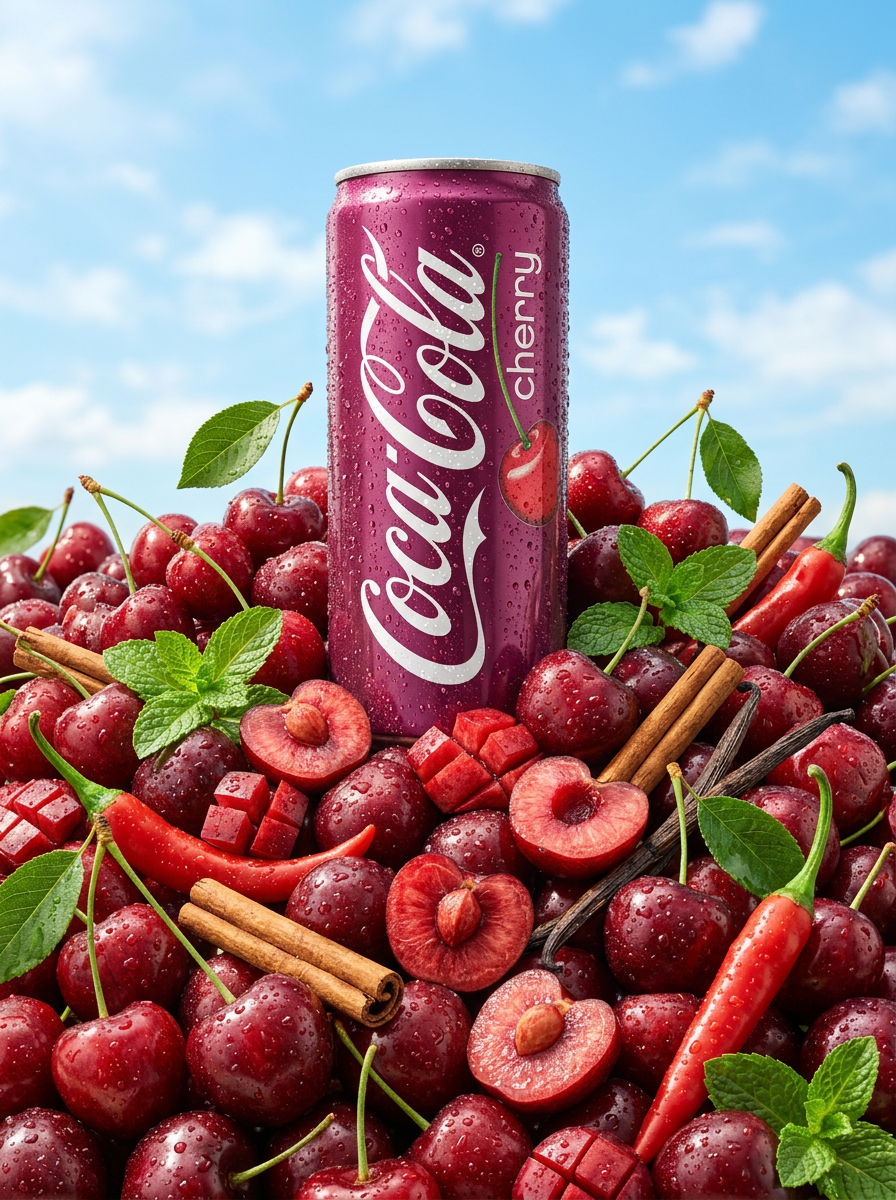
Drop your product into a pile of fresh fruit for an ultra-refreshing summer vibe. It builds dramatic low-angle hero shots against a bright sky, complete with realistic glistening condensation and crisp macro detail.
Regenerate using your own assets.
When is this workflow the right fit (and when is it not)?
This MyUP AI workflow is purpose-built for time-strapped founders, consultants, and individual marketers who need to consistently publish high-quality, authentic content on LinkedIn. If you're struggling with ideation, maintaining a consistent voice, or producing engaging visuals, and you have less than an hour a week to dedicate to content creation, this system will be a game-changer. It's ideal for those who want to build a strong personal brand without sacrificing their valuable time. However, this workflow might not be the best fit for very large marketing teams with complex, multi-stage approval processes that require human oversight at every micro-step, or for individuals who prefer to manually craft every word from scratch and are not looking for efficiency gains. Our focus is on empowering professionals to scale their personal brand with intelligent automation, not to replace the human element entirely, but to make it vastly more efficient. Ready to transform your LinkedIn presence? Explore our pricing plans or create an account today.
Build your LinkedIn content engine with MyUP AI
Automating your LinkedIn content doesn't mean sacrificing authenticity or quality. It means building a smart, repeatable system that leverages AI to do the heavy lifting, freeing you to focus on your core expertise. By following this MyUP AI workflow, you can consistently deliver thoughtful, engaging content that truly reflects your personal brand, all while reclaiming valuable time in your busy week. Stop generating generic posts and start building a content engine that works as hard as you do.
