
You can now generate an entire luxury jewelry campaign from your desk, without a camera, stylist, or studio. A critical technology threshold was crossed in April 2026, as AI models finally became proficient at rendering the two things that define jewelry: complex light reflections on polished metals and the refractive, inner fire of gemstones. What was previously a frustrating, uncanny mess is now commercially indistinguishable from a professional photoshoot.
This isn't about creating one-off images. This is a complete workflow for producing the full suite of assets you need to launch a product, refresh your e-commerce listings, and populate your social media calendar.
The three essential shots for any jewelry campaign
A successful campaign isn't built on a single image. It requires a visual vocabulary that serves different commercial purposes. Before we build, let's define the three core assets we'll generate. Each one does a specific job for your brand.
- The E-commerce Catalog Shot: This is your workhorse. A clean, clear image of the product on a simple background. Its job is to inform and show detail on a product page, removing all distractions.
- The Moody Editorial Shot: This is your brand builder. A stylized, atmospheric image that creates desire and sets a tone. It's perfect for social media, email newsletters, and homepage banners where mood trumps pure product detail.
- The Aspirational Lifestyle Shot: This is your storyteller. It places the jewelry in a context, often on a model or as part of a styled scene. Its job is to help the customer imagine the product in their own life.
Generating all three with a consistent aesthetic has been the primary challenge for AI workflows. Here’s how to solve it.
Step 1: Generate flawless e-commerce catalog shots
Your product listing is where the final sale happens, and it demands clarity. Generic AI tools often struggle here, adding unwanted stylistic flourishes or getting details wrong. A purpose-built workflow gives you the control you need for a clean, commercial result.
We'll use a specialized workflow designed for this exact task. It's engineered to understand the nuances of studio lighting, macro detail, and clean composition for small luxury items. The goal is a high-resolution image that looks like it was shot on a professional product table.
In MyUP, select the Luxury Jewelry Editorial Generator. Workflow code: #myup-uivg-p8mw. Instead of a complex prompt, the workflow simply asks for the key details. For example, you might input:
Product: A delicate 18k gold chain necklace with a single small pearl pendant.Background: A plain, off-white textured paper background.Lighting: Soft, diffused studio light from the side.
The result is a perfect, sales-ready catalog image. Generate several variations with slightly different angles or backgrounds to give your product pages a complete, professional feel.
Step 2: Create dramatic, on-trend editorial images
To capture attention on social media, you need to tap into current visual trends. A popular aesthetic right now is 'Gilded Noir'—a style defined by dark, moody settings, dramatic shadows, and rich textures that make gold and silver pop. Trying to describe this complex style in a generic prompt is a recipe for frustration. A specialized workflow, however, can be built to produce this exact aesthetic reliably.
This is where you move from selling a product to selling a feeling. For this, we'll use a workflow designed for atmosphere and drama. The Dark Volcanic Jewelry Editorial workflow is perfect for the Gilded Noir style. Workflow code: #myup-xoux-qmmy.
Dark Volcanic Jewelry Editorial
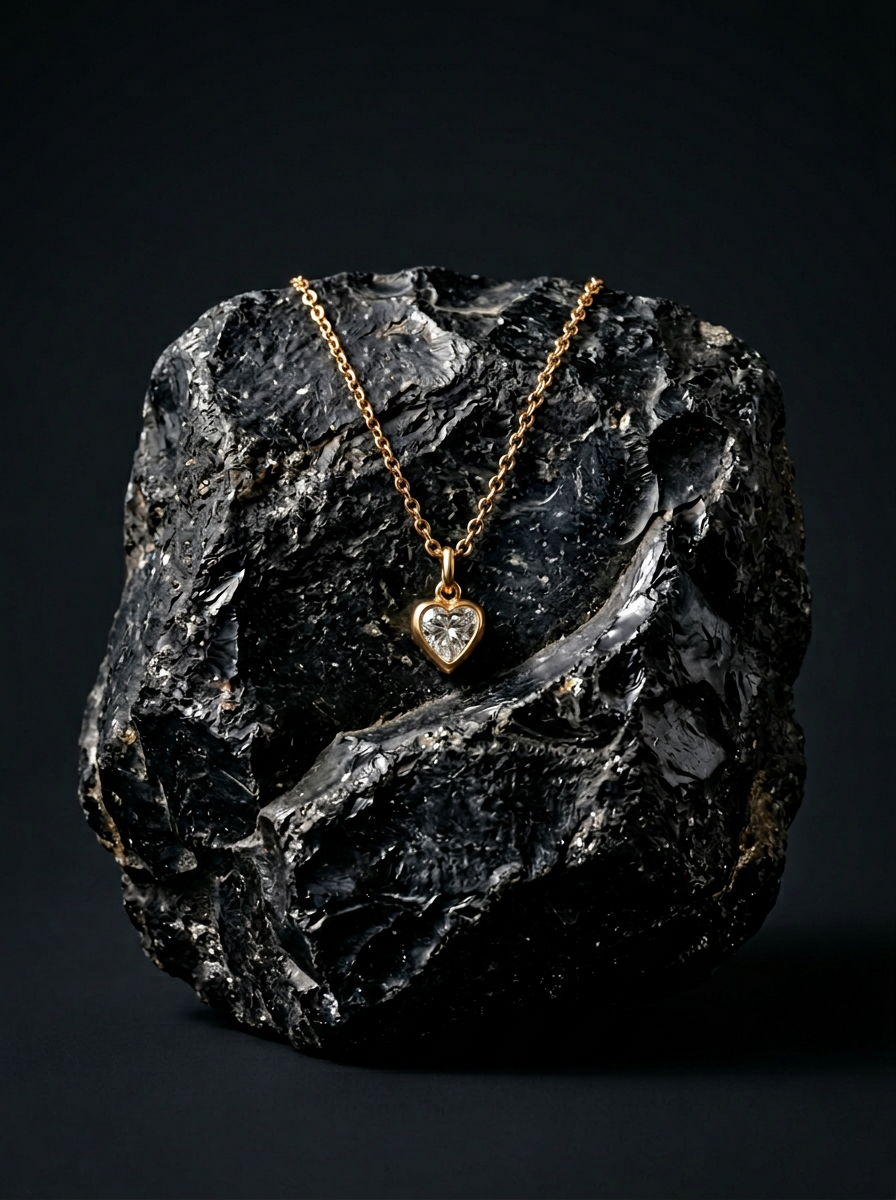
Place your product on a raw volcanic stone pedestal set against a pitch-black, moody studio backdrop. It creates a high-end, dramatic look with deep charcoal tones and sharp contrast. Perfect for making minimalist packaging or sleek tech stand out.
Regenerate using your own assets.
This workflow already incorporates the core elements of the aesthetic—dark backgrounds, high-contrast lighting, and rich textures. You only need to specify your product. An input could be as simple as:
Product: A pair of chunky silver hoop earrings.Setting Details: Resting on black volcanic rock with a hint of gold dust.
This single step generates a powerful, on-trend image that would typically require a skilled photographer and stylist to create. It's the perfect asset for an Instagram post or a hero image in an email campaign announcing a new collection.
Step 3: Build a cohesive lifestyle campaign
The final piece of the puzzle is showing your jewelry in the world. This means creating lifestyle shots that feel like they were all part of the same high-end photoshoot. Consistency is key; mismatched lighting or models will make your brand look amateurish. Recent AI developments in style referencing now make this possible.
The goal is to define a visual identity once and apply it across multiple generations. The Classical Jewelry Editorial Campaign workflow is designed for this. Workflow code: #myup-6jwq-tvx9. It uses a core style profile to ensure every image—whether it's a close-up on a model's ear or a flat lay with props—shares the same color grade, lighting style, and overall mood.
You can run this workflow multiple times with different compositions, knowing the aesthetic will remain locked in. For a deeper dive into the strategy behind this, our guide on how to create a luxury AI product photoshoot campaign covers building a complete narrative with these tools.
- Shot 1 Input: A close-up of a woman's hand, wearing three stacked gold rings, resting on a silk scarf.
- Shot 2 Input: A woman's neckline, wearing a matching gold pendant, soft morning light from a window.
- Shot 3 Input: A flat lay of the jewelry collection next to a leather-bound book and a pair of vintage sunglasses.
The output is a series of distinct but visually related images that form a believable and professional campaign.
Why a workflow beats a generic prompt
You could attempt to create these images by writing lengthy, complex prompts in a general-purpose AI image generator. You would spend hours wrestling with terms like 'focal length,' 'aperture,' 'subsurface scattering,' and 'caustic lighting,' only to get inconsistent and often unrealistic results. You would then need to composite and edit these images in another program to fix the inevitable flaws.
A MyUP workflow is different. It's a purpose-built tool for a specific commercial job. The complex technical prompting is already engineered into the workflow's backend. You are guided through a series of simple questions about your product and creative vision, not a test of your prompt engineering knowledge. This is the crucial difference between using AI as a novelty and deploying it as a professional production tool. It's not about replacing your creativity; it's about removing the technical friction that gets in the way of it.
From campaign visuals to a complete product listing
Once you have a folder full of stunning, on-brand campaign images, the job is only half done. Those visuals need to be paired with compelling copy to convert a browser into a customer. The next logical step is to write the product titles, descriptions, and metadata that will drive traffic and sales.
Just as you used specialized AI workflows to create your images, you can use them to write your sales copy. Our guide on how to generate a complete e-commerce product listing with AI shows you how to take your new visuals and build the entire listing around them in minutes, creating a seamless and powerful path to purchase.
