For years, AI-generated jewelry looked cheap. The results were consistently disappointing: waxy metals, dull gemstones, and an overall lack of sparkle that screamed 'fake'. For luxury brands, this made AI a non-starter. That era is officially over.
Recent AI models have finally cracked the code on rendering light, mastering the complex reflections on polished gold and the refractions that give a diamond its fire. This isn't a minor update; it's the technological leap that makes professional AI jewelry photography possible. This guide provides the complete workflow to harness this power, moving beyond simple prompts to produce an entire high-end campaign without a camera.
Why AI jewelry photography is suddenly viable
The core challenge for any jewelry photographer, human or AI, is physics. Light behaves in incredibly complex ways when it hits a small, multi-faceted, reflective object. Previous AI models approximated this, resulting in images that felt flat and lifeless. They couldn't distinguish between the soft sheen of brushed silver and the sharp glint of chrome, or the deep, internal glow of an emerald versus the surface sparkle of a diamond.
The newest generation of image models has been trained specifically on these material properties. They understand concepts like specular highlights, caustics (the patterns of light created by refraction), and ambient occlusion. This means you can now generate images where a gold ring realistically reflects its marble backdrop, and a sapphire shows accurate depth of color. This breakthrough moves AI from a novelty to a commercially essential tool for e-commerce brands looking to cut six-figure photography budgets without compromising on quality.
Step 1: Create your foundational product shot
Every successful campaign is built on consistency. Before you can create dramatic lifestyle shots or moody editorials, you need a perfect, foundational image of your product. Think of this as your 'digital master'—a high-resolution, perfectly lit shot of your piece on a clean, neutral background. This image becomes the anchor that ensures your product looks identical across every other visual you generate.
To create this, you can start with a simple, clear photo taken on your phone. Upload it to an AI workflow and use prompts to clean the background, perfect the lighting, and enhance the details. Or, if the piece is still in design, you can generate this master image from a detailed text description alone. The goal is a single, isolated, studio-quality asset that will serve as the input for the rest of your campaign.
Step 2: Build a campaign with the 'studio swap' workflow
Once you have your digital master, you can place it in an infinite number of virtual studios. This popular technique, often called the 'AI Studio Swap,' lets you create a varied campaign without losing product consistency. Instead of trying to describe your jewelry and a complex scene in one massive prompt, you give the AI your master image and tell it to build a new scene around it.
This is where specialized workflows outperform generic tools. A template like MyUP’s Luxury Jewelry Editorial Generator is engineered for this exact task. You provide your product shot, and the workflow generates a series of on-brand scenes—your necklace resting on a bed of silk, your earrings placed on a stark marble slab, or a ring surrounded by soft-focus botanicals. The workflow maintains consistent lighting and realistic shadows, giving you a cohesive set of campaign images in minutes. For a more timeless, classical feel, you can use the Classical Jewelry Editorial Campaign workflow. Workflow code: #myup-6jwq-tvx9.
Workflow code: #myup-uivg-p8mw
Step 3: Capture a trending aesthetic: the 'dark volcanic' look
The best commercial art taps into the cultural moment. On platforms like TikTok and Pinterest, a visual aesthetic dubbed 'Dark Volcanic' has become a major trend for luxury goods. It involves placing high-shine products against dark, textured surfaces like volcanic rock, obsidian, or black sand, using dramatic, high-contrast lighting. This look makes gold and silver pop, creating a feeling of elemental luxury and power.
Building a physical set like this is wildly impractical and expensive. With AI, it’s effortless. This is a perfect opportunity to create timely, scroll-stopping content that feels current. In MyUP, you can use the Dark Volcanic Jewelry Editorial template to instantly achieve this style. Workflow code: #myup-xoux-qmmy. It’s designed to generate these specific high-contrast, moody visuals that help your product stand out in a crowded feed.
Dark Volcanic Jewelry Editorial
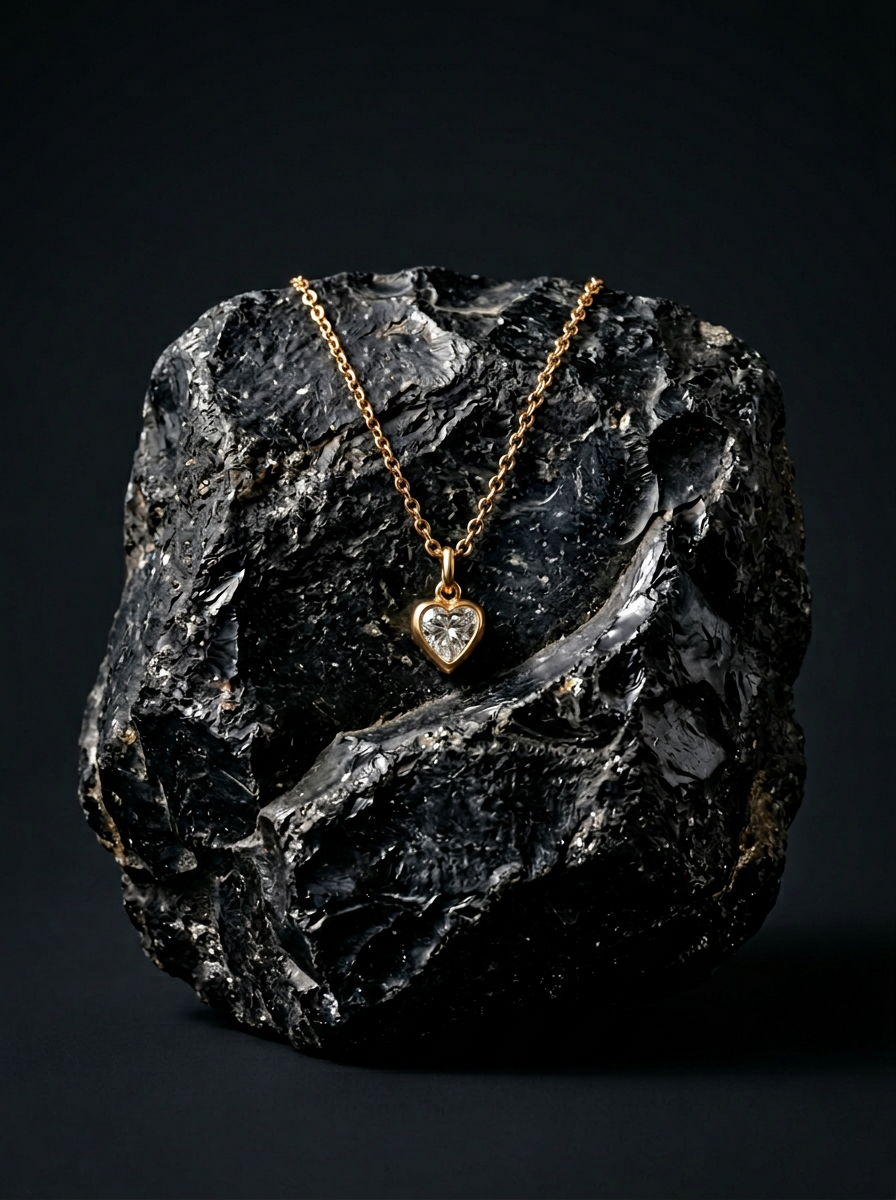
Place your product on a raw volcanic stone pedestal set against a pitch-black, moody studio backdrop. It creates a high-end, dramatic look with deep charcoal tones and sharp contrast. Perfect for making minimalist packaging or sleek tech stand out.
Regenerate using your own assets.
Step 4: Go from product shots to lifestyle lookbook
Product-only shots sell the item, but lifestyle images sell the dream. The final step in your campaign is to show your jewelry being worn. This means creating a lookbook with hyperrealistic AI-generated models. This allows you to showcase your pieces on a diverse range of models that perfectly match your brand's target demographic, all without the cost and complexity of hiring talent, stylists, and a location.
The key here is generating multiple shots with a consistent model and aesthetic. You can use your foundational product shot as a reference to place the item accurately on the AI model. This is the most advanced part of the workflow, combining character consistency with product integration. For a deeper dive into creating full photoshoots with AI models and environments, see our guide on how to create a luxury AI product photoshoot campaign from start to finish.
Common pitfalls and how to avoid them
While AI is powerful, it's not foolproof. Generic, all-purpose generators can introduce errors that devalue a luxury brand. Here are three things to watch for:
- Unrealistic Hands: AI's historical difficulty with rendering hands is well-known. Always scrutinize the hands of your AI models in lifestyle shots. A slightly distorted finger can ruin an otherwise perfect image. Regenerate or edit as needed.
- Inconsistent Lighting: If your campaign includes a shot of a ring on sun-drenched marble and another on a dark, moody rock, the lighting on the ring itself must change accordingly. A good workflow does this automatically, but always do a final check to ensure the shadows and highlights feel cohesive across the set.
- Color Inaccuracy: If your brand is known for a specific shade of rose gold or a signature tsavorite green, ensure the AI is rendering it accurately. You may need to specify the exact color in your prompts or perform a minor color correction pass on the final images to maintain brand integrity.
Your camera-free campaign is ready. What's next?
You now have a complete, repeatable workflow to produce dozens of unique, on-brand images for your next jewelry launch—at a fraction of the cost and time of a traditional shoot. This process isn't about replacing creativity; it's about giving you the tools of a full-scale production studio.
The critical takeaway is that for luxury products, specialized workflows will always beat generic prompts. Using a system designed for a specific commercial outcome gives you the control of a creative director, not just an operator. With your campaign visuals finalized, the next step is to pair them with compelling copy. You can learn how to generate a complete e-commerce product listing with AI in 5 minutes to get your products live and selling faster.
