
The news cycle in July 2026 has been dominated by Adobe's impressive new AI photo tools. First came the update to the Indigo camera app on July 20th, followed closely by the launch of 'Generative Match' in Firefly on July 22nd. Both are genuinely powerful, letting you create a stunning image or seamlessly blend an AI object into an existing photo. The results look great. For one photo. But as any creative director or brand manager knows, brands don't operate in single shots. They operate in campaigns. This is great for one photo, but how do you make twenty more that look and feel exactly on-brand? That's not a tool problem; it's a workflow problem.
The single-image trap: why a cool 'look' isn't a scalable brand style
Relying on single-image tools creates what we call the 'single-image trap'. You find a prompt or a filter that produces a fantastic 'look'—the lighting is perfect, the mood is spot on. But a 'look' is a one-time success. A brand 'style' is a set of repeatable rules that ensures every visual asset, from a product shot to a social media story, feels like it came from the same universe. Trying to manually replicate that perfect look across an entire asset pipeline is a production nightmare. You spend hours tweaking prompts, trying to remember the exact negative keywords you used, or wrestling with sliders to match the color grade. The result is almost always a set of images that are 'close but not quite,' which erodes brand consistency and makes your marketing feel disjointed. This is the bottleneck where the magic of a single AI image dies and the real work of brand building begins. For a deeper dive into this challenge, see our guide on the workflow for professional photo edits.
Step 1: Define your photographic DNA with a Brandkit
The solution is to stop thinking about individual images and start building a visual system. This is where you move from a consumer app to a professional platform like MyUP.ai. The foundation of any scalable visual strategy on MyUP is the Brandkit. This isn't just a place to store your logo and hex codes. For photography, it's where you define your brand's visual DNA. You can codify abstract concepts into concrete rules that the AI will follow every time. For example:
- Lighting Style: 'Soft, diffused morning light, warm tones, long shadows.'
- Color Palette: 'Muted earth tones with a single terracotta accent color.'
- Mood & Atmosphere: 'Minimalist and serene, with a feeling of calm and space.'
- Composition: 'Rule of thirds, deep depth of field, clean backgrounds.'
By building these rules into your MyUP Brandkit once, you create brand guardrails. Now, instead of trying to describe your style from scratch in every prompt, you simply apply your Brandkit. MyUP handles the production; you validate the results. This is the first step to true consistency.
Step 2: Generate consistent studio product shots at scale
Let's make this practical. A major challenge for any e-commerce brand is creating clean, consistent product photography. The background color, lighting, and shadow style must be identical across hundreds of products. Doing this manually is tedious; doing it with disconnected AI tools is a recipe for inconsistency. In MyUP, you can use a workflow designed for this exact task. By combining your product information with the photographic rules in your Brandkit, you can generate an entire catalog of images that look like they were shot on the same day, in the same studio. The user approves the setup, and MyUP executes the production run. This is how you escape the single-image trap and build a real AI product photography workflow. To get started immediately, use this workflow to create a clean, on-brand studio shot.
Workflow code: #myup-u4lt-o0ho
Studio Product Ad

Drop in a single product photo to instantly build a cohesive visual identity. It automatically samples your item's dominant colors to generate a beautifully matched mosaic moodboard, giving your brand an instant, polished aesthetic.
Regenerate using your own assets.
Step 3: Turn your product shots into on-brand advertisements
Consistent product shots are the raw material. The next step is to turn them into finished marketing assets. This is where a system-based approach shows its real power. Because your Brandkit also contains your fonts, logo, and layout preferences, you can chain workflows together. A second workflow can take the approved product shots from Step 2 and automatically place them into on-brand ad templates. The AI already knows your headline font, your call-to-action button color, and where your logo should be placed. You can generate a dozen variations for A/B testing in minutes, and every single one will be perfectly aligned with your brand guidelines. There's no need to open another program or manually create each layout. The following workflow is designed to take an existing product photo and instantly build a branded ad around it.
Workflow code: #myup-seli-mtp0
Photo Product Ad
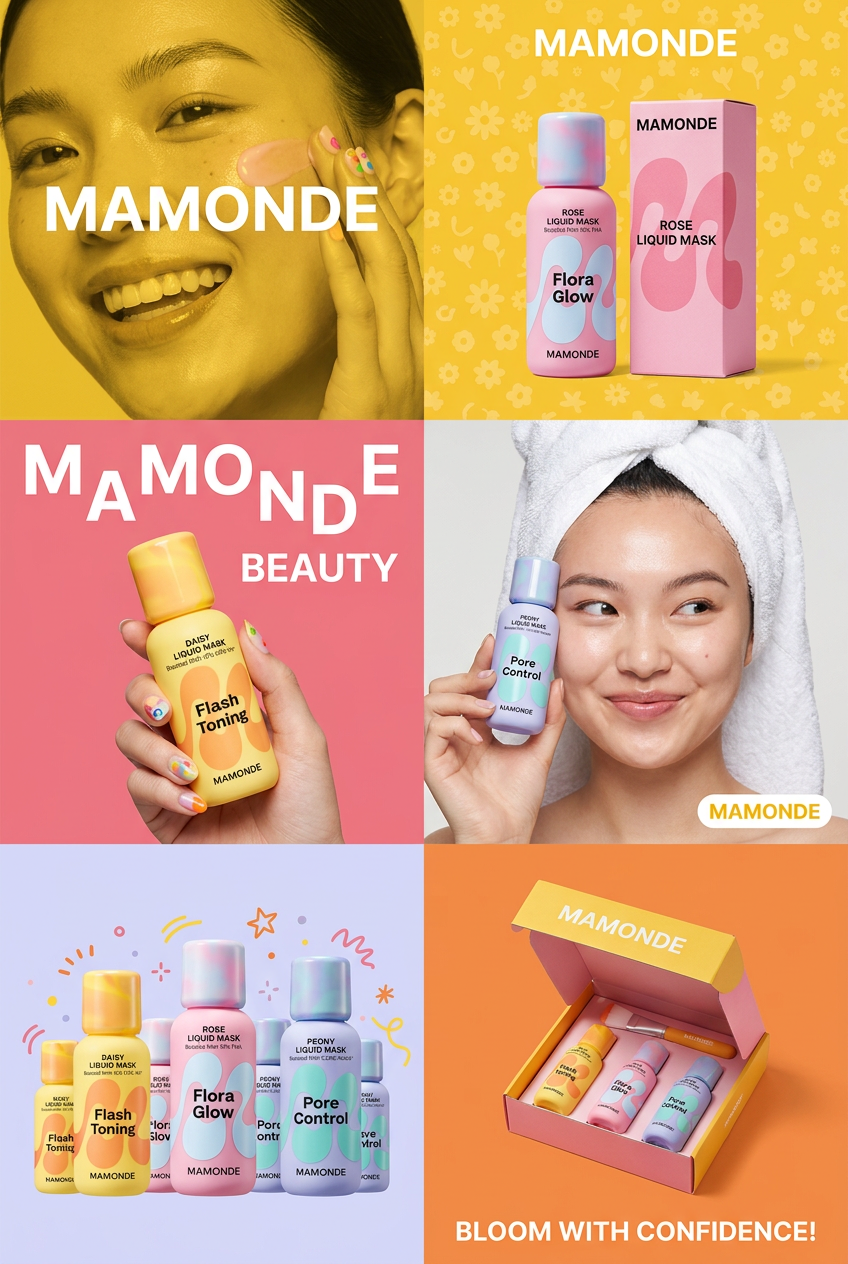
Get that high-end editorial look with a stacked, multi-panel campaign layout. It slices your brand visuals into a bold three-tier grid, pairing tight product close-ups right next to lifestyle shots for a cohesive, modern beauty poster.
Regenerate using your own assets.
Step 4: Scale up to a full, cohesive marketing campaign
Now, zoom out to the entire campaign. You need more than just product shots and standard ads. You need web banners, social media carousels, email headers, and maybe even posters. With a workflow-based platform, creating this variety is simple. You can adapt your core workflows to generate assets for different channels, all drawing from the same central Brandkit. This ensures that a customer sees the same visual language on Instagram, in your email newsletter, and on your website. The lighting, colors, typography, and overall mood remain consistent, building a powerful and memorable brand identity. This is how you move from making images to building a brand. This poster workflow, for example, helps you create a high-impact campaign asset that feels perfectly connected to your other visuals.
Workflow code: #myup-fy77-jljs
Minimalist Elegant Product Advertising Poster

Turn any product shot into a high-end editorial ad. It places your item against a soft cream background with airy spacing and adds elegant, small serif typography at the top. Great for wellness or luxury brands wanting a calm, minimal aesthetic.
Regenerate using your own assets.
Stop editing images, start building a visual system
The excitement around new AI tools like Adobe Indigo and Generative Match is justified—they are remarkable pieces of technology. But for professionals, the 'wow' factor of a single image is less important than the consistency of a hundred. The future of professional AI content creation isn't about finding the perfect prompt or mastering an individual tool. It's about building an efficient, brand-aligned production system that scales. By encoding your brand's unique photographic style into a MyUP Brandkit and using workflows to apply it consistently, you can finally escape the single-image trap and create cohesive campaigns faster than ever before. Check our pricing to see how you can start building your visual system today.
