Adobe's July 2026 update to its Indigo camera app is impressive. With a tap, you can transform a drab photo into something vibrant, swapping backgrounds and tweaking light with generative AI. It’s a powerful tool for a quick social media post. But for a brand, it’s a trap.
This kind of one-off, magic-wand editing is the enemy of brand consistency. When every image has a slightly different aesthetic, you’re not building a brand; you’re just making pictures. Professional results don't come from a filter. They come from a workflow. This guide provides that workflow, showing you how to move from a basic photo to a complete, on-brand visual campaign using a systematic approach in MyUP.ai.
Why one-off AI edits create brand chaos
The appeal of mobile AI editors is speed. The hidden cost is brand chaos. When your team uses a dozen different apps and filters, each with its own aesthetic, the result is a visual identity that’s fragmented and unprofessional. The time you save on the initial edit is lost tenfold trying to manually correct off-brand colors, shoehorn in your logo, or find a font that even remotely matches your guidelines.
This isn't a sustainable production model. It creates more work, not less. True efficiency comes from a system that has your brand identity built-in from the start. The industry is waking up to this need for control; recent features like Midjourney's Style Reference and Adobe Firefly's Structure Reference show a clear demand for more than just random generation. But these are features, not a complete system. They don't automatically know your brand's specific hex codes, typography, or logo placement rules. For that, you need a workflow anchored by a central source of truth for your brand.
From photo to campaign: a repeatable AI editing workflow in MyUP
A professional AI photo editing process isn't about finding the perfect prompt. It's about building a repeatable machine that transforms your raw assets into finished, on-brand content. In MyUP.ai, this process is built on two core components: your Brandkit and a dedicated workflow.
1. Anchor your brand with a Brandkit
Before you edit a single pixel, you establish your visual identity. In MyUP, you create a Brandkit by simply providing a URL. MyUP automatically extracts your logo, color palette, and fonts. This becomes the non-negotiable foundation for every asset you create. No more guessing hex codes or searching for the right font file. The brand rules are locked in.
2. Start with your photo, not just a prompt
Unlike text-to-image tools that start from a blank canvas, professional photo editing starts with an existing asset—a product shot, a headshot, a picture from an event. You upload your image to MyUP as the structural foundation for the edit.
3. Use a workflow to transform the entire scene
This is where you go beyond filters. A MyUP workflow is a series of steps that can completely recompose your image. It can isolate the subject, place it in a new, AI-generated environment, adjust the lighting to be dramatic or soft, add realistic shadows, and ensure the entire scene aligns with the mood defined in your Brandkit. You're not just applying an effect; you're directing a virtual photoshoot.
Workflow in action: turning a simple product shot into an ad
Let's make this concrete. Imagine you have a clean shot of your product—a bottle of lotion, a pair of sneakers, a coffee bag—on a plain white background. You need to create an engaging ad for Instagram. Instead of trying to photoshop it into a stock photo, you can use a MyUP workflow to generate a custom, high-end scene around it.
You upload your product shot and launch a workflow designed for product advertising. The workflow, guided by your Brandkit, generates multiple scenes that fit your brand's aesthetic—perhaps a minimalist marble countertop for a skincare brand, or a rugged outdoor setting for an adventure gear company. The lighting, colors, and mood are all automatically aligned. You get a professional, campaign-ready asset in minutes, not hours.
To do this yourself, simply start with your product photo and let this workflow build the scene.
Workflow code: #myup-seli-mtp0
Photo Product Ad
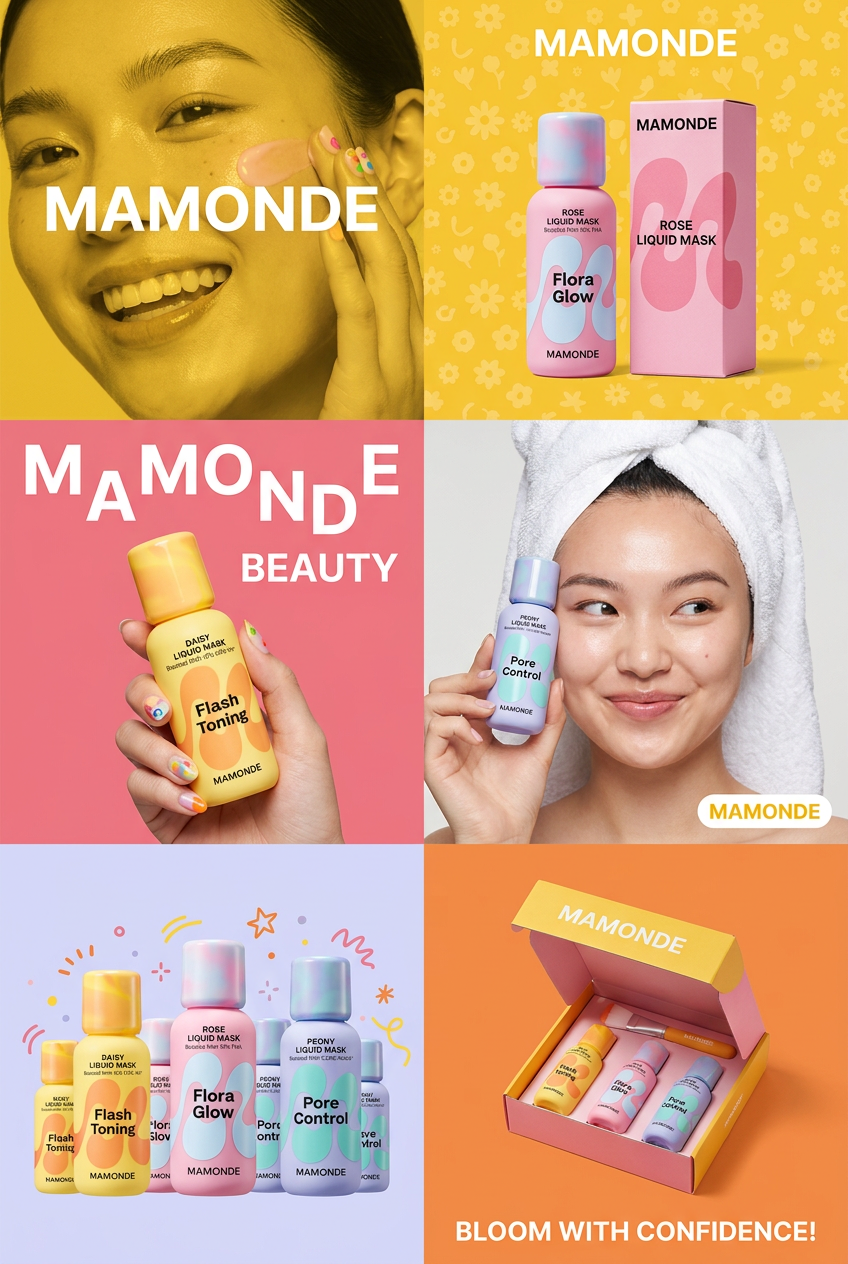
Get that high-end editorial look with a stacked, multi-panel campaign layout. It slices your brand visuals into a bold three-tier grid, pairing tight product close-ups right next to lifestyle shots for a cohesive, modern beauty poster.
Regenerate using your own assets.
Go further: create an entire campaign for food or apparel
This workflow-based approach scales across any industry. The principles of starting with a source image and applying a brand-aware transformation are universal.
For a food brand, getting AI-generated images to look genuinely delicious and appealing is a major challenge. A dedicated workflow can take a photo of your dish and place it in a scene with perfect restaurant lighting, fresh ingredients scattered artfully, and a background that evokes the right atmosphere—all while using your brand's color tones. The 'Bold Portrait Food Advertising Photo' workflow is built for exactly this task.
Workflow code: #myup-xjsb-hirr
Bold Portrait Food Advertising Photo

Get those high-impact, tight action shots of people actually enjoying your food brand. It drops your product right into a messy, realistic close-up bite shot that feels like a premium lifestyle campaign instead of a boring studio packshot.
Regenerate using your own assets.
Similarly, for an apparel or sportswear brand, the goal is to sell a lifestyle, not just a product. You can take a photo of a model wearing your gear and use a workflow to place them in an epic, dynamic environment—a misty mountain trail, a neon-lit urban streetscape at night, or a minimalist studio. The workflow handles the complex lighting and atmospheric effects, ensuring the final image is both aspirational and perfectly on-brand.
Workflow code: #myup-ywpr-rqz6
Professional Sportswear Ad

Suspends your apparel right in the center of a high-energy promo shot, held up by hands around the frame. It gives your shirts or jerseys a gritty, collaborative streetwear editorial look that feels alive and physical.
Regenerate using your own assets.
The final check: AI executes, you approve
A workflow doesn't remove your creative control; it focuses it. Instead of spending time on tedious production tasks like masking, color correcting, and background removal, you invest your time where it matters most: defining the strategy and validating the output. MyUP's system is built on this principle: the AI executes, but you approve. You can review the variations the workflow generates, select the best options, and make minor adjustments, confident that the core brand elements are already perfect. You are the creative director, and AI is your tireless production team.
Stop filtering, start producing
The latest AI camera apps are a testament to how powerful generative AI has become. But for anyone responsible for a brand's visual identity, they are a distraction. The goal isn't just to make one photo look good; it's to build a recognizable and consistent brand across hundreds of assets. That requires a system, not a single tool. By anchoring your creative process in a MyUP Brandkit and using repeatable workflows, you can move beyond the temporary magic of filters and start building a scalable, efficient production engine for your brand.
