The new wave of AI video models that arrived in June 2026, like Runway's Gen-3 Alpha and Luma's Dream Machine, are incredibly powerful. You can write a sentence and get a photorealistic video clip. But if you’ve tried to use them to create an actual product ad, you know the truth: that 5-second clip is just the first step in a long, fragmented process.
You get the video, but then you still need to composite your actual product into the scene, add a headline in your brand’s font, overlay a call to action, and apply your brand colors. Suddenly you’re juggling four more apps, and the promise of AI-driven speed vanishes. This is why the community is buzzing about 'one-shot' creation—the ability to go from an idea to a finished asset in a single, integrated process. That process is what MyUP workflows are built for.
AI video is amazing, but a finished ad is more than a 5-second clip
An effective product ad isn't just a moving image; it's a piece of strategic communication. It has to accomplish four distinct jobs, and most single-purpose AI tools only handle one of them:
- Concept & Script: It starts with an idea. What’s the hook? What’s the one message you want to land?
- Scene & Asset Generation: This is where you create the world. You need a background, a scene, and most importantly, your actual product has to be perfectly placed within it.
- Animation & Motion: Now you bring it to life. This is where tools like Gen-3 shine, adding subtle motion that grabs attention in a feed.
- Branding & Finishing: This is the final, crucial layer. You add your headline, your offer, your logo, and your call to action, all using your specific brand fonts and colors.
Doing this across multiple platforms is slow, expensive, and leads to inconsistent results. The solution isn't a better video generator; it's a better workflow that connects all four steps. On MyUP.ai, you can build this entire production line once and run it on repeat.
Step 1: Generate your scene and place your product
Every great ad starts with a compelling static image. Before you can animate anything, you need a high-quality scene with your product perfectly integrated. This is often where AI workflows fail. Getting an AI to generate a realistic background is one thing; making your uploaded product photo look like it naturally belongs in that scene—with correct lighting and shadows—is another entirely. It's a common frustration that leads to visuals that just look 'off'.
MyUP solves this by chaining the steps. First, the workflow generates a photorealistic background based on your prompt. Then, it intelligently composites your product image into that scene. You have full control, but MyUP handles the technical production of making it look seamless. For a deeper dive on this specific technique, see our guide on placing products in AI backgrounds so they actually look real.
The most versatile starting point for any ad is a clean, professional studio shot. This workflow gives you exactly that, creating a perfect canvas for any style of ad.
Workflow code: #myup-u4lt-o0ho
Studio Product Ad

Drop in a single product photo to instantly build a cohesive visual identity. It automatically samples your item's dominant colors to generate a beautifully matched mosaic moodboard, giving your brand an instant, polished aesthetic.
Regenerate using your own assets.
Step 2: Animate your scene into a video clip
Once you have your perfect static composition, the next step is to add motion. In a fragmented workflow, this means exporting your image, opening a new AI video tool, uploading it, and writing a new prompt to try and animate it correctly.
On MyUP, this step is just the next block in the workflow. The platform automatically takes the composited image from Step 1 and feeds it into the video generation model. There's no manual export/import. The goal here isn't to create a complex film, but to add the subtle, high-quality motion that stops a user from scrolling. Think of a slow camera pan, gentle ripples in the water, or light glinting off the product surface.
This workflow is a perfect example. It's designed to take a simple product image of a drink can and turn it into a dynamic, 15-second ad with subtle, professional animation.
Workflow code: #myup-cqnu-i50m
Drink Product Ad
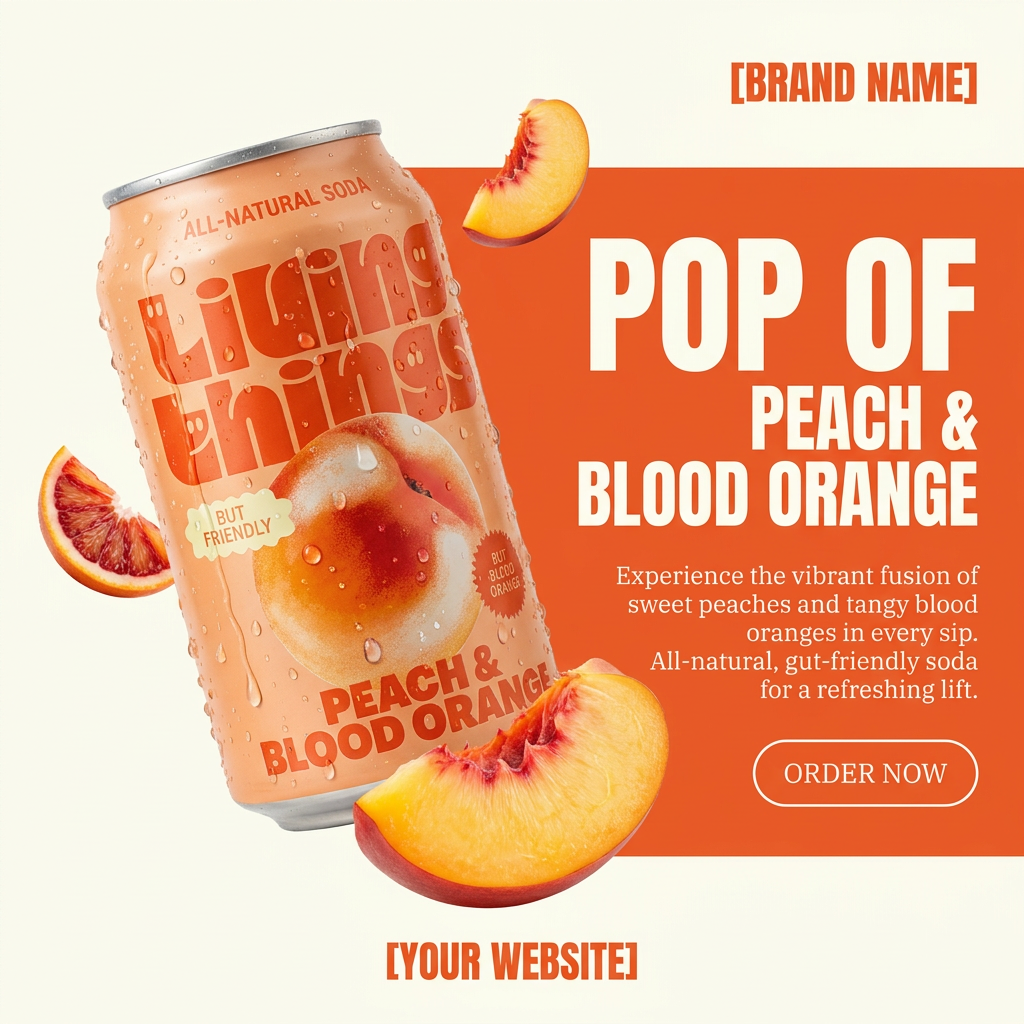
Turn any product photo into a bold, modern ad poster. It automatically frames your item against a split-color background, pairing a clean cream tone with a solid block of your product's dominant color. Super clean, minimal, and ready for social feeds.
Regenerate using your own assets.
Step 3: Add on-brand text and a call to action
This is the step that separates a generic AI creation from a real marketing asset. A video clip without a message is just content; a video clip with your headline and a 'Shop Now' button is an ad. But getting text right in AI is notoriously difficult, and almost impossible to make on-brand.
This is where MyUP's Brandkit becomes your unfair advantage. Instead of using a generic font, the MyUP workflow pulls directly from your saved Brandkit—applying your brand's exact fonts, colors, and even your logo. The AI handles the technical placement and rendering, but your brand strategy is in complete control of the final look. You approve and adjust the copy; MyUP ensures the production is perfectly on-brand, every time. Learn more about how to make AI-generated text on-brand here.
This workflow demonstrates how to apply strong typography and brand colors to create a finished ad, moving beyond the raw video clip.
Workflow code: #myup-zpby-tzie
Minimal Vibrant Product Advertising Poster

Drop in any product shot and watch it turn into a bold, high-energy square ad. It automatically reads your packaging to pull out the dominant colors and text, then builds a vibrant poster styled perfectly around your brand.
Regenerate using your own assets.
The final step: A repeatable workflow, not a one-off project
You've now gone from a simple idea to a finished, on-brand video ad without ever leaving a single platform. MyUP chained the script, scene generation, product placement, animation, and branded text overlays into one seamless process.
But the real power is what happens next. This entire sequence is now a saved, reusable workflow. Need to create an ad for a new product? Run the same workflow and just change the product image and headline. Want to test five different calls to action? Run the workflow five times with different text inputs. You've moved from one-off projects to a scalable production system, allowing you to generate diverse, on-brand product scenes at will.
This is how you turn AI from a novelty into a core part of your marketing engine. Start with a workflow like this one for a simple, effective vertical ad, and adapt it for any product you sell.
Workflow code: #myup-fts6-4ihp
Vertical Gourmet French Fry Ad

Transform your products into high-fashion editorial ads. This setup uses a dynamic diagonal layout and a slightly tilted overhead angle to give food and packaging incredible depth and texture. It's perfect for giving any brand a chic, premium look.
Regenerate using your own assets.
