
Scroll through any social feed and you’ll see it: the digital haze of “AI background bloat.” It’s the endless sea of swirly, abstract, vaguely futuristic visuals that all look like they came from the same prompt. This isn't just a design trend; it's a branding problem. When your visuals look like everyone else's, your brand becomes invisible.
The solution isn't a more clever prompt. It's a better system. This tutorial walks you through a repeatable workflow on MyUP.ai to stop generating generic noise and start building an infinite library of patterns and backgrounds that could only have come from your brand.
Why a custom pattern library is your new secret weapon
A strong brand is a consistent brand. Patterns and textures are the subtle workhorses of a visual identity, tying together everything from social media posts and presentation decks to packaging and web design. Owning a library of unique, on-brand patterns gives you three critical advantages:
- Instant Recognition: Consistent visual textures make your content immediately identifiable, even without a logo. It creates a cohesive world for your brand to live in.
- Perceived Quality: Custom assets signal a higher level of professionalism and attention to detail than generic stock or AI backgrounds.
- Production Speed: Once created, this asset library becomes a grab-and-go resource for your entire team, dramatically speeding up the creation of new marketing materials without sacrificing quality.
The workflow: from brand identity to infinite patterns
The core problem with most AI image generators is that they have no memory of your brand. You have to describe your style, colors, and mood in every single prompt, which is inefficient and leads to inconsistent results. The MyUP workflow flips this model. Instead of telling the AI about your brand every time, you teach it once. Then you can ask it for endless variations.
The process is simple and breaks down into three main steps, all handled within the MyUP platform.
Step 1: Teach AI your brand with a MyUP Brandkit
The foundation of this entire workflow is the MyUP Brandkit. This is where you store your brand's core visual DNA. It’s a one-time setup that pays dividends on every piece of content you create afterward.
In your MyUP account, you’ll create a Brandkit by providing:
- Your Logo: Upload your logo files. MyUP's AI will analyze its shapes, style, and composition.
- Your Color Palette: Define your exact brand colors using hex codes. This ensures the AI uses your red, not just any red.
- Your Style: Describe your brand's visual language with keywords (e.g., 'minimalist', 'geometric', 'organic', 'tech-focused', 'hand-drawn').
Once saved, this Brandkit becomes a permanent reference point for the AI. You've officially moved from prompting to building a visual system.
Step 2: Generate patterns that speak your brand's language
With your Brandkit active, you can now write prompts that are much simpler and more powerful because they reference your brand's stored identity. While tools like Midjourney are adding basic pattern parameters, the crucial step they miss is this direct link to a pre-defined brand identity. In MyUP, you don't just ask for a pattern; you ask for a pattern that understands your brand.
Here are a few prompt recipes to get you started:
- For a geometric style:"Seamless pattern of interlocking geometric shapes, inspired by the angles in our [Brandkit Logo], using [Brandkit Color 1] and [Brandkit Color 3], minimalist and clean."
- For an organic feel:"Subtle, seamless pattern of hand-drawn botanical elements, in a monochrome palette based on [Brandkit Color 2]."
- For a branded texture:"A textured background that feels like brushed metal, subtly incorporating the wave motif from our [Brandkit Logo], using a gradient of our [Brandkit Colors]."
The key is to let the Brandkit do the heavy lifting. The AI already knows your colors and logo shapes, so your prompt can focus on the creative concept. Generate a dozen options, select the best ones, and add them to your asset library. The user validates; MyUP handles the production.
Step 3: From generation to asset: putting your patterns to work
A pattern isn't useful until it's applied. This is where the workflow closes the loop. Instead of downloading a JPG and uploading it to another tool, you can immediately use your new patterns as backgrounds and design elements within MyUP's templates. This turns a creative exercise into a practical production step.
Let's look at a few examples of how this works in practice.
Example 1: A subtle background for a minimalist poster
For a clean, modern design, a busy background can be distracting. But a plain white background can feel flat. A subtle, on-brand pattern adds depth and a professional finish without overpowering the message. You can generate a simple geometric pattern using a light shade from your Brandkit and apply it instantly.
To build this yourself, use the template below. You can feed it one of your newly generated patterns as the background asset.
Workflow code: #myup-k4td-9k6z
Minimalist Poster

Give your social feed a clean, gallery-like aesthetic. This layout frames your images with structured mono typography and soft, neutral backgrounds for a high-end editorial look. It's perfect for minimal product launches or brand announcements.
Regenerate using your own assets.
Example 2: A bold pattern for an editorial grid
Sometimes the pattern is the star. For a bold social media graphic, a high-contrast, dynamic pattern can capture attention and create a strong brand statement. Generate a more complex pattern using multiple brand colors and apply it to a gridded layout to frame your content.
This workflow for a bold editorial poster is the perfect canvas for a dominant, on-brand pattern.
Workflow code: #myup-n0bi-2wzk
Bold Editorial Grid Poster

Create striking 2x3 editorial posters with six seamless, flat-color square cards in a perfect 4:5 grid. There are absolutely no gaps between the blocks, giving your content a bold, high-contrast magazine layout. It looks incredibly clean on any social feed.
Regenerate using your own assets.
Example 3: Integrating textures into a complex magazine cover
Patterns don't always have to be flat backgrounds. They can be used as textures within shapes, text, or as part of a layered collage. For a rich, editorial look, you can generate multiple patterns—some subtle, some bold—and use them as different elements within a single design, ensuring the entire composition feels cohesive and on-brand.
This magazine cover template is designed for layering multiple visual elements, making it ideal for experimenting with your new pattern library.
Workflow code: #myup-aktp-7jq0
Food Magazine Mosaic Cover
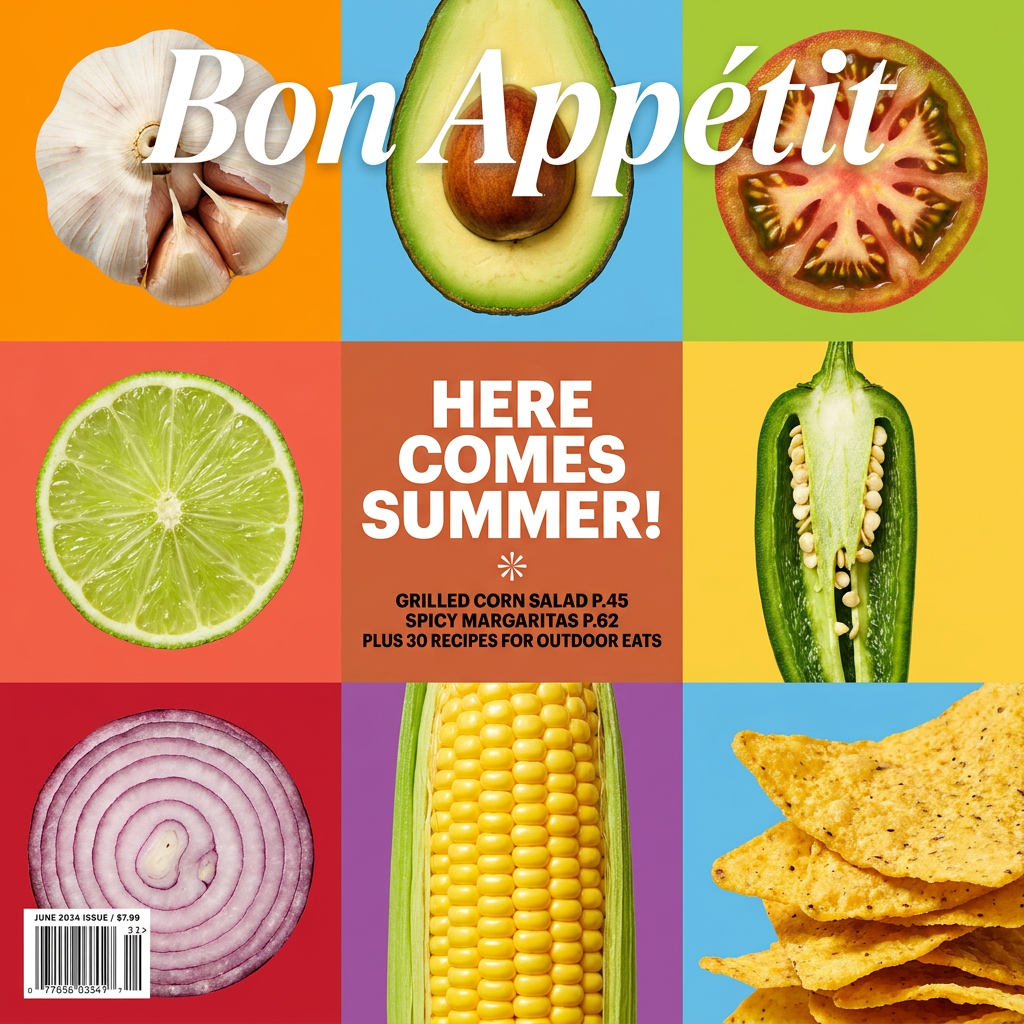
Turn your food shots into a bold, high-end editorial cover. It takes extreme close-ups of your dishes or ingredients and arranges them into a vibrant 3x3 grid that looks straight out of a premium food magazine.
Regenerate using your own assets.
Beyond backgrounds: using patterns for product branding
Your pattern library is more than just a resource for social media. These assets are core to your brand's visual system and can be applied to product mockups, packaging designs, and merchandise. Generating a set of unique patterns can give your physical or digital products a distinctive, premium feel. This is similar to how you might develop a full set of on-brand icons or conceptual art to build out your visual world.
Use this workflow to create branded stickers, which can be used for packaging, social GIFs, or as digital assets.
Workflow code: #myup-swqt-4zo3
Product Stickers

Turn your logo into a nostalgic, vibrant Y2K-style vertical ad. It automatically pulls your brand colors to create matching sweet treats like custom donuts or cupcakes in the background, giving you a super playful retro-pop aesthetic.
Regenerate using your own assets.
Stop prompting, start building your visual system
The goal of using AI for brand content isn't just to make one cool image. It's to build a scalable system that allows you to produce a high volume of on-brand content, faster. Generic AI tools that rely on text prompts alone will always fall short because they lack brand context.
By investing a few minutes to set up a MyUP Brandkit, you shift from being a prompter to being a creative director. You provide the core identity, and the AI becomes a tireless production assistant, generating an infinite library of visual assets that are uniquely, unmistakably yours. That's how you escape the background bloat and build a brand that stands out.
