
This week, the AI world is buzzing. With the launch of Midjourney's 'Style Kit' and a new tool called BrandFoundry AI in late June 2026, the term 'AI brand kit generator' is suddenly everywhere. The promise is seductive: feed the AI a few images or a prompt, and get a folder of consistent visuals back. It’s a great step towards solving AI’s biggest problem for brands: consistency.
But a folder of lookalike images is not a brand kit. A pretty grid is nice for a mood board, but it's not a production system. What happens on Monday morning when you need an Instagram Story, a vertical video ad, and a set of product stickers? That's where these tools fall short. They give you inspiration, not an engine for creating the assets you actually need to run your business.
A real brand kit is a system of rules you can apply forever. This article shows you the workflow to build that system.
Workflow code: #myup-swqt-4zo3
Product Stickers

Turn your logo into a nostalgic, vibrant Y2K-style vertical ad. It automatically pulls your brand colors to create matching sweet treats like custom donuts or cupcakes in the background, giving you a super playful retro-pop aesthetic.
Regenerate using your own assets.
What a real brand system needs (that image folders can't provide)
When you commission a brand identity from a designer, you don't just get a folder of JPEGs. You get a set of rules. A functional brand system is built on concrete, repeatable elements:
- A definitive logo: Not a dozen close-enough variations, but a single, scalable vector file that can be applied cleanly to any background.
- A core color palette: A specific set of 5-6 hex codes that define your brand's primary, secondary, and accent colors. These are non-negotiable.
- A typographic hierarchy: A defined pairing of a headline font and a body font, with set weights and sizes. This ensures readability and consistency across all communications.
- A repeatable style: A clear definition of photography style, illustration rules, or graphic treatments. This is the 'vibe' that tools like Midjourney's Style Kit try to capture, but it's only one piece of the puzzle. You might even need to generate a complete, on-brand icon set that follows these rules.
A folder of stylistically similar images from a generator doesn't give you this. You can't extract a reliable hex code from a dozen different images, you can't get a clean logo file, and you definitely can't enforce a font pairing. You're left with a reference, not a tool. You still have to do all the manual work of building the system and applying it to every new asset.
The one-prompt workflow to generate your complete brand system
The goal isn't just to generate assets that feel like your brand, but to generate assets that are provably your brand. This requires a different approach: one where you use AI to define the core elements, then lock them into a reusable system that automates production. In MyUP, this system is called the Brandkit. Here’s how to build it from a single prompt and put it to work immediately.
Step 1: Define your brand's core identity with a single prompt
Start with a descriptive prompt that captures the essence of your brand. Go beyond just visual style and include the brand's mission, target audience, and emotional tone. The more detail, the better the AI's starting suggestions will be.
Example Prompt:"A brand identity for 'Solana', a sustainable, direct-to-consumer sunscreen brand. The target audience is eco-conscious millennials. The vibe is minimalist, earthy, and trustworthy. Core colors should be terracotta, sage green, and cream. Typography needs to be a clean, modern sans-serif. The logo should be a simple, abstract sun icon with the word 'Solana' next to it."
This prompt gives the AI specific instructions for colors, fonts, and logo concepts, while also providing the creative context it needs to generate a cohesive visual language.
Step 2: Build your Brandkit (the system you'll actually use)
MyUP will generate a set of suggestions based on your prompt: logo ideas, color palettes, and font pairings. This is where you, the user, take control. Instead of just accepting a folder of images, you validate and formalize the system.
- Upload or select your logo: Pick the AI-generated logo you like best, or upload your existing one. This becomes the single source of truth.
- Lock in your color palette: The AI will suggest palettes. Click to select the exact hex codes you want. You can refine them manually to perfectly match your vision.
- Choose your font pairing: Select the headline and body fonts that fit your brand.
Once you save this, you have a MyUP Brandkit. This isn't just a reference; it's an active component. It’s a set of rules that MyUP will now automatically apply to every piece of content you create.
Step 3: Activate your brand with one-click content workflows
This is the payoff. Your Brandkit is now the engine for production. You don't need to manually apply your brand to a generic template ever again. You simply run a workflow, and the output is automatically on-brand. The logo is in the right place, the colors are correct, and the fonts are perfect.
You can go from defining your brand to shipping a fully on-brand social media post in a few minutes, without ever opening another design tool. Need a quick product post for Instagram? Just run a workflow.
Workflow code: #myup-kbgo-tlle
Product Brand Post

Drop in your product to generate a cohesive nine-post Instagram grid. It blends warm lifestyle photography and flat-lay packaging with bold hand-drawn doodles, collages, and urban billboard mockups. Everything automatically styles itself to your brand's colors.
Regenerate using your own assets.
The system handles the production; you handle the creative direction. This is how you scale content creation without diluting your brand identity. It's not just about one-off images, it's about building a repeatable process for your entire social media campaign.
Workflow code: #myup-gxue-opd0
Product Post

Turn a single product shot into a cohesive six-part Instagram story campaign. It mixes tactile crumpled paper textures with bold, stacked typography and custom mascot spots in your brand's signature colors.
Regenerate using your own assets.
Proof: From brand kit to on-brand assets in seconds
With a single saved Brandkit, you can generate a huge variety of assets that are all perfectly and automatically consistent. The visual style can adapt to the format, but the core brand identity—logo, colors, fonts—remains locked in.
Need a sheet of die-cut stickers for your packaging or an event? Run the Product Stickers workflow. It will use your Brandkit's visual style to create them instantly.
Workflow code: #myup-swqt-4zo3
Want to see how your brand looks on apparel for a new merch line? There’s a workflow for that, too.
Workflow code: #myup-3sro-edbt
Brand Clothes Post

Turn any outfit photo into a high-end fashion promo poster. It centers your subject in a full-body shot against a dark, dramatic studio backdrop, perfectly cropped for social feeds. It gives your apparel a moody, editorial look instantly.
Regenerate using your own assets.
You can even apply your brand to more complex, stylized templates, like a scrapbook collage, and the core elements will remain consistent.
Workflow code: #myup-sacz-tjdn
Y2K Scrapbook Collage Creator
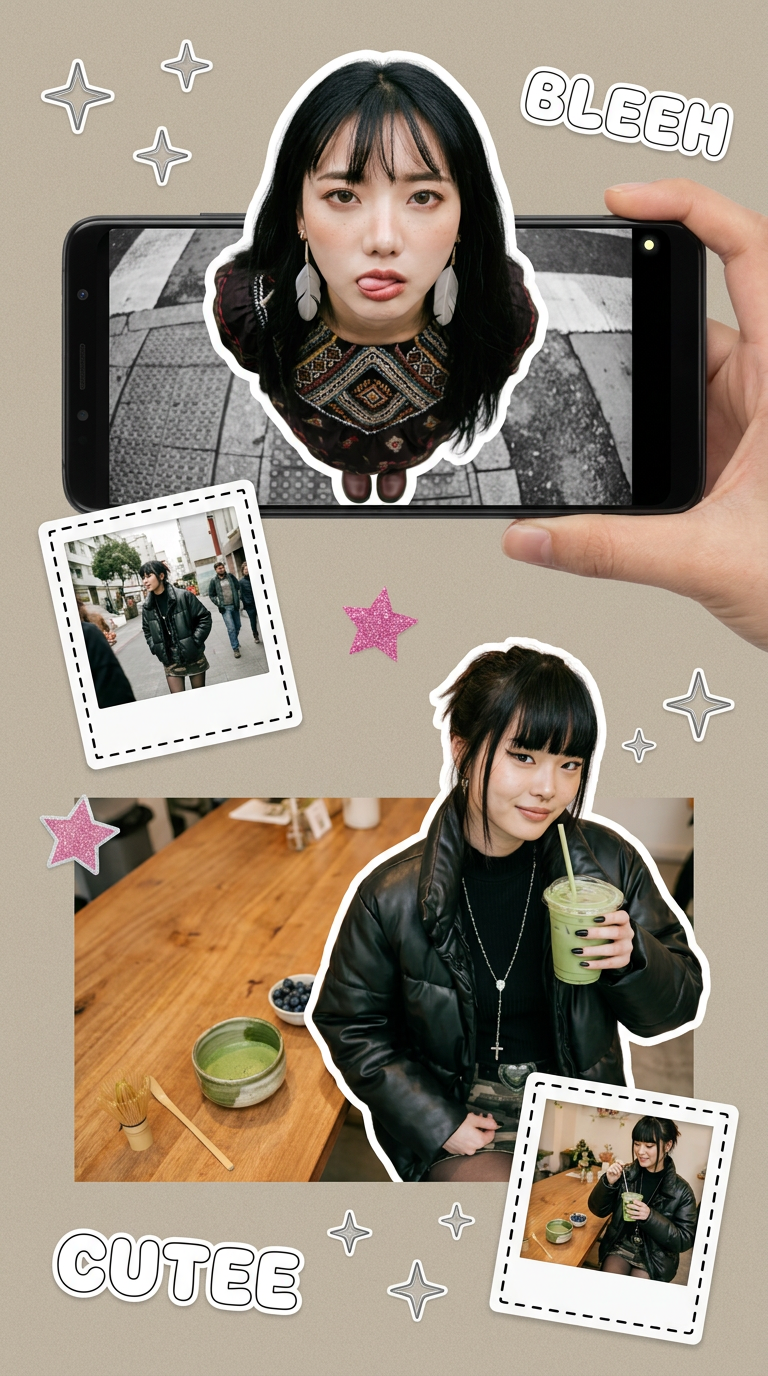
Put two different people into the same scene without losing their real-world features. Just upload two portraits and drop them together into any setting or style you need. It keeps both faces incredibly accurate.
Regenerate using your own assets.
This is the difference between a style reference and a production system. One gives you ideas; the other gives you finished work.
The bottom line: Stop generating images, start building a system
The new wave of AI brand kit generators is exciting because it validates a universal need: brands want consistency at scale. But the current tools mistake a consistent style for a consistent brand. A folder of images that look alike is a starting point, not a solution.
A true brand system is a set of rules—logo, colors, fonts—that can be applied to any asset, any time, with perfect fidelity. By using AI to establish those rules and then saving them into a MyUP Brandkit, you move from one-off image generation to a sustainable, automated content production system. You stop being an AI image prompter and start being a creative director for an automated design engine.
