
With today's, June 26, 2026, launch of Canva's 'Brand Kit AI', the idea of an instant brand generator has gone mainstream. You’ve probably also seen the viral workflows on X and Behance, showcasing entire brand identities created in hours. The promise is huge: bypass the weeks of traditional branding and get to a final look, fast. But there's a problem. Most of these tools give you a collection of disconnected, often generic, assets. You get a logo, some colors, and a few templates that look like they belong to someone else's brand.
A real brand identity is a cohesive system, not just a folder of images. This article provides the workflow for a 'one-day brand sprint'—a practical, step-by-step guide to prototyping a unique and complete brand identity, from mood board to a full suite of on-brand assets, using a single integrated platform: MyUP.ai.
The one-day brand sprint: a complete workflow
Forget agonizing over decisions in a vacuum. The goal of this sprint is to make your brand tangible as quickly as possible so you can see it, test it, and validate it. We'll break the day into three focused blocks:
- Morning: Define Your Visual Core. We'll start by establishing a unique style, moving beyond generic prompts to create a visual foundation that is yours alone.
- Mid-day: Generate Foundational Assets. With the visual core defined, we'll generate the essential building blocks of your brand—logo concepts, typography, and color palettes—and explore variations.
- Afternoon: Stress-Test Your Identity. This is the payoff. We'll apply your new brand identity to real-world content to see how it performs across social media posts, ads, and product mockups.
Morning: Define your visual core with an AI mood board
The biggest mistake in AI branding is starting with a logo. A logo is an output, not an input. Your starting point should be the brand's unique atmosphere, texture, and emotional core. This is where a mood board is essential. Instead of just prompting for 'a minimalist logo for a coffee shop,' you'll generate a collection of images that capture the feeling of that coffee shop—the warm lighting, the grain of the wooden tables, the specific shade of green in the plants, the typography on an old menu.
In MyUP.ai, you can do this by generating a series of images based on descriptive, sensory language. Think about photography styles, color temperatures, and material textures. Once you have a dozen images that feel right, you have your visual core. From there, you create a MyUP Brandkit. A Brandkit isn't just a style guide; it's an active ingredient. MyUP analyzes your mood board images to extract color palettes, identify font styles, and learn the key descriptors of your aesthetic. This Brandkit becomes the engine for every asset you generate next, ensuring a level of consistency that a simple prompt can't match. For a deeper dive into this first step, see our guide on the AI mood board workflow for a consistent brand style.
Mid-day: Generate foundational assets and explore variations
With your Brandkit locked in, it’s time to generate the core components of your identity. Because the Brandkit is already loaded with your unique style, you're not starting from scratch. When you ask MyUP to generate logo concepts, it will automatically use your color palette and stylistic instructions. When you explore typography, it will suggest pairings that fit the mood you’ve defined.
The goal here isn't to find the one perfect logo. It's to generate dozens of high-quality options in minutes. This is where AI's speed becomes a strategic advantage. You can explore divergent ideas without penalty. What does the brand look like with a bold, serif typeface versus a clean sans-serif? How does the primary color work as a background versus an accent? A great way to see how these different elements interact is to throw them together in a collage. This helps you get a feel for the visual language before committing to a final direction.
Workflow code: #myup-sacz-tjdn
Y2K Scrapbook Collage Creator
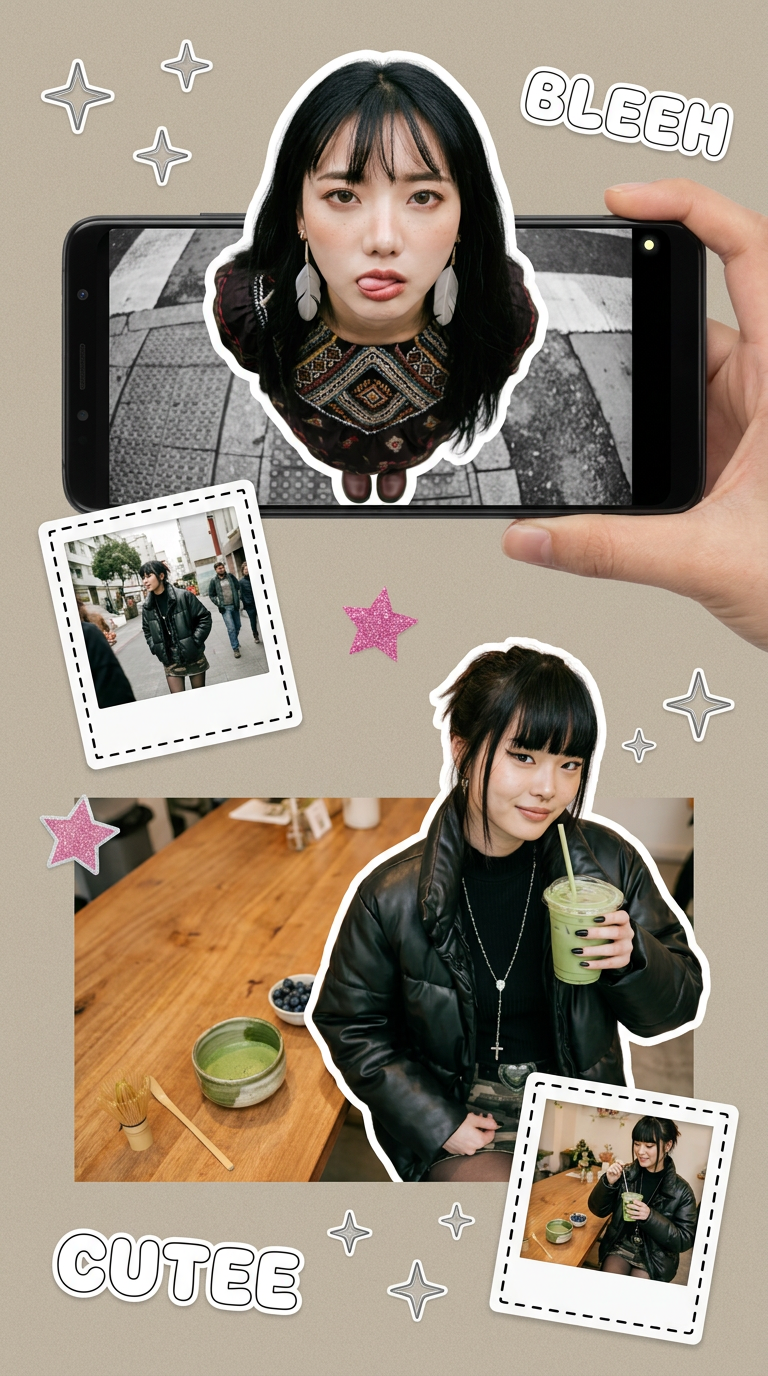
Put two different people into the same scene without losing their real-world features. Just upload two portraits and drop them together into any setting or style you need. It keeps both faces incredibly accurate.
Regenerate using your own assets.
Using a workflow like the 'Y2K Scrapbook Collage Creator' in MyUP lets you quickly combine logo concepts, type treatments, and textural images into a single canvas, giving you an immediate gut check on what works.
Afternoon: Stress-test your new identity on real-world content
A brand identity only proves its worth when it's applied to actual marketing materials. A logo might look great on a white background, but how does it hold up on a busy social media post or a product label? The afternoon is for stress-testing. This is where MyUP's workflow system leaves simple generators behind. Your Brandkit connects directly to a library of content templates. With a single click, you can see your new identity live on dozens of assets.
Want to see how your brand looks on an Instagram post for a new product? Run the Product Brand Post workflow. MyUP will automatically pull in your logo, colors, and fonts, and generate a post that is instantly on-brand. No manual tweaking required.
Workflow code: #myup-kbgo-tlle
Product Brand Post

Drop in your product to generate a cohesive nine-post Instagram grid. It blends warm lifestyle photography and flat-lay packaging with bold hand-drawn doodles, collages, and urban billboard mockups. Everything automatically styles itself to your brand's colors.
Regenerate using your own assets.
Need another variation for a different product shot? The Product Post workflow gives you another option in seconds, maintaining perfect consistency.
Workflow code: #myup-gxue-opd0
Product Post

Turn a single product shot into a cohesive six-part Instagram story campaign. It mixes tactile crumpled paper textures with bold, stacked typography and custom mascot spots in your brand's signature colors.
Regenerate using your own assets.
In a single hour, you can generate a complete set of social media graphics, ad mockups, and even see how your brand might look on physical products by exploring a workflow for on-brand packaging mockups. This rapid application is what turns a theoretical brand into a validated one. You're no longer guessing; you're seeing.
Why a workflow beats a generator for brand building
The difference between a tool like Canva's Brand Kit AI and MyUP's system is the difference between templates and a workflow. A template-based generator gives you a finished object. A workflow-based system gives you a repeatable, scalable process. When you use MyUP, you're not just making a single post; you're building an engine for all future posts.
This is the core of the human-control angle: MyUP executes, and you validate. The AI handles the painstaking production of applying your brand across a hundred different formats, but you remain the creative director. You approve, you adjust, and you guide the vision. The speed of generation removes the production bottleneck, letting you spend your time on what matters: making better creative decisions.
Your brand is a system, not a single image
By the end of the day, you won't have just a logo; you'll have a tested visual system. You'll have seen how your brand behaves in the wild and have a complete set of foundational assets ready for production. Rapid prototyping with AI isn't about finding a shortcut to a perfect image. It's about building and testing a cohesive brand identity at a speed that was impossible a year ago. The bottleneck is no longer the time it takes to create. It's the time it takes to decide. A one-day brand sprint gives you everything you need to make those decisions with confidence. Ready to run your own? Create a free MyUP.ai account and start your sprint today.
