On July 20, 2026, Adobe updated its Indigo camera app with generative AI features promising a 'natural look' with a single tap. It's a clever feature for consumers, but for brands, it highlights a fundamental problem: a generic 'natural look' is just a filter. It's not an ownable brand asset.
Professional photorealism isn't about finding a one-size-fits-all preset. It's about control, intention, and consistency. While tools like Midjourney's Style Tuner and Adobe Firefly's Structure Reference are trying to solve consistency with isolated features, they miss the core issue. Your brand's visual identity is a system, not a single prompt.
This article provides the professional workflow for creating realistic AI photos that are not just believable, but also uniquely and repeatably yours.
Step 1: Define your photographic DNA, not just a prompt
The difference between a generic AI image and professional brand photography lies in the specifics. A simple prompt like 'photorealistic image of a coffee cup' leaves hundreds of creative decisions up to the AI. A professional defines those variables upfront. This is your brand's Photographic DNA.
Instead of thinking in prompts, think like a photographer making deliberate choices. On MyUP.ai, you can codify these choices into your Brandkit. This becomes the foundation for every image you generate. Here are the core elements to define:
- Lighting: Don't just say 'good lighting'. Specify it. Is your brand's look defined by the soft, diffused light of an overcast morning, the warm glow of golden hour, or the dramatic, high-contrast shadows of a single hard light source in a studio?
- Lens and Aperture: The lens choice dictates the entire feel of a photo. A 35mm f/1.4 lens creates a very different world than a 105mm f/2.8 macro lens. Define your preferred focal length and aperture to control depth of field, compression, and perspective consistently.
- Film Stock and Color Grade: Photorealism has a flavor. Is your brand's feel closer to the saturated, vibrant look of Fuji Velvia film stock, the muted skin tones of Kodak Portra 400, or a desaturated, cool-toned cinematic grade? Defining this ensures your color palette is always on-brand.
- Composition and Angle: Decide on your compositional rules. Do you favor centered, symmetrical product shots, dynamic low-angle hero shots, or organic, rule-of-thirds lifestyle scenes? This guides the AI to build scenes that fit your brand's layout principles.
Once you define these elements, you move from hoping for a good result to engineering one.
The workflow for creating a repeatable photographic style
With your Photographic DNA defined, the next step is to build it into a reusable system on MyUP.ai. This is where you graduate from one-off image generation to a scalable content production workflow.
First, you save these photographic principles in your MyUP Brandkit. Your Brandkit isn't just for logos and colors; it's a central repository for your entire visual identity, including detailed style prompts that encode your unique version of photorealism. For example, a style instruction might be: 'Shot on a 50mm prime lens at f/2.0, early morning golden hour light, Kodak Portra 400 film grain, slightly desaturated color grade.'
When this is saved to your Brandkit, any team member can generate on-brand images without needing to be a prompt engineer or a photographer. The user provides the subject—the 'what'—and MyUP applies the brand's defined style—the 'how'.
To see how this works for high-end e-commerce visuals, this workflow provides a complete studio setup, ready for your product. You just tell it what to shoot, and it handles the professional lighting, lens, and staging automatically.
Workflow code: #myup-xjaq-qhgx
Luxury Product Photography Studio
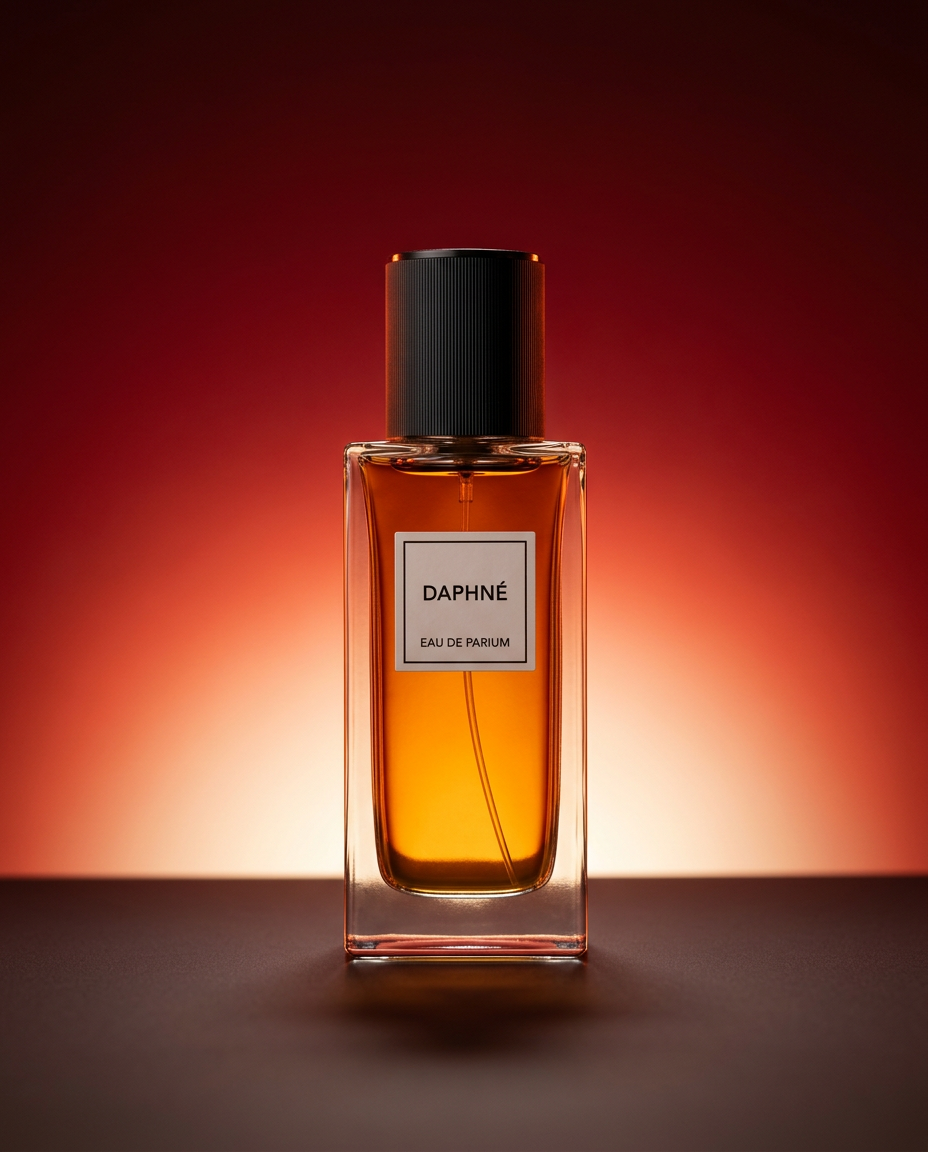
Drop your product into a dramatic, high-end studio setup. It places your item on a sleek flat surface against a rich crimson and orange cinematic gradient background. It's an easy way to get that moody, premium commercial look for any bottle, tech, or cosmetic.
Regenerate using your own assets.
Step 2: Apply your style everywhere, from product shots to campaigns
The real power of this system is scalability. A filter gives you one look. A saved photographic style in a MyUP workflow gives you infinite, on-brand assets. Because your Photographic DNA is a central asset, you can apply it to any subject to create a cohesive campaign.
Imagine generating a set of images:
- A shot of your new skincare bottle.
- A portrait of a model using the product.
- An abstract texture shot of the product's ingredients.
- A lifestyle scene of the bottle on a bathroom shelf.
Using a MyUP workflow powered by your Brandkit, all four images will share the same lighting, color grade, and lens characteristics. They will look like they were produced during the same professional photoshoot, by the same photographer. This is how you solve the problem of visual inconsistency that plagues brands using AI for content creation. You can learn more about this specific process in our guide to generating consistent AI product photos.
For a food or beverage brand, the same logic applies. This workflow is designed to create bold, character-filled portraits that can be adapted for any subject, ensuring your brand's unique photographic style is applied every time.
Workflow code: #myup-xjsb-hirr
Bold Portrait Food Advertising Photo

Get those high-impact, tight action shots of people actually enjoying your food brand. It drops your product right into a messy, realistic close-up bite shot that feels like a premium lifestyle campaign instead of a boring studio packshot.
Regenerate using your own assets.
Step 3: Generate on-brand lifestyle ads with one click
Lifestyle advertising is one of the most resource-intensive forms of content creation. With a defined Photographic DNA, you can automate much of this production. MyUP workflows can take your saved style and apply it to complex scenes, generating entire AI lifestyle photoshoots that are ready for a campaign.
Instead of just generating a single image, you can create a series of shots featuring different models, locations, and activities, all while maintaining the core visual identity you've defined. The user's role shifts from production to creative direction. You approve the concepts and compositions, and MyUP executes the time-consuming rendering and styling, ensuring every single asset is on-brand.
This workflow for sportswear advertising is a perfect example. It combines a dynamic, athletic subject with a professional, pre-defined photographic style that you can customize to fit your brand's look and feel.
Workflow code: #myup-ywpr-rqz6
Professional Sportswear Ad

Suspends your apparel right in the center of a high-energy promo shot, held up by hands around the frame. It gives your shirts or jerseys a gritty, collaborative streetwear editorial look that feels alive and physical.
Regenerate using your own assets.
Filters are for consumers. Control is for professionals.
The rush to add AI features to consumer apps is creating a sea of sameness. A 'natural look' filter from Adobe, a 'cinematic' preset in another app—they all produce generic, unownable visuals. For professionals, the goal is the opposite: to create a look so specific and consistent that it becomes a recognizable brand asset.
Tools like Midjourney's Style Tuner are a step in the right direction, but they are feature-level solutions locked within a single platform. A MyUP Brandkit is a strategic asset that governs all your content, ensuring consistency whether you're creating a social media post, a product shot, or a video ad. It provides true creative control, not just a better filter.
The future of brand content isn't about finding the perfect prompt. It's about building a system that makes the perfect prompt unnecessary. It's about defining your brand's unique vision of realism and having a platform that can execute it at scale.
