If you’re a creator, you’ve felt it. A sense of unease. A fear that the very tools meant to help us are instead diluting our voice. That anxiety was given a name in a July 3, 2026, article from The Verge, which detailed how creative communities like fanfiction are “at war with AI.” They’re fighting against generic, soulless content that mimics style without understanding substance. They’re afraid of losing what makes their work, and them, unique.
They are right to be concerned. But the problem isn't the AI. The problem is that we’ve been using it like a vending machine, feeding it coins and hoping for a masterpiece. It's time to stop prompting and start teaching. This is how you give AI your artistic identity, ensuring every creation it helps you with comes from your unique point of view.
Why default AI art feels empty: the blank canvas problem
An AI image generator, left to its own devices, has no taste, no history, no personal vision. It operates on a statistical average of its training data. Ask for a “cyberpunk city,” and you will get the most generic, universally recognized version of that concept. It’s a collage of a million images, but it has the soul of none.
An artist’s style, on the other hand, is the opposite of an average. It’s a collection of specific, intentional choices built over years. It’s your unique color palette, your preferred brush strokes, your recurring motifs, your way of framing a subject. It's a visual fingerprint. When you use a generic AI tool, you're asking it to draw with a fingerprint that isn't yours. No wonder the results feel alien and inauthentic.
To get results that feel like you, the AI needs your constraints. It needs your history. It needs your artistic DNA.
Forget code: how to build your personal 'Stylekit' in MyUP
Some creators venture into the complex world of training their own models with tools like Dreambooth or creating LoRAs. These are powerful but highly technical processes, often requiring coding knowledge, powerful hardware, and a lot of patience. For most working artists and designers, it’s not a practical path.
MyUP offers a different approach. Instead of training a model from scratch, you create a personal ‘Stylekit’—what we call a Brandkit. This isn't about code; it's about curation. You provide the AI with the core components of your artistic identity, teaching it to see the world through your eyes. Once your Stylekit is saved, every piece of content you generate in MyUP—from images to posters to social posts—is automatically infused with your unique vision. The AI becomes your apprentice, not your replacement.
Step 1: Deconstruct your style with reference images
The first step is to give the AI a visual foundation. Go through your portfolio and select 5-10 images that best represent your signature style. Don't just pick your favorites; choose the ones that scream 'you.' Look for consistency in:
- Composition: Do you favor centered subjects, rule-of-thirds, or chaotic arrangements?
- Lighting: Is your work typically high-contrast, softly lit, or dramatic?
- Motifs: Are there recurring symbols, textures, or character features in your work?
In MyUP, you'll upload these images directly into your Brandkit. This acts as a private, visual library that the AI references for every generation. It’s the most direct way to show the model, “This is what I mean when I say my style.”
Step 2: Define your color palette and core textures
A signature style is often built on a signature palette. Think of Wes Anderson's pastels or a film noir's stark monochrome. Your colors tell a story. Instead of hoping the AI guesses your preferred shades of ochre or teal, you need to define them explicitly.
In your MyUP Brandkit, you can lock in your exact hex codes. This is far more powerful than just writing “use red and blue” in a prompt. It ensures absolute color consistency across every single asset. When the AI generates a design, it will pull from *your* approved palette, not a random one.
This is especially critical for aesthetics with a distinct color feel. Imagine you're creating a gig poster. A template like the one below can be instantly transformed by your personal Stylekit. Your defined colors and textures would take this layout and make it unmistakably yours.
Workflow code: #myup-3xus-3l9x
Vintage Risograph Event Poster

Turn any announcement into a gritty, tactile gig poster. It layers your text with an uneven letterpress ink texture over a dusty, warm pink risograph paper background. It’s perfect for giving social posts a real analog, screenprinted vibe.
Regenerate using your own assets.
Step 3: Write the style prompt that becomes your signature
The final piece of your Stylekit is translating your visual identity into words. This is a one-time instruction that gets automatically applied to your prompts. This isn't just a list of keywords; it's a description of your artistic soul. A good style prompt is specific and evocative.
- Bad prompt: “detailed, cool art, illustration”
- Good prompt: “Gritty ink wash lines with a limited, desaturated color palette. Focus on heavy textures, dramatic low-angle lighting, and a sense of urban decay. Inspired by 90s graphic novels.”
Describe your textures, your line work, your mood, and your influences. This written guide, combined with your reference images and color palette, gives the AI a comprehensive understanding of your vision. For more ideas on developing a consistent style, see our guide on creating a truly consistent AI illustration style.
Putting it all to work: generating art that is truly yours
This is where the magic happens. With your Stylekit active in MyUP, you no longer have to fight the AI to get on-brand results. Every template and workflow becomes a starting point for your unique vision. The system handles the production; you provide the creative direction.
Want to create a zine-style post? The layout is there, but the output will use your colors, textures, and compositional tendencies.
Workflow code: #myup-msop-hlxf
Retro Zine Style Event Poster

Give your social posts a gritty, analog zine aesthetic. It layers a crumpled paper texture and a subtle grid over a warm cream background to make any event graphic look like a tactile, photocopied flyer. Perfect for DIY gigs and bold promos.
Regenerate using your own assets.
Need to design a magazine cover? The structure is provided, but the final image will reflect the artistic DNA you embedded in your Stylekit.
Workflow code: #myup-aktp-7jq0
Food Magazine Mosaic Cover
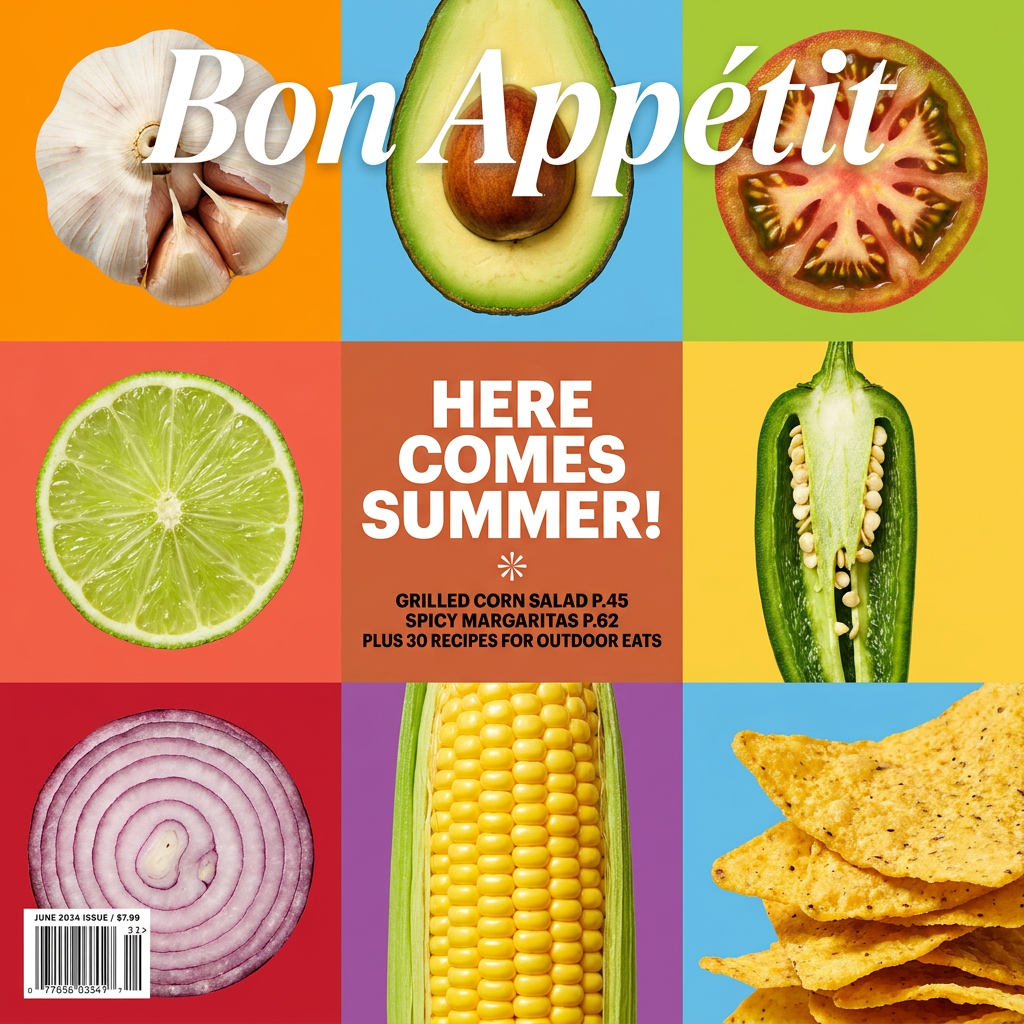
Turn your food shots into a bold, high-end editorial cover. It takes extreme close-ups of your dishes or ingredients and arranges them into a vibrant 3x3 grid that looks straight out of a premium food magazine.
Regenerate using your own assets.
You're no longer rolling the dice with a generic prompt. You are applying your pre-defined, unique style to a task. This is the difference between AI as a slot machine and AI as a collaborator. It's how you scale your output without sacrificing your soul.
You are the artist, AI is the apprentice
The fear that AI will replace artists comes from a misunderstanding of its role. A tool without direction produces generic work. But a powerful tool guided by a clear artistic vision becomes an extension of the artist's own hands, allowing them to create more, explore faster, and execute ideas that were previously too time-consuming.
By building a personal Stylekit in MyUP, you are taking control. You are defining the creative sandbox in which the AI is allowed to play. The user validates and adjusts; MyUP handles the production. Your voice remains the driving force. The AI is just a better, faster, and more obedient apprentice. Start building your Stylekit today and turn the AI into a true partner in your creative process.
