The AI community is buzzing with rumors about a hypothetical '--campaign' parameter in a future Midjourney update, a feature that would supposedly generate a full set of marketing assets from a single prompt. This excitement, along with Adobe's recent launch of 'Style Kits,' confirms a universal pain point for marketers: generating consistent, multi-format campaigns is a massive production bottleneck. The good news is that you don't need to wait for a rumored feature. The AI campaign generator you want is already here, and it’s a repeatable workflow you can build today.
Why the 'one image at a time' method is broken
Generating one perfect AI image is a victory, but for a real campaign, it's just the start of a long, repetitive process. That hero image for your Instagram feed (1:1) needs to become a Story (9:16), a Pinterest pin (2:3), and maybe a landscape banner (16:9). The standard approach is a soul-crushing cycle of downloading, opening in a design tool, resizing, awkwardly cropping, and manually re-applying your brand's logo and fonts to each version. Every step introduces a chance for inconsistency. The result is often a set of assets where the composition is compromised, key elements are cut off, and the brand application feels like an afterthought. This manual work doesn't just drain hours; it dilutes the impact of your core creative idea.
The logic of a multi-format workflow
A true campaign generator doesn't just resize one image; it re-imagines one core idea for every format. It’s a shift from post-production hacking to parallel, native creation. In MyUP, this workflow is built on a simple but powerful logic:
- The Central Idea: It all starts with a single, master prompt that defines the campaign's subject, style, and mood. This is your creative brief for the AI.
- Core Concept Generation: The AI uses this prompt to establish the core visual elements—the product, model, environment, and aesthetic.
- Parallel, Native-Format Generation: Instead of generating one image and then cropping it, the workflow triggers multiple, simultaneous generation paths. It instructs the AI to compose a unique image for each required aspect ratio (1:1, 9:16, 4:5, etc.), ensuring the composition is perfect for each specific format.
- Automated Branding: As each asset is generated, your MyUP Brandkit is automatically applied. Your logo is placed correctly, headlines use your brand fonts, and color palettes are enforced. The result is a complete set of on-brand, ready-to-post assets from a single click.
How to build your campaign generator in MyUP
Building this automated system in MyUP is straightforward. It starts with establishing your brand's visual identity as a reusable asset. Your Brandkit is the foundation, storing your logos, color palettes, and fonts. Once your Brandkit is saved, it can be automatically applied to any content you generate.
Next, you use the Workflow Builder to chain together the necessary steps. You define your core prompt and then create separate output branches for each format you need. For a typical social campaign, you might have three branches:
- Branch 1: Generate Image (Aspect Ratio 1:1 for Instagram/Facebook feed) -> Apply Brandkit.
- Branch 2: Generate Image (Aspect Ratio 9:16 for Stories/Reels) -> Apply Brandkit.
- Branch 3: Generate Image (Aspect Ratio 4:5 for vertical posts) -> Apply Brandkit.
When you run the workflow, MyUP executes all three branches in parallel. You provide one prompt and get back a complete, on-brand campaign set. To see this in action for a common e-commerce use case, you can start with a pre-built template.
Workflow code: #myup-3sro-edbt
Brand Clothes Post

Turn any outfit photo into a high-end fashion promo poster. It centers your subject in a full-body shot against a dark, dramatic studio backdrop, perfectly cropped for social feeds. It gives your apparel a moody, editorial look instantly.
Regenerate using your own assets.
From a simple post to a high-end editorial campaign
This multi-format workflow isn't just for basic social posts. It's powerful enough to generate sophisticated, editorial-quality visuals for high-end brands. Imagine you're launching a luxury jewelry line. Your central prompt could describe a scene with specific lighting, materials, and a high-fashion aesthetic. The workflow can then generate a cohesive set of assets: a dramatic close-up for your main ad, an environmental shot for your website banner, and a portrait-oriented version for a magazine-style social post.
The AI isn't just resizing; it's acting as a photographer shooting the same scene from different angles and compositions to best fit each frame. The user validates the output, ensuring it aligns with the brand's creative direction, while MyUP handles the complex production. This template for a luxury campaign is the perfect starting point to see the level of quality and consistency you can achieve.
Workflow code: #myup-40pt-v0sm
Luxury Jewelry Editorial Campaign
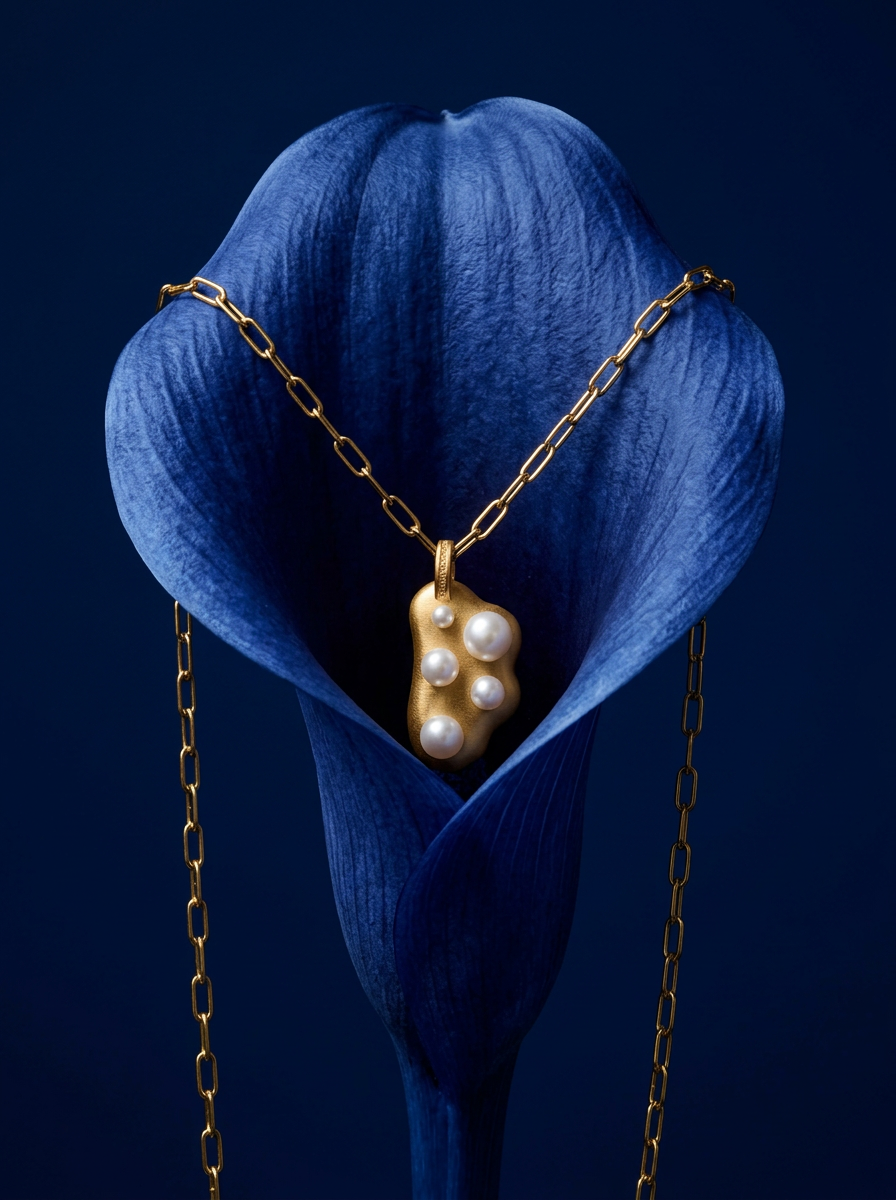
Drop your product into a moody, deep navy studio environment. It wraps your item in a seamless royal blue backdrop with high-contrast lighting and clean organic props, giving everything a premium, high-end editorial look.
Regenerate using your own assets.
Native formats matter: stop cropping, start composing
The difference between a resized asset and a natively composed one is the difference between amateur and professional content. When you force a square image into a vertical 9:16 frame for an Instagram Story, you're left with an awkward crop or distracting empty space. The visual is fighting the format.
A multi-format workflow solves this by composing the image for the vertical frame from the very beginning. The AI understands that a 9:16 aspect ratio requires more vertical space and adjusts the composition accordingly, creating a more balanced and impactful visual. This is critical for grabbing attention on platforms where vertical video and imagery dominate. Instead of thinking about how to repurpose a single visual, the professional approach is to generate a whole set of natively composed ones. For creating striking vertical ads, a dedicated workflow can make all the difference.
Workflow code: #myup-sygb-rhnt
Minimalist Vertical Product Advertising Poster

Drop the clutter and put your product in the spotlight. This setup places your item against a pure, seamless white background with a striking vertical flow that draws the eye straight up. It's perfect for creating clean, high-end studio posters.
Regenerate using your own assets.
Your role shifts from producer to creative director
Adopting a multi-format AI workflow fundamentally changes your job. You spend less time in the tedious, manual loop of resizing, exporting, and uploading. MyUP handles the production, executing your campaign across every required format with perfect brand consistency. Your role is elevated to that of a creative director. You focus on the high-level strategy: defining the core campaign concept, crafting the perfect master prompt, and validating the final assets. You provide the vision; the platform provides the velocity. This is how you scale high-quality, native, on-brand content across every channel without scaling your team or your hours.
Build your first campaign generator today
The demand for multi-asset generation is a clear signal that the era of one-off AI images is ending. The future of brand content is systemic, automated, and consistent. With MyUP, you can build that future for your brand right now. Start with a template or build your own multi-format workflow and turn your next great idea into a complete campaign in a single click.
