You’ve seen the posts. The viral “AI Brand Pack” trend sweeping across X and Reddit in July 2026 shows creators wrestling with tools like Midjourney to produce a full suite of brand assets. The goal is right—a consistent set of visuals for every channel. The process, however, is a mess of complex prompt chains, inconsistent character references, and juggling multiple apps just to get the formats right.
This manual grind is the opposite of efficiency. You spend hours re-prompting, resizing, and trying to force brand consistency onto assets that were never designed to work together. The launch of single-purpose tools like FormatFactory AI validates the pain, but they only solve one part of the problem: resizing. They don’t address the core issue of brand integrity.
True efficiency isn't about generating one thing faster. It's about creating a whole system of things, consistently and on-brand, from a single source of truth. This is the workflow for that system, built inside MyUP.
Step 1: Generate your 'source of truth' visual (and nothing else)
The biggest mistake in AI content repurposing is trying to create visuals for each platform from scratch. The key is to start by generating one perfect, high-quality master visual. This is your 'source of truth'—the single asset from which all others will be derived.
This is where you, the creator, exercise control. Focus all your prompting effort here. But don't just prompt for a subject; prompt for a subject that already embodies your brand. The most effective way to do this in MyUP is to apply your Brandkit from the very first generation. A Brandkit bakes your specific colors, fonts, logo, and overall aesthetic into the AI's output, ensuring your source visual is on-brand before you even think about repurposing it.
Think of it as setting the foundation. If the foundation is strong and on-brand, everything you build on top of it will be, too. For instance, you could start with a rich, complex concept to establish a campaign's visual theme.
Workflow code: #myup-aktp-7jq0
Food Magazine Mosaic Cover
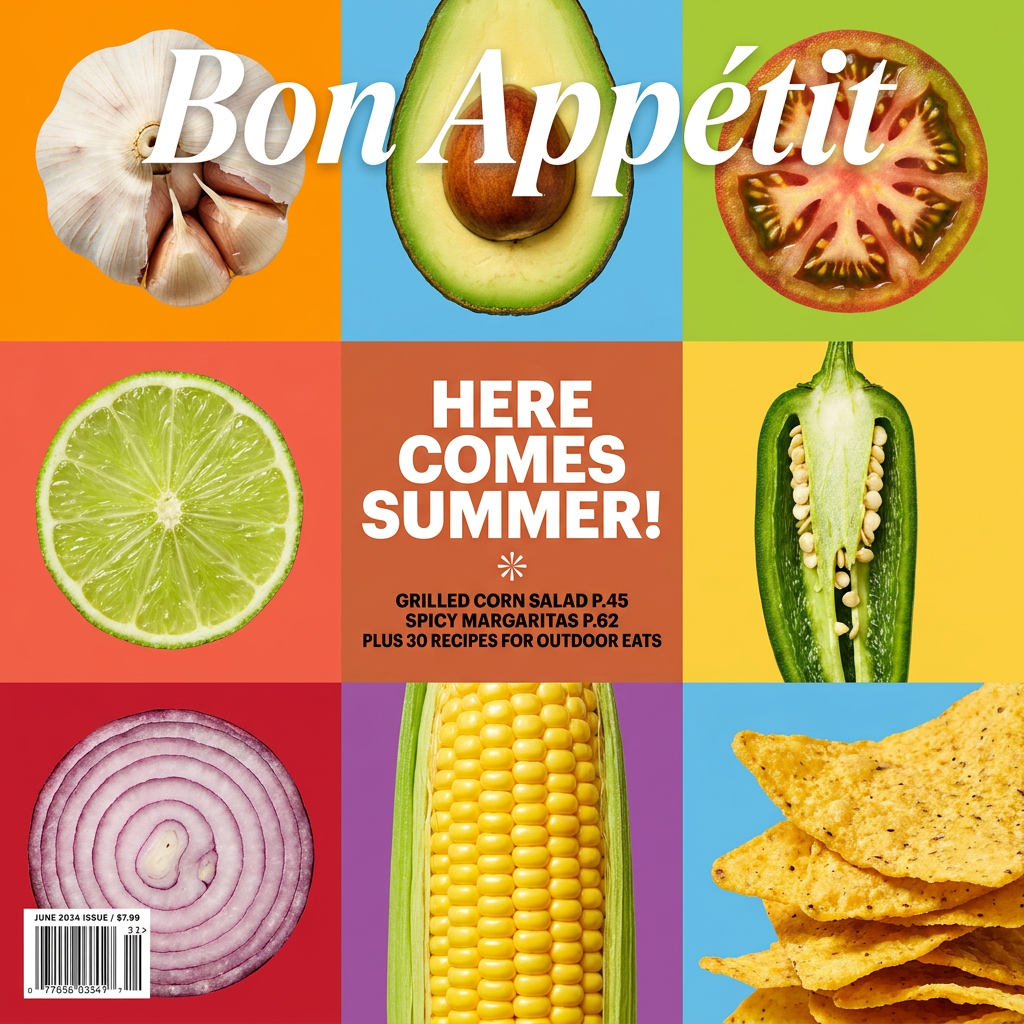
Turn your food shots into a bold, high-end editorial cover. It takes extreme close-ups of your dishes or ingredients and arranges them into a vibrant 3x3 grid that looks straight out of a premium food magazine.
Regenerate using your own assets.
Step 2: Build the one-click repurposing workflow
With your source visual created, you never have to go back to prompting for this campaign. Now, you build the machine that turns that one image into a dozen assets. In MyUP, this is a saved workflow—a repeatable sequence of commands that you can run on any source image with a single click.
Here’s how to build your repurposing assembly line:
- Start with your source image. This is the input for the entire workflow.
- Chain your reformatting steps. Add a separate action for each social media format you need. In the MyUP workflow builder, this looks like adding sequential blocks: 'Resize for Instagram Post (1:1)', then 'Resize for Instagram Story (9:16)', then 'Resize for X Card (1.91:1)', and so on. MyUP handles the cropping and reframing intelligently.
- Apply brand overlays. After each resize, add an 'Apply Brandkit Overlay' step. This is crucial. It ensures your logo, a specific text style for a headline, or a branded frame is applied consistently across every single format, regardless of its dimensions.
Once built, you save this workflow. Now you have a permanent, one-click tool called “My Campaign Formatter” or whatever you choose. You’ve stopped thinking in one-off tasks and started building a content system.
Step 3: Run the workflow and validate the results
This is the easy part. Select your source visual, run your saved workflow, and let MyUP handle the production. In moments, you'll have a complete set of assets, all perfectly formatted and fully branded, ready for review.
This is where the human control angle becomes critical. MyUP executes the repetitive, mechanical tasks of resizing and branding; you validate the final output. You’re not wrestling with prompts or pixels. You’re the creative director, approving the final campaign assets. Does the crop on the Story version look good? Is the logo placement correct on the LinkedIn post? You make the final call, but you didn’t waste an hour doing the manual labor to get there.
The output is a full set of cohesive visuals, ready to be scheduled. A hiring announcement, for example, can be instantly adapted for every platform where you post jobs.
Workflow code: #myup-eiob-7tbc
Modern Hiring Poster

Turn your open roles into stylish social announcements. It sets your hiring details against a soft, textured paper background with clean, editorial typography. Perfect for giving your brand a polished, modern look when you're looking to hire.
Regenerate using your own assets.
Case study: A full social campaign from one product shot
Let's make this concrete. Imagine you're launching a new line of artisanal coffee. The old way: prompt for an Instagram post, then a different prompt for a Story, then try to create a hero image for your newsletter, all while hoping they look related.
The MyUP workflow:
- Generate the source visual. Use a workflow designed to create a stunning, on-brand product shot. Your prompt focuses on the coffee bag, the environment, and the mood. Your Brandkit ensures the colors match your identity perfectly.
Workflow code: #myup-kbgo-tlle
Product Brand Post

Drop in your product to generate a cohesive nine-post Instagram grid. It blends warm lifestyle photography and flat-lay packaging with bold hand-drawn doodles, collages, and urban billboard mockups. Everything automatically styles itself to your brand's colors.
Regenerate using your own assets.
- Run the repurposing workflow. You take that single, beautiful product shot and run it through your saved multi-format workflow.
- Get your campaign assets. The output is immediate: a 1:1 square post for your Instagram grid, a 9:16 vertical slice for your Story announcement, a 1.91:1 wide image for your X card, and a 2:1 hero image for your email header. All generated from one image, all featuring your logo in the same corner.
In two steps, you've gone from a single idea to a complete, multi-platform launch campaign. This is how you scale content production without sacrificing brand consistency, something we explain in more detail in our one prompt, one week of visuals guide.
Beyond static images: Repurposing into video and motion
Your repurposing workflow doesn't have to end with static images. As platforms increasingly prioritize video, your source visual can be the starting point for motion content, too. With new AI video features like Runway's Multi-Motion Brush (July 2026), the ability to animate specific parts of an image is becoming more accessible.
In MyUP, you can extend your system by creating a second workflow. This one takes the static, resized images from your first workflow and uses them as inputs for simple video generation. A command like 'Animate with subtle zoom' or 'Add kinetic text overlay' can turn your on-brand product shot into a simple, engaging video clip for Reels or TikTok. This maximizes the value of your original creative concept, turning one idea into an entire ecosystem of static and video content.
From one-off images to a content system
The promise of AI in content creation isn't just about making one image faster. It's about eliminating the repetitive, low-value work that consumes a marketer's day. The constant resizing, reformatting, and re-branding of visuals for different platforms is exactly that kind of work.
By shifting your thinking from single generations to a systematic approach, you solve the problem at its root. A MyUP Brandkit acts as your central source of visual truth, ensuring every creation starts on the right foot. A saved workflow acts as your automated production line, ensuring that truth is carried consistently across every format. Together, they form a system that lets you focus on the creative idea, not the mechanical execution.
