
This week's announcement from Meta is a turning point for any brand using social media. As of July 12th, 2026, the company confirmed it is using public photos and content from Instagram and Facebook to train its generative AI models. For casual users, it's a privacy debate. For a brand, it's a direct threat to your intellectual property, brand identity, and legal safety.
While many articles focus on how to opt out, the professional question isn't about opting out of Meta's system; it's about opting into a better one. This guide provides the workflow for creating original, on-brand AI content in a secure environment where your brand assets are protected, and your outputs are truly your own.
The real risks of creating AI content on platforms fed by public data
When an AI model is trained on the entire public internet, including your Instagram feed, it creates a minefield for professional content creation. The outputs may look impressive, but they come with significant, often hidden, costs.
- Copyright Contamination: If an AI learns from millions of copyrighted images, who truly owns the image it generates for you? Using these tools for commercial work puts your brand in a legally grey area, exposed to potential infringement claims.
- Brand Dilution: AI models trained on public data are designed to produce popular, average aesthetics. This leads to generic visuals that look like everything else on the internet, diluting your unique brand identity and making it harder to stand out.
- Loss of Control: Once your public content is ingested into a massive training dataset, you lose control over how it's used. Your brand's visual style, product shots, and campaign assets become raw material for a system you don't own or direct.
- Ethical Concerns: Building your brand's future on a foundation of scraped data is ethically questionable. The professional standard requires a clear chain of ownership and consent, something public-data models cannot provide. For more on this, see how to build ethical AI art styles from the ground up.
The professional alternative: a closed-loop creation environment
The solution isn't to abandon AI but to use it within a controlled, private system. This is what we call a 'closed-loop' environment. Instead of the AI learning from the public internet, it learns from a secure, private source: your brand.
On MyUP.ai, this is your Brandkit. You build it once by providing your website URL. MyUP automatically extracts your logo, color palette, and fonts, creating a private visual identity for the AI to use. Every image, video, or design you generate is guided by your Brandkit, not by a dataset of random Instagram photos.
This fundamentally changes the dynamic. The AI works for your brand, using your assets, within your rules. It’s a private studio, not a public playground. The user approves and adjusts; MyUP handles the production, ensuring every output is compliant with the brand identity you defined.
Workflow: Create original, on-brand product visuals in a private studio
Let's make this practical. You need a high-quality, original photograph of your product. Using a public-data tool is a risk. The professional workflow is to generate it from scratch in your own private, AI-powered studio.
In MyUP, you can start with just your product and a prompt. The platform uses your Brandkit to inform the aesthetic, lighting, and mood, ensuring the result is uniquely yours and commercially safe. You don't need to worry if the background was borrowed from someone else's copyrighted photo because it was generated for you, based on your inputs.
This workflow gives you a library of original, brand-safe assets to build campaigns from. To execute this immediately, the 'Luxury Product Photography Studio' template is the perfect starting point.
Workflow code: #myup-xjaq-qhgx
Luxury Product Photography Studio
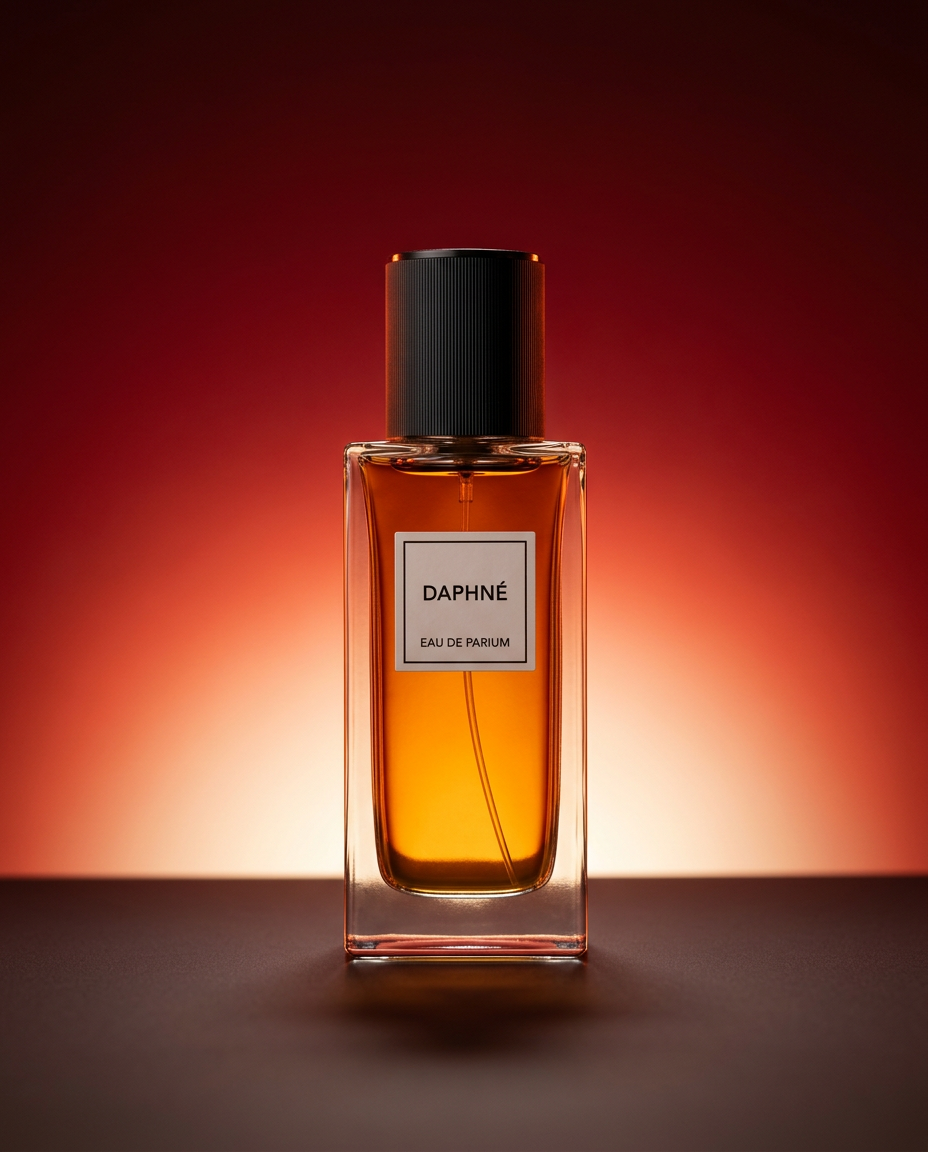
Drop your product into a dramatic, high-end studio setup. It places your item on a sleek flat surface against a rich crimson and orange cinematic gradient background. It's an easy way to get that moody, premium commercial look for any bottle, tech, or cosmetic.
Regenerate using your own assets.
Step-by-step: Turn your safe assets into on-brand social posts
A legally safe product shot is only the beginning. The next step is to turn it into a finished, ready-to-publish social media post. This is where brand consistency becomes critical. Your colors, fonts, and logo must be applied correctly every time.
Because you're working within the MyUP environment, your Brandkit is always active. You can take the product image you just generated and instantly use it in a social post template. The workflow automatically applies your brand's typography and logo placement, converting a raw image into a polished asset in seconds. This is how you avoid the inconsistencies that come with using separate tools for image generation and graphic design, a process that’s especially critical for platforms like Instagram.
The 'Brand Clothes Post' workflow is designed specifically for this task, turning product shots into compelling social content.
Workflow code: #myup-3sro-edbt
Brand Clothes Post

Turn any outfit photo into a high-end fashion promo poster. It centers your subject in a full-body shot against a dark, dramatic studio backdrop, perfectly cropped for social feeds. It gives your apparel a moody, editorial look instantly.
Regenerate using your own assets.
How to scale safe content creation for entire campaigns
The real power of a closed-loop system is scalability. The process of creating a single, safe, on-brand image isn't a one-off trick; it's a repeatable workflow you can use for every marketing asset your brand needs.
Whether you're creating a carousel post, a video ad, or a print-ready poster, the principle is the same: start with your private Brandkit and use workflows to generate the assets. This ensures that as you increase the volume of content, you also maintain perfect consistency and legal compliance. You're not just making images; you're building an automated system for brand expression.
To see how this scales to different formats, try the 'Minimalist Elegant Product Advertising Poster' workflow. It takes the same brand inputs and applies them to a completely different campaign asset.
Workflow code: #myup-fy77-jljs
Minimalist Elegant Product Advertising Poster

Turn any product shot into a high-end editorial ad. It places your item against a soft cream background with airy spacing and adds elegant, small serif typography at the top. Great for wellness or luxury brands wanting a calm, minimal aesthetic.
Regenerate using your own assets.
For brands, control isn't a feature—it's the foundation
The debate over Meta's use of public data will continue, but for professional creators and brands, the path forward is clear. Relying on platforms that treat your intellectual property as free raw material is not a sustainable or safe strategy. The future of brand building with AI depends on control, privacy, and ownership.
True creative leverage comes from an environment where your brand is the source of truth, not a drop in an ocean of public data. In MyUP, you are not just prompting an AI; you are directing a production process built exclusively on your brand's identity. That is the difference between being a user and being the owner of your creative workflow.
