
On July 23, 2026, Meta announced its 'Content Seal,' a system designed to label AI-generated content across Facebook and Instagram. For creators and brands, this changes everything. Soon, your feed will be filled with posts all wearing the same generic badge: 'Made with AI.' In this new reality, compliance isn't a strategy. The real challenge isn't proving your content was made by AI, but proving it was made by you.
Why a watermark solves Meta's problem, not yours
An invisible watermark or a simple label serves the platform's need for transparency. It tells the audience that a machine was involved. But it does nothing to solve the creator's core problem: differentiation. When every AI-generated image has the same label, the only thing that will make a user stop scrolling is a distinctive, recognizable brand identity.
Relying on generic AI tools in this environment is a direct path to the 'generic AI' penalty box. Your content risks being perceived as low-effort and interchangeable. The solution isn't to find a better watermarking tool; it's to adopt a better creation workflow—one that bakes your unique visual DNA into every single asset from the start.
Your brand is the seal: The workflow for recognizable AI content
The most powerful content seal isn't a technical tag; it's your brand's visual identity. It's the specific hex codes, the curve of your logotype, the texture in your photography, and the tone of your campaigns. The problem is, most AI image generators ignore all of it. You spend hours wrestling with prompts, trying to approximate a style you've already spent years building.
This is a production bottleneck, and it’s exactly what MyUP.ai is built to solve. MyUP’s core feature, the Brandkit, acts as your brand's permanent visual memory. Instead of describing your style in a text prompt over and over, you create a Brandkit once. MyUP learns your brand's entire visual system—colors, fonts, logo, and aesthetic—and automatically applies it to every piece of content you generate.
Step 1: Create your Brandkit in minutes
Building your brand's AI-ready identity on MyUP is straightforward. You don't need to be a designer or a prompt engineer. The platform handles the technical work; you provide the creative direction.
- Start with your URL: Simply enter your brand's website URL into MyUP. The platform scans your site and automatically extracts your brand's core assets: logo, color palette, and fonts.
- Refine and approve: MyUP presents the extracted assets for your review. You can adjust colors, upload specific font files, and add stylistic keywords that define your brand’s aesthetic (e.g., 'minimalist, high-contrast, grainy film'). This is where human control is key—MyUP executes, you validate.
- Save your Brandkit: Once you approve, your Brandkit is saved and ready. It's now the default visual engine for every workflow and template you use on the platform.
Step 2: Generate visuals that are unmistakably yours
With your Brandkit active, content creation shifts from approximation to production. Imagine you need a social media post for a new product launch. Instead of starting from a blank canvas, you use a workflow that already knows your brand.
The workflow will ask for the essential details—product name, key features—but the visual identity is already handled. The generated image will feature your product in a scene that reflects your brand’s style. The text overlay will use your brand's fonts and colors. The output isn't just an AI image; it's a campaign-ready asset. This is the key to baking your brand's DNA into every AI image, making it instantly recognizable in a crowded feed.
Ready to create a post that looks like it came from your design team, not a generic generator? Use this workflow for an on-brand product post.
Workflow code: #myup-kbgo-tlle
Product Brand Post

Drop in your product to generate a cohesive nine-post Instagram grid. It blends warm lifestyle photography and flat-lay packaging with bold hand-drawn doodles, collages, and urban billboard mockups. Everything automatically styles itself to your brand's colors.
Regenerate using your own assets.
Workflow code: #myup-gxue-opd0
Product Post

Turn a single product shot into a cohesive six-part Instagram story campaign. It mixes tactile crumpled paper textures with bold, stacked typography and custom mascot spots in your brand's signature colors.
Regenerate using your own assets.
From product shots to lifestyle content, consistency is key
A strong brand isn't built on a single great post; it's built on hundreds of consistent ones. The true power of a Brandkit is its ability to scale your visual identity across every type of content you need, from studio product shots to lifestyle campaigns and even branded custom AI avatars.
Because the Brandkit is the foundation, you can run different workflows for different needs and get a cohesive result every time. Need a shot of your new clothing line? The system applies your aesthetic. Need a clean, minimalist ad for your app? It does that too, all while staying true to the visual rules you defined.
This is how you move faster without sacrificing quality. You stop being an AI prompter and become a creative director, guiding a system that already speaks your brand's language.
To see it in action, try these workflows with your Brandkit:
- For on-brand apparel shots: Brand Clothes Post. Workflow code: #myup-3sro-edbt
- For clean, minimalist product ads: Studio Product Ad. Workflow code: #myup-u4lt-o0ho
Workflow code: #myup-aon6-zvop
Studio Product Ad
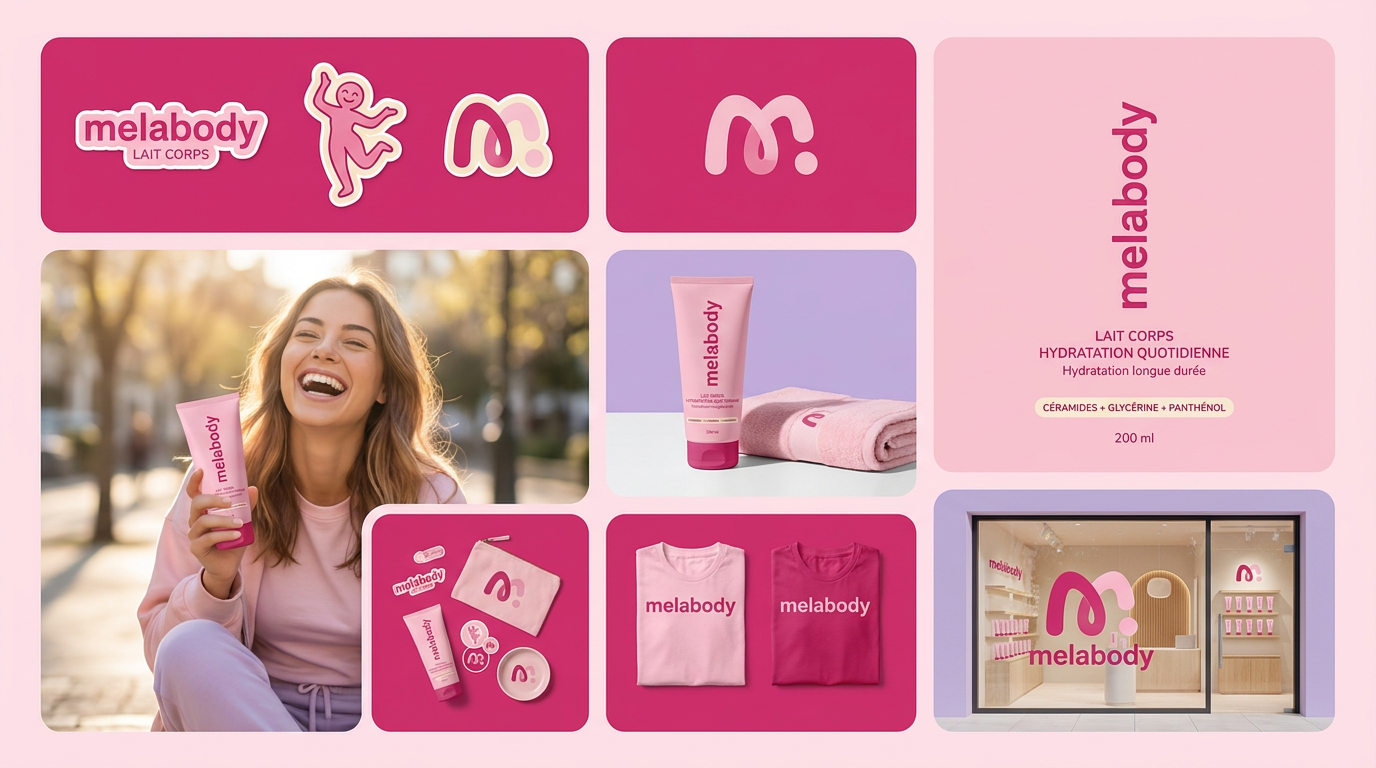
Turn any product photo into a cohesive brand moodboard. It automatically extracts the dominant color from your image to style the background, framing everything in a clean mosaic layout that perfectly matches your aesthetic.
Regenerate using your own assets.
In a world of AI labels, be the brand they recognize
Meta's 'Content Seal' isn't a threat; it's a filter. It will filter out the generic, unbranded AI content, making truly creative, brand-aligned work more valuable than ever. While others focus on the technical challenge of AI detection, you can focus on the strategic opportunity of brand recognition.
Stop generating AI content that anyone could have made. Start building a body of work that only you could have created. Your brand is your seal. With MyUP.ai, you have the workflow to apply it, consistently and at scale.
