
When you search for how to add a custom watermark to AI images, you're asking a tactical question. But the real problem you're trying to solve is strategic: how do I make my content instantly recognizable as mine? How do I build brand recall? A logo in the corner is a 20-year-old answer to a brand new production challenge. There is a much better way.
The industry is chasing brand consistency. A watermark is the wrong answer.
On July 22, 2026, Midjourney released its '--brand' parameter, allowing users to reference a brand guide to influence image style. This is a significant move. It's a direct admission from a major AI platform that generating random, beautiful images is no longer enough. The critical challenge for creators and marketers is consistency.
But a single parameter, like a watermark, is a partial fix for a systemic problem. Slapping a logo on an image after it's generated is an admission that the image itself isn't on-brand. It’s a label, not an identity. It’s fragile—easily cropped out, often distracting, and it screams 'stock photo' even if the image is custom. The goal isn't to prove you made something; it's to make your creations so stylistically coherent that they need no introduction.
From label to language: Why your brand's style is the real watermark
Think of the brands you recognize instantly without seeing a logo. The minimalist tech ads with soft gradients. The rustic, earthy tones of a sustainable food brand. The high-contrast, energetic look of a sportswear company. This is stylistic watermarking. It's a visual language, not a label. This brand DNA is composed of several key elements:
- Color Palette: Not just using your primary color, but consistently applying the entire brand palette in a specific way.
- Lighting and Mood: Is your brand bright and airy, or dark and cinematic? This is one of the most powerful and subconscious brand identifiers.
- Composition: Do your images favor centered subjects, rule-of-thirds, or chaotic, maximalist layouts?
- Texture and Detail: Is your style clean and graphic, or rich with film grain and organic textures?
When these elements are consistent, your content becomes unmistakable. Your audience develops brand recall. They don't just see an image; they see you. This is something a PNG logo in the corner can never achieve. It's the difference between someone wearing a name tag and having a signature style you'd recognize from across the room.
How to build your brand's visual DNA in MyUP
Capturing and deploying a stylistic watermark requires a system, not just a prompt. This is where MyUP's Brandkit becomes your central source of truth for all visual content. It’s designed to absorb your brand's DNA once, then apply it automatically to every creation.
Building it is straightforward:
1. Create Your Brandkit from a URL.Simply enter your website's address. MyUP scans your site and automatically extracts your logo, color palette, and fonts. This isn't a guess; it's a direct pull of your existing brand assets.
2. Validate and Refine.MyUP handles the production; you validate the results. Once the assets are extracted, you can review them. Remove a secondary color you don't want in your AI visuals, upload a different logo variation, or lock in your specific heading font. You have full control to curate the brand identity AI will use.
3. Define Your Style Core.This is where you codify your aesthetic. In your Brandkit's style prompts, you define the core of your visual language. For example: 'Clean, minimalist product photography, shot on a seamless off-white background with soft, natural morning light, deep depth of field.' This core prompt becomes the foundation for all future generations, ensuring stylistic cohesion.
Workflow in action: Generating on-brand campaign assets
With a completed Brandkit, you stop thinking about brand consistency on a per-image basis. It becomes the default. You can now use workflows to produce different assets that all share the same visual DNA automatically.
Imagine you run a direct-to-consumer fashion brand. You need a steady stream of social media images that look cohesive. Instead of trying to write the perfect, lengthy prompt every time, you can use a workflow designed for the task. The Brand Clothes Post workflow takes your product and instantly creates an on-brand lifestyle or studio image, pulling its style directly from your Brandkit.
Workflow code: #myup-3sro-edbt
Brand Clothes Post

Turn any outfit photo into a high-end fashion promo poster. It centers your subject in a full-body shot against a dark, dramatic studio backdrop, perfectly cropped for social feeds. It gives your apparel a moody, editorial look instantly.
Regenerate using your own assets.
The same logic applies to other industries. A food company can use the Food Product Ad workflow to generate images for a new snack. It won't just generate a picture of the food; it will generate it with the specific lighting, color grading, and mood defined in your Brandkit, ensuring it matches the rest of your campaign visuals.
Workflow code: #myup-w0vh-abft
Food Product Ad
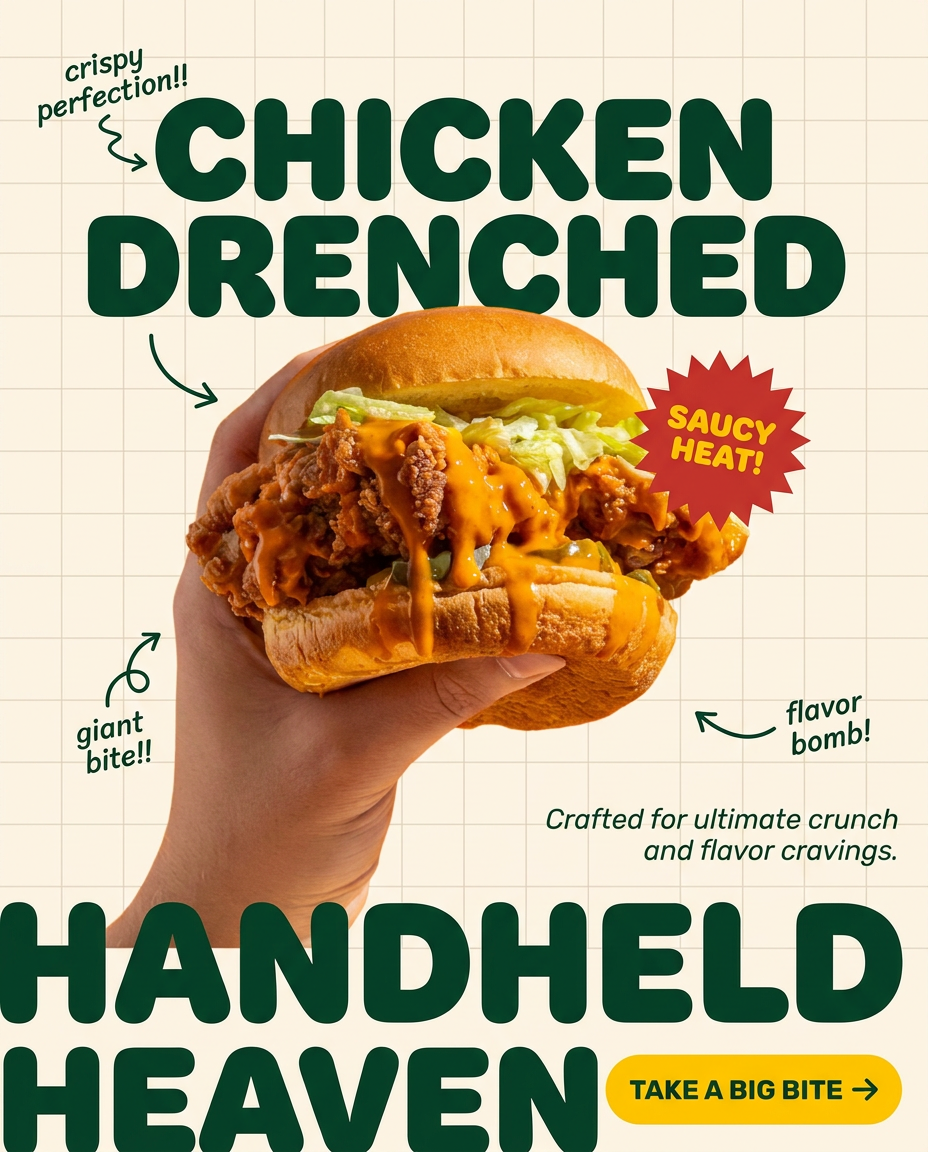
Turn any dish or snack into a bold, playful social ad. It places your food against a soft warm beige background with a subtle grid pattern, topped with chunky rounded headlines. It's clean, friendly, and instantly grabs attention in the feed.
Regenerate using your own assets.
Beyond a single post: Scaling your brand's visual identity
A strong brand system allows you to scale from a single social media image to a multi-faceted campaign without losing consistency. Your Brandkit ensures that a simple Instagram post and a complex, design-led event poster feel like they came from the same creative director. This is how you move beyond generating single images and start building a real library of on-brand AI patterns and assets.
For example, creating a series of posters for a product launch requires more than just consistent images; it requires consistent typography and layout. A workflow like the Bold Editorial Grid Poster uses your Brandkit's fonts, colors, and image style to construct a finished, designed asset in seconds. You provide the content, and the workflow builds the on-brand poster around it.
Workflow code: #myup-n0bi-2wzk
Bold Editorial Grid Poster

Create striking 2x3 editorial posters with six seamless, flat-color square cards in a perfect 4:5 grid. There are absolutely no gaps between the blocks, giving your content a bold, high-contrast magazine layout. It looks incredibly clean on any social feed.
Regenerate using your own assets.
This is the limitation of feature-level solutions like a style parameter. They can help with aesthetic similarity, but they don't integrate your specific fonts, logos, and layout rules into a repeatable production workflow. A true brand system does.
Stop labeling your images. Start owning a style.
The conversation started by Midjourney's new feature is the right one to have. Brand consistency is the next major hurdle in AI content creation. But the solution isn't a better way to label your images; it's a system that makes them inherently yours from the moment of creation.
A watermark proves you made an image. A consistent brand style proves you own the entire aesthetic. While other tools are adding features, MyUP provides the complete system: a central Brandkit to hold your visual DNA and automated workflows to deploy it at scale. The goal is to make every piece of content you generate unmistakably, intuitively yours.
Build your Brandkit in MyUP today. Stop watermarking, and start creating a visual language that speaks for itself.
