
If you're a performance marketer, the last 48 hours on social media felt familiar. The viral backlash against AI-generated UGC ads with 'dead eyes' and plastic skin, which peaked around July 21, 2026, confirmed what your own low conversion rates have been telling you: authenticity is everything, and most AI creative misses the mark.
But a bigger, more expensive problem is hiding just behind that one. The underlying tech is rapidly improving. Runway’s Gen-3 Alpha and Midjourney’s new ‘--character’ parameter, both released this week, are finally delivering the realistic, expressive, and consistent human characters we need. The uncanny valley is being crossed. So, what's the new bottleneck? Production. The real challenge is no longer generating one good shot; it's the grueling manual labor of turning that one shot into a full campaign with dozens of assets for A/B testing and multi-platform delivery. This is a production pipeline problem, not a single-image problem. Point solutions for generation are not enough. You need an integrated system that automates the entire process, from brief to branded campaign assets. This is where you move from being an AI operator to a campaign director, and it’s precisely what MyUP.ai is built for.
Step 1: Create your consistent AI brand ambassador
A successful UGC campaign relies on connection, and connection requires a consistent face. Before, creating a recurring AI character was a nightmare of prompt-chaining and hoping for the best. With new model features, it's finally possible to generate a consistent 'brand ambassador'—the same person across multiple scenes, shots, and ads.
But you don't need to become an expert in complex parameters. In MyUP, you can build a simple workflow to define and generate your ideal character. This isn't just about a face; it's about crafting a persona. You can specify demographic details, style, mood, and even subtle imperfections that make them feel real. The goal is to create a 'hero' image of your character that will serve as the consistent reference for the entire campaign. This first step replaces hours of frustrating trial-and-error with a repeatable, on-brand process.
To generate your foundational character shot, start with a workflow designed for high-end, personality-driven visuals. This template provides the right structure to focus the AI on creating a believable human subject.
Workflow code: #myup-yk1h-uqy8
High-End Editorial Fashion Magazine Cover

Drop in any portrait and turn it into a high-end editorial magazine cover. It frames your subject beautifully with relaxed, high-fashion posing and soft styling for a polished print aesthetic.
Regenerate using your own assets.
Step 2: Build the automated campaign workflow in MyUP
With your AI brand ambassador created, the next step is to build the machine that puts them to work. This is where you move from one-to-one creation to a one-to-many production system. The core of this system in MyUP is the workflow builder, which chains generative steps together, all guided by your brand's unique identity.
First, ensure your Brandkit is set up in MyUP. By simply providing a URL, MyUP imports your brand’s logo, colors, and fonts. This Brandkit becomes a foundational layer in your workflow, ensuring every single asset generated is automatically on-brand without you ever touching a color-picker or uploading a logo file again. It's the key to making AI-generated content truly yours. Learn more about how to add branding to AI images automatically.
Your campaign workflow will look something like this:
- Input: Your approved AI brand ambassador image as a character reference.
- Step 1: Scene Generation. Create multiple steps that place your character in different lifestyle or product-focused scenes. For example: 'Character using a laptop in a bright, modern cafe' or 'Character unboxing the product in a cozy living room.'
- Step 2: Product Integration. Add a step to place your actual product into these scenes, ensuring it looks natural and integrated.
- Step 3: Branding & Formatting. The workflow automatically applies your Brandkit logo and colors, then resizes each scene for every platform you need—square for Instagram feed, 9:16 for Stories, 16:9 for YouTube thumbnails.
Use this workflow as a starting point for placing your new brand ambassador into a commercial product shot.
Workflow code: #myup-seli-mtp0
Photo Product Ad
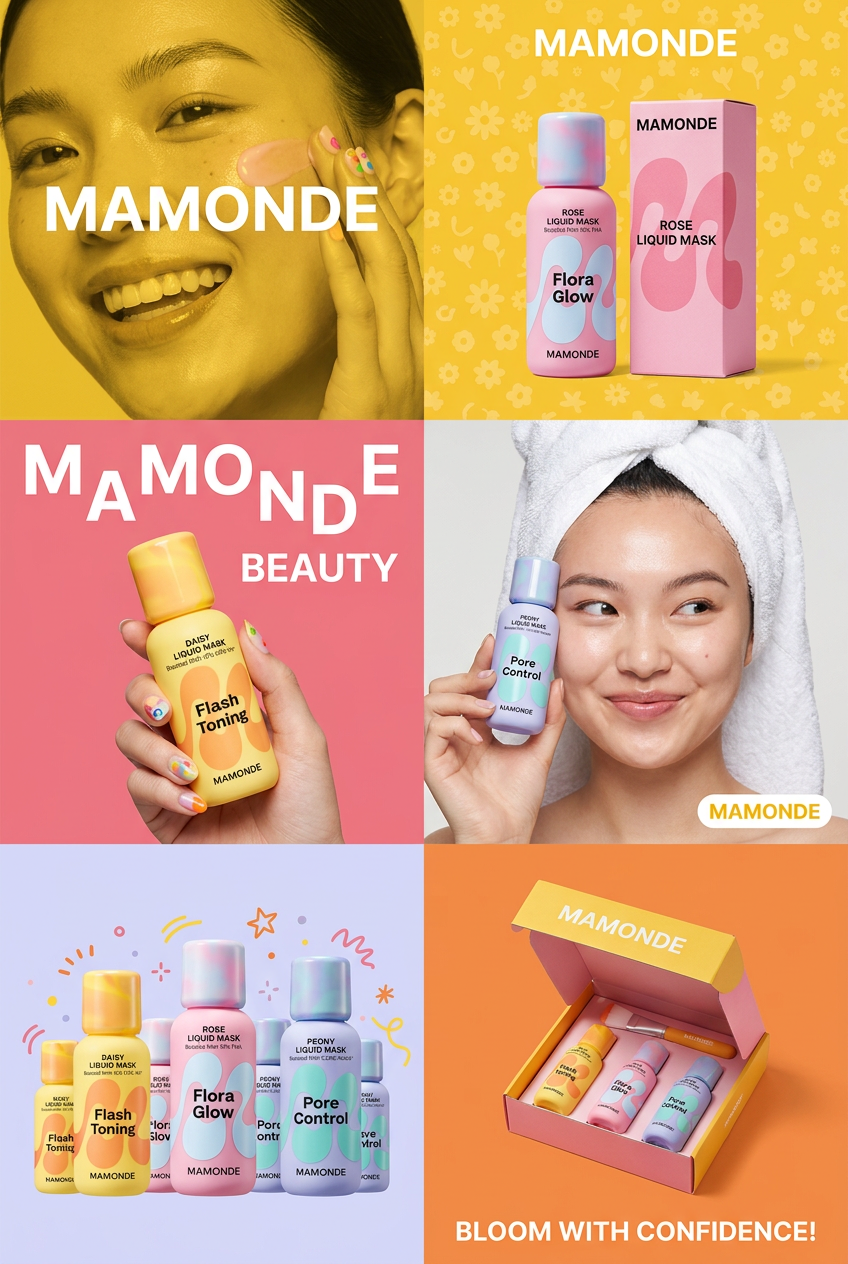
Get that high-end editorial look with a stacked, multi-panel campaign layout. It slices your brand visuals into a bold three-tier grid, pairing tight product close-ups right next to lifestyle shots for a cohesive, modern beauty poster.
Regenerate using your own assets.
Step 3: Generate and diversify your campaign assets in one click
This is the payoff. After setting up your workflow, you don't run it to get one image. You run it to get fifty. With a single click, the automated system executes every step you defined, generating a complete matrix of campaign assets.
Imagine needing to A/B test a new ad campaign. Instead of spending days with a designer creating variations, your MyUP workflow can generate them in minutes. You can instantly produce:
- The same scene with five different background environments.
- The same ad with three different taglines or calls to action.
- The same character showing slightly different emotions.
- Every variation perfectly formatted for Facebook, Instagram, TikTok, and LinkedIn.
This transforms your production pipeline from a costly bottleneck into a strategic advantage. You can test more variables, find winning creative faster, and scale your campaigns without scaling your workload. This is how you move beyond the single shot and start thinking in terms of full campaigns.
To generate a complete set of campaign visuals from a single brief, use a workflow designed for one-to-many production.
Workflow code: #myup-j6sp-glnw
Fruit Advertisement Campaign
Drop your product straight into a lush, hyperrealistic pile of fresh sliced fruit. It takes your clean product shot, blends it into rich organic textures, and generates a premium, slow-motion falling animation ready for a luxury cosmetic or food ad.
Regenerate using your own assets.
The final step is always human: How to review and refine your campaign
Automation doesn't remove the creator; it elevates them. MyUP executes, but you validate. Once your workflow generates dozens of campaign assets, your role shifts from tedious production to strategic direction. You're no longer dragging pixels around; you're the creative director reviewing the output.
In MyUP, you can quickly browse the grid of generated options. Your job is to approve the visuals that best capture the campaign's intent, discard the ones that don't, and provide simple feedback for any necessary adjustments. If a background is too dark or a headline isn't punchy enough, you can instruct the AI to regenerate just that element, and the system will update the assets while preserving everything else that worked. This feedback loop ensures you maintain complete creative control, combining the scale of AI with the nuance of human judgment.
