
This week, the conversation around AI content creation hit a fever pitch. On July 22, Adobe rolled out format presets for Firefly, and viral threads are everywhere showing creators' complex, multi-tool hacks to turn one image into a dozen social posts. Everyone is trying to solve the same problem: how to efficiently repurpose a single visual concept for every platform. But they’re all missing the most important part.
A tool that just resizes an image is a gadget. A platform that reapplies your brand’s unique intelligence to every new format is an engine. Repurposing isn't just about changing aspect ratios; it's about maintaining brand integrity. And that’s where the typical workflow breaks down.
The real cost of manual repurposing: brand drift and wasted hours
If you're a social media manager or brand creator, you know the grind. You generate a great hero image in one tool. Then you pull it into another to outpaint it into a 16:9 banner. You crop a 1:1 version in a third app, then struggle to make a 9:16 story format that doesn't awkwardly cut off the subject. By the end, you have five derivatives of your original idea, and none of them look quite right—or quite like each other.
This is brand drift. Each manual edit, each new tool, introduces tiny inconsistencies. The color palette is slightly off. The logo placement is different. The typography doesn't match. Individually, these are small compromises. Collectively, they dilute your brand identity and make your content feel disjointed. This process doesn't just cost hours of tedious work; it costs you brand consistency, the very thing that builds recognition and trust.
The repurposing workflow: from master asset to full campaign in MyUP
The solution isn't a better resizing tool. It's a better system. At MyUP, we've built our platform around a simple, powerful workflow designed to eliminate brand drift and automate the grunt work. It has three core components:
- The Master Asset: You start by creating one single, high-quality visual that perfectly captures your concept. This is your creative source of truth.
- The Brandkit: Before you create anything, you build your Brandkit in MyUP. You upload your logo, define your color palettes, and set your brand fonts once. This Brandkit becomes a persistent layer of brand intelligence that can be applied to any asset automatically.
- The Automated Workflow: This is where the magic happens. In MyUP, you build a chain of commands that takes your master asset, applies your Brandkit, and then generates all the derivatives you need for every social platform—all in one click.
This isn't just about making things faster. It's about making them right, every single time. It’s how you can generate a month of on-brand social media visuals without the manual pain.
Step 1: Generate your master visual concept
Everything starts with a strong core idea. Before you think about formats, focus on creating one perfect image. This master asset should be rich in detail and compositionally flexible enough to work in different crops. It’s the anchor for your entire campaign, so invest your creative energy here.
In MyUP, you can use a guided workflow to ensure your master asset is high-impact from the start. For example, if you're launching a new product, you need a visual that’s polished and professional. The Product Brand Post template is designed for exactly this purpose, helping you create a studio-quality shot that will form the basis of your entire campaign.
Workflow code: #myup-kbgo-tlle
Product Brand Post

Drop in your product to generate a cohesive nine-post Instagram grid. It blends warm lifestyle photography and flat-lay packaging with bold hand-drawn doodles, collages, and urban billboard mockups. Everything automatically styles itself to your brand's colors.
Regenerate using your own assets.
Step 2: Build the one-click repurposing workflow
With your master asset ready, you can build your repurposing engine. In the MyUP workflow builder, this is a simple process of chaining together actions. It might look something like this:
- Start: Upload Master Asset
- Step 1: Apply Brandkit (this automatically adds your logo, colors, and fonts)
- Step 2: Create Instagram Post (Resize to 1:1, add text overlay with brand font)
- Step 3: Create Instagram Story (Resize to 9:16, reframe subject, add animated text)
- Step 4: Create X Post (Resize to 16:9, add watermarked logo)
- Step 5: Create LinkedIn Post (Resize to 1.91:1, add professional text overlay)
You build this workflow once. From then on, you can run any new master asset through it to generate a complete, on-brand social media package in seconds. This is the power of a system over a single tool.
Step 3: Execute, validate, and deploy
Once you run the workflow, MyUP handles the production, generating a full suite of assets. Your job shifts from tedious manual editor to creative director. You validate the results, make any minor tweaks needed, and approve the final outputs. This 'human in the loop' approach ensures you maintain full creative control without being bogged down by the production process.
This system also allows for creative re-contextualization. That same master asset you used for a product launch can be repurposed for a completely different goal. For instance, you could run it through a workflow designed to create a hiring announcement, instantly transforming a product-focused image into a compelling recruitment tool that still feels 100% on-brand.
Workflow code: #myup-eiob-7tbc
Modern Hiring Poster

Turn your open roles into stylish social announcements. It sets your hiring details against a soft, textured paper background with clean, editorial typography. Perfect for giving your brand a polished, modern look when you're looking to hire.
Regenerate using your own assets.
Beyond resizing: repurposing ideas into complex formats
True repurposing goes beyond just changing aspect ratios. A robust brand system allows you to adapt your core visual identity to entirely different and more complex layouts. Your Brandkit—the colors, fonts, and logo—acts as the connective tissue that makes every asset feel like part of the same family, even if the formats are radically different.
For example, you can take the elements from your master product shot and run them through a workflow designed to create a sophisticated magazine cover. The system intelligently reapplies your brand's visual language to a new, complex composition. This proves that a workflow isn't just a shortcut; it's a scalable system for creative expression.
Workflow code: #myup-aktp-7jq0
Food Magazine Mosaic Cover
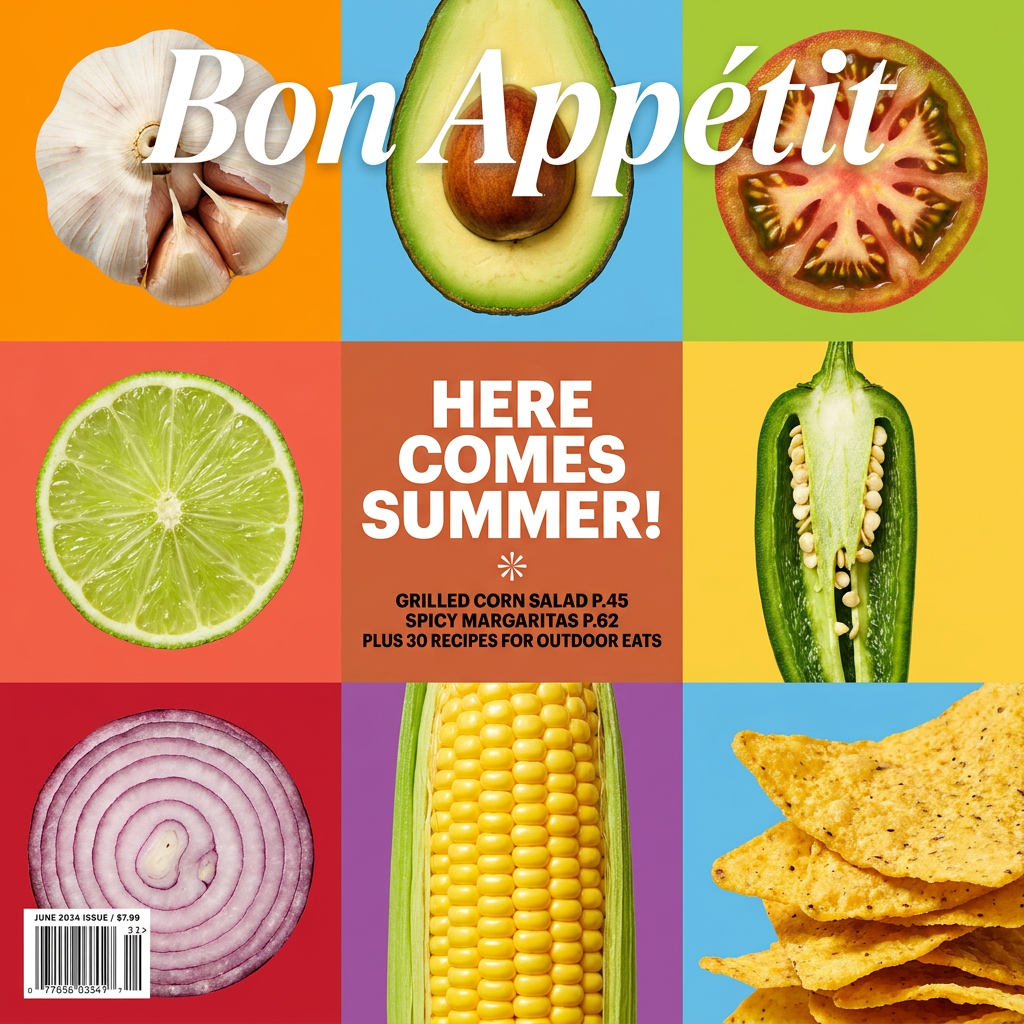
Turn your food shots into a bold, high-end editorial cover. It takes extreme close-ups of your dishes or ingredients and arranges them into a vibrant 3x3 grid that looks straight out of a premium food magazine.
Regenerate using your own assets.
Stop resizing. Start systemizing.
The new wave of AI features for content repurposing is exciting, but it only solves half the problem. Automating resizing is a minor efficiency gain if the end result is a collection of off-brand, inconsistent visuals. The real breakthrough comes from building a repeatable system that embeds your brand intelligence into every asset it creates.
With MyUP, your Brandkit is that intelligence. Your workflows are the engine. You create the master concept, and the platform handles the production, ensuring every single post, banner, and story is a perfect reflection of your brand. That isn't just faster—it's smarter. It's time to stop thinking about creating one asset at a time and start building a system that generates your entire campaign from a single source of truth.
