You’ve tried the AI video generators. You upload your crisp, perfect logo, write a prompt for a simple animation, and get back a melted, swirling approximation of your brand. It’s a common frustration and the reason the entire AI video market is now obsessed with solving the “control” problem. We’ve even seen major players like Runway release complex features like the Multi-Motion Brush in July 2026 just to give users a way to paint over the chaos.
But what if the problem isn’t the tool, but the entire approach? Adding more complex features to fix a fundamentally flawed process is a dead end for brands. The goal isn’t to wrangle an AI into respecting your logo; the goal is to use a workflow that protects your brand assets from the start.
An animated logo in a vacuum is a gimmick. A professional brand asset integrates that logo into a compelling scene. It’s time to stop trying to “animate your logo” and start building an animated scene *around* your logo. Here’s the workflow for doing it right.
You have an animated logo. Now what?
Let's say you managed to get a decent logo animation—a simple fade-in, a gentle spin, or a clean reveal. You have the MP4 or GIF file. What’s the next step? The real work for any marketer or content creator isn't possessing this file; it's using it. You need to place it in a social media ad, a product demo, or a website header. This is where the production workflow breaks down.
You could open a complex video editor and start layering tracks, but that defeats the purpose of using AI for speed and scale. Or, you could upload your static logo to an image-to-video tool and hope for the best. The result is predictable: the AI interprets your logo not as a fixed asset but as a collection of pixels to be re-imagined, leading to distortion that instantly undermines your brand's credibility.
The fundamental mistake is treating the logo as the subject of the animation. For a brand, the logo should be the anchor of the composition.
Why you should animate the scene, not the logo
A professional video ad creates focus and visual interest through motion in the environment, not by tampering with the core brand mark. Think of a high-end car commercial: the car itself is often shot in crisp focus while the background blurs with motion. The brand is stable; the world moves around it. This is the principle we need to apply to AI video generation.
By generating a rich, on-brand scene and then applying controlled motion to the *entire composition*, you achieve a far more professional and brand-safe result. The logo, overlaid as a pristine, high-resolution asset, remains perfectly intact. The motion—a subtle zoom, a gentle pan, or a soft drift—brings the scene to life, drawing the viewer's eye exactly where you want it. This method gives you the dynamic quality of video without ever putting your brand identity at risk. It’s a strategic choice for controlled animation, not a technical workaround.
In MyUP.ai, this isn't a complex, multi-tool process. It's a single, repeatable workflow designed for brand integrity.
The workflow: From product shot to finished video ad
Here is the exact, step-by-step process for creating a polished, animated video ad where your logo is the hero of a dynamic scene. We'll build the entire asset from a single prompt inside MyUP, demonstrating the power of an integrated platform.
Step 1: Generate your on-brand product scene
Before you can add a logo, you need a stage. The first step is to create the visual world for your product or message. Instead of just prompting for a generic background, a MyUP workflow uses your Brandkit—your specific colors, fonts, and visual style—to inform the generation. The AI executes, but you validate the output, ensuring the composition and mood are a perfect fit for your brand.
This workflow is designed to create a clean, studio-quality scene for any product. Simply tell it what your product is, and it generates a professional, on-brand backdrop ready for the next step.
Workflow code: #myup-aon6-zvop
Studio Product Ad
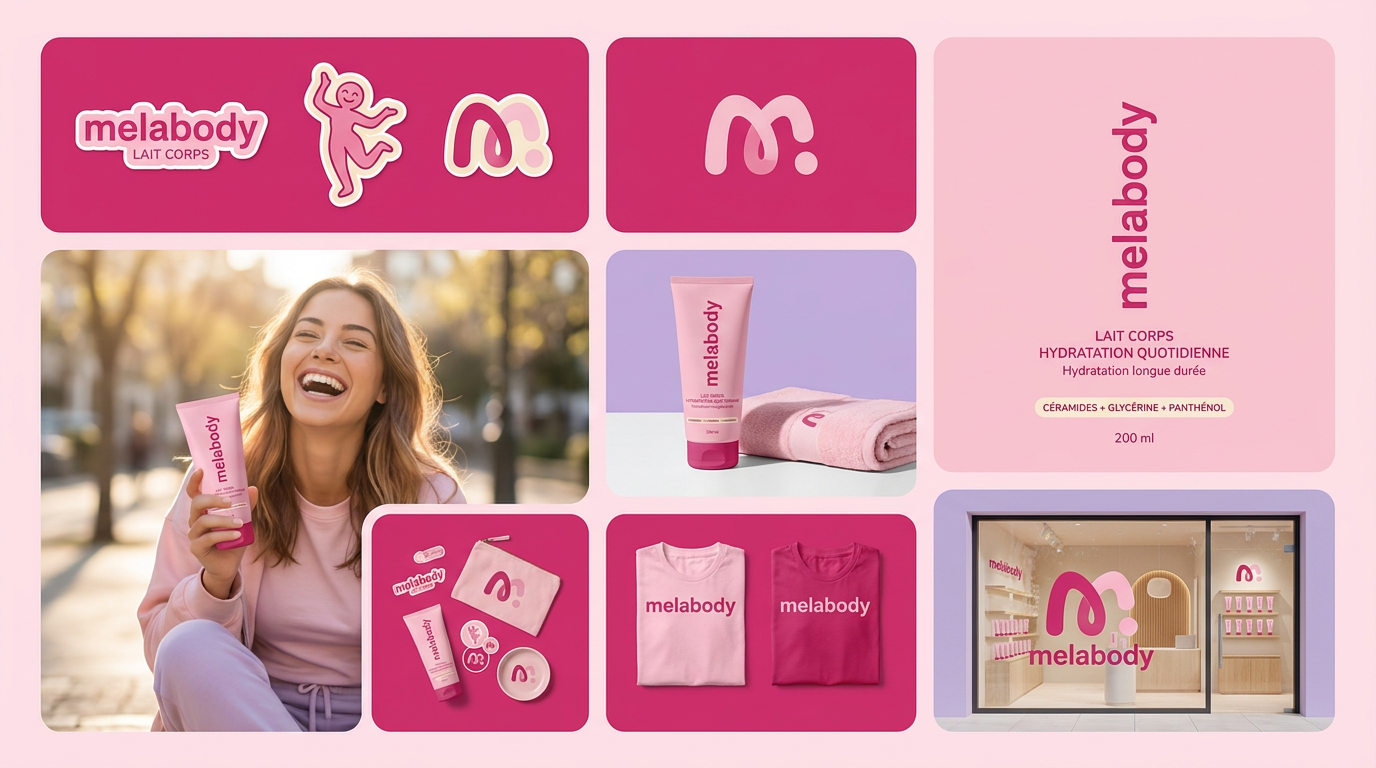
Turn any product photo into a cohesive brand moodboard. It automatically extracts the dominant color from your image to style the background, framing everything in a clean mosaic layout that perfectly matches your aesthetic.
Regenerate using your own assets.
Step 2: Add your logo and apply controlled motion
With your scene generated, the next step is to place your brand at the center of it. In MyUP, your Brandkit contains your high-resolution logo file. With one click, you can overlay it onto your new scene. There's no uploading, resizing, or quality loss—just a perfect placement of your core brand asset.
Now for the animation. Instead of selecting an “animate logo” button that might distort it, you'll use MyUP’s video generation function on the entire composition. You can instruct it to apply a “slow zoom in,” “gentle pan from left to right,” or “subtle drift effect.” The platform treats your logo and the background as a single, locked composition and applies the motion smoothly to the whole frame. Your logo moves with the scene, but its form, color, and clarity are never compromised.
Step 3: Scale your ad with repeatable workflows
You’ve created one perfect video ad. Now you need five more versions for different social platforms and A/B tests. This is where a workflow-based platform becomes a true production engine. The entire process—from scene generation to logo placement to motion application—is a saved workflow in MyUP.
You can run the same workflow again with a slightly different prompt to feature a new product or change the aspect ratio for a different social feed. The consistency is built-in. This is how you move from making single assets to running entire campaigns with a cohesive visual identity. For example, you can adapt your video ad concept into a series of static posts or on-brand animated GIFs.
This workflow is perfect for quickly turning your product scene into a social-ready post with consistent branding.
Workflow code: #myup-kbgo-tlle
Product Brand Post

Drop in your product to generate a cohesive nine-post Instagram grid. It blends warm lifestyle photography and flat-lay packaging with bold hand-drawn doodles, collages, and urban billboard mockups. Everything automatically styles itself to your brand's colors.
Regenerate using your own assets.
Your logo is an anchor, not an experiment
The promise of AI for brand content isn't to roll the dice on your identity with every generation. It's to give you leverage, speed, and scale while maintaining absolute control over what matters most. By shifting your thinking from “animating a logo” to “building an animated scene around a logo,” you adopt a professional production mindset.
Your logo is the result of careful strategy and design; it’s not a suggestion for an AI to reinterpret. A proper workflow provides the guardrails to enhance your brand with motion, not erase it. Start by building your free Brandkit on MyUP.ai, and use the workflows in this article to create video ads that are as professional as they are efficient.
