
The AI video novelty is over. Now, it's time for results.
You’ve generated the AI videos. You’ve mastered the prompts for stunning visuals. The videos get views, maybe even some shares. But they don't get clicks, and they certainly don't drive sales. Sound familiar? You're not alone. The initial thrill of text-to-video is wearing off, and marketers are now asking the only question that matters: can AI make a video that actually sells?
The entire market is pivoting to answer this. In July 2026 alone, we saw Runway release 'Director Mode' for granular camera control and Adobe roll out 'Structure Reference' to fight for visual consistency. These are powerful features, but they are also signals of a deeper problem: most AI video tools are just generators, not strategic partners. They give you more buttons to press but offer no marketing blueprint.
An AI video ad generator that doesn't understand conversion funnels is a toy. A professional tool doesn't just create motion; it builds a narrative that moves a customer to act. This requires structure, not just a better prompt. It requires a system that enforces marketing best practices every single time. That system is a workflow, and it’s the core of how MyUP approaches AI-powered advertising.
The 3-part formula of a social video ad that converts
Before we even open an AI tool, let's deconstruct what works on a crowded social feed. High-performing video ads aren't random collections of cool shots. They are meticulously structured arguments, usually under 15 seconds, built on a timeless marketing formula.
1. The Hook (Seconds 0-3)
This is the scroll-stopper. You have less than three seconds to earn the viewer's attention. The hook must be visually arresting, spark curiosity, or present a relatable problem immediately. It’s not about showing your logo; it’s about making them pause their thumb.
2. The Problem & Solution (Seconds 4-10)
With attention captured, you now present the core narrative. You can show the 'before' (the problem) and the 'after' (the solution your product provides). Or, you can focus entirely on the aspirational outcome—the feeling, the status, the relief your product delivers. This is where you connect your product to the viewer's life.
3. The Call to Action (Seconds 11-15)
This is the closer. You've hooked them and shown them the value. Now you must tell them exactly what to do next. “Shop Now.” “Learn More.” “Download the Guide.” This should be bold, clear, and visually integrated with your brand. A weak or missing CTA turns a potential ad into a pleasant but pointless brand video.
How to build the conversion formula into a MyUP workflow
Knowing the formula is one thing. Executing it consistently at scale is another. This is where a single-prompt approach fails. You can't ask an AI to “make a high-converting ad” and expect it to understand the narrative pacing of a hook, problem, and CTA. You have to build it.
In MyUP, you don’t just write prompts; you build a workflow. Each part of the ad formula becomes a dedicated, repeatable step in your production line. This lets you focus your creative energy on each strategic component, while MyUP handles the production and ensures every asset is automatically infused with your brand identity via its integrated Brandkit.
Let’s build that workflow, step by step.
Step 1: Generating the 3-second visual hook
The goal here is pure visual magnetism. For a product, this often means an extreme close-up, a surprising texture, or a dynamic, satisfying motion. We need to create a shot that feels premium and intriguing. Instead of prompting for a generic product shot, we prompt for the sensory experience.
For example, instead of “lip gloss on a table,” you might prompt for “extreme macro shot, glossy candy-like texture on a lip gloss applicator, vibrant pink, studio lighting.” This focuses on the visual details that make someone stop and look.
MyUP lets you build a dedicated step in your workflow just for this hook. You can refine your prompt until it consistently delivers a scroll-stopping intro. The user validates the creative direction; MyUP handles the rendering. To see this in action, this template is built specifically to generate a powerful, product-focused hook.
Workflow code: #myup-iffs-sdef
Gourmand Candy Lip Gloss Ad
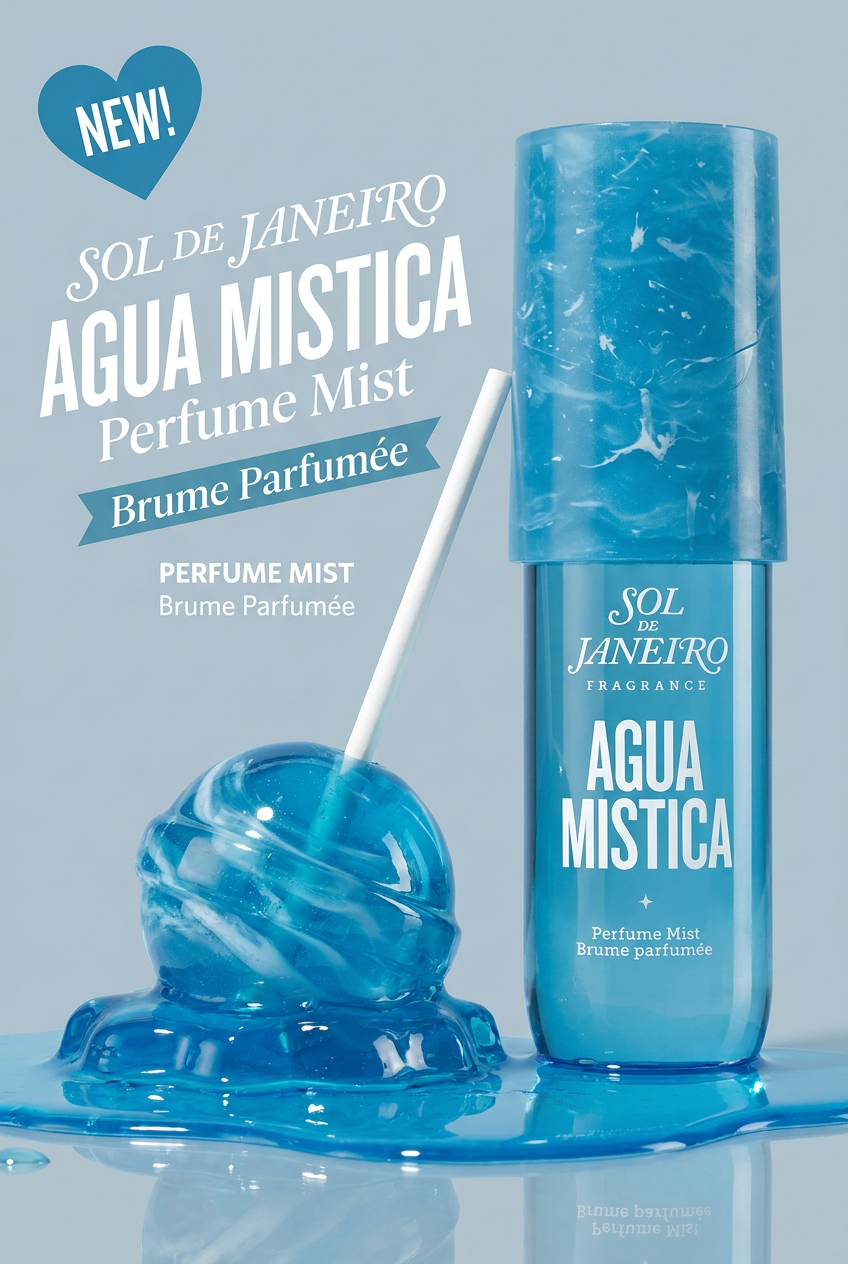
Drop your product photo in and watch it transform into a sleek, modern cosmetic ad. It automatically extracts your item's signature colors to build a vibrant, gourmand-style backdrop that matches perfectly.
Regenerate using your own assets.
Step 2: Crafting the problem/solution scene
Once you've earned their attention, the next step in your workflow is to create the story. This is where you show your product in an aspirational context. For a sportswear brand, it’s not just showing the shorts; it’s showing the athlete effortlessly clearing a hurdle, embodying performance and determination. These scenes need to look authentic and compelling, not like sterile, fake AI creations. You can find a complete guide on achieving this in our article on creating cinematic AI video that looks real.
In your MyUP workflow, this is a separate step with its own prompt. Here, you define the action, the environment, and the mood. Your Brandkit ensures that even in this new scene, the color grading and overall aesthetic remain consistent with the hook you just created. This template is a perfect example of a workflow step designed to show a product in a powerful, action-oriented context.
Workflow code: #myup-ywpr-rqz6
Professional Sportswear Ad

Suspends your apparel right in the center of a high-energy promo shot, held up by hands around the frame. It gives your shirts or jerseys a gritty, collaborative streetwear editorial look that feels alive and physical.
Regenerate using your own assets.
Step 3: Adding a clear, on-brand call to action
The final and most crucial step is the call to action. An amazing video with no clear next step is a wasted media spend. Many AI video tools struggle with legible, well-designed text, forcing you into a separate video editor to finish the job. This breaks the workflow and kills efficiency.
The final step in your MyUP workflow should be dedicated to generating the closing shot, complete with a text overlay. The magic here is the Brandkit. When you add a text element, MyUP automatically applies your brand's font and color palette. Your logo can be added as a permanent watermark. This ensures that the most important part of your ad—the part that drives the conversion—is always perfectly on-brand without any manual adjustments.
This template combines a delicious visual with a clear space for a strong, on-brand CTA, showing how the final piece of the puzzle fits.
Workflow code: #myup-fts6-4ihp
Vertical Gourmet French Fry Ad

Transform your products into high-fashion editorial ads. This setup uses a dynamic diagonal layout and a slightly tilted overhead angle to give food and packaging incredible depth and texture. It's perfect for giving any brand a chic, premium look.
Regenerate using your own assets.
Your workflow is your system for scalable, on-brand ads
With your three-step workflow built—Hook, Solution, CTA—you now have more than just a single video ad. You have a strategic asset. This is your brand's formula for conversion, codified into a repeatable system.
Need to create 10 variations for A/B testing? Simply run the workflow again with minor tweaks to the prompts in each step. Launching a new product? Duplicate the workflow and update the product details. Your Brandkit ensures every single output, regardless of the visual content, feels like it came from your brand.
This is the difference between using an AI video generator as a novelty and integrating it as a professional marketing tool. Stop prompting for one-off videos. Start building workflows that create predictable, on-brand results that drive your business forward.
