You’ve seen the demos. The latest AI video models generate stunning, high-resolution clips from a single line of text. Yet when you try it, the output feels… off. The motion is random, the lighting is flat, and the skin has an unnatural, waxy sheen. It looks expensive, but it still looks fake.
The problem isn't the technology. In fact, as of early July 2026, the tools have never been more powerful. Luma Labs just launched 'Dynamic Scene' for controllable camera movement. Midjourney quietly upgraded its comprehension of cinematic lighting terms. Adobe Firefly added 'Shot Matching' to fix color inconsistency in post-production. The potential is there.
But these features are just instruments. They don't make you a filmmaker. A powerful model without a clear creative vision is like a world-class camera crew with no director on set. You don't get cinematic results by accident; you get them by encoding your intention into a workflow. Here’s the workflow that separates professional results from amateur experiments.
What 'cinematic' actually means (and why AI struggles with it)
Before you can direct an AI to create a cinematic video, you have to know what you’re asking for. 'Cinematic' isn't just a vibe; it's a collection of intentional creative choices. AI models, left to their own devices, typically fail at three core elements:
- Intentional Camera Movement: In a film, the camera moves for a reason—to reveal information, follow a character, or create a feeling. A slow dolly-in builds tension; a sweeping crane shot establishes scale. Most AI video models produce a generic, drifting 'swirl' that serves no narrative purpose.
- Motivated Lighting: Professional lighting sculpts a scene. It creates mood, directs the viewer's eye, and defines shape and texture. A single 'key light' and 'fill light' can be the difference between a flat, digital-looking portrait and a dramatic, emotional one. A simple prompt often results in generic, evenly-lit scenes that lack depth and realism.
- Consistent Color Grading: A film's color palette is a critical part of its identity. Every shot in a sequence is graded to match, creating a cohesive visual world. When you generate multiple AI clips and stitch them together, you get a jarring mess of slightly different colors, shadows, and styles.
A single text prompt can't communicate this level of directorial intent. To get cinematic results, you need to break down your vision into a series of clear instructions—a shot list, a style guide, and a plan for execution. You need a workflow.
The workflow: a 4-step plan for cinematic AI video in MyUP
The solution is to stop thinking like a prompter and start thinking like a director. In MyUP, you can build a repeatable workflow that orchestrates the powerful new capabilities of underlying AI models according to your specific creative vision. This process ensures every element—from the color palette to the camera angle in each shot—is intentional and on-brand.
Step 1: Define your film's look with a Brandkit
Before you generate a single frame, you need to define the aesthetic. What is the color story? What is the mood? This is where a MyUP Brandkit is essential. Instead of trying to fix inconsistent colors in post-production with a tool like Adobe's 'Shot Matching', you define the correct color grade, style, and visual identity from the start.
Your Brandkit acts as the film's 'bible', providing the AI with a constant reference for your brand’s unique visual language. MyUP automatically applies these rules to every asset you generate, ensuring that your wide shots, close-ups, and product features all feel like they belong in the same world. This proactive approach is the key to achieving brand consistency at scale.
For a high-end commercial, for example, you need to establish a premium look first. This workflow is a perfect starting point for defining a sophisticated product aesthetic.
Workflow code: #myup-i4ju-fq5a
Premium Beverage Commercial Photography
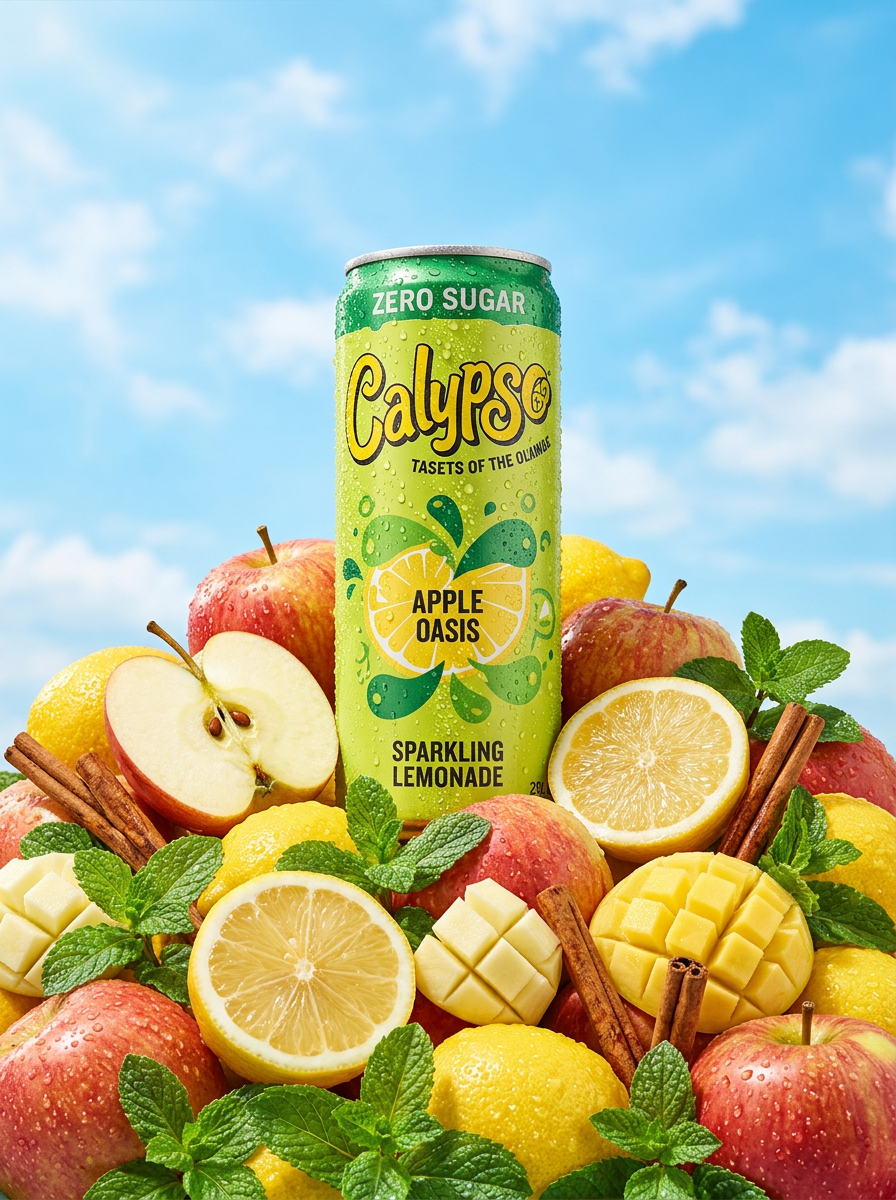
Give your packaged products an ultra-fresh summer look. It places your item in a pile of vibrant fruit, shooting from a dramatic low angle against a bright sky with hyper-realistic condensation droplets and sharp macro details.
Regenerate using your own assets.
Step 2: Build your shot list with a storyboard
A film isn't one long, continuous shot; it's a sequence of carefully planned shots that tell a story. In MyUP, you build this sequence using a storyboard. Each step in your storyboard corresponds to a specific shot in your final video. This is where you translate your creative vision into precise instructions for the AI, using the language of cinematography.
Instead of a vague prompt like 'a video of a car driving,' your storyboard prompts will be specific:
- Shot 1 (Establishing): 'Wide shot, drone footage of a black sports car on a winding coastal road at golden hour, anamorphic lens flare.'
- Shot 2 (Close-Up): 'Medium close-up on the driver's hands on the steering wheel, shallow depth of field, cool blue color grade.'
- Shot 3 (Action): 'Low-angle tracking shot, following the car as it speeds past the camera, motion blur, dynamic energy.'
This storyboard approach lets you direct the AI, telling it not just *what* to create, but *how* to frame it, light it, and move the virtual camera.
Step 3: Generate and direct your keyframes
With your Brandkit and storyboard in place, you can begin generating the keyframes—the still images that will form the basis of your video clips. MyUP will execute each prompt from your storyboard, applying your Brandkit's style to ensure consistency from the very first image.
This is where human control is critical. MyUP executes the production, but you validate the creative. You review each generated keyframe, approving the ones that match your vision and regenerating or adjusting the ones that don't. This iterative process puts you in the director's chair, making creative decisions instead of just accepting the first thing the AI produces. For a powerful opening shot, you need a keyframe with perfect lighting and composition.
This workflow for a high-fashion cover is designed to generate exactly that: a stunning, professionally lit image that can serve as the perfect 'Shot 1' for a video sequence.
Workflow code: #myup-yk1h-uqy8
High-End Editorial Fashion Magazine Cover

Drop in any portrait and turn it into a high-end editorial magazine cover. It frames your subject beautifully with relaxed, high-fashion posing and soft styling for a polished print aesthetic.
Regenerate using your own assets.
Step 4: Animate and assemble with consistent style
Once you've approved your keyframes, the final step is to animate them into video clips and assemble your sequence. Because you started with a Brandkit, MyUP ensures that the motion and color grading applied to each clip are consistent. The result is a cohesive video where every shot belongs to the same visual narrative, eliminating the jarring effect of stitched-together, mismatched clips.
Whether you're creating a short social ad or a longer explainer video, this workflow guarantees a level of polish and brand alignment that a single prompt can never achieve. It's the same principle behind creating on-brand slide decks; consistency is planned from the start, not bolted on at the end. For dynamic, action-oriented shots that need to feel energetic and professional, a specialized workflow is key.
Use this template to create high-impact, brand-aligned clips for sportswear or any product that requires a sense of motion and power.
Workflow code: #myup-ywpr-rqz6
Professional Sportswear Ad

Suspends your apparel right in the center of a high-energy promo shot, held up by hands around the frame. It gives your shirts or jerseys a gritty, collaborative streetwear editorial look that feels alive and physical.
Regenerate using your own assets.
The difference is intention, not just technology
The next leap in AI video quality isn't going to come from a new model that magically reads your mind. It will come from creators who use structured workflows to direct the powerful technology that already exists. Tools like Luma and Midjourney provide the advanced controls; platforms like MyUP provide the workflow to orchestrate those controls for a specific, brand-aligned creative goal.
Stop prompting and start directing. Build your vision with a Brandkit, plan your narrative with a storyboard, and use a repeatable workflow to turn powerful AI into your personal, on-brand film crew.
