
You've tried it. You fed an AI headshot generator a dozen photos of yourself, paid the fee, and got back a folder of 100 images. Two were great, ten were okay-ish, and the rest were a gallery of horrors with six-fingered hands and uncanny valley eyes. Now, imagine trying to repeat that 'success' for your entire 20-person team and have all the good ones actually look like they belong on the same company website. It’s a production nightmare.
This is the core failure of most AI headshot tools: they are a lottery, not a system. They might produce a single decent image, but they can't produce a consistent set of images at scale. With searches for 'AI headshot for team' spiking recently, it's clear this is a widespread and unsolved problem. The solution isn't a magic prompt. It's a repeatable workflow. This guide will walk you through the exact system on MyUP.ai to generate professional, visually consistent headshots for everyone on your team, every time.
Why most AI headshot generators fail for teams
The challenge isn't creating one good photo; it's creating twenty that look like they were taken by the same photographer, in the same studio, on the same day. Generic, prompt-only tools treat every generation as a new, independent event. This is why you get chaos when you try to scale.
The common points of failure are:
- Inconsistent Backgrounds: You ask for a 'light gray background,' and you get ten different shades, from off-white to near-charcoal. Your 'About Us' page ends up looking like a random collage.
- Variable Lighting: One person gets dramatic side-lighting, another gets a flat, fluorescent look. The mood shifts from person to person, undermining a unified brand presence.
- Unpredictable Attire: Asking for 'business casual' can result in anything from a polo shirt to a full three-piece suit, making the team look disjointed.
- Lack of Control: The entire process is a black box. You can't enforce your specific brand color for the background or lock in a specific photographic style. You just have to keep rolling the dice.
This isn't a sustainable way to manage a brand's visual identity. You need a system that separates creative direction from the subject matter.
The solution is a system, not just a better prompt
Consistency comes from control. Instead of trying to cram all your style rules into a complex prompt for each person, the professional approach is to define your brand's visual system first, then apply it repeatably. In MyUP.ai, this system has two parts: the Brandkit and the Workflow.
The Brandkit is your single source of truth for style. This is where you define and lock in your brand's core visual elements. Instead of vaguely describing your background color, you input the exact hex code. You can define fonts, logos, and even specific style instructions like 'lighting should be soft and diffused'. This is fundamentally different from fine-tuning a model, which is a much heavier process; a Brandkit is a lightweight set of rules that gives you direct control over the AI's output. You can learn more about the difference in our guide on fine-tuning vs. using a Brandkit.
The Workflow is your repeatable production line. It takes your Brandkit rules and applies them to the input you provide—in this case, reference photos of a team member. By running every person through the exact same workflow, you guarantee that the output adheres to the same set of visual standards.
This is the shift from gambling to directing. You set the rules; MyUP handles the production.
Step 1: Define your headshot style in a MyUP Brandkit
Before you generate a single image, start by building the container for your brand's headshot style. In MyUP.ai, navigate to your Brandkit settings. For this task, you'll want to define a few key elements:
- Brand Colors: Add the specific hex code for the background you want. If your brand uses a specific shade of blue (#0033A0, for example), add it to your color palette. This ensures every headshot has the identical background color, not just a similar one.
- Style Descriptors: In the style section of your Brandkit, add descriptive phrases that define the photographic look you're after. Think like an art director. Examples could include: 'Professional corporate headshot,' 'Soft, even studio lighting,' 'Photorealistic, high-detail,' 'Subject looking directly at the camera.'
- Logo (Optional): If you plan to use these headshots in assets that include a watermark or logo, upload it to your Brandkit now.
By doing this upfront, you've created a permanent, reusable definition of your headshot style. Any workflow you connect to this Brandkit will automatically inherit these rules.
Step 2: Create a reusable headshot workflow
With your Brandkit defined, it's time to build the engine that will create the headshots. A workflow in MyUP chains together instructions to produce a final asset. For a clean, professional headshot, you don't need to start from scratch. You can use a pre-built workflow as a foundation.
The 'Studio Product Ad' workflow is an excellent starting point because it's designed for clean lighting against a simple background. It takes an input subject and renders it in a professional, studio-like setting—perfect for a corporate headshot.
To use it, simply start a new creation in MyUP and use the workflow below. MyUP will ask for reference photos of your first team member and automatically apply the style rules from your active Brandkit.
Workflow code: #myup-u4lt-o0ho
Studio Product Ad

Drop in a single product photo to instantly build a cohesive visual identity. It automatically samples your item's dominant colors to generate a beautifully matched mosaic moodboard, giving your brand an instant, polished aesthetic.
Regenerate using your own assets.
Step 3: Generate and validate for each team member
Here is where the system proves its value. For each person on your team, you will run the exact same workflow you just configured. The only thing that changes is the set of 5-10 reference photos you upload for each individual.
Because the Brandkit and workflow are constant, the output will be remarkably consistent. The background color will be identical for everyone. The lighting style will be the same. The overall mood will be unified. MyUP executes the repetitive task of applying the style, while you perform the high-value task of validation—reviewing the generated options and selecting the best one for each person.
Once you have your set of headshots, you can immediately put them to use. For example, you can feed a new headshot directly into a workflow to announce a new hire on social media.
Workflow code: #myup-eiob-7tbc
Modern Hiring Poster

Turn your open roles into stylish social announcements. It sets your hiring details against a soft, textured paper background with clean, editorial typography. Perfect for giving your brand a polished, modern look when you're looking to hire.
Regenerate using your own assets.
Advanced control: a workflow for specific attire and poses
What if you need more specific control? Perhaps your company has a dress code, or you want to ensure everyone has a similar, forward-facing pose. You can easily add these constraints into your workflow.
Simply edit your workflow prompt to include more specific instructions. For example, you can add phrases like:
- '...wearing a dark blue blazer and white shirt.'
- '...professional head and shoulders portrait.'
- '...slight, confident smile, looking at the camera.'
By adding these details, you can tighten the consistency even further. For a more stylized, editorial look that still maintains brand consistency, you could even adapt a workflow designed for high fashion. This gives you creative flexibility while still being grounded in your Brandkit's rules.
Workflow code: #myup-yk1h-uqy8
High-End Editorial Fashion Magazine Cover

Drop in any portrait and turn it into a high-end editorial magazine cover. It frames your subject beautifully with relaxed, high-fashion posing and soft styling for a polished print aesthetic.
Regenerate using your own assets.
From headshots to brand assets: putting your new photos to work
The true power of this system is that your new, consistent headshots become a reliable resource for all your other brand content. Because they are visually unified, you can drop them into any marketing asset without it looking patched together. They are now a core part of your brand's visual library within MyUP.
You can create subsequent workflows that pull from this library to generate:
- 'Meet the Team' carousels for Instagram.
- Speaker announcement graphics for LinkedIn.
- Consistent profile pictures for your company's Slack or Teams directory.
- On-brand visuals for sales proposals and pitch decks.
For example, you can use a simple ad workflow to quickly turn a team member's headshot into a branded social media graphic. This closes the loop, turning a one-time project into a scalable content creation system.
Workflow code: #myup-seli-mtp0
Photo Product Ad
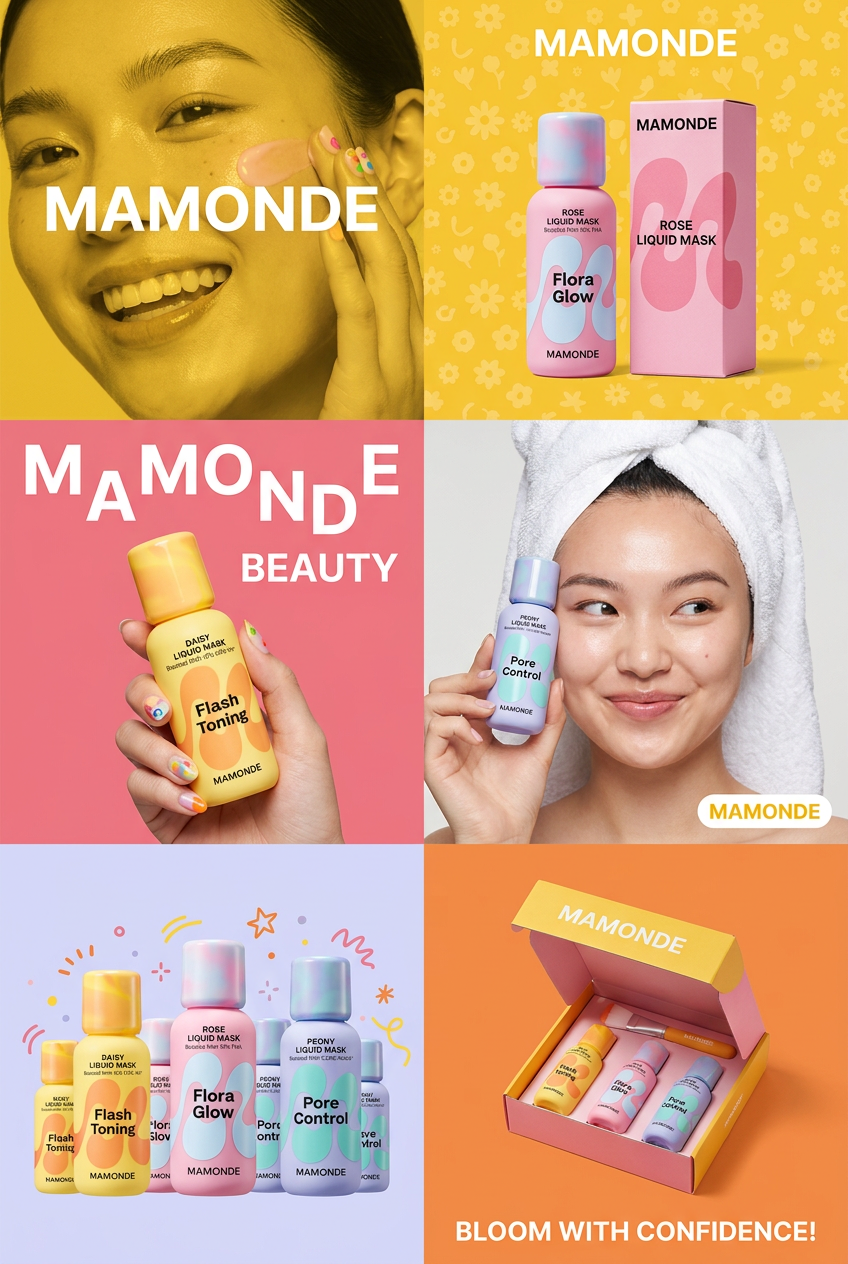
Get that high-end editorial look with a stacked, multi-panel campaign layout. It slices your brand visuals into a bold three-tier grid, pairing tight product close-ups right next to lifestyle shots for a cohesive, modern beauty poster.
Regenerate using your own assets.
