If you’ve tried to create a sequence of images with AI, you know the pain. You get the perfect character in frame one. You tweak the prompt for frame two—'now she turns her head'—and suddenly she has different hair, clothes, and is in a completely new room. The process devolves into a frustrating cycle of re-rolls, hoping for a lucky match. Creating a ten, twenty, or fifty-frame storyboard felt impossible. Until this week.
On June 25, 2026, news of hyper-efficient models like Un-0 revealed a 1000x improvement in generation speed and cost. This isn’t just a technical benchmark; it’s a development that fundamentally changes what’s possible. The bottleneck of slow, expensive, one-by-one generation is gone. Mass production of sequential art is now a practical reality.
The old way is dead: why AI storyboards were a frustrating fantasy
The core problem with sequential AI art has always been consistency. Trying to generate a series of images manually is like playing a slot machine. You might get lucky once or twice, but the odds of getting 50 consistent results in a row are astronomical. Every new generation was a fresh start, disconnected from the last.
This forced creators into a low-volume, high-effort workflow that was unsuitable for professional pre-visualization, comic strips, or animatics. The industry has been trying to solve this with bolt-on features—just this week, Midjourney released a new '--lref' parameter for lighting consistency. While helpful, these are patches on an old process. The real solution isn't a new parameter; it's an entirely new production model.
From one-by-one to assembly line: the new logic of sequential generation
The breakthrough in model efficiency allows us to move from an artisanal, one-at-a-time approach to an industrial, assembly-line model. The creative input is no longer a single, perfect prompt. It's a 'shot list'—a script that outlines every frame in the sequence. You provide the complete creative direction upfront, and the AI handles the manufacturing.
This is where a workflow platform becomes essential. Hyper-efficient models are the engine, but a system like MyUP.ai is the factory floor that organizes the production. Instead of you manually feeding prompts one by one, MyUP ingests your entire shot list and automates the generation of every single frame in one unattended run. The human creator validates the output, but MyUP executes the repetitive labor.
Step 1: Write your shot list and lock in consistency with a Brandkit
Your shot list is the blueprint for your storyboard. Each line is a prompt for a specific frame. The key is to establish consistent elements that carry through the entire sequence. Here’s a simple example for a three-shot scene:
- Frame 1: Wide shot. A woman named ELARA, with short silver hair and a red leather jacket, stands in the middle of a neon-lit, rain-slicked alley at night. Cyberpunk aesthetic.
- Frame 2: Medium shot. ELARA, silver hair, red leather jacket, looks down at a glowing data-pad she holds in her hands. Neon alley background.
- Frame 3: Close-up shot. ELARA's face, she looks up from the data-pad with a surprised expression. Her face is illuminated by the screen's blue light.
Notice the repetition of key descriptors ('ELARA', 'silver hair', 'red leather jacket', 'neon alley'). This is crucial for consistency. But what about the overall style, color palette, and mood? Adding 'cinematic, high-contrast, detailed, 8k' to every prompt is inefficient. This is what a MyUP Brandkit is for. You define your visual identity—colors, style descriptors, even negative prompts—once. MyUP then automatically applies that Brandkit to every generation in your workflow, ensuring a consistent aesthetic across all 50 frames without you ever having to repeat yourself. You lock in the style, then focus your prompts purely on the action.
To see how powerfully a pre-defined style can shape an image, try this template that generates a high-fashion aesthetic from a simple subject.
Workflow code: #myup-yk1h-uqy8
High-End Editorial Fashion Magazine Cover

Drop in any portrait and turn it into a high-end editorial magazine cover. It frames your subject beautifully with relaxed, high-fashion posing and soft styling for a polished print aesthetic.
Regenerate using your own assets.
Step 2: Automate the entire sequence with a MyUP workflow
With your shot list written and your Brandkit activated, you can now build the assembly line. In MyUP, you can configure a workflow to read each line from your shot list and run an image generation for it sequentially. You load the script, press 'run', and the platform gets to work, creating frame after frame until the entire storyboard is complete. This is the power of the new workflow: you can generate an entire Instagram carousel or a full storyboard with the same effort it used to take to generate a single image.
This process separates creative direction from production. Your expertise is in crafting the narrative through the shot list. MyUP's job is to execute that vision without deviation, frame after frame. You are the director; the AI is your tireless production crew.
This template, for example, is built to produce a specific cinematic mood. A MyUP workflow can apply this same level of stylistic control across your entire shot list automatically.
Workflow code: #myup-4mva-7iki
Cinematic Space Product Campaign
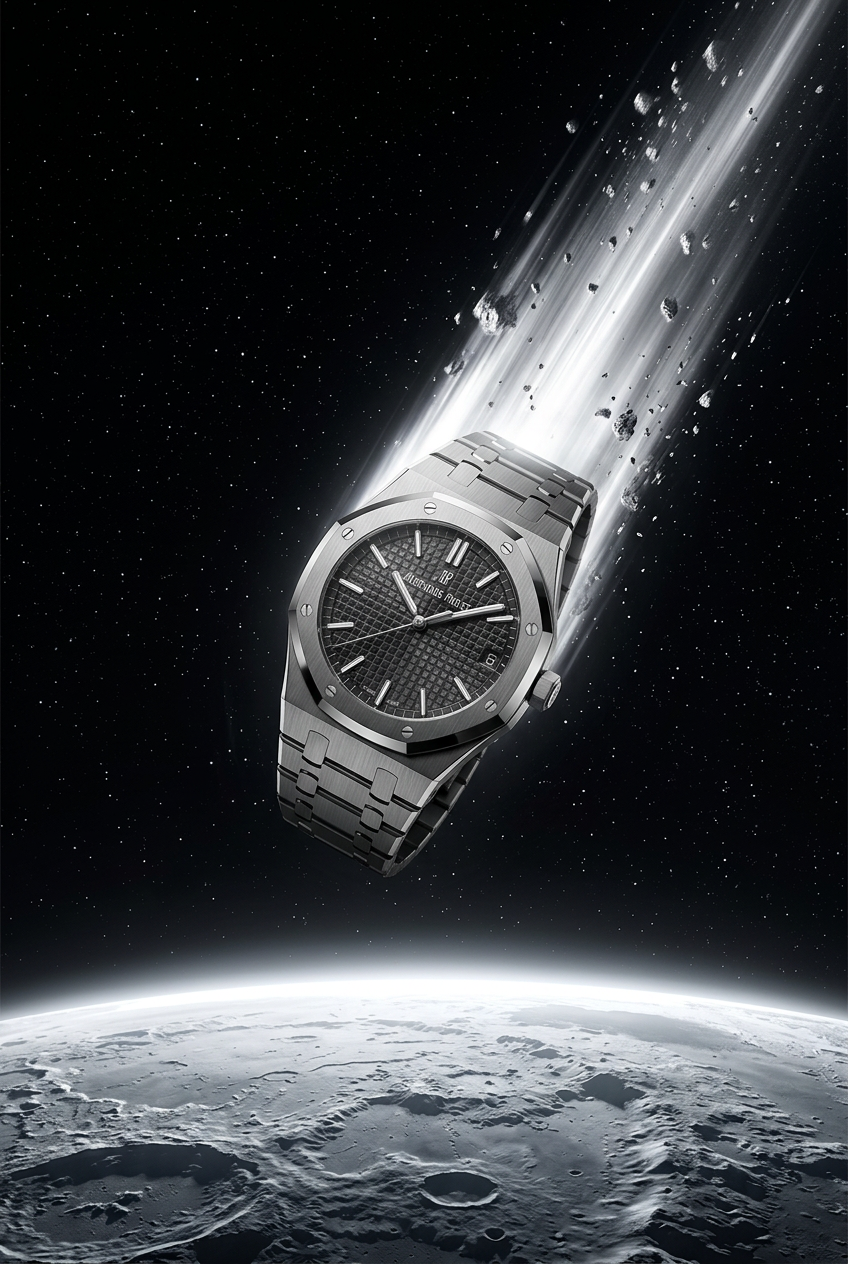
Drop your product into a dramatic, cosmic scene. It creates an epic set of images starting with a dynamic space launch framed by a blazing meteor, followed by a low-angle hero shot and an extreme macro of the surface textures catching the high-contrast light.
Regenerate using your own assets.
Pro-tip: Controlling composition for specific shots
A good storyboard uses a variety of shots to create rhythm and focus attention. Your shot list is the place to define this. Use standard filmmaking language directly in your prompts to control the camera:
- Establishing Shot / Wide Shot: Shows the environment and the character's place within it.
- Medium Shot: Frames the character from the waist up, good for showing action and body language.
- Close-Up (CU): Focuses on the character's face to convey emotion.
- Extreme Close-Up (ECU): Isolates a single detail, like the eyes or an object.
By including these terms in your shot list prompts ('Frame 4: Close-up on the strange alien device...'), you can direct the composition for each frame precisely. This level of control is essential whether you're building a storyboard or laying out panels for an AI comic strip.
For instance, if a key moment requires a dramatic close-up on a product or character, you can use a workflow designed for that specific framing.
Workflow code: #myup-xjsb-hirr
Bold Portrait Food Advertising Photo

Get those high-impact, tight action shots of people actually enjoying your food brand. It drops your product right into a messy, realistic close-up bite shot that feels like a premium lifestyle campaign instead of a boring studio packshot.
Regenerate using your own assets.
Next step: Turn your storyboard into an AI animatic
The sequence of still images you generate in MyUP is more than just a planning document. It's the raw material for the next wave of AI creation: the AI animatic. A trend emerging on social media this past week (June 27, 2026) involves creators feeding sequences of consistent still images into video generation tools. By adding simple motion prompts like 'slow pan right' or 'zoom in slightly', they can transform a storyboard into a pre-visualized animated scene.
This provides a fast, low-cost way to test the timing, pacing, and feel of a video before committing to full production. The MyUP sequential generation workflow is the critical first step in this process. It solves the hardest part—producing a high volume of consistent keyframes. With that done, you're ready to bring your story to life.
