If you’ve been on social media in late June 2026, you’ve seen them: charming, tactile, slightly quirky videos of clay-like characters and objects moving with a stop-motion cadence. The release of new tools like Luma Labs’ Dream Machine has made this aesthetic accessible to everyone, and creators are producing incredible work. But if you've tried to create one for your brand, you’ve likely run into the style’s one massive technical problem: a flickering, inconsistent mess.
Your character’s face changes from one frame to the next. The background subtly warps. The lighting shifts for no reason. Instead of charming stop-motion, you get a wobbly, unusable clip. You are not alone, and it’s not a failing of your prompt skills. It’s a fundamental mismatch between the creative goal and the tool’s approach. This guide provides the professional workflow to fix it.
Why single-prompt video tools struggle with stop motion
Most text-to-video AI models, from Runway to Adobe, are designed for one-shot generation. You give them a prompt, and they generate an entire video clip, interpreting the motion and filling in the frames as they see fit. For generating a fluid, cinematic scene, this is powerful. But for stop motion, that AI creativity becomes a bug, not a feature.
True stop motion is built from a sequence of deliberate, individual still photographs. The consistency from one frame to the next is what creates the illusion of movement. When a one-shot AI model generates a video, it re-interprets the scene for every frame, introducing tiny, random variations that result in flicker and wobble. It lacks the frame-by-frame control required for this specific aesthetic.
The solution isn’t a better prompt. It’s a better process. At MyUP, our view is that creative control in AI comes from building workflows, not just writing prompts. By breaking the problem down—generating a sequence of perfectly consistent still images first, then compiling them—you get the control and quality that single-prompt tools can't provide.
The workflow: how to generate consistent frames first on MyUP.ai
Instead of asking an AI to create a finished video, you can use a MyUP workflow to replicate the methodical process of traditional stop motion. The AI handles the repetitive production, but you control the creative direction at each step. Here’s how it works.
Step 1: Define your base frame
Everything starts with a single, high-quality image. This is the anchor for your entire animation. Write a detailed prompt that describes your subject, the environment, the lighting, and the composition. Your goal is to get one perfect still image that captures the exact aesthetic you want.
Step 2: Lock in your brand style with a Brandkit
Before you generate variations, lock in your visual identity. A MyUP Brandkit—built once from your website URL—stores your brand's colors, fonts, and overall style. By applying your Brandkit, you ensure the base frame and every subsequent frame adhere to your specific visual guidelines. This is the difference between a random AI animation and a true brand asset.
Step 3: Loop generation with controlled variations
This is where the workflow automates the hard part. In MyUP, you can build a workflow that takes your initial prompt and loops it to generate a sequence of images. The key is to introduce a small, controlled change in the prompt for each loop. For example:
- Frame 1 Prompt:Claymation figurine of a coffee cup on a wooden table, steam is low.
- Frame 2 Prompt:Claymation figurine of a coffee cup on a wooden table, steam is rising slightly.
- Frame 3 Prompt:Claymation figurine of a coffee cup on a wooden table, steam is rising higher.
The workflow executes this loop automatically, producing a numbered sequence of images where only one specific element changes, just like in manual animation.
Step 4: Compile the image sequence into a video
The final step in the workflow takes your approved image sequence and stitches it together into a video file. You can define the frame rate (frames per second) to control the speed and smoothness of the final animation. MyUP handles the assembly, delivering a clean, flicker-free stop-motion video ready for use.
Case study: creating an on-brand product animation
Let's apply this to a common business need: a short, eye-catching video for a social media ad. Imagine you're marketing a new brand of craft soda. You want a playful, retro vibe to stop the scroll.
First, you need to establish the visual style for your base frame. Instead of prompting from scratch, you can use a pre-built MyUP workflow as a starting point. This saves time and provides a proven foundation for your aesthetic. For a vibrant, vintage feel, a template designed for food advertising is ideal.
Workflow code: #myup-1hgd-9oz5
Retro Style Food Advertising Poster

Turn any food product shot into a bold, nostalgic retro advertisement. It drops your item onto a warm cream background and automatically frames it with a color-matched header badge for that classic mid-century print ad look.
Regenerate using your own assets.
You would run the 'Retro Style Food Advertising Poster' workflow, customizing the prompt for your soda can. Once you have a base frame you love—one that's perfectly on-brand thanks to your Brandkit—you can build the animation workflow. You might create a 12-frame loop where tiny animated bubbles rise up the side of the can, simply by adding 'tiny bubbles rising' to the prompt with slight variations for each frame. The result is a professional, engaging product ad that feels unique, not generic. This approach is perfect for creating diverse, on-brand product scenes that maintain visual consistency.
Fine-tuning your animation: controlling speed and style
The workflow approach gives you granular control over the final output. One of the most important variables is the frame rate. By changing the number of frames generated for a specific action, you control the animation's speed:
- 12 FPS: A lower frame rate creates a classic, slightly jerky stop-motion feel, perfect for a handmade aesthetic.
- 24 FPS: A higher frame rate results in smoother, more fluid motion, which can feel more modern and polished.
This same workflow is incredibly versatile. The logic of 'base frame -> loop variations -> compile' works for any visual style. While the soda ad was playful and retro, you could just as easily create a sophisticated animation for a high-end brand. The key is to start with a base frame that communicates the right tone. For an elegant product reveal, you'd start with a completely different stylistic foundation.
Workflow code: #myup-40pt-v0sm
Luxury Jewelry Editorial Campaign
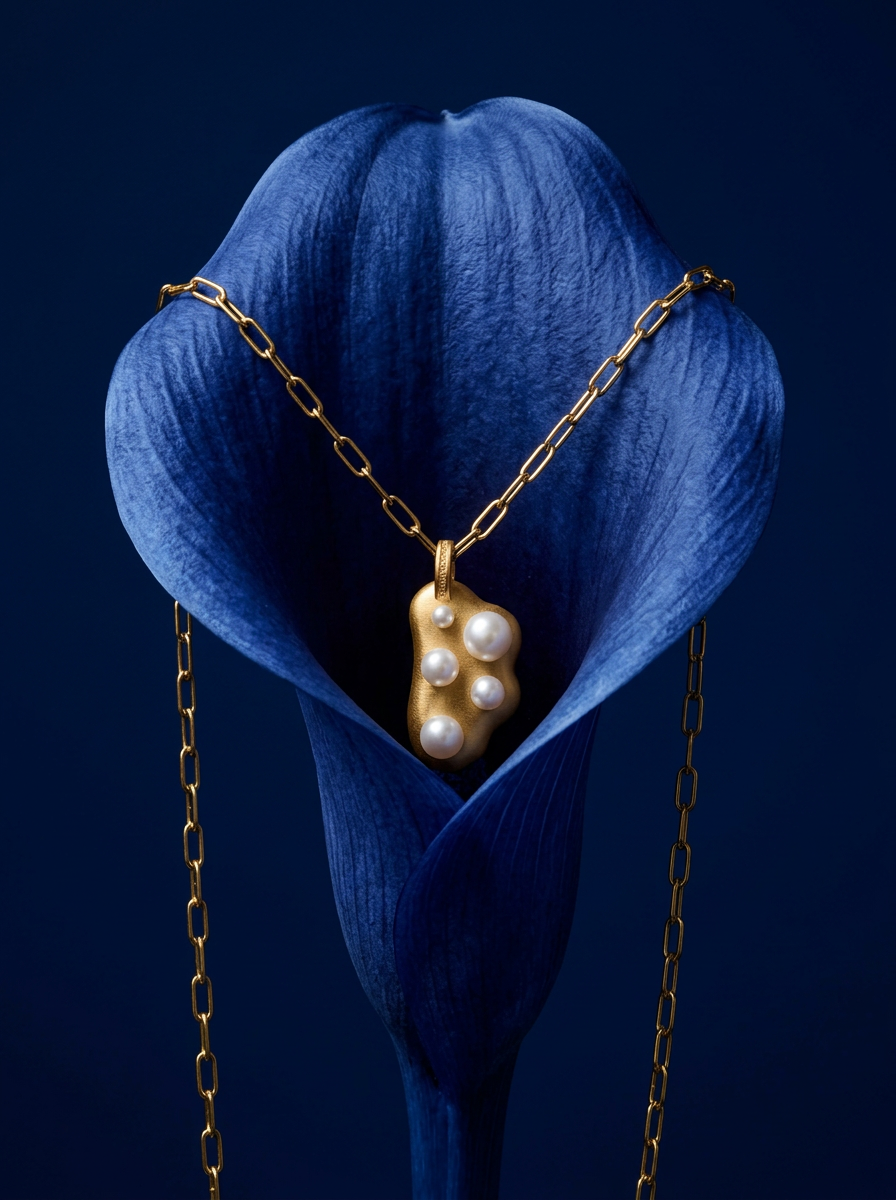
Drop your product into a moody, deep navy studio environment. It wraps your item in a seamless royal blue backdrop with high-contrast lighting and clean organic props, giving everything a premium, high-end editorial look.
Regenerate using your own assets.
Using the 'Luxury Jewelry Editorial Campaign' workflow as a starting point for a brand like a watchmaker or perfumery ensures your animation begins with a sense of prestige. From there, you could animate a subtle glint of light across a watch face or the slow unfurling of a ribbon on a gift box. This level of control is essential for creating on-brand AI video ads that truly reflect your brand's position in the market.
The right tool for a scalable video strategy
The viral stop-motion trend is a perfect example of a common challenge in AI content creation. A tool like Luma or a feature in Adobe Photoshop can produce a single, impressive *effect*. But for brands, marketers, and agencies, the goal isn't just one effect—it's a scalable *system* for producing on-brand content consistently.
A workflow in MyUP is that system. Once you build your stop-motion workflow, you can reuse it endlessly. Swap out the product, change the background, adjust the action—the core process remains the same. This allows you to create an entire campaign of cohesive, charming animations for different products or promotions without starting from zero each time.
If you're tired of fighting with AI to get the consistent results you need, stop focusing on the single prompt. Start building a workflow. It's the definitive path to gaining creative control and turning a viral trend into a repeatable part of your content strategy.
