
You need visuals. A lot of them. For ads, for social, for your website. The traditional options are a bottleneck. A professional photoshoot costs thousands and takes weeks. Stock photography is generic, and your product is never in the shot. So you turn to AI, but the results are a lottery—one good image, ten that are off-brand, and zero consistency between them. The lighting is wrong, the mood is off, and nothing looks like it belongs to your brand.
The market is catching on. The recent launch of single-purpose tools like Stylar AI on June 29, 2026, proves that the new challenge isn't just generating an image; it's generating hundreds of *consistent* images. But adding another isolated tool to your stack isn't the answer. The solution is a complete workflow that bakes your brand identity into the production process from the start. This isn't about creating one fake photo. It's about building an infinitely variable, on-brand visual world for your product to live in, without the cost and chaos of physical shoots.
This guide lays out that exact workflow, step-by-step, inside MyUP.ai.
The foundation: preparing your single source-of-truth product photo
Every great campaign starts with a great core asset. Before you generate anything, you need one high-quality photograph of your product. This is your 'source of truth' that the AI will place into countless new scenes. Get this part right, and everything that follows becomes easier and more realistic.
Your source photo must be:
- High-resolution: The more detail the AI has to work with, the better the final output.
- Well-lit and in focus: No motion blur, no strange shadows. Just a clean, sharp image of the product itself.
- On a transparent background: Save it as a PNG file. This is non-negotiable. A transparent background allows the AI to seamlessly composite your product into new environments without messy edges or halos.
Think of this as the digital master of your product. Once you have it, you're ready to build its world.
Step 1: Define your visual world with a MyUP Brandkit
This is where you solve the consistency problem for good. Random AI generations feel random because the AI has no context for your brand's aesthetic. A MyUP Brandkit is where you give it that context. It's more than just uploading a logo and color hex codes. A Brandkit in MyUP acts as a set of creative direction instructions that are automatically applied to your workflows.
Instead of typing 'soft morning light, moody, minimalist' into every single prompt, you define your visual identity once. Your Brandkit can include:
- Core Styles: Keywords that describe your photography style (e.g., 'cinematic, high-contrast, dramatic shadows', or 'bright, airy, natural light, shallow depth of field').
- Brand Colors and Fonts: For ensuring any text or graphic overlays are always on-brand.
- Logo Assets: Ready to be applied where needed.
By creating your Brandkit first, you ensure that every image generated—whether it's a clean studio shot or a complex lifestyle scene—feels like it was art-directed by the same person. It’s the system that guarantees consistency at scale.
Step 2: Generate diverse scenes from one product image
With your source photo uploaded and your Brandkit active in MyUP, you can now start the production process. The goal is to create a variety of shots that serve different marketing purposes. We'll break this down into two key categories: clean studio shots for your e-commerce store and rich editorial shots for social media and advertising.
For clean, professional shots: the studio workflow
Every product needs classic, professional shots for product pages, catalogs, and marketplaces. These are typically images of the product on a simple, elegant background, with perfect lighting that highlights its features. Manually setting up these shots for every product is tedious. With MyUP, you can automate it.
Using your product's source image, you can run a workflow that places it in various studio settings—on a marble slab, a wooden block, or a simple gradient background—all while adhering to the lighting and mood defined in your Brandkit. This allows you to generate dozens of high-quality catalog images in minutes, not days.
To execute this immediately, use the template below. It’s pre-configured to create clean, luxury studio environments for any product.
Workflow code: #myup-xjaq-qhgx
Luxury Product Photography Studio
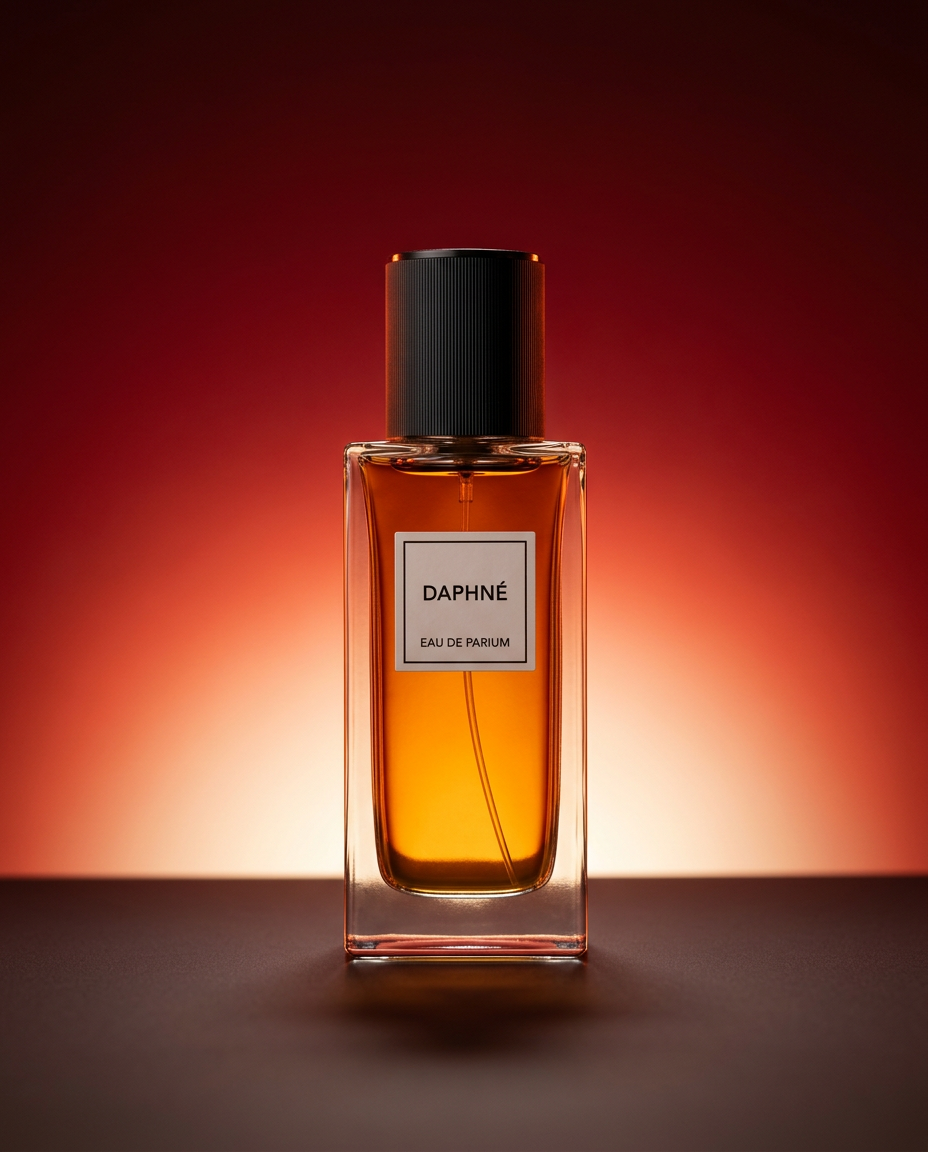
Drop your product into a dramatic, high-end studio setup. It places your item on a sleek flat surface against a rich crimson and orange cinematic gradient background. It's an easy way to get that moody, premium commercial look for any bottle, tech, or cosmetic.
Regenerate using your own assets.
For rich, contextual shots: the editorial workflow
Studio shots sell the product, but editorial and lifestyle shots sell the story. These are the images that stop the scroll on Instagram and create an emotional connection in an ad. They show your product in a real-world or aspirational context, helping customers imagine it in their own lives.
This is where the 'one-to-many' workflow truly shines. Take your single product PNG and use a MyUP workflow to place it in countless lifestyle scenes. A bottle of lotion on a spa-like background with orchids. A watch on a rugged, rocky cliffside. A coffee bag next to a steaming mug on a cozy kitchen counter. Your Brandkit ensures the aesthetic remains consistent across every single variation.
This template is designed to create elegant, floral-themed editorial shots, perfect for beauty, wellness, or luxury brands.
Workflow code: #myup-5q78-bln0
Luxury Floral Product Editorial
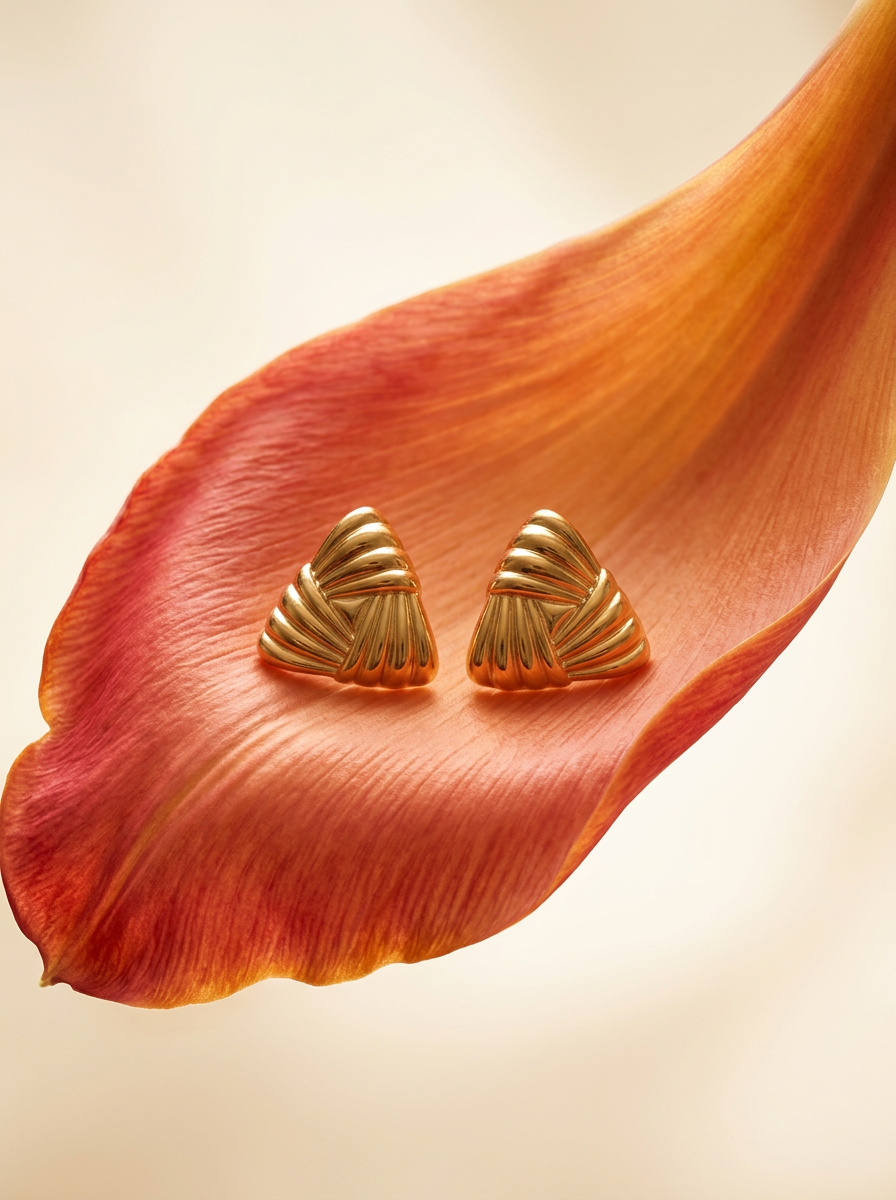
Place any product in an ultra-minimalist, warm studio space. It wraps your item in a seamless cream and beige backdrop with a super soft bokeh that melts away, making the details pop. It’s perfect for giving goods a clean, high-end look.
Regenerate using your own assets.
Step 3: Scale your visuals for a full marketing campaign
An effective marketing campaign requires a high volume of visual assets tailored to different channels and audiences. With the MyUP workflow, you're no longer limited to the 10-15 final shots from a physical photoshoot. You have a system for infinite production.
Need to A/B test ad creatives? Generate five different backgrounds for your product and see which one performs best. Need content for different social platforms? Create square crops for your Instagram feed, vertical 9:16 shots for Reels and Stories, and 16:9 lifestyle images for your blog. This is exactly how you can use one photo to power an entire ad campaign.
The recent viral trend of hyper-realistic AI food photography shows just how high the demand is for niche, high-quality commercial images. Instead of hiring a food stylist and photographer, restaurants and CPG brands can generate entire menus' worth of mouth-watering shots. This workflow for bold food advertising is a perfect example.
Workflow code: #myup-xjsb-hirr
Bold Portrait Food Advertising Photo

Get those high-impact, tight action shots of people actually enjoying your food brand. It drops your product right into a messy, realistic close-up bite shot that feels like a premium lifestyle campaign instead of a boring studio packshot.
Regenerate using your own assets.
You're the creative director, MyUP is your studio
This workflow doesn't remove you from the creative process; it elevates your role. Your job is to set the vision—to define the brand's aesthetic in the Brandkit and to curate the best outputs from the AI. You are the creative director.
MyUP is your production studio, handling the repetitive, time-consuming work of setting up scenes, adjusting lights, and shooting hundreds of variations. It executes your vision at a scale that was previously impossible. You guide and validate; MyUP handles the production. That's how you move beyond generating single images and start building a scalable, on-brand visual engine for your business.
