If you've spent any time on Reddit or creative communities in the last week, you’ve seen the same question everywhere: “Is there an AI alternative for kinetic typography yet? My After Effects subscription is killing me.” This isn’t a random complaint. With new tools like TypoGrapher AI launching just yesterday, August 12, 2026, and Pika Labs teasing its own text animation features, the demand for accessible motion graphics is boiling over. Everyone wants their words to move beautifully, but nobody wants to spend a week learning keyframes to do it.
The problem is, jumping from a complex professional tool to a simple AI generator often means sacrificing brand identity. This guide breaks down a practical AI process on MyUP.ai that gives you the best of both worlds: stunning animated text, no complex software, and—most importantly—your brand's actual look and feel.
The problem with generic AI text animators: they don't know your brand
The new wave of AI text animators is exciting. They promise to turn a line of text into a dynamic video with a single click. But they have a critical flaw: they don't know your brand. They offer a pre-approved list of fonts and a standard color picker, forcing your content to look like everyone else's.
For any serious marketer or creator, this is a deal-breaker. Your typography isn't just text; it's a core part of your visual identity. Using a generic sans-serif font when your brand is built on a custom serif is a compromise that dilutes your message and cheapens your look. You end up spending more time trying to approximate your style guide than you save by using the tool. Good motion graphics are about brand expression, not just movement. The AI you use should start with your brand identity, not force you to work around its limitations.
The 3-step process for on-brand kinetic typography in MyUP
Instead of a single-task tool, MyUP.ai uses a brand-aware system. It’s built around a central Brandkit where your unique visual identity lives. Once it's set up, every piece of content you create—from images to videos—is automatically on-brand. Here’s how to apply that to kinetic typography.
1. Build your Brandkit with custom fonts
This is the one-time setup that solves the brand consistency problem for good. In MyUP, you create a Brandkit by uploading your brand’s specific font files (like .TTF or .OTF), defining your exact color palette with hex codes, and adding your logo. This Brandkit becomes the foundation for all your AI creations.
2. Generate your background or scene
Your text needs a stage. You can start with a blank canvas in your brand colors, upload an existing video or image, or use MyUP’s AI image generator to create a custom background from a prompt. This gives you a visually rich base to layer your animated text onto.
3. Add and animate your text
In the MyUP video editor, simply add your text. Because your Brandkit is active, it automatically appears in your brand's font and colors. From there, you can select from a library of animation styles—fades, slides, pops—and adjust the timing. The system handles the technical production; you just validate the creative choices. The result is a custom piece of motion graphics that is unmistakably yours.
Use case 1: A high-end animated product ad
Imagine you need a short, slick video for a luxury product to post on Instagram. You want it to feel premium and cinematic, not like a cheap template. In MyUP, you can start with a template designed for this exact purpose, which generates a moody, atmospheric product shot. Then, you can layer elegant, subtly animated text over the top to call out the product name or a key feature. Because your Brandkit is applied, the font will match the high-end aesthetic of your brand perfectly.
To get a head start, this template creates the perfect cinematic base for a premium product reveal.
Workflow code: #myup-mvtk-dmtt
Luxury Perfume Brand Commercial Video
Capture a cinematic glow that makes any subject look like a brand icon. This process blends a sharp, low-angle still with a fluid motion sequence to turn your product into the star of a golden hour commercial.
Regenerate using your own assets.
Use case 2: A bold social media announcement
Kinetic typography is perfect for grabbing attention for an event, a sale, or a launch. You need something fast, bold, and impossible to ignore in a crowded feed. Instead of starting from scratch, you can use a graphic design template in MyUP to create a striking background. A retro poster with a bold color palette, for example, can serve as a static frame. From there, you can animate your event details over the top, creating a dynamic video post from a static design in just a few clicks.
This template is a great visual starting point for an announcement. Just add your text and choose an animation style.
Workflow code: #myup-xbur-hzoi
Bold Retro Yellow Event Poster

Turn your branding or event details into bold, nostalgic posters. It blends vibrant warm backdrops with a clean, retro square grid pattern to make any announcement look like a classic piece of mid-century graphic design.
Regenerate using your own assets.
Use case 3: Creating a simple AI lyric video
The request for an “AI lyric video generator” is one of the most common seen on Reddit. While perfect audio-sync is still the domain of complex tools, you can create stylish, effective lyric videos with AI right now. The key is a clean, visually interesting background that doesn’t distract from the words. In MyUP, you can generate a minimalist background, set it as your scene, and then add text blocks for each lyric. By timing their appearance in the video editor, you can create a compelling visual narrative for a song. For a deeper dive on combining AI visuals with audio, our guide on the workflow for lyric videos offers more advanced techniques.
This template creates a clean, hand-lettered aesthetic that serves as a beautiful backdrop for lyrics.
Workflow code: #myup-6hp6-zwh2
Minimalist Hand-Lettered Food Brand Poster
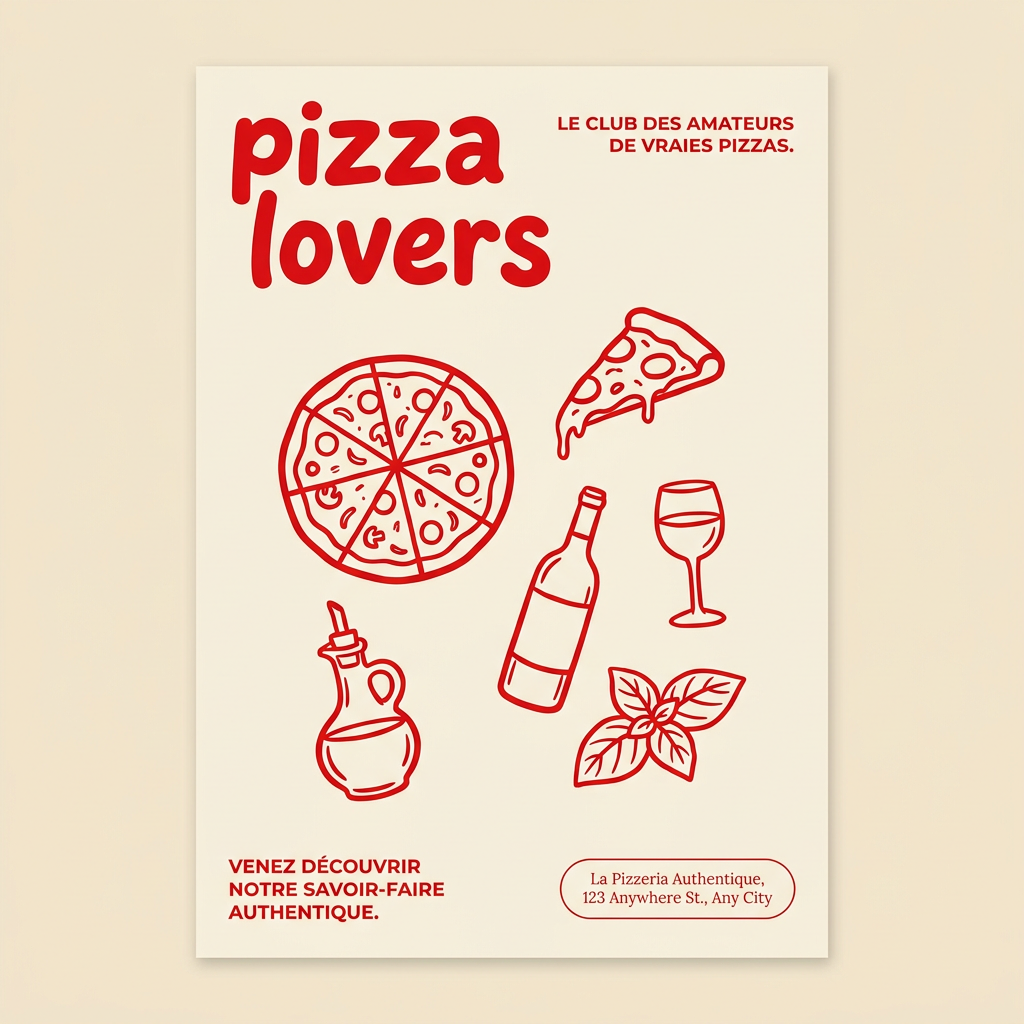
Generate clean, minimal posters for your food brand or cafe. It sets up a soft cream background with tons of breathing room, contrasted by a bold, chunky handwritten title in vivid red. It's a gorgeous editorial layout that makes your brand look instantly high-end.
Regenerate using your own assets.
You don't need another tool, you need a brand-aware system
The explosion of single-purpose AI tools is both a blessing and a curse. While they make individual tasks easier, they also create a fragmented, inconsistent brand presence. You end up with one style for your social graphics, another for your videos, and a third for your blog images. The real solution isn't finding a better text animator; it's adopting a system where your brand identity is the starting point for everything.
By building your Brandkit once in MyUP.ai, you ensure every asset, from a static image to a full piece of AI motion graphics, is cohesive. You spend your time on the message and the creative idea, not on manually tweaking hex codes and font settings to stay on-brand. That's not just a faster way to work—it's a smarter one.
