The motion graphics toolbox just exploded. So did the complexity.
If you're a creator or marketer, the last few days in August 2026 have been a whirlwind. Runway just dropped Motion Brush Pro, giving creators incredible control over animating specific parts of an image. On the same day, a new tool called Glyph AI launched, dedicated entirely to generating kinetic typography from a prompt. The potential is obvious: professional-looking motion graphics without touching After Effects.
But after the initial excitement, the production reality sets in. These are powerful, single-purpose tools. Motion Brush animates a background. Glyph AI creates a text layer. Another tool might generate a logo sting. Suddenly, your 'no-code' workflow involves three different AI tools, a video editor for compositing, and a constant battle to maintain brand consistency with colors and fonts. The promise of speed is lost in a sea of exports and imports.
Why the 'Frankenstein' method of AI video is a dead end
Stitching together outputs from multiple AI tools is a frustrating, inefficient process. We call it the 'Frankenstein' method, and it's a creative dead end for any team that values speed and brand integrity.
Here’s the real cost of that fragmented approach:
- Time Sink: Every tool has its own interface and export settings. The time you save on keyframes is spent on app-switching, file management, and trying to align layers in a video editor.
- Brand Dilution: How do you ensure the animated text from Glyph AI uses your exact brand font and hex codes? How do you make sure the background from Runway matches your campaign's color palette? You can't, not reliably. Brand consistency becomes a matter of guesswork.
- No Repeatability: A successful motion graphic isn't a one-off asset. It's a format you need to reuse for new products, announcements, and social posts. The Frankenstein method is impossible to scale; you have to manually rebuild the entire sequence every single time.
The future of AI motion graphics isn't about finding the single best tool for each layer; it's about having one integrated workflow that understands your brand from the start. That’s the core philosophy behind MyUP.
The one-platform workflow: building a motion graphic in three layers
Instead of wrestling with multiple tools, MyUP treats a motion graphic as a single, cohesive project built in controllable layers. The entire process happens in one place, governed by your brand's unique visual identity stored in your MyUP Brandkit.
A complete, 10-second motion graphic sequence breaks down into three simple, automated layers:
- The Background: A dynamic, AI-generated video that sets the mood and aligns with your brand's style.
- The Text: Crisp, kinetic typography that uses your actual brand fonts and colors.
- The Brand Assets: A clean logo reveal or product shot that completes the sequence.
Let's walk through how to build each layer in a single, repeatable workflow.
Layer 1: Generate a dynamic background that matches your brand
The foundation of any motion graphic is the background. You don't want a generic stock video or a random AI-generated clip. You need something that feels like it belongs to your brand. This is where your MyUP Brandkit comes in. By analyzing your website, MyUP already knows your color palette, visual style, and overall aesthetic.
When you start a workflow, you can prompt for a background like 'subtle, abstract liquid motion in brand colors' or 'a slow zoom through a minimalist architectural space'. MyUP uses the information in your Brandkit to guide the video generation, ensuring the output is not just visually interesting, but also thematically and chromatically aligned with your brand. This simple step replaces the entire process of generating a video in a separate tool and hoping the colors match.
This workflow for creating a vibrant product poster is a perfect starting point. It analyzes a product image to create a perfectly matched, dynamic background.
Workflow code: #myup-zpby-tzie
Minimal Vibrant Product Advertising Poster

Drop in any product shot and watch it turn into a bold, high-energy square ad. It automatically reads your packaging to pull out the dominant colors and text, then builds a vibrant poster styled perfectly around your brand.
Regenerate using your own assets.
Workflow code: #myup-gxue-opd0
Product Post

Turn a single product shot into a cohesive six-part Instagram story campaign. It mixes tactile crumpled paper textures with bold, stacked typography and custom mascot spots in your brand's signature colors.
Regenerate using your own assets.
Layer 2: Add kinetic typography that actually uses your font
Getting clean, on-brand animated text is the hardest part of the fragmented workflow. General video models mangle text, and specialized tools like Glyph AI don't have access to your specific brand fonts. The result is often a compromise: a cool animation using the wrong typeface.
In a MyUP workflow, this problem is solved before you even start. The workflow pulls your primary and secondary fonts directly from your Brandkit. When you add a text layer, you're not just describing the animation; you're applying it to your actual brand typography. The system handles the compositing, ensuring the text is sharp, legible, and perfectly placed over your animated background. You get the control of a motion designer without needing to manually set a single keyframe. For a deeper dive on this, see our breakdown of the hybrid workflow for AI animated text.
See how this ad workflow layers crisp, on-brand text over a generated background for a complete social media asset.
Workflow code: #myup-cqnu-i50m
Drink Product Ad
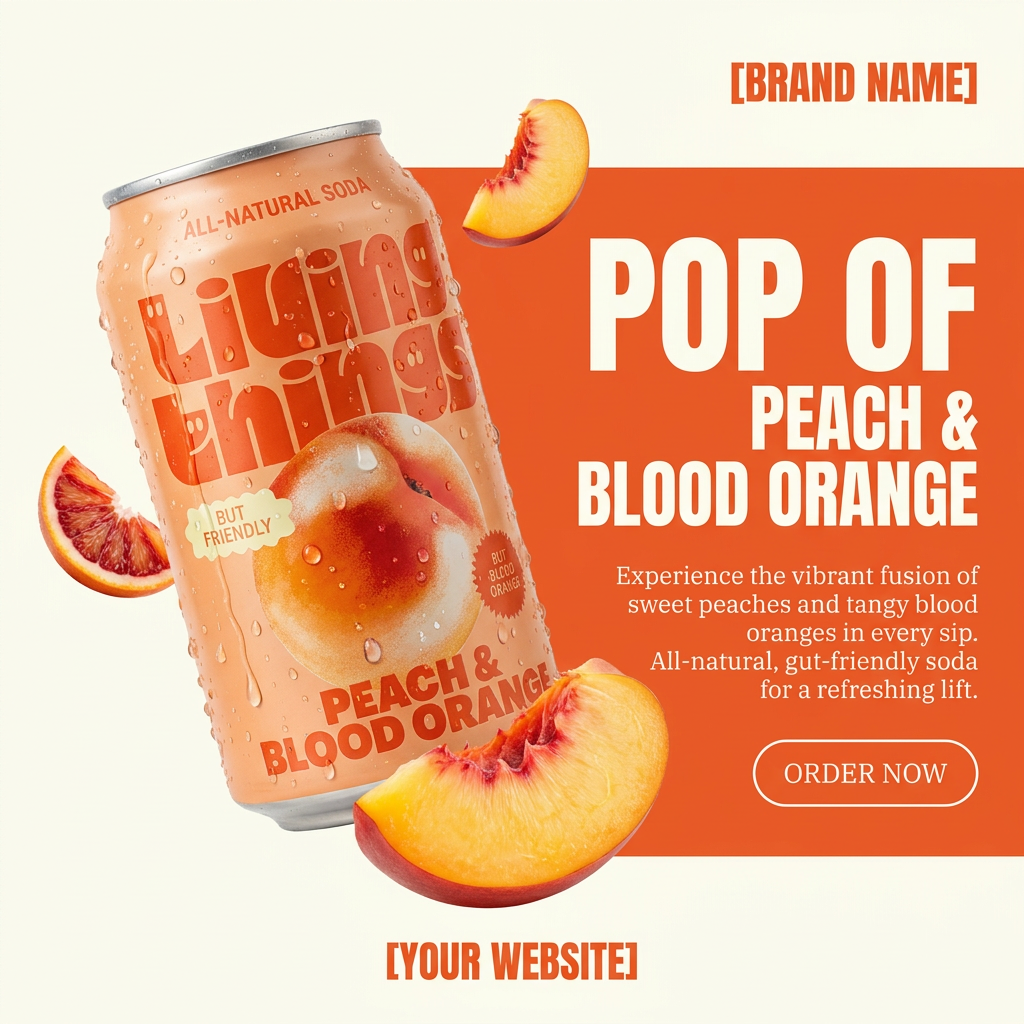
Turn any product photo into a bold, modern ad poster. It automatically frames your item against a split-color background, pairing a clean cream tone with a solid block of your product's dominant color. Super clean, minimal, and ready for social feeds.
Regenerate using your own assets.
Layer 3: Finish with a clean, on-brand logo reveal
The final layer is the payoff: your logo or product. A MyUP workflow automatically pulls your logo from the Brandkit and composites it into the final scene. You can define simple animations like 'fade in', 'slide up', or even prompt for more complex effects. The recent viral trend of 'liquid logo animations', for example, can be easily replicated by instructing the workflow to animate your logo with a fluid motion style.
This final step is crucial. It turns a cool animation into a valuable brand asset. And because it's part of an integrated workflow, it's perfectly timed and placed, providing a professional finish that's nearly impossible to achieve by manually dropping a PNG file into a video editor.
This workflow for a food brand poster shows a complete, multi-layered composition, from background to text to the final branded elements.
Workflow code: #myup-tbky-nciq
Food Brand Poster

Instantly turn any food or drink product packaging into a bold, vibrant retro poster. The system automatically reads your bottle or box to grab its exact colors and ingredients, then crafts a perfectly coordinated vintage background around it.
Regenerate using your own assets.
You're the creative director, MyUP is the production house
The arrival of powerful new AI animation tools is exciting, but true creative control isn't about having more buttons to press. It's about having a reliable system that executes your brand vision perfectly, every time. A fragmented, multi-app process puts the burden of integration and brand consistency on you. An integrated workflow on MyUP does the opposite.
You make the strategic decisions: the message, the visual concept, the call to action. You validate the output and make adjustments. MyUP handles the production—generating the layers, compositing the elements, and ensuring every pixel adheres to your Brandkit. This isn't about replacing creative judgment; it's about automating the tedious production work so you can focus on the ideas.
