
That AI-generated burger looks like a plastic toy. The cheese has a strange, uniform gloss, the bun lacks any crumb or texture, and the whole image feels sterile. You’re not imagining it. Just yesterday, on June 25, 2026, Adobe announced a 'Texture Control' feature for Firefly, validating what every creator has experienced: getting realistic texture is the biggest failure point in AI image generation. The industry is finally admitting the problem. We’re here to give you the solution.
Forget one-off prompts and random luck. Creating mouth-watering AI food photography isn't about finding a single magic phrase. It’s about implementing a repeatable recipe—a workflow that combines the principles of great photography with the DNA of your brand. This is that workflow.
The diagnosis: Why your AI food photos fail
Before we build the workflow, let’s diagnose the symptoms. Most fake-looking AI food images suffer from four specific failures that instantly signal 'artificial' to the viewer's eye.
- The Plastic Gloss: AI models, trained on millions of stock photos, tend to over-apply a generic, high-sheen reflection to everything. This makes sauces look like paint and fresh vegetables look like they’ve been shrink-wrapped.
- Lifeless Texture: The model doesn't understand the difference between a crispy fry, a fluffy pastry, and a juicy piece of fruit. Without specific guidance, it defaults to a smooth, uniform surface that lacks the imperfections and details that signal 'delicious'.
- Generic Lighting: Your image is probably lit like a corporate headshot—flat, bright, and boring. Real food photography uses dramatic, specific lighting (like soft morning light or a warm golden hour glow) to create mood and appetite appeal.
- Off-Brand Styling: The plate is wrong, the background color clashes with your brand palette, and the overall vibe feels disconnected from your identity. A great photo that isn't *your* photo is a missed opportunity.
Fixing these issues isn't about longer prompts. It's about a smarter process. In MyUP, we solve this with a 4-step workflow designed for control, consistency, and brand alignment.
Step 1: Master the composition—lighting and camera angles
A great food photo starts with a great shot, not a great subject. Before you even think about the food itself, you need to direct the camera and lights like a professional photographer. Instead of just prompting for 'a photo of a burger,' you need to specify the photographic style.
Use descriptive, professional photography terms. Think about:
- Lighting: Is it 'soft window light', 'dramatic side lighting', 'bright, hard light with defined shadows', or 'warm golden hour light'?
- Camera Angle: Are you shooting from 'eye-level', a 'macro close-up', a 'top-down flatlay', or a 'low-angle hero shot'?
- Lens Effects: Do you want a 'shallow depth of field' with a 'blurry background (bokeh)' to make the subject pop?
In MyUP, you can build these photographic instructions into a reusable workflow. You establish the visual foundation first, ensuring every image has the professional quality of a studio shoot. The user validates the composition; MyUP handles the production. This template is pre-built with the perfect settings for a dramatic, high-impact hero shot.
Workflow code: #myup-xjsb-hirr
Bold Portrait Food Advertising Photo

Get those high-impact, tight action shots of people actually enjoying your food brand. It drops your product right into a messy, realistic close-up bite shot that feels like a premium lifestyle campaign instead of a boring studio packshot.
Regenerate using your own assets.
Step 2: Dial in the texture—from crispy to glossy
This is where we solve the 'plastic food' problem. You need to give the AI a vocabulary of textures. Be specific and sensory. Instead of just 'bread,' ask for 'fluffy brioche bun with a toasted crumb' or 'artisanal sourdough with a cracked, flour-dusted crust.' The more precise your language, the more realistic the result.
Your texture vocabulary:
- For fried foods: 'crispy golden-brown texture,' 'flaky batter,' 'uneven, bubbly surface.'
- For baked goods: 'delicate, flaky pastry layers,' 'chewy cookie texture,' 'moist cake crumb,' 'glossy icing drizzle.'
- For produce: 'dewy fresh strawberries with visible seeds,' 'juicy orange pulp,' 'crisp lettuce leaf with water droplets.'
- For grilled items: 'dark seared grill marks,' 'charred edges,' 'juicy, rendered fat.'
A single prompt can't always capture this perfectly, which is why a workflow is essential. In MyUP, you can generate a base image and then use iterative steps to refine specific details, ensuring every element feels authentic. This workflow for gourmet fries is engineered to get that perfect 'crispy golden-brown' texture right every time, in a format perfect for social stories.
Workflow code: #myup-fts6-4ihp
Vertical Gourmet French Fry Ad

Transform your products into high-fashion editorial ads. This setup uses a dynamic diagonal layout and a slightly tilted overhead angle to give food and packaging incredible depth and texture. It's perfect for giving any brand a chic, premium look.
Regenerate using your own assets.
Step 3: Add your secret ingredient—the MyUP Brandkit
A realistic photo is good. A realistic photo that looks like it belongs to your brand is great. This is the step where most AI tools fail and where MyUP’s workflow changes the game. A one-off prompt in Midjourney might produce a beautiful image, but it won't know to use your brand's specific shade of blue in the background or feature props that match your company's aesthetic.
This is what the MyUP Brandkit is for. Once you’ve set up your brand by simply entering your website URL, MyUP automatically knows your colors, fonts, and overall style. When you run your food photography workflow, you instruct it to use your Brandkit for:
- Backgrounds & Surfaces: Ensure the tabletop, wall color, or scene matches your brand palette.
- Props & Tableware: Style the shot with plates, napkins, and utensils that fit your brand's aesthetic (e.g., rustic and earthy vs. modern and minimalist).
- Typographic Overlays: If the image is for an ad or poster, your Brandkit ensures any text uses your specific brand fonts and colors automatically.
This is how you move from generating random images to producing a cohesive set of on-brand assets. Use this workflow to see how your Brandkit can instantly transform a generic food photo into a powerful brand poster.
Workflow code: #myup-tbky-nciq
Food Brand Poster

Instantly turn any food or drink product packaging into a bold, vibrant retro poster. The system automatically reads your bottle or box to grab its exact colors and ingredients, then crafts a perfectly coordinated vintage background around it.
Regenerate using your own assets.
Step 4: Plate and serve—iterate until it’s perfect
The goal of a professional workflow is not to get a perfect image on the first try. It's to create a system that lets you get to the perfect image quickly and repeatably. The final step is to act as the creative director. MyUP makes it easy to generate multiple variations of your image. Maybe you want to see the same shot with slightly different lighting, or with the main dish repositioned. Your workflow is set, so these adjustments are minor tweaks, not starting over from scratch.
This is the core of the MyUP philosophy: the human validates, the AI executes. You make the creative calls, approving the final shot that meets your standards. MyUP handles the heavy lifting of production, ensuring that every variation remains perfectly on-brand and stylistically consistent. You're no longer gambling on a prompt; you're directing a photoshoot.
From a single dish to a full campaign
This 4-step workflow isn't just for creating one beautiful photo. It's a scalable system for producing an entire campaign's worth of visual assets. Once you've perfected the recipe for your hero shot, you can easily adapt it to create variations for different platforms, promotions, and products. You can generate a dozen on-brand social posts in the time it would take to set up a single traditional photoshoot.
By combining professional composition, precise texture control, and the automated consistency of your Brandkit, you build a content engine—not just a collection of images. This approach extends beyond food, forming the foundation for all high-quality, realistic AI product photography. Start with a simple, elegant poster to see just how powerful a brand-aware workflow can be.
Workflow code: #myup-6hp6-zwh2
Minimalist Hand-Lettered Food Brand Poster
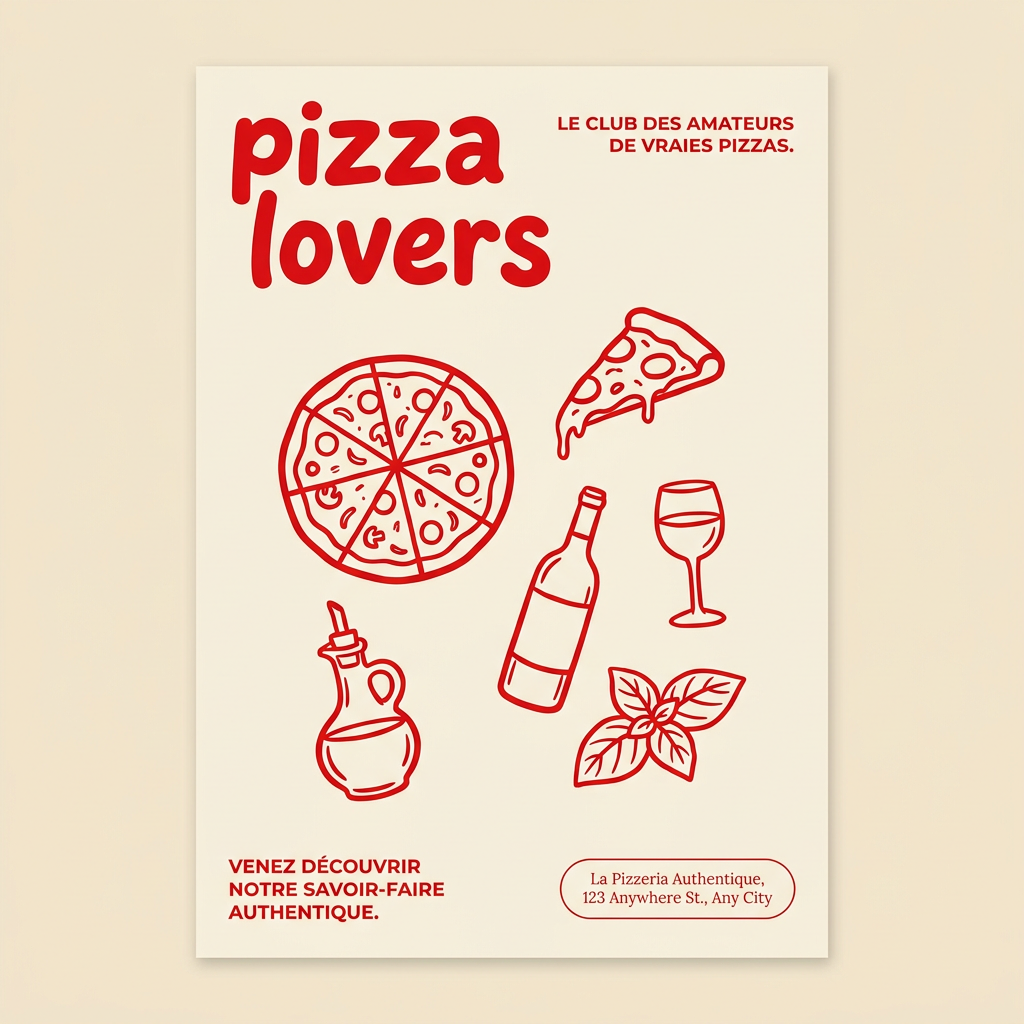
Generate clean, minimal posters for your food brand or cafe. It sets up a soft cream background with tons of breathing room, contrasted by a bold, chunky handwritten title in vivid red. It's a gorgeous editorial layout that makes your brand look instantly high-end.
Regenerate using your own assets.
