You've seen the viral posts, maybe even shared a few: AI-generated food that looks more like plastic props than a plate-ready meal. It’s a common frustration, and as of June 26, 2026, a widely discussed topic across platforms like X and Google Trends, where searches for 'realistic AI food photography' are spiking. While AI models like Midjourney (with its recent v7 update focusing on material rendering), Adobe Firefly (introducing Texture Control Layers), and Stability AI (with the new TextureFlow model) are rapidly improving, getting truly appetizing results still requires more than generic prompts.
This isn't about simply generating 'a burger.' It's about generating *your* burger, with perfectly melted cheese, a toasted bun, and the ideal lighting that makes it irresistible. The 'plastic problem' isn't a limitation of AI itself anymore; it's a limitation of how we're instructing it. To fix it, you need to think like a food photographer. This article will walk you through a professional workflow on MyUP.ai, showing you how to move beyond basic commands to create hyper-realistic, delicious, and consistently on-brand food imagery, turning every AI generation into a marketing asset.
Beyond basic prompts: why AI food looks fake
The core reason AI food photography often misses the mark lies in a lack of specific, nuanced detail in prompts. AI models excel at interpreting broad concepts, but food photography demands precision. Without explicit instructions, the AI defaults to generic textures, flat lighting, and uninspired compositions, leading to images that feel synthetic rather than succulent. It struggles to capture the subtle imperfections and organic qualities that make real food appealing.
Recent advancements are indeed tackling these issues. Midjourney's v7 update, released today, significantly boosts photorealism and material rendering. Yesterday, Adobe Firefly launched 'Texture Control Layers' for granular surface detail, and Stability AI unveiled its 'TextureFlow' model, specifically designed for enhancing realistic textures. These developments are game-changers, but they still require a human touch – a strategic input – to guide the AI towards truly delicious output. MyUP.ai leverages these underlying capabilities within its structured workflows, allowing you to focus on the creative vision while the platform handles the technical execution.
Step 1: Mastering texture for mouth-watering realism
Texture is paramount in food photography. It's the crispy skin on roast chicken, the gooey molten cheese on a pizza, the flaky crust of a pastry, or the glistening condensation on a cold drink. To achieve realism, you must describe these textural qualities with precision in your prompts. Instead of just 'pizza,' try 'a close-up of a Neapolitan pizza, with bubbling, slightly charred crust, molten mozzarella, fresh basil, and a drizzle of olive oil, showcasing the rich textures.' Be specific about adjectives that evoke sensory details.
On MyUP.ai, you can integrate these detailed textural descriptors into your image generation prompts. The platform's ability to interpret complex instructions, especially when combined with a pre-configured Brandkit, ensures that the AI understands the desired tactile quality. This level of detail helps the AI move past a generic interpretation to something that genuinely looks edible.
For a quick start on showcasing product texture with focus and clarity, use this template:
Workflow code: #myup-w0vh-abft
Food Product Ad
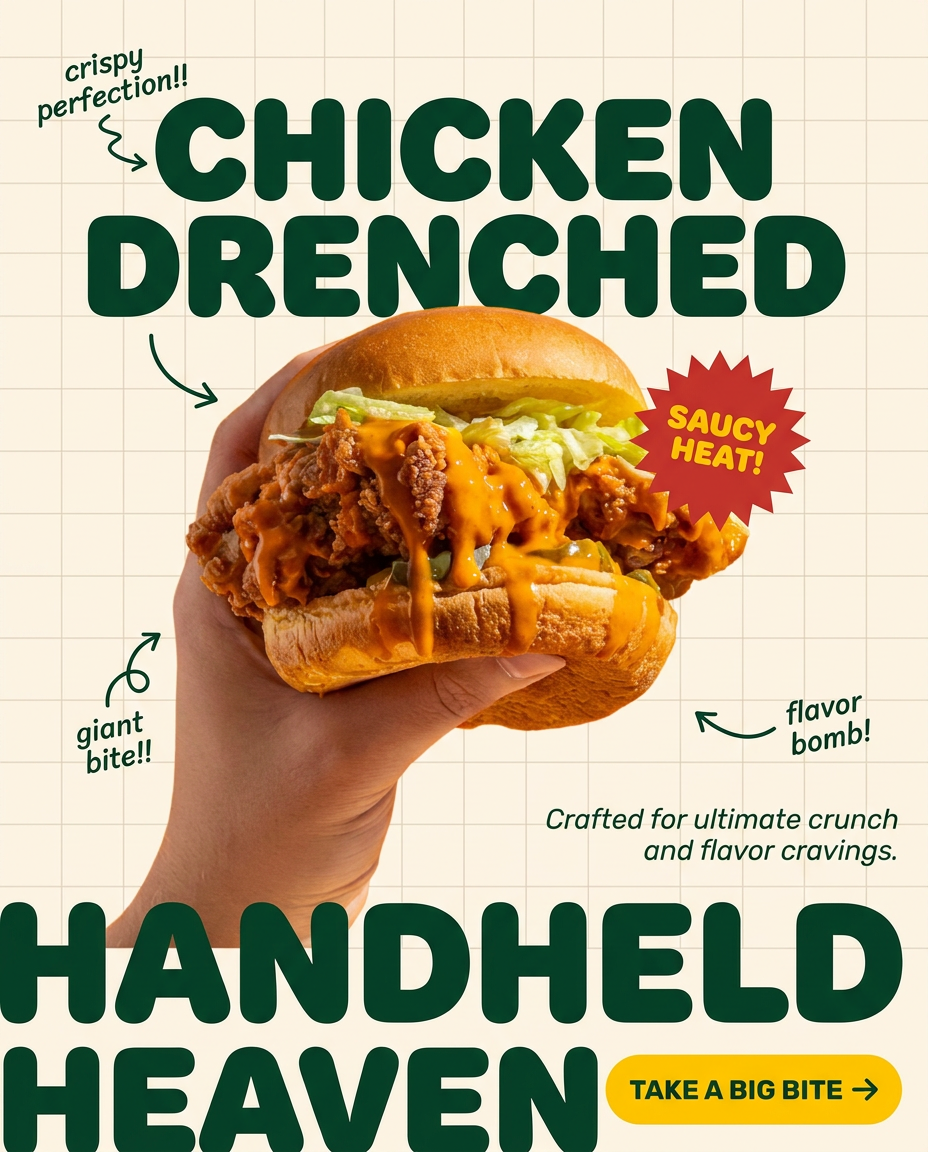
Turn any dish or snack into a bold, playful social ad. It places your food against a soft warm beige background with a subtle grid pattern, topped with chunky rounded headlines. It's clean, friendly, and instantly grabs attention in the feed.
Regenerate using your own assets.
Step 2: Sculpting with light for appetizing appeal
Just like a professional photographer uses light to sculpt and define food, you need to instruct the AI on your desired lighting setup. Flat, even lighting often makes food look dull and uninviting. Consider how different light sources affect the dish:
- Soft natural light: 'Soft, diffused natural window light from the left, highlighting steam rising from a bowl of ramen.' This creates warmth and authenticity.
- Dramatic backlighting: 'Strong backlighting creating a beautiful rim light on a stack of pancakes with dripping syrup.' This emphasizes glistening surfaces and adds depth.
- Studio food photography: 'Professional studio lighting setup, with a softbox from above and a fill light from the front, for a high-key product shot of artisanal bread.' This provides clarity and detail for commercial use.
MyUP.ai allows you to specify these lighting conditions within your prompts. Furthermore, if you've established a particular aesthetic within your Brandkit—say, a 'dark and moody' restaurant vibe or a 'bright and airy' cafe feel—MyUP.ai will automatically strive to apply consistent lighting and shadow characteristics across all your food images. This ensures visual coherence, whether you're generating a single dish or an entire menu for social media.
Step 3: Composing for impact and visual storytelling
Composition elevates a picture from a mere snapshot to an enticing visual story. Think about how a human eye would naturally be drawn to the most appealing part of a dish. Essential photographic principles like the rule of thirds, leading lines, and negative space apply just as much to AI food photography. Describe the camera angle and depth of field:
- Shallow depth of field: 'Close-up shot with shallow depth of field, focusing sharply on the glistening glaze of a donut, with a blurred bakery background.' This isolates the subject and makes it pop.
- Overhead shot (flat lay): 'Perfectly overhead flat lay shot of a breakfast spread on a rustic wooden table, featuring avocado toast, coffee, and fresh fruit, composed according to the rule of thirds.' This is excellent for showing variety or an entire meal.
- Dynamic angle: 'Low-angle shot of a towering gourmet burger, emphasizing its height and layers, with a slightly blurred restaurant interior in the background.'
On MyUP.ai, you can easily integrate these compositional elements into your prompts. The platform helps you generate images that are not just realistic, but also visually engaging and professional. You retain control over the creative direction, while MyUP handles the complex rendering. For dynamic, impactful food compositions ready for advertising, try this workflow:
Workflow code: #myup-xjsb-hirr
Bold Portrait Food Advertising Photo

Get those high-impact, tight action shots of people actually enjoying your food brand. It drops your product right into a messy, realistic close-up bite shot that feels like a premium lifestyle campaign instead of a boring studio packshot.
Regenerate using your own assets.
Step 4: On-brand styling and consistency with MyUP's Brandkit
Generating a single, realistic food image is one thing; generating an entire campaign that consistently reflects your brand is another. This is where MyUP.ai's Brandkit becomes indispensable. Instead of repeatedly prompting for specific plate colors, table settings, background textures, or overall mood, your Brandkit captures these elements from your website or existing assets. This means if your brand aesthetic is 'minimalist, industrial chic' or 'vibrant, bohemian cafe,' MyUP.ai remembers and applies this visual identity automatically to every image generation.
You can prompt for specific props ('served on a white ceramic plate,' 'garnished with fresh rosemary'), but the Brandkit ensures the overarching style, color palette, and even the general 'feel' of your brand's photography remain consistent. This saves immense time and guarantees that all your AI-generated food content looks like it came from the same professional photoshoot, building strong brand recognition. To see how branded text and minimalist food imagery combine, explore this workflow:
Workflow code: #myup-6hp6-zwh2
Minimalist Hand-Lettered Food Brand Poster
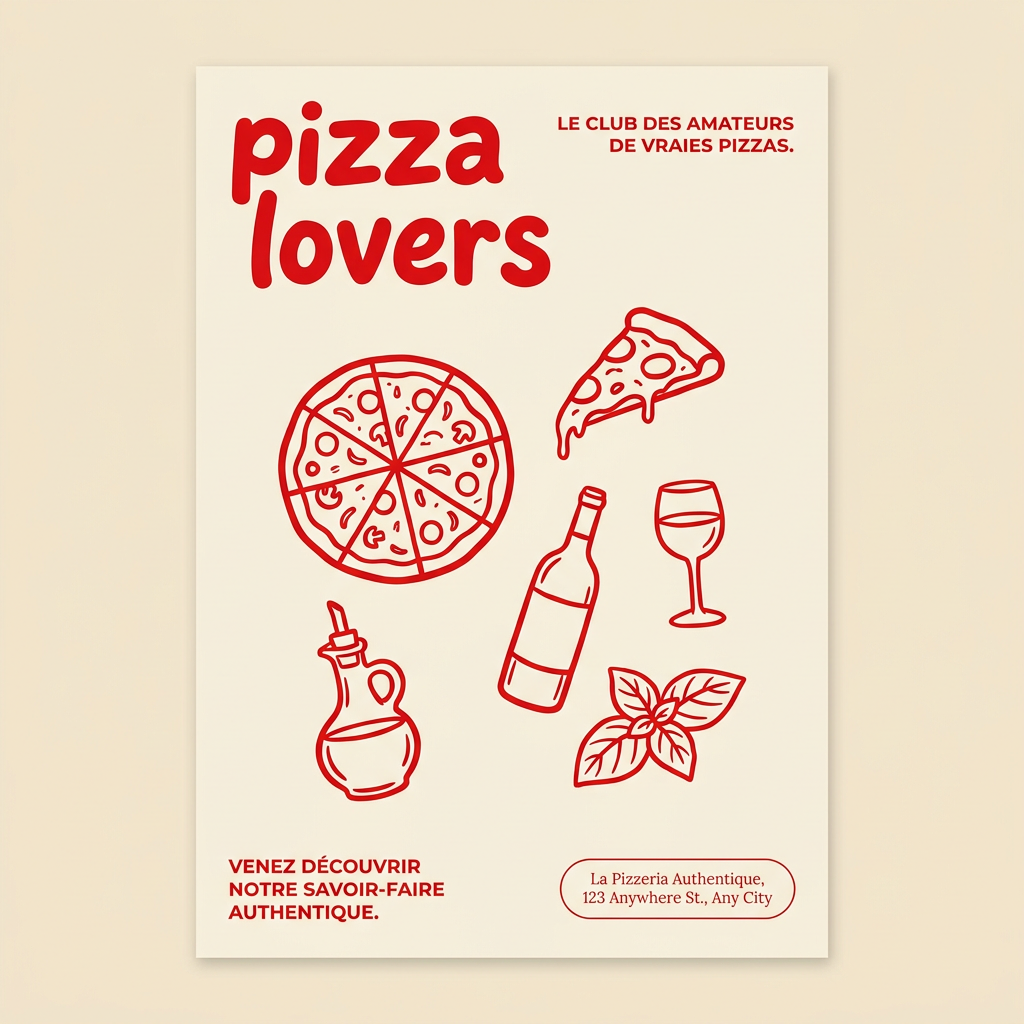
Generate clean, minimal posters for your food brand or cafe. It sets up a soft cream background with tons of breathing room, contrasted by a bold, chunky handwritten title in vivid red. It's a gorgeous editorial layout that makes your brand look instantly high-end.
Regenerate using your own assets.
From image to campaign: building complete food marketing assets
Hyper-realistic food images are just the beginning. The real value comes when you integrate them into a cohesive marketing campaign. MyUP.ai isn't just an image generator; it's a content production platform. Once you have your stunning food photos, you can use MyUP's workflows to quickly transform them into social media posts, ads, and even short videos. Imagine generating a series of product shots for a new menu item, then automatically flowing them into a collection of Instagram stories, Facebook ads, and a hero image for your website—all while maintaining your brand's visual consistency.
This automation significantly reduces the manual effort and design time typically required. You validate the initial image, make any necessary adjustments, and MyUP handles the repetitive production across various formats. This allows brands, from local restaurants to large CPG companies, to scale their visual content output without sacrificing quality or consistency. For creating a complete advertising asset that combines your delicious food image with promotional text, consider this template:
Workflow code: #myup-fts6-4ihp
Vertical Gourmet French Fry Ad

Transform your products into high-fashion editorial ads. This setup uses a dynamic diagonal layout and a slightly tilted overhead angle to give food and packaging incredible depth and texture. It's perfect for giving any brand a chic, premium look.
Regenerate using your own assets.
The MyUP workflow: consistent, delicious food photography at scale
The days of settling for 'plastic' AI food photography are over. With MyUP.ai, you gain a powerful ally that understands the nuances of professional food styling and branding. By combining detailed, photographer-inspired prompts with MyUP's Brandkit and automated workflows, you can consistently generate hyper-realistic, mouth-watering images that truly sell your products.
MyUP.ai empowers you to:
- Define specific textures: Ensure your food looks juicy, crispy, or flaky.
- Control lighting: Create the perfect mood and highlight key features.
- Master composition: Frame your food for maximum impact and appetite appeal.
- Maintain brand consistency: Automatically apply your unique visual identity across all content, from plating to background.
The human element remains critical: you provide the creative vision, and MyUP executes the production. This seamless process allows you to produce high volumes of top-tier visual content, freeing up your team to focus on strategy and engagement. Stop struggling with generic AI output and start creating marketing assets that truly resonate. For more insights on consistent visual output, explore articles like Your AI-generated TikToks look random. Here's the workflow for a week of on-brand video. or Your AI interior designs look fake. Here's the workflow for realistic, client-ready results.
Elevate your AI food photography from plastic to plate-ready
Achieving hyper-realistic AI food photography is no longer a distant dream. It's a tangible reality with the right approach and the right tools. By shifting your prompting mindset to that of a seasoned food photographer—focusing on texture, lighting, and composition—and leveraging the power of MyUP.ai's Brandkit and workflows, you can overcome the 'plastic problem' and consistently produce stunning, on-brand visuals. It's time to transform your AI-generated food images from generic placeholders into irresistible marketing assets that truly capture the essence of your dishes. Start your journey with MyUP.ai today and taste the difference.
