Conversational video editing is here, and it’s a game-changer
Yesterday, July 12th, 2026, Runway launched its conversational video editor. Instead of wrestling with a timeline, you can now edit video clips by typing commands like, "make the lighting more dramatic" or "slowly zoom in on the subject." It’s an incredible step forward for making video creation more accessible. Anyone can now direct an AI to generate and modify video with natural language.
This is fantastic for rapid ideation and generating initial concepts. You can explore visual ideas faster than ever. But for anyone creating content for a brand, this new power immediately runs into a wall: the AI has no idea who you are.
The problem: Your brand doesn’t fit in a prompt
A conversational interface is, by its nature, stateless. It has no memory from one command to the next, let alone from one project to the next. You can't teach it your brand's specific hex codes, your approved font pairings, or the exact placement and size of your logo. Every time you start a new chat, your brand is forgotten.
This leads to predictable problems for professional content:
- Color Drift: Asking for a "warm tone" might give you a generic orange, not your brand's specific terracotta (#E2725B).
- Font Mismatches: The AI will use a default sans-serif for any text overlays, not your licensed Poppins or Inter typeface.
- Inconsistent Assets: Your logo might be applied differently in every video, or the call-to-action buttons will have slightly different styles, eroding brand recognition over time.
Chat is a brilliant starting point, but for a finished, professional asset, you need an AI that remembers your visual identity. You need a system that connects conversational commands to a persistent Brandkit.
The workflow: From raw chat-clip to on-brand ad
Instead of trying to force brand consistency through a chat window, use these new tools for what they're good at: generating the core visual clip. Then, bring that asset into a brand-aware platform like MyUP to finish the job. This is the professional workflow.
Step 1: Generate your core video. Use a tool like Runway’s chat editor to create your base clip. Focus on the action, the subject, and the overall mood. Don't worry about text, logos, or exact colors yet.
Step 2: Import into MyUP. Upload your generated video file into a new project in MyUP. This is where you transition from pure generation to brand-aware production.
Step 3: Apply your Brandkit. This is the crucial step. Because MyUP has your Brandkit saved—with your logo, fonts, and color palette—it can apply your visual identity automatically. The MyUP AI agent understands instructions within the context of your brand. When you ask it to add a headline, it uses your brand's font. When you add a colored overlay, it pulls from your approved palette.
A raw clip of a refreshing drink can be transformed into a finished, on-brand social media ad in minutes, because the AI already knows what your brand looks like. You don't have to explain it every single time.
To see this in action, you can use a pre-built MyUP workflow that does exactly this. It takes a product video and automatically applies brand elements to turn it into a high-impact ad.
Workflow code: #myup-cqnu-i50m
Drink Product Ad
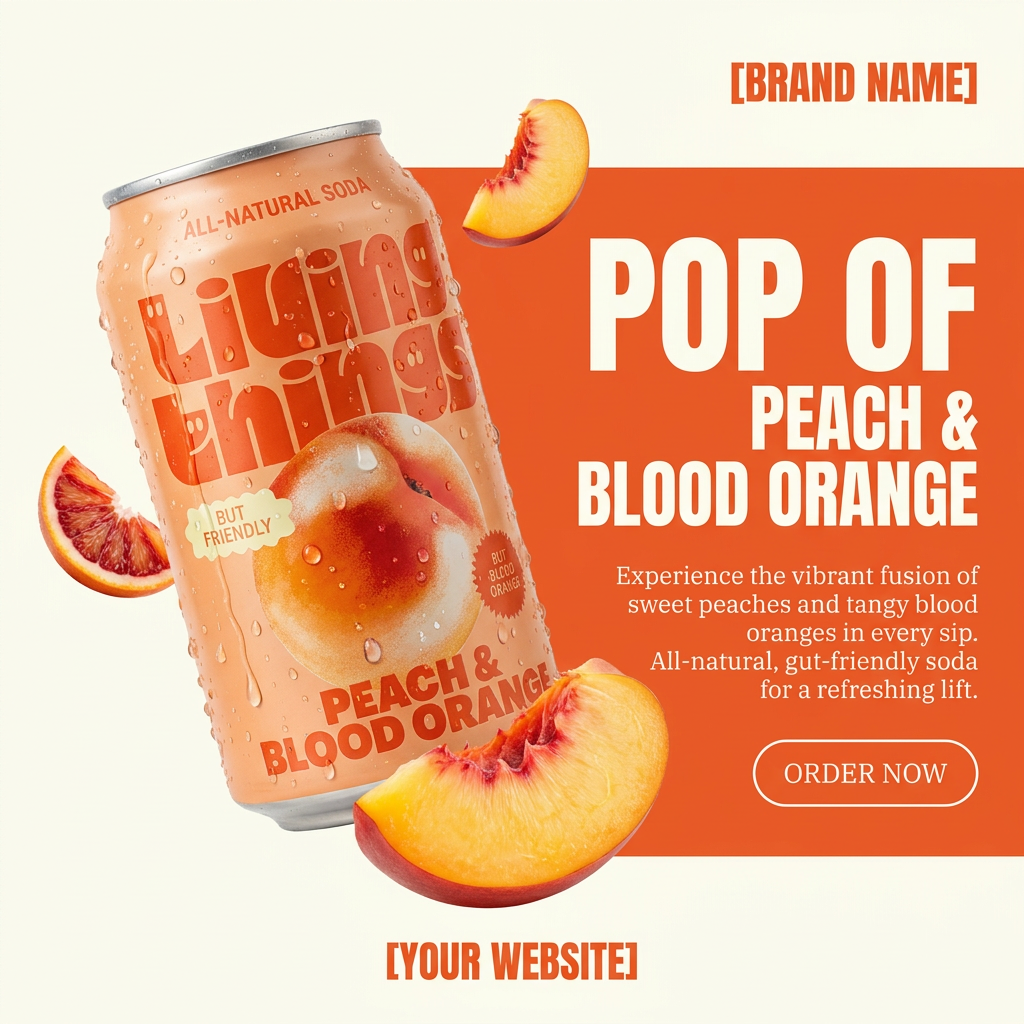
Turn any product photo into a bold, modern ad poster. It automatically frames your item against a split-color background, pairing a clean cream tone with a solid block of your product's dominant color. Super clean, minimal, and ready for social feeds.
Regenerate using your own assets.
Why a Brandkit is the AI’s missing memory
Think of a Brandkit as the long-term memory for your creative AI. A chat prompt is a short-term command. It's an instruction for a single task, which is then immediately forgotten. A Brandkit is a permanent, centralized source of truth for your visual identity.
This distinction is what separates a fun toy from a professional production tool. A stateless AI requires you to be the brand police, manually correcting every output. It creates more review work, not less. An AI with a Brandkit, like the one in MyUP, becomes a true creative partner. It knows the rules, so it can execute your ideas while respecting your brand guidelines automatically. This is the key to creating quality AI video that doesn't look generic or off-brand, a challenge many creators face when patching together multiple tools. You can read more about this in our guide to fixing common AI video quality issues.
Scale your on-brand video production, not just your prompts
The real cost of brand inconsistency isn't just one bad video; it's the inability to scale. If every video requires manual color correction and font replacement, you can't produce content at the speed AI promises. The bottleneck just moves from creation to post-production.
By using a platform like MyUP, you build repeatable, on-brand workflows. Once you've defined how to turn a raw clip into a finished ad for one product, you can reuse that exact workflow for the next product, and the one after that. The Brandkit ensures every video in the campaign shares the same visual DNA, building a cohesive and recognizable presence.
For example, a workflow for a sportswear ad can be saved and reused for every new product launch in a season, ensuring every video feels like it's part of the same collection. You focus on the creative direction for each new product; MyUP handles the brand consistency.
Workflow code: #myup-ywpr-rqz6
Professional Sportswear Ad

Suspends your apparel right in the center of a high-energy promo shot, held up by hands around the frame. It gives your shirts or jerseys a gritty, collaborative streetwear editorial look that feels alive and physical.
Regenerate using your own assets.
You direct, your brand-aware AI produces
Conversational editing is the future. It puts the creator in the director's chair, focused on the big picture. But a director needs a crew that knows the production's style guide. That's the role MyUP's Brandkit and workflows play. You provide the high-level creative vision, and your brand-aware AI handles the tedious, repetitive tasks of applying brand elements correctly every time.
This workflow allows you to take full advantage of cutting-edge generation tools like Runway's without sacrificing the professionalism and consistency your brand requires. You get the best of both worlds: the speed of conversational AI for ideation and the reliability of a brand-aware system for production. Whether you're creating a cinematic ad or a quick vertical video for social media, the principle is the same: you direct, and MyUP produces—perfectly on-brand.
For a vertical ad perfect for TikTok or Reels, a workflow can be tailored to that specific format, ensuring your brand looks its best on any channel.
Workflow code: #myup-fts6-4ihp
Vertical Gourmet French Fry Ad

Transform your products into high-fashion editorial ads. This setup uses a dynamic diagonal layout and a slightly tilted overhead angle to give food and packaging incredible depth and texture. It's perfect for giving any brand a chic, premium look.
Regenerate using your own assets.
