
On June 24, 2026, the AI creative space lit up with the launch of Ideogram 2.0 and its 'Magic Text' feature. For anyone who has spent hours wrestling with Midjourney or Stable Diffusion to produce a simple, legible word—only to get a garbled, alien-like script—this felt like a massive breakthrough. And it is. For the first time, generating a poster with reasonably coherent text directly from a prompt is a reality.
It's a fantastic step forward for rapid prototyping. But as the excitement settles, the professional's question emerges: can it generate text in my brand's specific font? Can it guarantee perfect spelling and spacing for a global campaign? The answer is still no. For that, you need to stop trying to win the prompt lottery and start using a professional workflow.
AI can finally write. But can it use your brand's font?
The core issue is control. While models like Ideogram 2.0 are a huge improvement, they are still guessing at typography. You can ask for 'bold sans-serif font,' but you can't ask for 'Helvetica Now Display Medium at 72pt with -10 tracking.' For a brand, that distinction is everything. Your typography isn't just a style; it's a registered, essential part of your identity. Getting it 'close enough' isn't good enough.
This is why the most reliable method for creating on-brand AI visuals separates the image from the text. You let the AI do what it does best—create a stunning, text-free visual—and then you apply your typography with precision in a second, controlled step. This isn't a workaround; it's the correct production workflow. You can generate a beautiful, on-brand poster with perfect lettering in minutes, without ever leaving the platform. Try it now with this minimalist poster workflow.
Workflow code: #myup-6hp6-zwh2
Minimalist Hand-Lettered Food Brand Poster
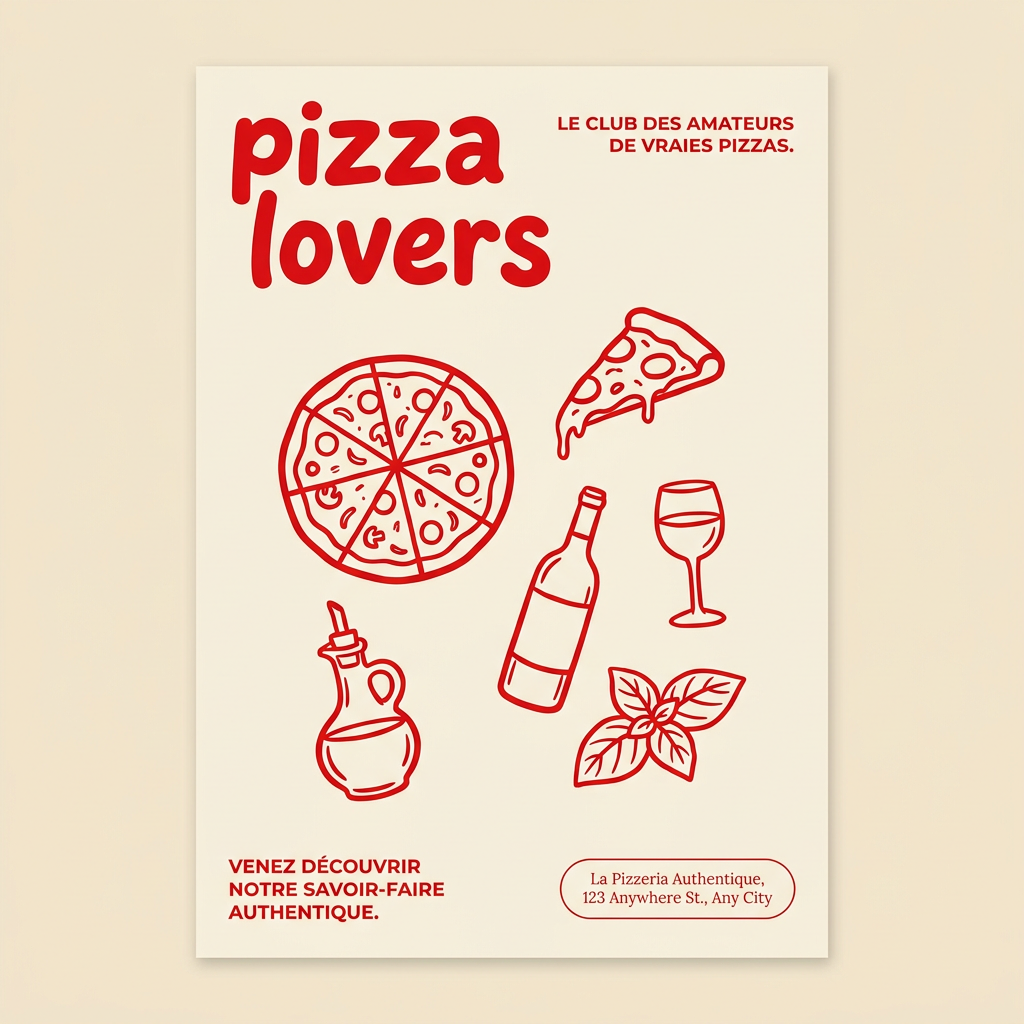
Generate clean, minimal posters for your food brand or cafe. It sets up a soft cream background with tons of breathing room, contrasted by a bold, chunky handwritten title in vivid red. It's a gorgeous editorial layout that makes your brand look instantly high-end.
Regenerate using your own assets.
Workflow code: #myup-k4td-9k6z
Minimalist Poster

Give your social feed a clean, gallery-like aesthetic. This layout frames your images with structured mono typography and soft, neutral backgrounds for a high-end editorial look. It's perfect for minimal product launches or brand announcements.
Regenerate using your own assets.
The brand consistency gap: why prompting is a gamble
Relying on a single prompt to generate both a complex image and perfect, brand-aligned text introduces multiple points of failure that are unacceptable for professional work. When you're creating assets for a real campaign, the risks are:
- No Custom Fonts: AI models don't have access to your brand’s font files. They can mimic styles, but they can't reproduce your specific typeface. This is a non-starter for any brand with established visual guidelines.
- Subtle Errors and Artifacts: Even the best models can introduce small errors—misspelled words, incorrect letter spacing (kerning), or strange visual artifacts where the text meets the image. These small mistakes can instantly make a professional asset look cheap and untrustworthy.
- Lack of Repeatability: You might get a lucky result once, but can you create five more social posts for the same campaign with the exact same typographic lockup? Prompting for text is inherently unpredictable, making it nearly impossible to maintain the visual consistency required for a cohesive brand presence. As we've discussed when comparing MyUP AI vs. Midjourney for branded social media, true consistency comes from systems, not just prompts.
The professional's choice: a two-step workflow for total control
The MyUP point of view is simple: treat AI image generation and typography as separate, sequential steps. This decouples the unpredictable, creative part of the process from the precise, brand-critical part.
Step 1: Generate the perfect visual. Focus your prompt entirely on the image. Describe the mood, lighting, subject, and composition without mentioning any text. Let the model create a stunning, clean background plate. This is where the AI executes its core strength.
Step 2: Apply text with your Brandkit. In the next step of the workflow, you add your text as a controlled overlay. Because MyUP integrates with your saved Brandkit, it doesn't guess at your font—it uses the actual font files you uploaded. It applies your exact brand colors from their hex codes. The user is in charge of validation; MyUP handles the production. This is how you move from an interesting AI experiment to a reliable, scalable production asset.
Walkthrough: creating a hiring poster with a perfect text overlay
Let's make this concrete. Say you need to create a sharp, modern poster for a new job opening. Instead of trying to prompt a busy image with text, you can use a workflow designed for this exact task.
This 'Modern Hiring Poster' workflow first asks the AI to generate a clean, professional background image suitable for a corporate announcement. Then, in a separate step, it presents you with simple fields for 'Headline,' 'Job Title,' and 'Details.' When you enter your text, the workflow automatically applies the fonts and colors stored in your Brandkit, placing them in a pre-designed layout. The result is a perfectly composed, 100% on-brand poster with crisp, legible text—no typos, no weird letterforms, no luck involved.
Workflow code: #myup-eiob-7tbc
Modern Hiring Poster

Turn your open roles into stylish social announcements. It sets your hiring details against a soft, textured paper background with clean, editorial typography. Perfect for giving your brand a polished, modern look when you're looking to hire.
Regenerate using your own assets.
When to prompt for text vs. when to use a workflow
This doesn't mean new tools like Ideogram 2.0 aren't useful. They absolutely are. The key is knowing which tool to use for which job. Here’s a clear framework:
Use single-prompt text generation for:
- Rapid Ideation: Quickly exploring different taglines and visual concepts for a mood board.
- Artistic Effects: Creating visuals where the text is part of the art itself and perfect legibility is not the primary goal.
- Informal Content: Generating memes or one-off social media images where strict brand guidelines are not a concern.
Use a two-step Brandkit workflow for:
- Final Campaign Assets: Any ad, social post, or web graphic that will be seen by customers and must be 100% on-brand.
- Scalable Content Production: When you need to create a series of visuals that are all stylistically consistent.
- Templates and Repeatable Tasks: Creating assets like event announcements, hiring posters, or product features where the layout is fixed but the text changes.
Ultimately, a prompt-based tool is like a sketchbook for ideas, while a workflow platform like MyUP is the production studio where you create the finished work. The struggle for control over AI outputs is universal, extending beyond text to overall brand style, which is why even advanced features like Midjourney's `--sref` often fall short for true brand consistency without a workflow to enforce the rules.
