Searching for 'free music event flyer templates for download' often leads to a common frustration: generic designs, illegible text, and a lack of brand integration. While the idea of a quick, free solution is appealing, the reality is that these templates rarely help your event stand out. Instead of settling for a design that looks like everyone else's, you can generate a custom, professional music event flyer that truly represents your event and brand. The fastest way to achieve this is by using a dedicated solution like Template: #myup-gig-promo-kit-for-social-media-and-print, which creates a full promotional kit tailored to your specifics.
Gig Promo Kit For Social Media And Print
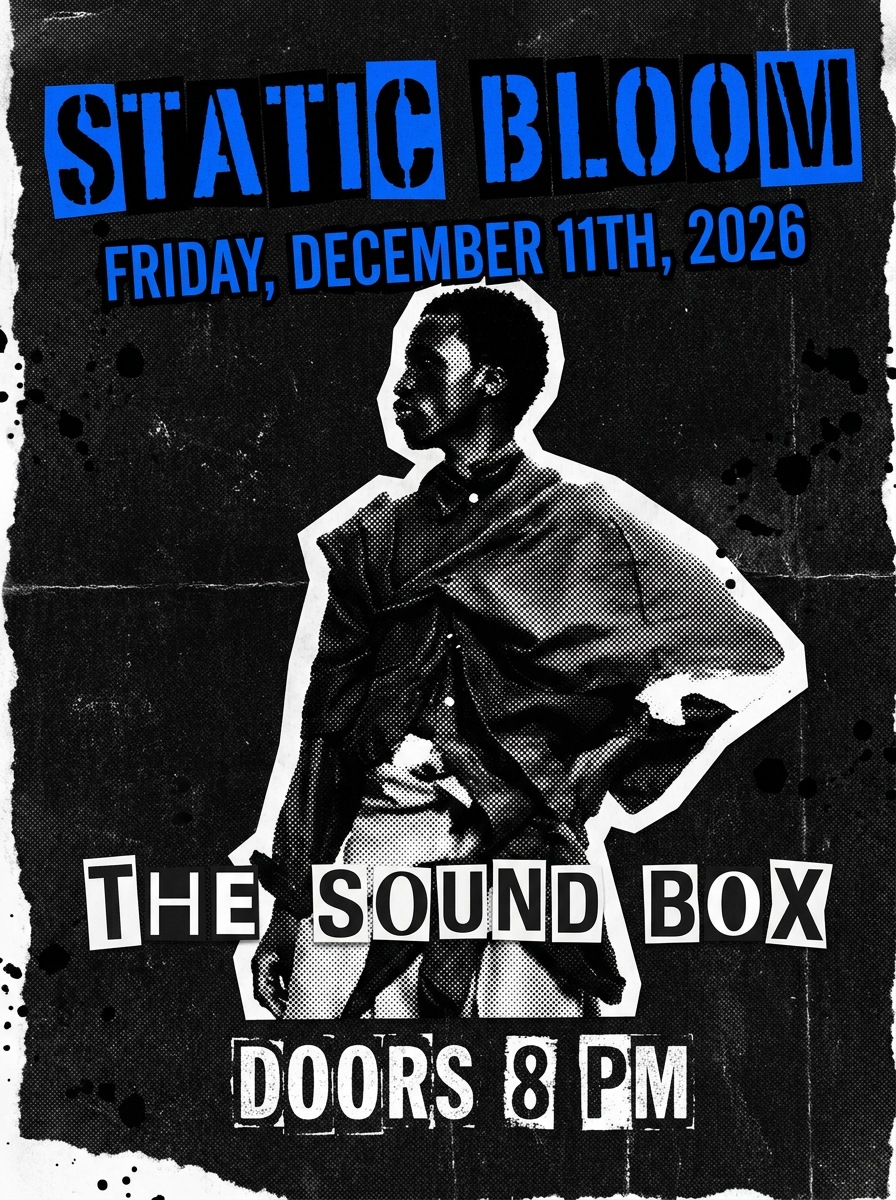
Promote your next music gig with a complete promotional kit that captures a raw, energetic, DIY punk aesthetic. This includes a main poster for printing and digital use, a square post for social media feeds, a vertical story for countdowns and reminders, and a small handbill for distribution. Just provide your band photo, name, gig date, and doors open time, and everything else is handled for you. The kit comes with a consistent look, ensuring all materials highlight your band and event details clearly. Perfect for bands, artists, or anyone promoting live music events online and offline.
Regenerate using your own assets.
The hidden costs of 'free' music event flyer templates
When you search for 'free music event flyer templates for download,' the appeal is clear: quick, no-cost promotion. However, many event organizers and artists quickly discover that 'free' often comes with hidden costs. These templates frequently deliver generic designs that make your event blend in rather than stand out. More critically, the text on these templates can be illegible, poorly integrated, or simply garbled, a common frustration with AI-generated designs from the past year. What's worse, integrating your unique brand identity—your logo, specific colors, or event vibe—into these pre-made files becomes a time-consuming struggle, often leading to off-brand visuals that do more harm than good.
Instead of a quick solution, you end up spending hours trying to wrestle a template into something usable, only to achieve a mediocre result. This time is better spent focusing on your event itself or creating truly impactful promotional materials.
Why custom generation beats generic downloads for event promotion
Imagine a flyer that perfectly captures the energy of your band, the mood of your DJ set, or the vibe of your festival—without you needing to be a graphic designer. That's the advantage of custom generation. Instead of starting with a pre-designed template that dictates your aesthetic, you start with your vision. This approach allows for originality, precise messaging, and the ability to match the event's unique atmosphere from the ground up. You get to define the artistic style, from 'retro synthwave' to 'gritty punk,' ensuring your promotional material resonates with your target audience.
This level of control ensures your flyer isn't just a placeholder but a genuine extension of your event's identity. It's about moving past the limitations of generic designs to create something that truly speaks to your audience and communicates your message clearly.
Step 1: Define your event's core message and visual style
Before you generate anything, clarify what your flyer needs to communicate and how it should look. This initial step is crucial for getting a professional result. Start by listing the absolute essentials:
- Event Name: The main title.
- Who/What: Artists, bands, DJs, or the type of music.
- When: Date and time.
- Where: Venue name and location.
- Key Call to Action: 'Get Tickets,' 'RSVP,' 'Free Entry,' etc.
Next, articulate the desired visual style. This is where you move beyond generic descriptions. Think about the mood and genre of your music or event. Use descriptive language to guide the visual generation. For instance:
Step 2: Generate your main music event flyer with precise details
Now that you have your core message and visual style defined, it's time to bring your flyer to life. The key to success here is providing clear, specific instructions for every element. You want to ensure the AI understands exactly what text to include, what imagery to generate, and the overall mood to convey. For a comprehensive solution, you can use a dedicated tool like Template: #myup-gig-promo-kit-for-social-media-and-print. This template is designed to create a main poster/flyer suitable for print and digital use, along with social media assets, all tailored to your specific event details.
When using such a template, be explicit. Instead of saying 'a cool band flyer,' try something like: 'A concert flyer for
Step 3: Integrate your brand elements for a consistent look
Getting a unique flyer is one thing; ensuring it looks like your unique flyer is another. Many users struggle to integrate their existing brand identity—logos, specific color palettes, and unique graphic elements—into AI-generated designs. To move beyond generic outputs and achieve truly on-brand materials, you need to provide your brand assets directly.
When using a custom generation tool, upload your logo files (preferably high-resolution PNGs with transparent backgrounds). Clearly state your brand colors using hex codes if possible, or provide reference images that embody your brand's aesthetic. For example, you might instruct: 'Use the attached logo prominently at the top. The primary color palette should be dark teal (#008080) and burnt orange (#CC5500), reflecting the attached brand guidelines.' This direct input helps the AI apply your established visual identity to the new design, ensuring consistency across all your promotional materials. For a deeper dive into maintaining visual consistency across various assets, consider exploring how to create a reusable AI thumbnail template for consistent series.
Step 4: Expand your flyer into a full promotional kit
A single flyer is a good start, but a successful event promotion requires a cohesive set of materials for different platforms. Once you have your main flyer, leverage that design to generate complementary assets. This means creating versions optimized for social media feeds, stories, and even email banners, all while maintaining visual consistency.
When using an AI agent like the Gig Promo Kit For Social Media And Print, you're not just getting a flyer; you're often getting a full suite of assets. Ensure your instructions cover the need for: 'A square version for Instagram feeds,' 'A vertical version for Instagram Stories and TikTok,' and 'A banner for Facebook events.' Specify any text adaptations needed for each format, such as shorter calls to action for social posts. This approach saves you time and ensures every piece of your promotional campaign looks professional and unified. For more on creating a comprehensive package, see how to create a digital promo kit with advertising flyers and service cards.
MyUP Template : #myup-gig-promo-kit-for-social-media-and-print
Refining your flyer: ensuring text clarity and visual impact
Even with precise instructions, the first output might need tweaks. The goal is a professional, legible flyer that grabs attention. Review your generated flyer for these key elements:
- Text Legibility: Is all text clear and easy to read, even at a glance? Pay attention to font choice, size, color contrast against the background, and spacing. If text is garbled or hard to see, ask for specific adjustments: 'Make the artist names larger and use a bolder font,' or 'Increase contrast for the date and time against the background image.'
- Visual Hierarchy: Does the most important information stand out? The event name, artist, date, and venue should be immediately apparent. If not, request changes like: 'Emphasize the event title more; make it the focal point.'
- Overall Mood and Style: Does the flyer match the desired aesthetic you defined in Step 1? If it's too dark, too busy, or doesn't capture the genre's feel, ask for revisions: 'Adjust the lighting to be brighter and more energetic,' or 'Simplify the background elements to reduce clutter.'
- Brand Integration: Is your logo clear and well-placed? Are your brand colors used effectively without overwhelming the design? If not, specify: 'Move the logo to the top right corner and ensure it's not obscured by other elements.'
By providing clear, actionable feedback, you guide the AI to produce a polished, high-impact flyer that effectively promotes your music event. For more detailed guidance on achieving professional results with AI poster design, refer to our practical guide to AI event poster design.
Get your custom music event flyer today
Moving beyond generic 'free download' templates means taking control of your event's visual identity. By defining your message, guiding the AI with precise details, integrating your brand, and refining the output, you can create a music event flyer that not only looks professional but truly captivates your audience. This approach ensures your event gets the attention it deserves, with promotional materials that are as unique and exciting as the event itself.
Keep going: Beyond 'Brand Lock': Create a reusable AI thumbnail template for consistent series · AI event poster design: a practical guide to professional results · Create a digital promo kit with advertising flyers and service cards