
On July 2, 2026, the game changed. With the release of features like Runway's 'Talk to Video', the creative community got a glimpse of a new reality: editing complex video with simple, natural language. The promise is incredible—no more timelines, no more keyframes, just a conversation with an AI to bring your vision to life. It’s a massive leap forward.
But within hours, the catch became painfully obvious. As creators on X and Reddit began sharing their results, a single, critical flaw emerged: these powerful new tools have absolutely no concept of your brand.
You can now edit video by talking to it. There's just one problem.
You can tell the AI to 'make the scene feel warmer' or 'add a slow zoom on the product', and it will obey. The technology is impressive. The problem is what happens next. The AI might choose a warm, orange tint that clashes with your cool blue color palette. It might add a text overlay in a generic sans-serif font, completely ignoring your brand's custom typography. The 'excitement' it adds is random, not the specific visual language you've spent years building.
This isn't a failure of prompt engineering. It's a fundamental context gap. A generic AI doesn't know your brand's rules, so it can't follow them. For any professional creator, marketer, or brand manager, this turns a promising breakthrough into an unusable novelty. The time you save on editing is lost trying to fix the off-brand mess it creates.
The illusion of control: why 'make it pop' will never match your style guide
Vague, subjective commands like 'make it pop' or 'give it a modern feel' are interpreted by a general AI based on a massive dataset of public internet content. Its idea of 'modern' is a statistical average, not your brand's specific, carefully defined aesthetic. You're left with content that feels generic at best and completely off-brand at worst.
This is the core frustration. You have conversational control over actions, but zero control over identity. To be truly useful in a professional context, conversational editing needs a non-negotiable set of rules to operate within. It needs to know your brand's DNA before the conversation even starts.
The solution: a brand-aware conversation
This is where a workflow-driven platform like MyUP.ai changes the equation. Instead of having a free-form chat with a generic AI, MyUP facilitates a structured conversation that is always guided by your brand.
The foundation is your MyUP Brandkit. You build it once, defining your exact colors, fonts, logos, and overall style. From that moment on, your Brandkit acts as a permanent set of instructions for the AI. It's the context that has been missing.
When you start a video project in MyUP, the AI already knows your brand's visual language. A prompt to 'add a headline' automatically uses your brand's primary font and color. A request to 'create a vibrant background' will generate options within your approved palette. The conversation is no longer about random creation; it's about on-brand production. The user validates the creative direction, and MyUP handles the brand-safe execution.
Workflow: creating a polished product ad with conversational edits
Let's make this practical. You need a short, compelling video ad for a new product. Instead of starting from scratch and fighting with a generic AI, you use a MyUP workflow.
- Start with a structure: Launch a workflow designed for product ads. This provides a proven narrative structure and shot sequence.
- Apply your brand instantly: Your Brandkit is automatically applied. The colors, logo, and fonts are already correct before you type a single word.
- Converse with purpose: Now, you can use natural language to direct the production. You might start with a base video of your product and then prompt: 'Animate the product reveal with a smooth slide-in from the left.' or 'Add a call-to-action banner at the end with the text 'Shop Now'.'
- Refine and approve: The AI generates the video, but every element—from the color of the banner to the font of the text—is locked to your Brandkit. You're not fixing mistakes; you're making high-level creative decisions.
This approach gives you the speed of conversational AI without sacrificing the consistency your brand demands. You can get started right now with a workflow built for exactly this purpose.
Workflow code: #myup-u4lt-o0ho
Studio Product Ad

Drop in a single product photo to instantly build a cohesive visual identity. It automatically samples your item's dominant colors to generate a beautifully matched mosaic moodboard, giving your brand an instant, polished aesthetic.
Regenerate using your own assets.
From a single video to a full campaign, without losing consistency
The real test for any content creation tool is scalability. Can you create one great video, or can you create a dozen variations for a full campaign that all feel cohesive? This is where generic conversational tools completely break down. Trying to get the same style twice is a matter of luck.
In MyUP, consistency is built into the workflow. Once you've created your initial product ad, you can simply adjust a few parameters to generate versions for different platforms. With a few conversational prompts, you can adapt the same core video:
- 'Reformat this ad for a 9:16 Instagram Story.'
- 'Change the headline to 'New Arrival' and generate a 5-second version for TikTok.'
- 'Create a square version for a LinkedIn feed post.'
Each output is perfectly on-brand because the Brandkit is the constant. This is how you move from one-off creative experiments to a reliable content production system. To create a series of social posts for a product launch, a dedicated workflow is the most direct path.
Workflow code: #myup-kbgo-tlle
Product Brand Post

Drop in your product to generate a cohesive nine-post Instagram grid. It blends warm lifestyle photography and flat-lay packaging with bold hand-drawn doodles, collages, and urban billboard mockups. Everything automatically styles itself to your brand's colors.
Regenerate using your own assets.
The future is a conversation with your brand, not just an AI
The ability to edit video with natural language is a genuine breakthrough. But for anyone creating content professionally, the 'wow' factor of new tech quickly gives way to the practical need for control and consistency. The real future isn't just talking to an AI; it's having an AI that already understands your brand's unique language.
By grounding conversational AI in a Brandkit and a structured workflow, MyUP turns a powerful new capability into a reliable production tool. It ensures that every video you create isn't just a response to a prompt, but a true expression of your brand. This is the key to unlocking both creative speed and unwavering brand integrity.
Workflow code: #myup-wo7y-ebmc
Food Ad
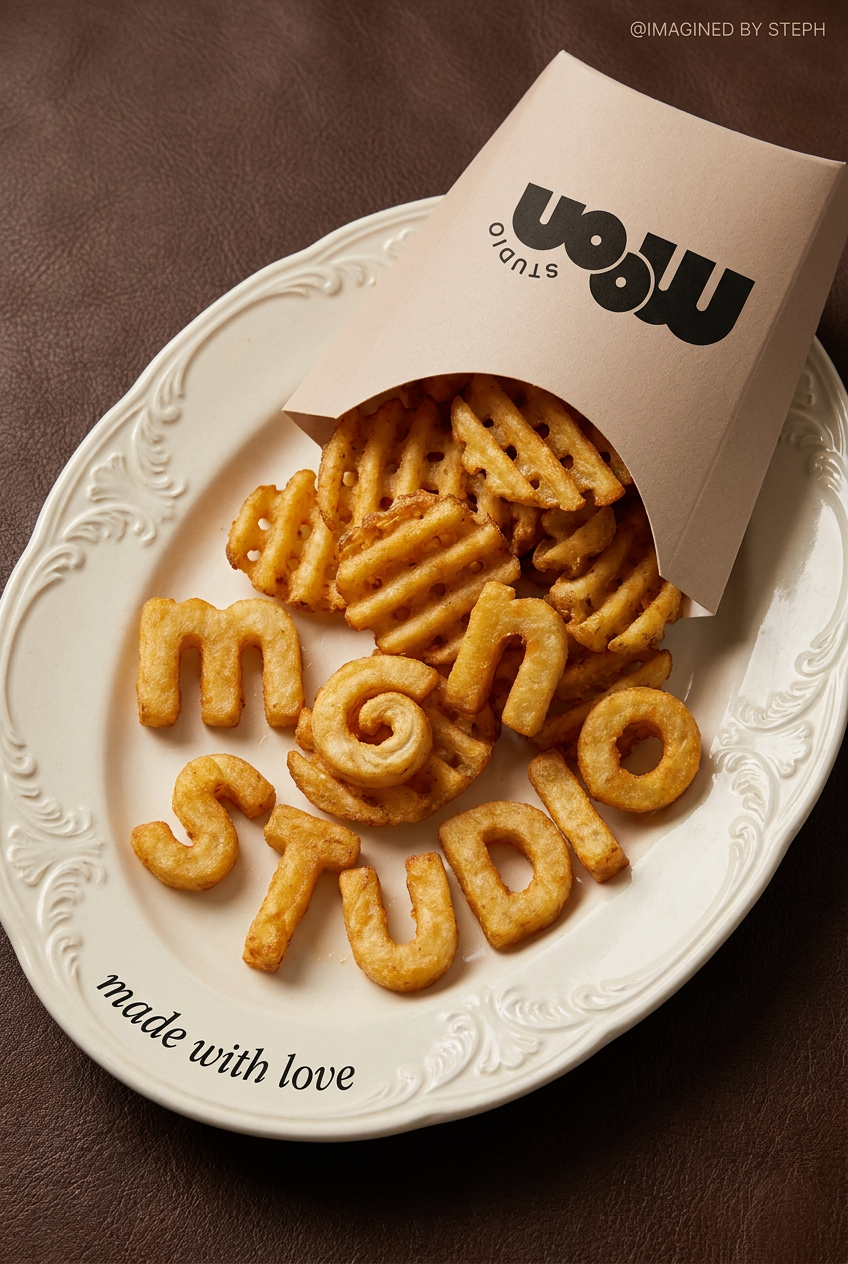
Transform simple food items into high-fashion editorial campaigns. This style uses a dynamic diagonal layout and a slightly tilted overhead angle to give your products incredible depth and texture, making them look like luxury design pieces.
Regenerate using your own assets.
