You generate the perfect shot for your new collection. The lighting is right, the garment looks incredible, and the model is exactly what you envisioned. Then you try to create another shot, and she’s gone. A completely different person is wearing your clothes. This is the single biggest frustration for fashion brands using AI, and the search interest for 'consistent AI character' spiking in July 2026 proves it’s a universal problem.
New, complex solutions are emerging, like Adobe Firefly’s recently announced 'Style Kit', which requires technical fine-tuning. But you don't need to be an AI developer to get consistency. You need a workflow. This guide lays out a practical, repeatable system within MyUP.ai to create a virtual model you can reuse indefinitely, ensuring your brand’s human face remains the same across every campaign, post, and product shot.
Your AI-generated model is a stranger every time. Here's why.
Most AI image generators operate on a principle of controlled randomness. Every time you run a prompt, the model interprets your words and generates a unique output based on its training data and a random 'seed'. While you can sometimes reuse a seed to get a similar result, it’s a fragile system. A tiny change in the prompt—like swapping 'wearing a blue jacket' for 'wearing a red jacket'—can cause the model to generate a completely different person.
This makes creating a cohesive lookbook or a multi-channel campaign impossible. Your customers build a connection with the people who represent your brand. If that person changes from one Instagram post to the next, you’re not building a brand; you’re just generating random pictures. Consistency isn’t a feature; it's a requirement. It’s the difference between a professional photoshoot and a lottery.
Step 1: Create your model's 'character DNA' with a reference
The solution isn't a better prompt; it's a better system. In MyUP.ai, the process starts by giving the AI an unbreakable reference point for your model. This is about defining the 'who' before you define the 'what they're doing'. You have two primary ways to do this:
- Use a Seed Image: The most direct method. Start with a clear, well-lit headshot of the model you want. This can be a previous AI generation you liked or a stock photo. By uploading this as a reference image in your workflow, you instruct MyUP to maintain the core facial features—eye shape, nose, jawline—in all subsequent generations. The AI understands the face is a fixed variable.
- Build a Character Model Sheet: For more control, you can create a detailed description that acts as your model's passport. This goes beyond simple traits. You define specifics like 'almond-shaped green eyes with gold flecks', 'a small mole on her left cheek', 'wavy, honey-blonde hair cut in a shoulder-length bob'. This text-based 'DNA' becomes a reusable asset in your MyUP workflow, ensuring the model's core identity is locked in. You can learn more about this in our guide to creating an
Step 2: Define your photoshoot style with a Brandkit
A consistent model is only half the battle. If she’s shot in harsh studio light in one image and soft golden-hour light in the next, your brand still looks disjointed. This is where most AI workflows fail. They solve for the character but ignore the world they inhabit.
MyUP’s Brandkit solves this by creating a set of rules for your entire visual identity. It’s a virtual creative director that ensures every image, regardless of the content, feels like it came from the same photoshoot. Inside your Brandkit, you define:
- Photography Style: Is your brand's look 'shot on 35mm Portra 400 film' or 'crisp, high-fashion digital photography'? Define it once.
- Lighting: Specify 'soft, diffused morning light' or 'dramatic, high-contrast studio lighting'.
- Color Palette: Lock in your brand's primary and secondary colors to ensure they are always present and accurate.
- Mood & Tone: Define the overall feeling, such as 'serene and minimalist' or 'energetic and vibrant'.
By applying your Brandkit, you ensure that your consistent model always appears in a consistent environment. You’re not just creating a person; you're building a world for them to live in. This is fundamental to creating professional AI product photography that sells.
Step 3: Put your virtual model to work across your collection
With your model's DNA established and your brand's visual world defined by the Brandkit, you now have a repeatable system. The final step is to deploy it at scale. This is where you move from setup to production, creating a full range of marketing assets without ever losing consistency.
Instead of starting with a blank canvas and a complex prompt for every new asset, you use MyUP templates. These pre-built workflows are designed for specific outputs—like an Instagram story, a magazine cover, or a product ad. When you run a template, it automatically pulls in your consistent model and applies your Brandkit, generating a perfectly on-brand asset in seconds. The user validates the result, and MyUP handles the production.
From sportswear ads to editorial covers: seeing it in action
Imagine your brand sells both athletic wear and high-fashion pieces. You need to show the same model in two completely different contexts. With your consistent model and Brandkit locked in, you can do this instantly.
For an energetic, action-oriented shot, you can use a template designed for performance wear. The workflow will place your model in a dynamic pose, apply lighting that highlights movement, and generate an image ready for a fitness campaign.
Workflow code: #myup-ywpr-rqz6
Professional Sportswear Ad

Suspends your apparel right in the center of a high-energy promo shot, held up by hands around the frame. It gives your shirts or jerseys a gritty, collaborative streetwear editorial look that feels alive and physical.
Regenerate using your own assets.
Then, for your couture line, you can switch to a different template. This one will generate a dramatic, high-fashion portrait of the exact same model, suitable for a magazine cover, all while maintaining your brand's core photographic style.
Workflow code: #myup-yk1h-uqy8
High-End Editorial Fashion Magazine Cover

Drop in any portrait and turn it into a high-end editorial magazine cover. It frames your subject beautifully with relaxed, high-fashion posing and soft styling for a polished print aesthetic.
Regenerate using your own assets.
Create everyday social content and campaign posters in seconds
This system isn't just for big campaign hero shots. Its real power is in accelerating your day-to-day content production. Need a quick social media post featuring your new sweater? There's a workflow for that. It will place your consistent model in the sweater, apply your Brandkit's aesthetic, and deliver an on-brand image ready to post.
Workflow code: #myup-3sro-edbt
Brand Clothes Post

Turn any outfit photo into a high-end fashion promo poster. It centers your subject in a full-body shot against a dark, dramatic studio backdrop, perfectly cropped for social feeds. It gives your apparel a moody, editorial look instantly.
Regenerate using your own assets.
Planning a new product launch and need a series of promotional posters? Simply run the appropriate template. Your model will appear consistently across every asset, building recognition and trust with your audience. The time saved is enormous—what used to take a full day of shooting and editing can now be done in minutes.
Workflow code: #myup-wtgs-4huq
Fashion Poster
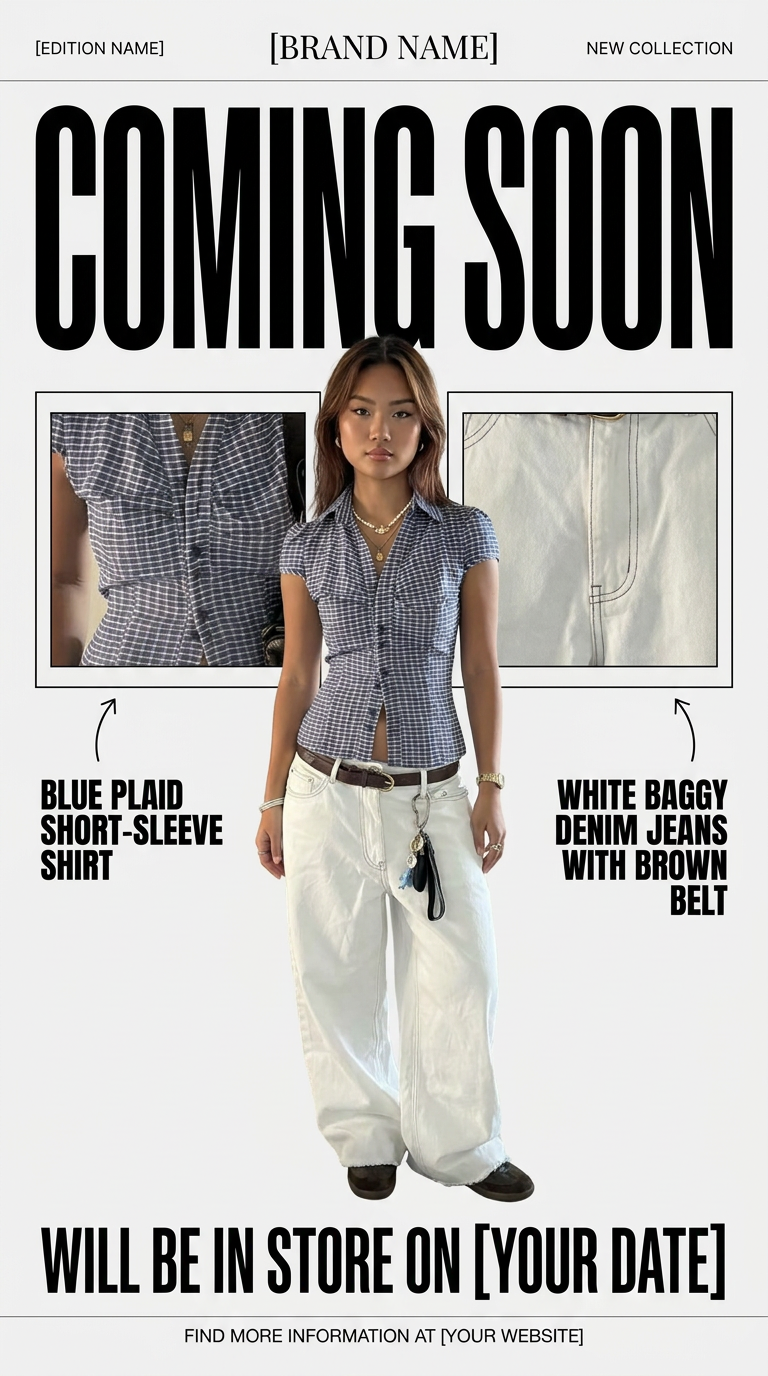
Turn your product shots into clean, high-end teaser posters. It frames your images in a minimalist off-white layout with editorial header text, giving your upcoming launches the look of a luxury fashion drop.
Regenerate using your own assets.
A consistent model isn't a prompt trick; it's a brand asset
Stop thinking of your AI model as a random output. With a repeatable workflow, your virtual model becomes a core brand asset—just as valuable as your logo or color palette. It’s a recognizable face that your customers can connect with across your entire marketing ecosystem.
The MyUP workflow of combining a character reference with a Brandkit and templates moves you from gambling on prompts to managing a system. It gives you the control to build a cohesive, professional, and scalable visual brand, freeing you to focus on the creative direction, not the frustrating mechanics of AI generation.
