You’ve probably seen the trend: a screen-recorded video showing a creator painstakingly chaining together four different AI tools to turn a podcast clip into a short video for social media. The effort is impressive, but it highlights a massive production bottleneck. Worse, the end result is almost always generic. A stock video background, default caption fonts, and a slapped-on logo. It’s content, but it does nothing to build your brand.
This fragmented process is a source of brand dilution. Every time you post a clip that doesn't use your brand's distinct visual identity, you miss an opportunity to build recognition. The problem isn't a lack of tools; it's the lack of an integrated system. This guide lays out a single, automated workflow in MyUP.ai to turn your best audio moments into compelling, on-brand video assets that stop the scroll and reinforce your identity.
Your podcast clips are getting lost in the feed. Here's why.
The standard audiogram—a static image with an animated waveform—is dead. On visually saturated platforms like Instagram and TikTok, it’s audio content forced into a visual container, and it gets ignored. Viewers expect more. They expect motion, context, and visual appeal. Tools that simply transcribe audio and place it over a waveform are solving a technical problem, but they're creating a marketing one.
The real cost of using disconnected tools for this task is inefficiency and inconsistency. You might use one service for transcription, an AI image generator for a background, and then a video editor to piece it all together. This multi-step process isn't just slow; it's a recipe for off-brand content. Fonts are slightly wrong, colors don't quite match, and the overall aesthetic feels disconnected from your podcast's identity. This isn't just a design issue; it's a brand-building failure that makes your content look amateurish and forgettable.
The one-click workflow for on-brand podcast videos
The solution is to stop thinking about this as three separate tasks (visuals, transcription, video editing) and start thinking of it as one integrated workflow. On MyUP.ai, you can build a process that does everything in one go, with your brand identity at its core.
The key is MyUP’s Brandkit. You set up your brand once—uploading your logo, defining your color palette, and specifying your fonts. From that point on, every asset you create inherits that identity automatically. When you run the podcast-to-video workflow, MyUP doesn't just generate a video; it generates a video that is unmistakably yours. The background colors match your palette, the animated captions use your brand font, and your logo is perfectly placed. The user validates the output, but MyUP handles the production, ensuring brand compliance every time.
Step 1: Generate a unique, on-brand background for your clip
The first step to breaking free from the boring waveform is creating a custom visual background that reflects the topic of your audio clip. Instead of a generic template, you can use an AI design workflow in MyUP to generate a unique image that serves as the foundation for your video. This isn't just a random AI image; it's a design created using a template that understands layout, typography, and style, and it automatically incorporates your Brandkit's colors and fonts.
For example, if your podcast clip is about a big announcement or a live event, you can use a poster-style template to create a bold, eye-catching background. The template provides the structure, and the AI fills in the details based on your prompt, all while adhering to your brand's visual rules. This immediately elevates your clip from a simple audiogram to a piece of designed content.
To get started, try this workflow for a high-energy, retro look.
Workflow code: #myup-xbur-hzoi
Bold Retro Yellow Event Poster

Turn your branding or event details into bold, nostalgic posters. It blends vibrant warm backdrops with a clean, retro square grid pattern to make any announcement look like a classic piece of mid-century graphic design.
Regenerate using your own assets.
Step 2: Add auto-transcribed, animated captions that use your font
With your unique background ready, the next step is adding the audio and captions. When you upload your audio clip to the MyUP workflow, it's automatically transcribed with high accuracy. But the magic is what happens next. MyUP generates animated, word-by-word captions (often called karaoke-style captions) that are proven to hold viewer attention.
Crucially, because your Brandkit is active, these captions are automatically styled with your brand's primary or secondary font and colors. There's no manual adjustment needed in a separate video editor. This single step solves one of the biggest sources of brand inconsistency in social video. It ensures that even the text on screen is building brand recognition, a detail that most generic AI animation tools miss entirely.
Step 3: Assemble and scale your production
The final step in the workflow brings everything together: your custom background, the audio track, the perfectly branded animated captions, and your logo, which is automatically placed in a designated spot. MyUP renders these elements into a single, ready-to-post video file formatted for social media.
But the real power comes from turning this process into a reusable asset. Once you've perfected a look you like, you can save the entire sequence as a custom workflow in MyUP. Now, creating the next clip isn't a multi-step project; it's a one-click action. Just feed in a new audio file, and MyUP will run the same process, generating a new on-brand video in minutes. This turns a major production bottleneck into a streamlined content machine, allowing you to repurpose an entire podcast episode into a dozen social clips with minimal effort.
For a different aesthetic, you could create a workflow based on a more classic, illustrative style.
Workflow code: #myup-sauf-5jod
Vintage Advertising Poster
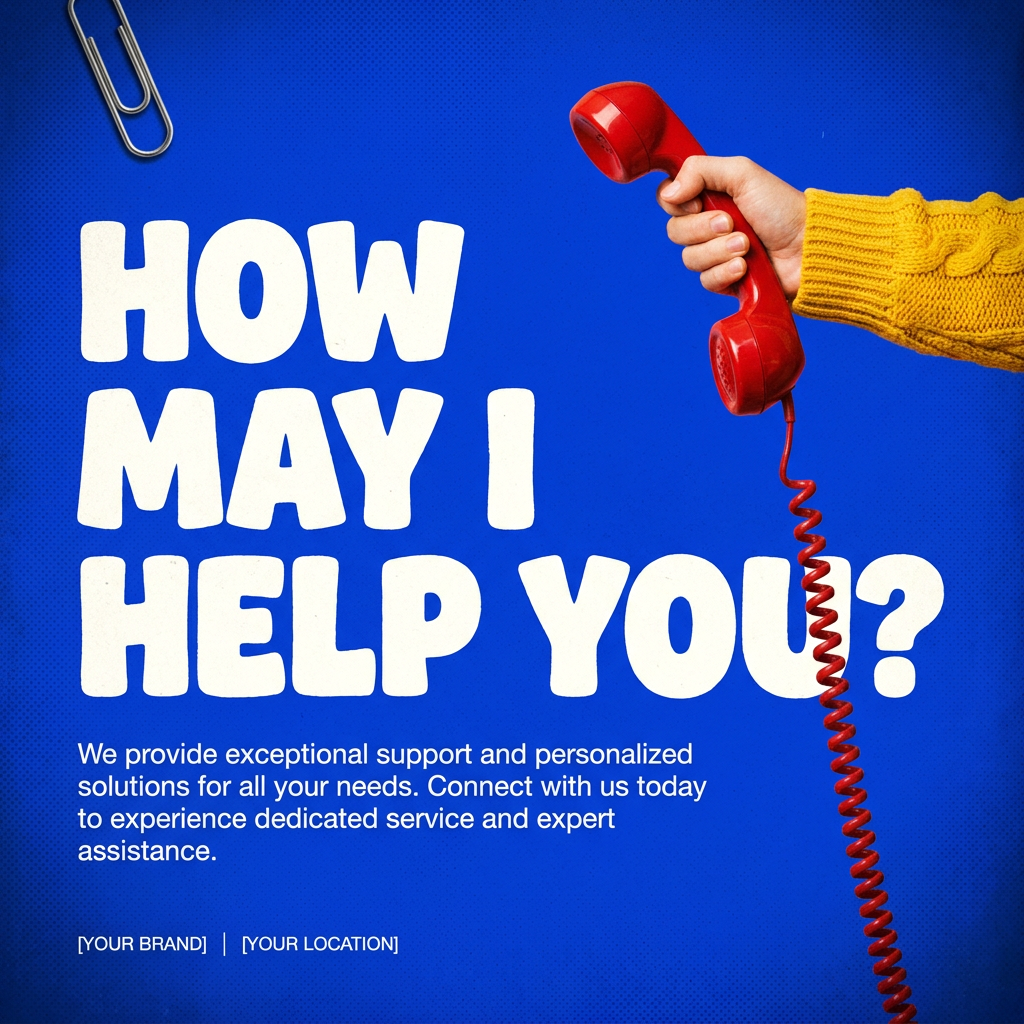
This creates high-impact graphic posters with a striking cobalt blue backdrop and subtle retro halftone textures. Just drop in your subject to get that bold, tactile look complete with realistic metallic accents and clean, modern framing.
Regenerate using your own assets.
Bonus: Creating clips for different platforms and moods
Your workflow doesn't have to be rigid. You can create several variations to match the tone of a specific clip or the requirements of different platforms. For instance, you might want a bold, high-contrast look for a controversial take, but a softer, more elegant design for an introspective moment. Or you might need a 9:16 vertical format for Instagram Stories and a 1:1 square for a LinkedIn post.
In MyUP, adapting your workflow is as simple as swapping out the background generation template. You can have a library of saved workflows for different scenarios. For a more edgy, modern clip, you could use a zine-style template to generate a completely different visual mood while still maintaining brand consistency through your colors and fonts.
Workflow code: #myup-msop-hlxf
Retro Zine Style Event Poster

Give your social posts a gritty, analog zine aesthetic. It layers a crumpled paper texture and a subtle grid over a warm cream background to make any event graphic look like a tactile, photocopied flyer. Perfect for DIY gigs and bold promos.
Regenerate using your own assets.
Stop stitching tools together. Start building your brand.
The viral, multi-tool workflows popping up on social media prove one thing: creators are desperate for a better way to turn audio into video. But the answer isn't a more complicated chain of tools; it's a single, integrated platform that puts your brand first. Every clip you post is a chance to make your brand more memorable. Generic visuals and default fonts don't just fail to help; they actively hurt by diluting your identity.
By using an automated workflow on MyUP.ai, you're not just saving hours of tedious production time. You're creating a system that turns your podcast content into a powerful brand-building asset. It's the difference between just posting content and building a recognizable media brand. Create an account and try the workflow to see how quickly you can transform your audio into social video that people actually watch.
