The industry is chasing consistency, but your game ships now
On June 28, 2026, Midjourney set the AI community buzzing with a teaser for its V7 model, promising 'character retention' and 'world consistency.' For game developers, this is the holy grail: the ability to create the same character or art style across countless images. It validates the single biggest challenge in using AI for production work.
But your project deadline isn't waiting for a future model release. As an indie developer or a small studio, you need a reliable asset pipeline today. The reality of current tools is a constant, frustrating battle for consistency. You generate one perfect health potion icon, then spend an hour trying to prompt a matching mana potion, only for the style to drift. Creating a dozen NPC portraits that look like they belong in the same world becomes a game of chance. This one-by-one approach isn't a pipeline; it's a bottleneck.
Stop generating assets one-by-one. Start manufacturing them.
The problem isn't just the AI model; it's the manual process. To scale asset creation, you need to change your mindset from 'generating' to 'manufacturing'. Think of it like a factory: you don't craft each product by hand. You build a production line, define the specifications once, and then produce thousands of consistent units.
In MyUP.ai, this production line has two core components:
- Your Art Bible as a Brandkit: This is the central system where you define your game's visual identity. It's not just a prompt; it's a reusable set of rules—colors, style descriptors (e.g., 'Ghibli-inspired watercolor,' '16-bit pixel art,' 'cel-shaded comic book'), and reference images that guide every single AI generation.
- Your Asset List as a Data Source: This is a simple list of every asset you need, typically in a Google Sheet or a CSV file. 'Sword of Valor,' 'Goblin Chieftain,' 'Forest Village Map,' 'Main Menu Button.'
The MyUP workflow connects your Brandkit to your asset list, turning your creative brief into an automated production engine. It manufactures every asset you need, on-demand and perfectly on-style.
The 4-step workflow for automated asset production
This workflow transforms a tedious, manual task into a simple, repeatable process. Here’s how you can set up your own asset factory in MyUP.
Step 1: Define your game's art style in a MyUP Brandkit
Before you generate a single image, you must define the style. A MyUP Brandkit is where you codify your game's art direction. Instead of typing style instructions into every prompt, you build them once. Upload reference art, define your exact color palette, and add keywords that capture your aesthetic ('dark fantasy', 'chiaroscuro lighting', 'isometric view', 'flat UI icon').
This Brandkit becomes the single source of truth for your visual style. Every asset generated through your workflow will automatically inherit these rules, ensuring a unified visual identity across your entire game. This is the foundation of consistency at scale.
Step 2: Prepare your asset list in a simple spreadsheet
Your data source doesn't need to be complex. Create a simple spreadsheet in Google Sheets or save a CSV file with one column listing the name of every asset you need. For example, a list of inventory items might look like this:
- Health Potion
- Mana Potion
- Antidote
- Scroll of Fireball
- Iron Sword
- Leather Shield
This list is your production order. The workflow will read this sheet row by row, generating one unique asset for each entry.
Step 3: Build the generation engine with a MyUP workflow
This is where you connect your style to your list. In the MyUP workflow builder, you'll create a simple process:
- Load Data: Start by pointing the workflow to your spreadsheet.
- Loop Through Rows: Add a step that iterates through each row of the sheet.
- Generate Image: Inside the loop, add an AI image generation step. Here, you'll write a single master prompt that uses a variable to pull the asset name from the current row.
Your prompt might look something like this: 'Game asset icon for {{item_name}}, top-down view, on a transparent background.' The workflow will automatically replace `{{item_name}}` with 'Health Potion' on the first run, 'Mana Potion' on the second, and so on, while applying your Brandkit's style to every single one.
Example: Generating 100 unique item icons
Imagine your RPG needs a full set of icons for potions, weapons, armor, and scrolls. Your spreadsheet contains 100 item names. You set up your Brandkit with a 'painterly fantasy' style. Your workflow uses a simple prompt to generate an 'isometric icon' for each item name from the sheet. You run the workflow, and in minutes, you have 100 distinct icons, all sharing the same perspective, lighting, and artistic style. This is how you fill an inventory screen with professional, consistent assets without days of manual work.
To get started instantly, you can use a pre-built template for generating on-brand product-style assets.
Workflow code: #myup-w0vh-abft
Food Product Ad
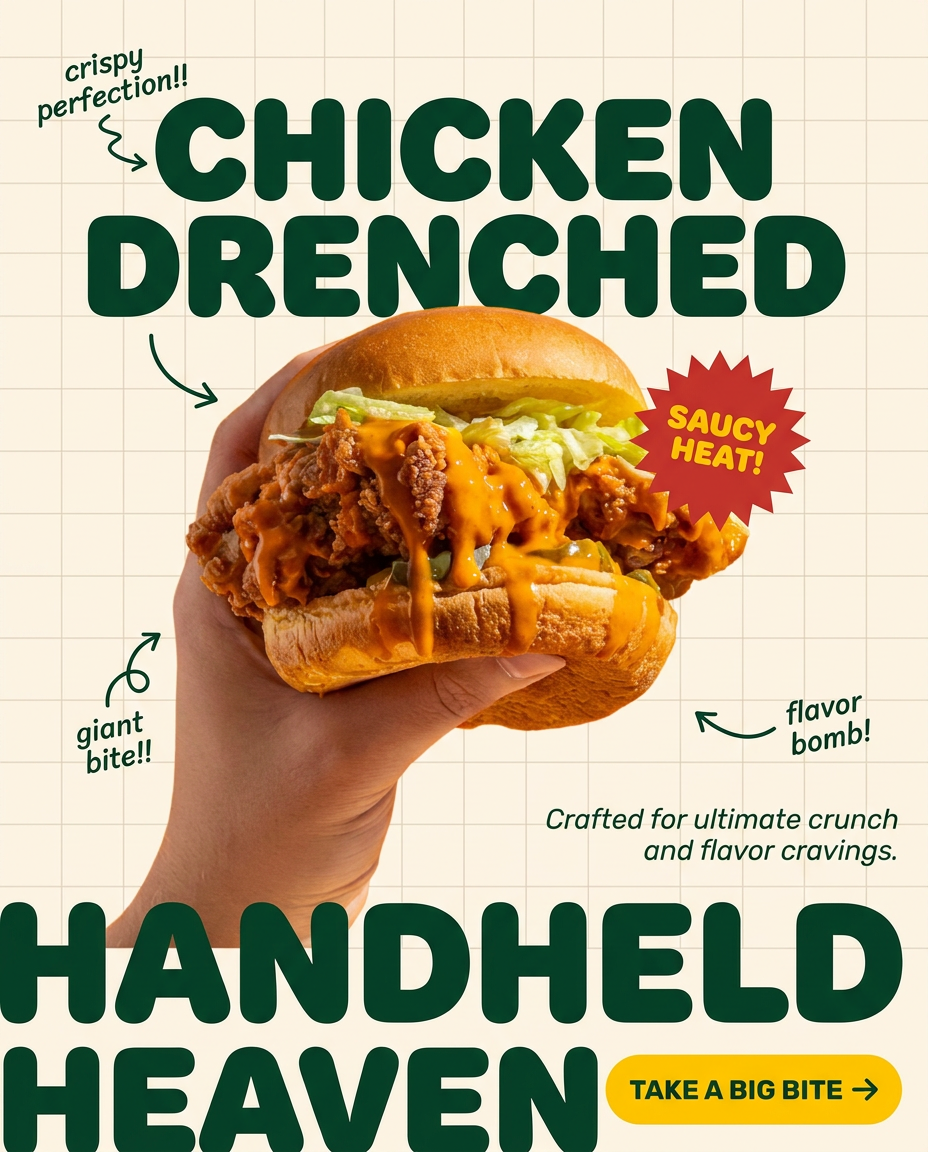
Turn any dish or snack into a bold, playful social ad. It places your food against a soft warm beige background with a subtle grid pattern, topped with chunky rounded headlines. It's clean, friendly, and instantly grabs attention in the feed.
Regenerate using your own assets.
Example: Creating 50 consistent character portraits
This workflow isn't just for items. Need portraits for your dialogue system? Create a spreadsheet with character descriptions like 'Old male shopkeeper with a friendly smile,' 'Stoic female city guard captain,' and 'Mysterious cloaked stranger.' Your Brandkit can define a 'semi-realistic, oil-painted portrait' style. The workflow will generate a unique, on-style portrait for every character on your list. This is essential for building a believable world and is a core part of the AI character concept art pipeline.
Use this workflow to create a series of high-end, editorial-style portraits that maintain perfect visual consistency.
Workflow code: #myup-yk1h-uqy8
High-End Editorial Fashion Magazine Cover

Drop in any portrait and turn it into a high-end editorial magazine cover. It frames your subject beautifully with relaxed, high-fashion posing and soft styling for a polished print aesthetic.
Regenerate using your own assets.
Step 4: Execute the batch and validate the results
Once your workflow is configured, you simply run it. MyUP handles the repetitive production work, executing the prompt for every single row in your asset list. Your job shifts from being a manual creator to a creative director. As the assets are generated, you can review the grid of results, discard any that don't fit, and perhaps run a smaller batch for a few variations.
MyUP executes the production; you validate the final output. This combination of automation and human control is what makes an AI asset pipeline practical for real projects. You get the scale and speed of AI without sacrificing creative oversight.
