
You have a document full of great ideas, bullet points from your last presentation, or notes from a client call. You know they'd make great LinkedIn content. But the thought of opening a design tool to turn each point into a carousel slide makes you put it off for another day. You’re not alone. This is the most common bottleneck in professional content creation.
The real bottleneck isn't ideas, it's design
For most professionals, the problem isn't a lack of expertise. It's the time-consuming, manual labor of translating that expertise into visually compelling assets. Every bullet point becomes a 15-minute wrestling match in Canva or Figma—choosing a layout, resizing text boxes, finding the right brand color hex code, and positioning your logo. Multiply that by a five-slide carousel, and you've lost an hour you didn't have.
This isn't a creativity problem; it's a production problem. The solution isn't to become a faster designer. It's to build a system where design is no longer part of the process. AI should do more than just write your post's text; it should be your production engine, turning raw information directly into finished, on-brand visuals. This guide will show you the exact five-step workflow in MyUP to make that happen.
Step 1: Structure your notes for an AI workflow
The first step is to give your raw ideas a tiny bit of structure so the AI can understand how to break them into individual visual 'slides.' You don't need complex formatting. The goal is to create a clear hierarchy. Think of it like writing an outline for a presentation.
Here’s a simple format that works perfectly:
- Use a clear title for the first slide: This will be your cover. Make it bold or use a heading style.
- Use bullet points for subsequent slides: Each bullet point will become its own slide in the carousel. Keep them concise—a single, powerful sentence works best.
- Keep it simple: Avoid complex tables or nested lists. The idea is a linear flow of information, from point A to point B to point C.
For example, a document with notes on AI brand consistency might look like this:
Title: Why Your Brandkit is Better Than Fine-Tuning
- Fine-tuning is slow and expensive, requiring thousands of images and technical expertise.
- A Brandkit gives you instant control over logos, fonts, and colors without any training.
- Brandkits ensure every asset is 100% compliant, avoiding the stylistic drift of fine-tuned models.
- Update your Brandkit once, and your entire content production system updates with it.
That’s it. This simple text file is now the fuel for your entire week of LinkedIn content.
Step 2: Turn your key points into a carousel
With your notes structured, the manual work is over. Now you can feed them into a MyUP workflow that automatically generates the visual assets. The most effective format on LinkedIn for sharing multi-point ideas is the carousel, and creating one is the core of this system.
In MyUP, you simply paste your structured text into a workflow designed for this task. The AI parses your title and each bullet point, treating them as individual inputs for a series of visual slides. It then applies a layout template to each one, instantly creating a multi-page document or a set of PNGs ready for upload.
For a clean, professional look that’s perfect for sharing key takeaways or list-based content, this template is the ideal starting point. It focuses on clear typography and a minimalist layout that lets your message stand out.
Workflow code: #myup-sygb-rhnt
Minimalist Vertical Product Advertising Poster

Drop the clutter and put your product in the spotlight. This setup places your item against a pure, seamless white background with a striking vertical flow that draws the eye straight up. It's perfect for creating clean, high-end studio posters.
Regenerate using your own assets.
Step 3: Let your Brandkit handle the details
This is where MyUP changes the game. While the AI generates the structure of the carousel, your saved Brandkit automatically handles the visual identity. As each slide is created, MyUP applies your brand's specific fonts, color palette, and logo in the correct position. There's no manual adjustment needed.
This solves the biggest time-sink of traditional design tools. You're not just using a generic template; you're running your ideas through your own automated design system. The user—you—validates the output, but MyUP handles the production. This is fundamentally different from the manual work of fine-tuning an AI model to learn your style. As we explain in our guide on fine-tuning vs. a Brandkit, a Brandkit offers immediate control and guaranteed consistency, which is exactly what professional content requires.
Step 4: Create variations for a full week of content
A single carousel is great, but the real power of a workflow is its repeatability and versatility. To generate a full week of content, you don't need new ideas. You just need to re-package your existing notes into different visual formats. With your text already structured, you can run it through different MyUP workflows to create a variety of assets.
For instance:
- Monday: Post the full carousel you created in Step 2.
- Wednesday: Take the most impactful bullet point and run it through a single-image quote template.
- Friday: Use your title slide text in a bold, graphic-heavy template to create a standalone announcement post.
This approach lets you triple the output from a single set of notes. For a more dynamic and eye-catching visual for your standalone posts, try a template with a stronger editorial feel.
Workflow code: #myup-n0bi-2wzk
Bold Editorial Grid Poster

Create striking 2x3 editorial posters with six seamless, flat-color square cards in a perfect 4:5 grid. There are absolutely no gaps between the blocks, giving your content a bold, high-contrast magazine layout. It looks incredibly clean on any social feed.
Regenerate using your own assets.
Step 5: Schedule it out and put your content on autopilot
In less than 30 minutes, you've turned one document of notes into three or more on-brand visual assets. The final step is to load them into your scheduling tool. By batch-creating a week's or even a month's worth of content this way, you shift from a reactive content process to a strategic one. You're no longer scrambling for something to post each day. Instead, you're building a library of high-value assets ready for deployment.
This system turns content creation from a daily chore into a scheduled, predictable part of your marketing operations. To visualize your content calendar coming to life, you can even use your notes to generate a themed graphic for your planning process.
Workflow code: #myup-hcix-fsva
Textured Paper Calendar Close-Up
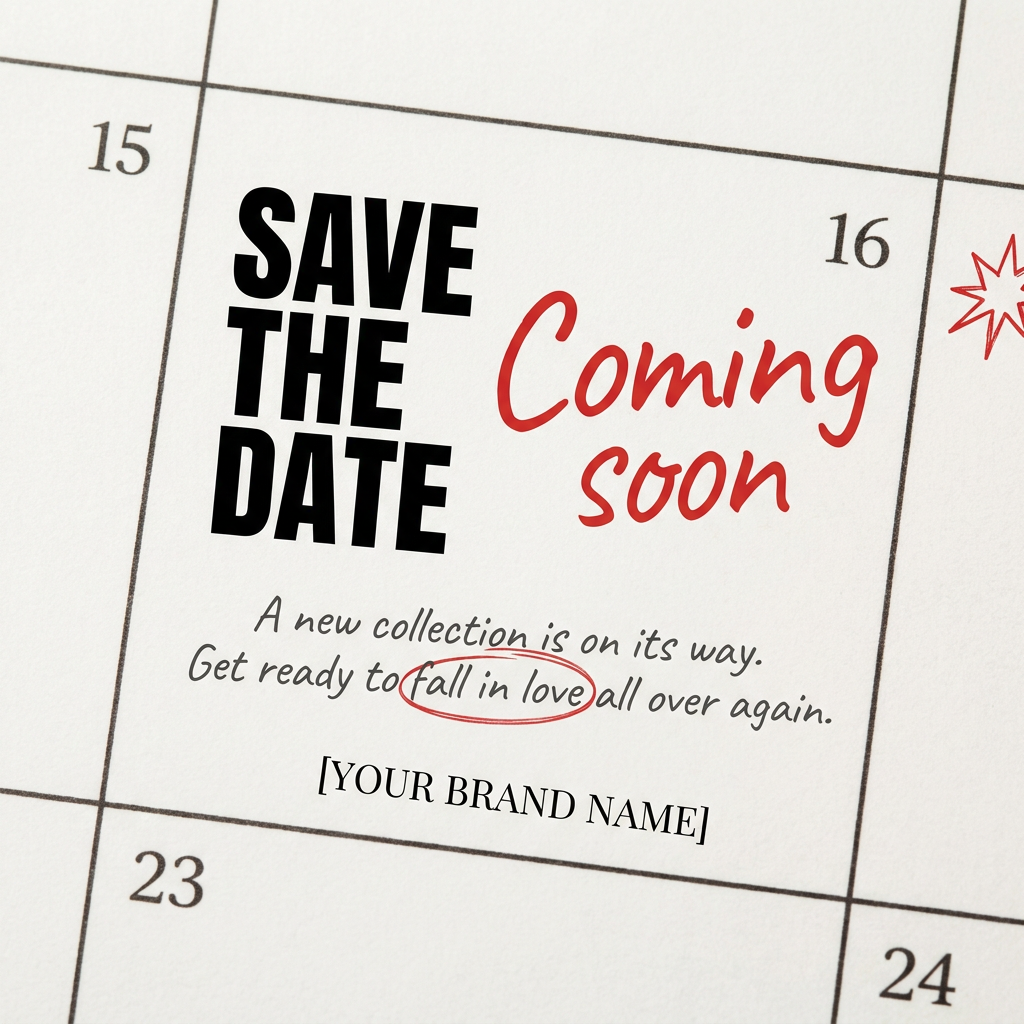
Turn your upcoming dates or launch schedule into a beautiful, tactile physical calendar. It renders crisp minimalist grids on heavy textured paper with realistic macro focus. Perfect for sharing events on social media without looking like a generic graphic.
Regenerate using your own assets.
From notes to assets: Your new content production system
By following this workflow, you've done more than just create a few LinkedIn posts. You've built a repeatable system for converting your knowledge into valuable brand assets with minimal friction. The bottleneck of manual design is gone. Your raw notes, meeting minutes, and presentation outlines are no longer just static text; they are inputs for an automated production engine powered by MyUP. Now, you can focus entirely on the quality of your ideas, confident that turning them into professional, on-brand content is just a click away.
