
You’ve seen it. The perfectly pleasant, perfectly generic AI-generated hero image of a smiling professional at a laptop. It fills the space, but it doesn't sell, convince, or build your brand. It's a visual placeholder that screams 'we used AI with a one-line prompt'. This visual uniformity is becoming a liability, making distinct brands look interchangeable.
The industry knows this is a problem. Just yesterday, June 27, 2026, Adobe announced Firefly's 'Structure Reference' to help with composition. Today, June 28, 2026, Stability AI released Stable Diffusion 4.0 with coherent in-image text. These are powerful features, but they are just that: features. They don't provide a complete system for creating assets that are not only well-composed but also consistently, deeply on-brand. A hero image isn't just a picture; it's a billboard for your entire value proposition. It needs to be engineered, not just generated. This guide provides the full workflow on MyUP.ai to create hero images that are functional, on-brand, and ready to convert.
A hero image has a job, not just a look
Before you write a single prompt, you need to define the job of your hero image. Unlike a blog illustration or a social media post, a hero image is a critical piece of your website's architecture. It must work with other elements, primarily your headline and call-to-action (CTA) button.
This means you need to control two things most AI image generators leave to chance:
- Composition and Negative Space: Where is your headline going? If your AI generates a busy image with the subject dead-center, you have nowhere to place your text without it becoming illegible. A functional hero image is designed with intentional negative space. You need to be able to command the AI to place the subject on the left third, leaving the right two-thirds clear for copy.
- Brand Alignment: The image must feel like it belongs to your brand. This goes deeper than just a general 'vibe'. It means using your exact color palette, reflecting your brand's photographic style, and matching the overall aesthetic of your UI. A mismatch here creates a subconscious sense of distrust and cheapens your brand perception. It's the same principle that applies when you generate AI video thumbnails; consistency is what drives clicks and conversions.
Generic AI tools treat this like an art project. MyUP treats it like marketing infrastructure. The goal isn't just a pretty picture; it's a functional asset built on your brand's rules.
Step 1: Define your brand's DNA with a Brandkit
You can't get on-brand results if the AI doesn't know your brand. Writing long, complex prompts trying to describe your style for every single image is inefficient and produces inconsistent results. The foundation of a scalable workflow is a centralized brand definition.
On MyUP.ai, this is solved with a Brandkit. Instead of describing your brand, you codify it. You can create a Brandkit in minutes by simply providing your website's URL. MyUP automatically analyzes your site and extracts the core components of your visual identity:
- Color Palette: Your exact primary, secondary, and accent color hex codes.
- Fonts: The typography you use for headlines and body text.
- Visual Style: The overall aesthetic of your imagery, whether it's minimalist, vibrant, photographic, or illustrative.
Once saved, this Brandkit acts as a permanent instruction set for any content you create on the platform. Every subsequent generation—from images to videos to social posts—will automatically reference this Brandkit to ensure consistency. This is the system-level solution that solves the root cause of inconsistent AI visuals. You can learn more about how this works in our deep-dive on why your AI designs lack consistency and how MyUP's Brandkit fixes it.
Step 2: Engineer the composition for your layout
With your Brandkit in place, you can now focus on the structure of the image. This is where you move from simple prompting ('a woman working') to compositional engineering ('a woman working, subject is on the left third of the frame, looking towards the right, with a clean, out-of-focus office background providing negative space on the right').
This level of control ensures the image you get is immediately usable with your website's layout. You're telling the AI not just *what* to create, but *how* to frame it as a functional design element. This is especially critical for product shots, where the product needs to be the clear focus but still leave room for marketing copy.
For a perfectly staged product hero image, you don't need to start from scratch. A workflow can handle the complex instructions for lighting, staging, and composition for you. The workflow below is designed to create high-end, studio-quality product shots with clean backgrounds perfect for a homepage.
Workflow code: #myup-xjaq-qhgx
Luxury Product Photography Studio
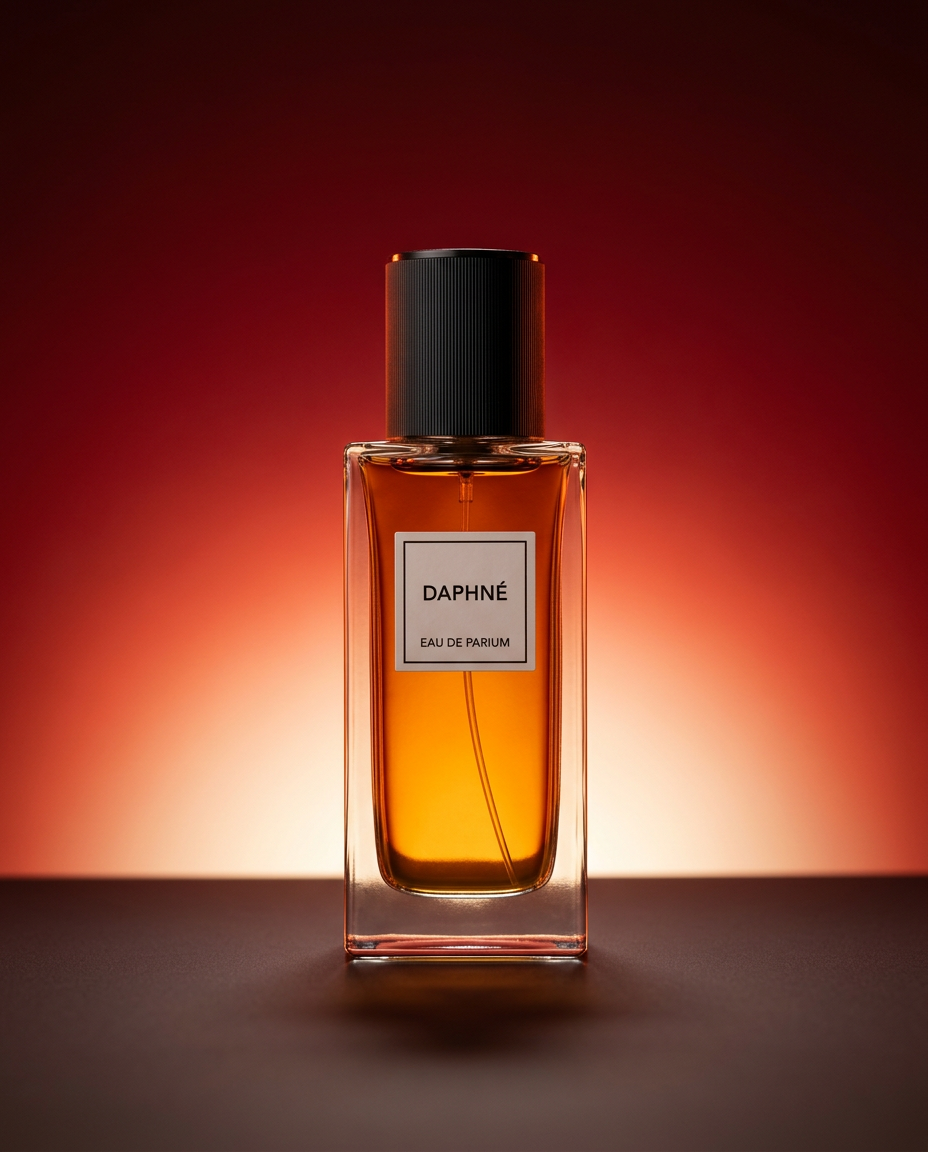
Drop your product into a dramatic, high-end studio setup. It places your item on a sleek flat surface against a rich crimson and orange cinematic gradient background. It's an easy way to get that moody, premium commercial look for any bottle, tech, or cosmetic.
Regenerate using your own assets.
Step 3: Generate on-brand visuals with a single click
This is where the preparation pays off. Because your Brandkit is active, MyUP's workflows automatically infuse your brand's color palette and stylistic DNA into the generation. If your brand uses a warm, earthy color scheme, the AI will prioritize those tones in the lighting, clothing, and environment. If your style is high-contrast and modern, the output will reflect that.
The user's role shifts from production to validation. MyUP executes the complex task of generating a compositionally sound, on-brand image. You simply approve or request variations. This is how you achieve both creative control and production speed.
If your hero image needs to feature a person who embodies your brand's persona—for example, for a fashion or lifestyle company—a workflow can ensure the result has the right editorial feel. This template generates visuals with a high-end magazine aesthetic, perfectly aligned with your brand's style.
Workflow code: #myup-yk1h-uqy8
High-End Editorial Fashion Magazine Cover

Drop in any portrait and turn it into a high-end editorial magazine cover. It frames your subject beautifully with relaxed, high-fashion posing and soft styling for a polished print aesthetic.
Regenerate using your own assets.
Step 4: Add headlines and CTAs directly in the image
For years, adding text to an AI image meant a clunky, two-step process: generate the image, then import it into a design tool to add text layers. With the latest models like Stable Diffusion 4.0, that's no longer necessary. It's now possible to generate images with crisp, coherent text baked directly into the visual.
On MyUP, this new capability is integrated directly into the brand workflow. You can now create a complete hero asset in a single step. The workflow can be instructed to generate an image that not only follows your Brandkit's style and color rules but also incorporates your headline or CTA using your brand's font style. The result is a fully-formed marketing asset, ready to be deployed to your site.
This workflow is ideal for creating posters or ads where text and image are tightly integrated. It uses your Brandkit to ensure both the visual and the typography are perfectly aligned with your identity.
Workflow code: #myup-fy77-jljs
Minimalist Elegant Product Advertising Poster

Turn any product shot into a high-end editorial ad. It places your item against a soft cream background with airy spacing and adds elegant, small serif typography at the top. Great for wellness or luxury brands wanting a calm, minimal aesthetic.
Regenerate using your own assets.
From one good hero to a dozen: making it repeatable
A single great hero image is good. A system for creating a dozen variations for A/B testing, different campaigns, or seasonal promotions is what actually grows a business. The entire process described above—from Brandkit application to compositional prompting—is a reusable workflow in MyUP.
Once you've perfected the workflow for your homepage hero, you can run it again and again with minor tweaks to generate endless on-brand assets. Change the product, adjust the headline, or target a different audience segment. The core brand rules and compositional structure remain locked in, ensuring consistency at scale.
This is the difference between using AI as a simple image generator and leveraging it as a true content production platform. You stop being a prompt operator and start being a creative director, guiding a system that handles the repetitive production work for you. See our pricing plans to get started with building your own automated brand workflows.
