
If you've been on X or TikTok in the last 48 hours, you've seen it: the 'AI UGC' trend. Since around June 24th, marketers have been sharing surprisingly authentic, low-fi product shots generated with AI, a direct rebellion against the sterile, hyper-polished look that screams 'made by a robot'. For performance marketers, this is huge. It promises a way to scale the highest-trust ad format without the logistical nightmare of shipping products to hundreds of creators.
But there’s a catch. Getting an AI to generate something that looks believably *imperfect* is a challenge. Most tools are optimized for flawless results. The real secret isn't just a magic prompt—it's an end-to-end workflow that takes a carefully crafted image and turns it into a finished, on-brand ad creative ready for testing. We ran the experiment ourselves. Here's the workflow that actually works.
Yes, AI can create UGC-style ads. Here’s the workflow that works.
The core problem isn't the AI model; it's the production process. A raw image from a generator like Midjourney is only step one. To fight creative fatigue and increase testing velocity, you need to turn that image into a branded ad with headlines, motion, and a call-to-action—and you need to do it fast. This is where a connected workflow makes all the difference. You generate the authentic visual and immediately assemble the final ad in the same environment. This simple workflow is the perfect starting point.
Workflow code: #myup-seli-mtp0
Photo Product Ad
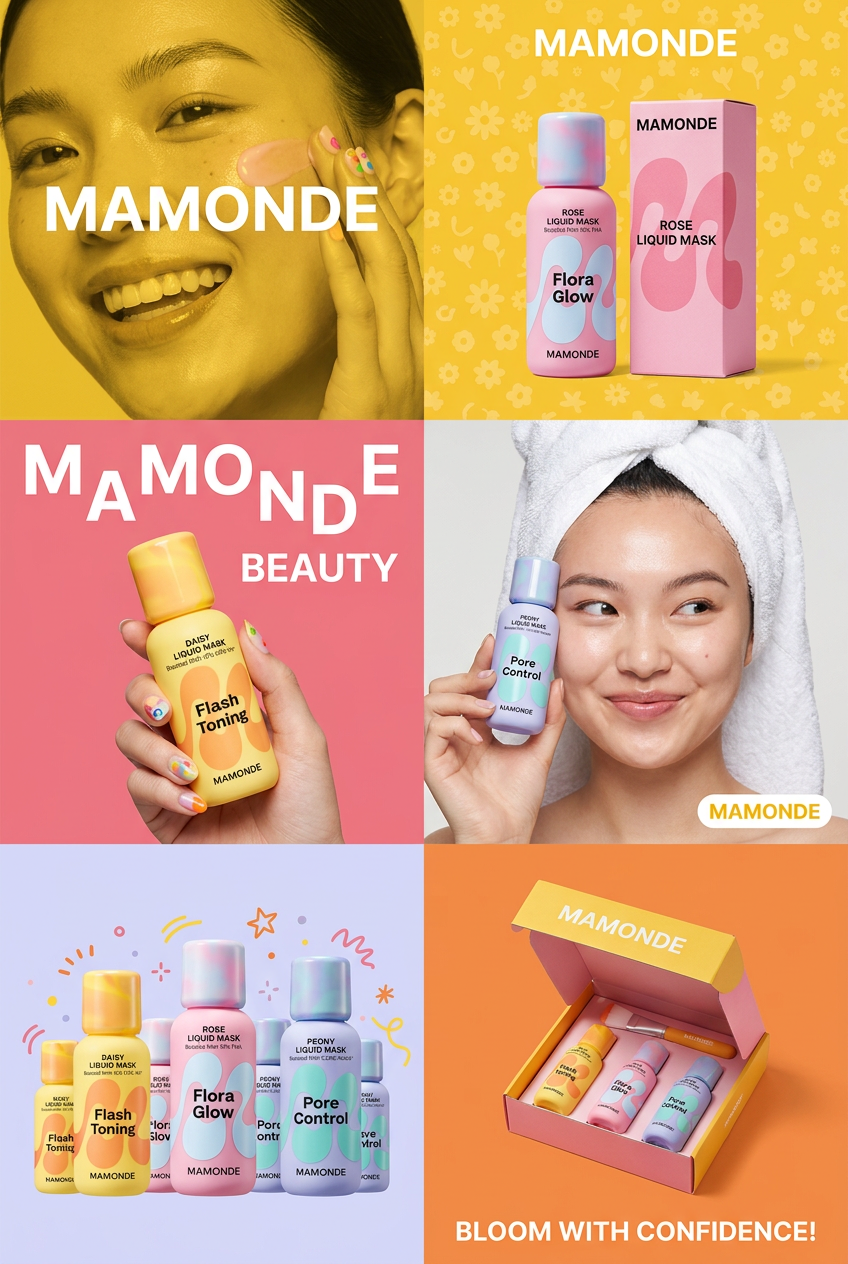
Get that high-end editorial look with a stacked, multi-panel campaign layout. It slices your brand visuals into a bold three-tier grid, pairing tight product close-ups right next to lifestyle shots for a cohesive, modern beauty poster.
Regenerate using your own assets.
Step 1: The 'anti-prompt' for faking authenticity
The first mental shift is to stop prompting for perfection. You need to ask the AI for the flaws that signal authenticity. We call this the 'anti-prompt'. Instead of 'photorealistic, 4K, studio lighting', you're asking for 'shot on a smartphone, natural window light, slightly messy room'. It’s about describing a real-world scenario, not an idealized one.
Here are the keywords we found most effective:
Camera & Framing
- shot on a smartphone, shot on iPhone
- selfie angle, from the user's perspective
- low angle, slightly tilted frame
- subtle motion blur, out of focus background
Lighting
- natural window light, morning light
- harsh direct flash with strong shadows
- overcast day, soft ambient light
- golden hour, warm tones
Environment & Context
- messy bedroom background, unmade bed
- cluttered kitchen counter, on a wooden table
- inside a car, on the passenger seat
- in a real home, lived-in apartment
Imperfections & Texture
- slight film grain, noisy image
- subtle lens flare
- realistic skin texture, pores
- --no perfect lighting, --no studio, --no professional model (as negative prompts)
Step 2: Generating our UGC-style product shots
We put the anti-prompt to the test with a fictional skincare brand, 'Aura'. The goal was to create two distinct UGC scenarios a real customer might capture.
Shot 1: The Bathroom Shelfie
The goal here was a classic 'top shelf' shot, but one that felt personal, not staged. Here's the prompt we used:
UGC style photo, a bottle of 'Aura' face serum on a crowded bathroom shelf next to other products. Natural morning light from a window is hitting the bottle. The background is slightly out of focus. Shot on a smartphone, realistic, slightly candid.
The result was a shot that felt genuine. The lighting wasn't perfect, and the cluttered background sold the 'real home' aesthetic, making the product feel like a part of someone's actual routine.
Shot 2: The 'On-the-Go' Moment
For this one, we wanted to capture the product in use, outside the home. The idea is to show it's a part of a customer's life.
From the user's perspective photo, a woman's hand holding a bottle of 'Aura' serum inside a car, passenger seat. Soft afternoon light. The background shows a blurry street scene through the window. Shot to look like a quick phone snap.
This image had the candid, unplanned quality that builds trust. It’s not a sales photo; it’s a snapshot from a life the customer can relate to.
Step 3: From static image to a complete video ad
This is the step that most people miss. A static image has a low thumb-stop rate on platforms like Instagram Reels or TikTok. It needs motion and a message. Instead of exporting the image and opening a separate design tool, we pull it directly into a MyUP video ad workflow.
The workflow automatically pulls from our saved Brandkit—applying the 'Aura' brand fonts, colors, and logo. We simply type in a headline like "Finally found my holy grail!" and a call-to-action. The workflow adds a subtle zoom effect, turning the static image into a 5-10 second video clip, ready for export. This entire process takes less than a minute.
By generating 10 image variations in Step 2, we can now create 10 unique video ad creatives in under 10 minutes. This is how you achieve real testing velocity. You can use a simple template or a more dynamic one depending on the campaign's goal.
Workflow code: #myup-ywpr-rqz6
Professional Sportswear Ad

Suspends your apparel right in the center of a high-energy promo shot, held up by hands around the frame. It gives your shirts or jerseys a gritty, collaborative streetwear editorial look that feels alive and physical.
Regenerate using your own assets.
The final check: Does it feel real enough?
AI isn't perfect, and that's where human oversight is critical. MyUP executes the production, but you validate the output. Before adding an asset to your campaign, run it through this quick check:
- The Uncanny Valley Test: Are there any obvious AI artifacts? Check hands, reflections, and text in the background. Regenerate if anything looks off.
- Lighting Plausibility: Does the light source make sense? A 'shot in car' image shouldn't have studio-style rim lighting.
- Compositional 'Flaws': Does it look a little too perfect? The best results are often slightly off-center or have an imperfect composition, just like a real photo.
Your job is to be the creative director, approving the shots that meet the authenticity bar. The AI does the heavy lifting of production.
The goal isn't to fool people, it's to test creative faster
Let's be clear: the point of AI UGC is not to create undetectable deepfakes or fabricate testimonials. It's an incredibly powerful tool for creative prototyping. It allows performance marketers to test dozens of visual concepts, scenarios, and aesthetics to see what resonates with an audience *before* investing thousands in photoshoots or creator campaigns.
Instead of guessing which lifestyle shot will perform best, you can generate ten different versions and get real data. This speed transforms your ability to optimize campaigns and beat creative fatigue. It’s about using AI to explore more ideas, find winning ads faster, and scale what works without the traditional production bottlenecks. You can even use it for more dynamic formats, like the viral product orbit video, to rapidly expand your creative library.
