You've tried the popular prompts. You've asked for "authentic user-generated content" or "real people using products." Yet, your AI-generated ads still have that tell-tale "AI sheen"—the models look too perfect, the lighting is too flawless, and the scene feels staged, not candid. It's frustrating when you're trying to scale your ad creative, but the output feels untrustworthy.
The problem isn't that AI can't create realistic images; it's that relying on a single magic prompt misses the bigger picture. Authenticity in UGC-style ads isn't just about the subject; it's about the subtle imperfections, the natural context, and the consistent brand elements that make a visual believable. This isn't a prompt issue; it's a workflow issue. And with MyUP, you can build a workflow that fixes it.
You've tried the prompts. Why do your AI UGC ads still look fake?
The core challenge with AI-generated UGC is the "authenticity gap." AI models, by design, often aim for ideal representations. This leads to images with:
- Overly perfect subjects: Flawless skin, symmetrical features, and poses that scream "model shoot" rather than "candid moment."
- Unnaturally pristine environments: Backgrounds that are too clean, lighting that's too studio-like, or settings that lack the lived-in feel of real life.
- Generic compositions: Shots that feel stock-photo sterile, lacking the dynamic, often imperfect framing of a real smartphone photo.
These subtle cues immediately signal to your audience that the content isn't real, eroding trust and diminishing the effectiveness of your ad. It’s the difference between a friend’s genuine recommendation and a glossy, manufactured endorsement.
For more on creating realistic people, check out our guide: Why your AI people look fake, and the prompts that create photorealism.
The fix is a workflow, not a magic prompt
To bridge the authenticity gap, you need a systematic approach that guides the AI beyond generic perfection. This means shifting from simply inputting a prompt and hoping for the best to directing the AI through a controlled, iterative process. MyUP.ai provides this control system, allowing you to define not just *what* you want to see, but *how* it should look, feel, and integrate with your brand.
Instead of rolling the dice with every new prompt, MyUP empowers you to build repeatable workflows that bake authenticity and brand consistency into every image. You become the creative director, approving and adjusting, while MyUP handles the complex generation and iteration.
Step 1: Lock in your brand reality with a Brandkit
Before you even think about generating an image, you need to ensure your brand elements are accurate. This is where MyUP's Brandkit feature becomes indispensable. A Brandkit allows you to define and save your visual identity—colors, fonts, logo, and even product specifics—which the AI then automatically references in every creative task.
Imagine trying to generate a UGC ad for your new skincare product. Without a Brandkit, the AI might invent a generic bottle, misrepresent your logo, or use off-brand colors. With a Brandkit, you upload your product images, specify hex codes, and provide brand guidelines once. Every subsequent generation will automatically incorporate these details, preventing costly misrepresentations and ensuring instant brand recognition. This foundational step ensures that even in a "candid" setting, your brand remains perfectly on-point.
Step 2: Prompt for imperfection, not perfection
The secret to authentic AI-generated UGC lies in embracing imperfection. Real user-generated content isn't perfectly lit or composed. Your prompts need to reflect this reality. When crafting your prompts in MyUP, focus on details that mimic real-world photography and candid moments:
- Camera style: Specify "shot on a smartphone," "candid photo," "amateur photography," or "unfiltered image."
- Lighting: Instead of "studio lighting," try "natural window light," "early morning sunlight," "soft afternoon glow," or "ambient room light."
- Composition: Request "asymmetrical composition," "rule of thirds," "slight motion blur," "off-center subject," or "shot from a low angle."
- Environment: Describe a "messy living room," "busy cafe," "urban street," or "cozy backyard" to add realism.
- Subject expression: Ask for "genuine smile," "laughing naturally," "lost in thought," or "interacting with product."
By guiding the AI with these nuanced details, you move away from the uncanny valley and towards believable, relatable imagery.
Workflow in action: Generating a candid sportswear ad
Let's put this into practice. Say you want a UGC-style ad for a new line of activewear—something that looks like a real person took it during their workout. Instead of a generic "woman running in sportswear," you'll use MyUP to direct a more authentic scene.
First, ensure your Brandkit includes your sportswear's exact colors and logo. Then, you can use a workflow like this to start generating:
Workflow code: #myup-ywpr-rqz6
Professional Sportswear Ad

Suspends your apparel right in the center of a high-energy promo shot, held up by hands around the frame. It gives your shirts or jerseys a gritty, collaborative streetwear editorial look that feels alive and physical.
Regenerate using your own assets.
This workflow will prompt for a "Professional Sportswear Ad" but within MyUP, you'll layer in the imperfection prompts: "a young woman, diverse ethnicity, casually stretching after a run, shot on a smartphone, natural morning light from a window, slight sweat on her brow, candid moment, wearing [Your Brand] activewear, soft focus on background, urban park in background, slight lens flare." You'll then review the initial generations, refining elements like expression, background blur, or product visibility directly within the MyUP interface until you achieve that perfect, imperfect shot. MyUP handles the production, and you validate the authenticity.
Step 3: Iterate and refine for believable variations
The first generation is rarely the final one. Authenticity often comes through iteration. Within MyUP, you don't just generate once; you refine. If the first image has a great pose but the lighting is off, or the product isn't quite right, MyUP allows you to adjust specific parameters or re-prompt for variations while maintaining the core elements you like.
You can guide the AI to make subtle changes: "make her smile a little less perfect," "add a slight shadow under the product," or "shift the background to be slightly more out of focus." This iterative control is crucial for moving from a good image to a truly believable one, ensuring the final output aligns perfectly with your vision for authentic UGC. It's about having human control over the AI's output, not just accepting its first attempt.
Workflow in action: Creating an authentic 'day in the life' fashion post
Consider creating an "outfit of the day" post that looks like a friend snapped it. This requires a natural setting and a sense of effortless style. With MyUP, you can set up a workflow that prioritizes this candid feel.
Start with a template designed for fashion, then inject your brand's specific clothing details via your Brandkit. From there, you can instruct the AI to create a scene like this:
Workflow code: #myup-3sro-edbt
Brand Clothes Post

Turn any outfit photo into a high-end fashion promo poster. It centers your subject in a full-body shot against a dark, dramatic studio backdrop, perfectly cropped for social feeds. It gives your apparel a moody, editorial look instantly.
Regenerate using your own assets.
This "Brand Clothes Post" workflow, combined with prompts like "woman casually walking down a bustling city street, shot from a slightly low angle on a phone camera, warm afternoon sunlight, natural interaction with her phone, wearing [Your Brand] jeans and a graphic tee, blurred background of street vendors, genuine expression," will help you achieve a truly authentic look. You can then iterate on the scene, perhaps changing the time of day or the specific action, until you have a series of posts that feel genuinely captured, not generated.
Step 4: Scale your authentic creative across an entire campaign
The real power of a MyUP workflow for UGC ads is its scalability. Once you've established a successful formula for authenticity and brand consistency, you can replicate it across an entire campaign without starting from scratch every time. Need 10 variations for A/B testing? A dozen different angles for various social platforms? MyUP's workflows allow you to generate these quickly, maintaining the authentic feel while providing the diversity you need.
This means you can produce a high volume of unique, believable UGC-style ads in a fraction of the time it would take with traditional methods or generic AI tools. The consistency is baked in, and the authenticity is a repeatable outcome, not a lucky guess.
For example, to quickly generate a range of authentic ads for a beverage product, you could use a workflow like this:
Workflow code: #myup-cqnu-i50m
Drink Product Ad
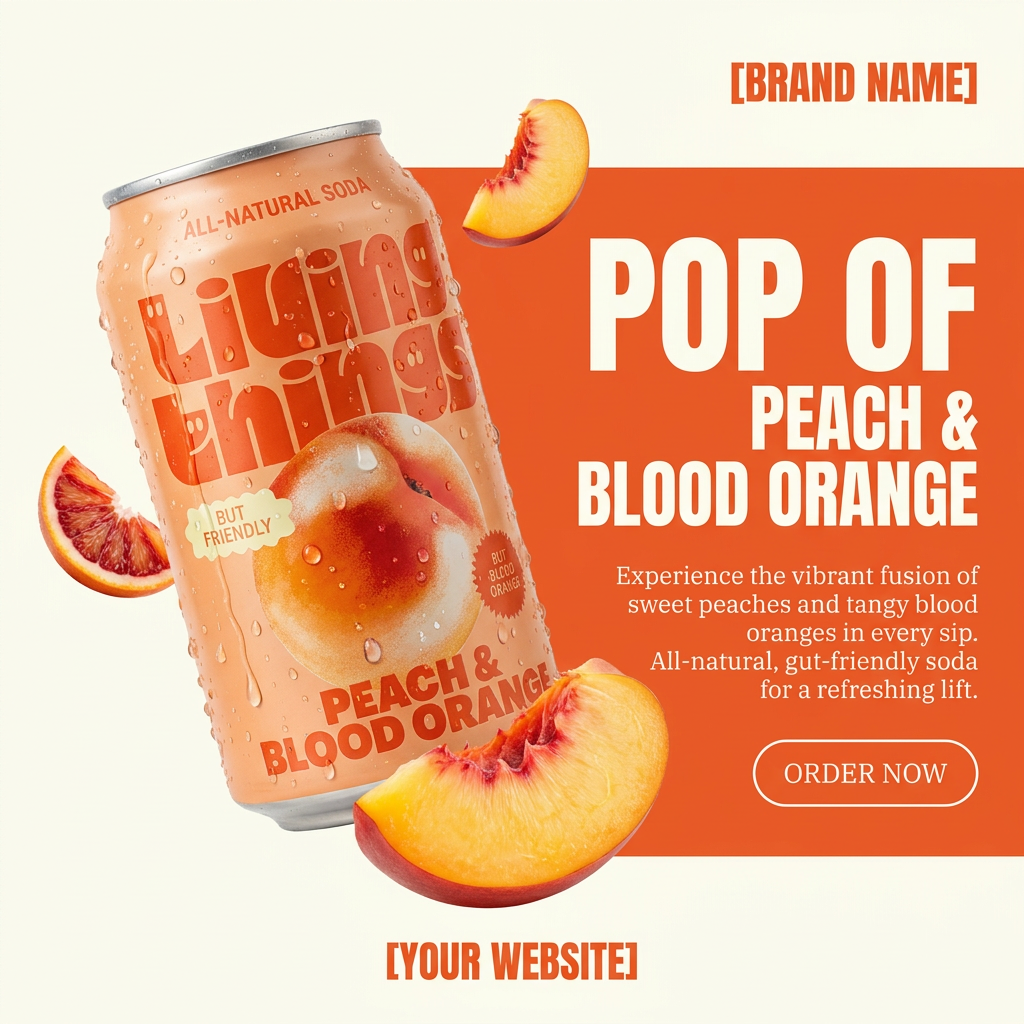
Turn any product photo into a bold, modern ad poster. It automatically frames your item against a split-color background, pairing a clean cream tone with a solid block of your product's dominant color. Super clean, minimal, and ready for social feeds.
Regenerate using your own assets.
This "Drink Product Ad" workflow, customized with your brand's specific drink and natural, candid prompts, can generate a series of images showing different people enjoying the product in various everyday settings, all while maintaining that crucial authentic feel.
Stop prompting, start directing
Creating AI UGC ads that look genuinely authentic isn't about finding a secret prompt; it's about implementing a disciplined, iterative workflow. The "AI sheen" disappears when you gain control over the subtle nuances of realism—the imperfections, the natural light, the candid moments. MyUP.ai provides that control system, turning you from a prompt gambler into a creative director.
By leveraging MyUP's Brandkits and structured workflows, you can direct the AI to produce content that truly resonates, builds trust, and drives conversions. It's time to move beyond hoping for realism and start consistently creating it.
