
You’ve done everything right. You used AI to generate a user-generated content (UGC) style ad. The person looks photorealistic, the lighting is perfect, and the product is clear. But it’s not converting. You look closer and see it: the vacant stare, the plastered-on smile, the complete lack of genuine feeling. The 'dead eyes'.
If you’ve been running into this, you’re not alone. As of mid-2026, it’s the number one complaint from performance marketers testing AI creative: the ads look technically real but feel emotionally fake. And in a format like UGC where authenticity is the only currency, 'fake' is a conversion killer. The problem isn’t your prompt. The problem is you’re using a single prompt when you need a workflow. This guide provides the exact MyUP workflow to fix it.
The emotional uncanny valley: why your AI UGC ads are failing
We've moved past the first uncanny valley of getting AI people to look real. Now we're stuck in the second, more difficult one: getting them to feel real. A generic prompt like “happy woman holding skincare product” will produce a technically perfect image of a person with the facial muscles arranged in the shape of a smile. But it won't produce an image of a person who is genuinely happy.
Why? Because AI models are trained on vast datasets of images tagged with simple emotional labels like 'happy', 'sad', or 'surprised'. They reproduce the most common, generic representation of that emotion. The result is a human-shaped mask, not a human expression. This lack of nuance is what creates the 'dead eyes' effect. It’s the subtle disconnect between the perfect smile and the empty expression that signals to a viewer’s brain that something is wrong. Trust evaporates, they scroll on, and your ad spend is wasted.
From prompter to director: the workflow for authentic emotion
To create an ad that converts, you need to stop thinking like a prompter and start acting like a director. A director doesn't just tell an actor to 'be happy'. They give them context, motivation, and specific notes: 'You just got a promotion, but you’re trying to play it cool. Give me a look of quiet satisfaction.' That level of nuance is what creates a believable performance.
You can achieve the same control over AI, but not with a single prompt. It requires a multi-step, iterative process. In MyUP, we build this as a reusable workflow:
- Step 1: Composition. Generate the base scene and character. Get the setting, lighting, and product placement right, but keep the expression relatively neutral.
- Step 2: Direction. Isolate and iterate on the facial expression using highly specific, nuanced emotional language. This is where you direct the performance.
- Step 3: Finalization. Lock in the perfect expression and use your MyUP Brandkit to layer on logos, fonts, and colors for a campaign-ready asset.
This approach puts you in control. MyUP executes the complex generation steps; you validate the final emotional output. This is the only reliable way to get results that feel authentic enough to persuade a real customer.
Step 1: create your base ad creative
First, we need a canvas to work on. The goal here is to generate a high-quality, photorealistic UGC-style image where the composition is solid, but the emotion is secondary. Don't try to get the perfect smile in this first step. Focus on the fundamentals: a believable person, your product shown clearly, and a natural environment.
In MyUP, you can use a template to handle this heavy lifting. Instead of writing a complex prompt from scratch, you start with a workflow that’s already structured for a UGC ad. You simply provide your product and scene details, and it generates the base image.
This workflow for a branded apparel post is a perfect starting point. It establishes the character and setting, giving you a strong foundation for the next step of emotional refinement.
Workflow code: #myup-3sro-edbt
Brand Clothes Post

Turn any outfit photo into a high-end fashion promo poster. It centers your subject in a full-body shot against a dark, dramatic studio backdrop, perfectly cropped for social feeds. It gives your apparel a moody, editorial look instantly.
Regenerate using your own assets.
Step 2: prompting for micro-expressions, not just smiles
With your base image generated, it's time to direct the emotion. This is where you move from simple labels to descriptive language. You will take your base image and use it as a reference in a new prompt, instructing the AI to only change the facial expression with surgical precision.
Here’s the difference in action:
- Weak Prompt: “A woman smiling.”
- Strong Prompt: “A woman with a look of wry amusement, a slight smirk playing on her lips, one eyebrow slightly raised.”
- Weak Prompt: “A man looking happy.”
- Strong Prompt: “A man with a look of quiet confidence and satisfaction after finishing a project, a subtle, relaxed smile, eyes looking directly at the camera with a friendly gaze.”
The key is to describe the physical components of the emotion, not just the emotion itself. Think in terms of 'micro-expressions'—the subtle crinkle of the eyes, the slight parting of the lips, the tension in the brow. This is an iterative process. You might run a few variations in MyUP, adjusting the prompt until you land on the expression that feels genuinely authentic. For more on the fundamentals of creating lifelike people, our guide on prompts for photorealism is a great resource.
Use this product ad workflow to iterate on your base image and dial in the perfect, believable expression.
Workflow code: #myup-seli-mtp0
Photo Product Ad
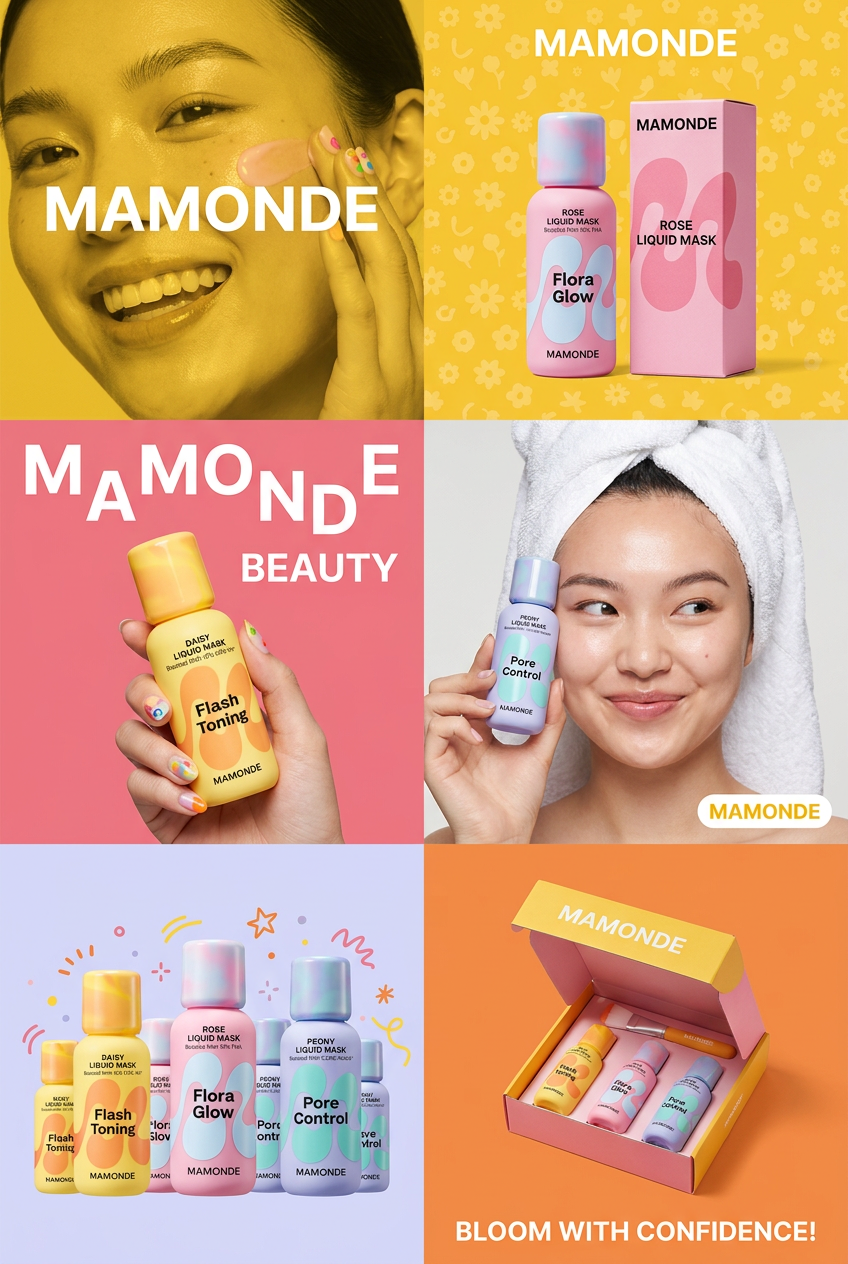
Get that high-end editorial look with a stacked, multi-panel campaign layout. It slices your brand visuals into a bold three-tier grid, pairing tight product close-ups right next to lifestyle shots for a cohesive, modern beauty poster.
Regenerate using your own assets.
Step 3: scaling authenticity across your campaign
You’ve done it. You have a single, emotionally resonant ad creative. But you don't need one ad; you need a campaign. This is where a workflow-based platform like MyUP becomes indispensable. Once you've perfected the series of prompts that generates your desired authentic emotion, you save it as a custom workflow in your MyUP library.
Now you have an 'emotion engine'. You can run this workflow again and again, simply swapping out the product, the background, or the character's clothing. The core emotional direction remains consistent, giving your entire campaign a cohesive, authentic feel. This is how you scale trust.
The final step is to make it brand-compliant. With your MyUP Brandkit, the platform automatically applies your logo, brand colors, and custom fonts to the finalized image. In minutes, you can generate a dozen variations of your ad, all emotionally consistent and perfectly on-brand. This is far more efficient than generating single images and hoping for the best, a process you can see in our guide to creating a week's worth of social visuals from one prompt.
This workflow helps you apply your brand elements to your emotionally-tuned creative, preparing it for any channel.
Workflow code: #myup-kbgo-tlle
Product Brand Post

Drop in your product to generate a cohesive nine-post Instagram grid. It blends warm lifestyle photography and flat-lay packaging with bold hand-drawn doodles, collages, and urban billboard mockups. Everything automatically styles itself to your brand's colors.
Regenerate using your own assets.
Stop generating faces. Start creating characters.
The era of getting lucky with a single prompt is over. Performance marketers can't build campaigns on chance. The future of effective AI ad creative lies in control, consistency, and direction. By shifting from prompting for a 'face' to using a workflow to direct a 'character', you move from generating static images to creating believable moments.
A character has a story, a motivation, and an inner life that shows on their face. A generic AI face has a vacant smile. Your customers can tell the difference instantly. MyUP is the platform built for this new reality, providing the workflow and brand controls you need to direct AI, validate the results, and produce ad creative that genuinely connects and converts.
