It’s June 2026, and we’re living in a strange new world for AI video. On one hand, Kuaishou just opened the waitlist for its Kling model, showing off demos of hyper-realistic sizzling steaks that look better than reality. The potential is clearly there.
On the other hand, your social feed is probably full of viral AI fails: pizza recipes where the cheese turns into plastic, ghostly hands stirring phantom ingredients, and onions that morph into apples mid-chop. For anyone trying to actually create food content, the gap between the promise and the reality is a massive frustration.
The problem isn't your prompts. The problem is trying to get a single text-to-video AI to perform a complex, physical process it doesn't understand. The secret to creating professional, Tasty-style recipe videos isn't a better AI model—it's a better workflow. Here’s the step-by-step process for getting delicious results every time on MyUP.ai, no camera or kitchen studio required.
Deconstructing the 'Tasty' video: what we need the AI to do
Before we build, let's break down the iconic overhead recipe video format. It’s not one continuous shot; it’s a sequence of distinct, controlled moments designed for clarity and visual appeal. To replicate it with AI, we need to generate:
- Crisp, clean overhead shots: Each key step of the recipe (e.g., ingredients in a bowl, onions sizzling in a pan, the final plated dish) needs its own high-quality image.
- Quick cuts and simple motion: The video creates energy by cutting between these steps, often with subtle zooms or pans to keep the viewer engaged.
- Bold, on-brand text overlays: Clear, easy-to-read instructions appear on screen, using a consistent font and color scheme that defines the brand's visual identity.
Trying to get this from a single prompt like "make a video of a lasagna recipe" is a recipe for disaster. But generating each component separately? That’s where you take back control.
Step 1: Generate your keyframes as hyper-realistic photos
The most reliable way to avoid the uncanny valley of melting cheese is to stop asking the AI to animate a physical transformation. Instead, generate a perfect still image for each critical stage of your recipe. This gives you total control over the quality and composition of every shot.
In MyUP.ai, you can use the AI Image Generator to create these keyframes. The goal is photorealism. Forget generic prompts; get specific with photographic language. Think like a food stylist:
- For ingredients: "Overhead flat lay of fresh pasta ingredients on a dark slate countertop: flour, eggs, olive oil, basil. Bright, natural morning light."
- For cooking action: "Macro shot, close up of minced garlic and onions sizzling in a hot stainless steel pan with olive oil, glistening, aromatic steam rising, studio lighting."
- For the final dish: "Beautifully plated spaghetti carbonara in a ceramic bowl, garnished with fresh parsley and black pepper. Shallow depth of field, warm restaurant ambiance."
This approach sidesteps the AI's weakness (process simulation) and leans into its strength (creating stunning still lifes). You're not generating a video; you're creating the core assets for your video. If your AI food photos have looked fake in the past, this focus on texture and lighting is the fix. To get a shot that looks like it came from a professional campaign, you can start with a workflow designed for high-quality product advertising.
Workflow code: #myup-w0vh-abft
Food Product Ad
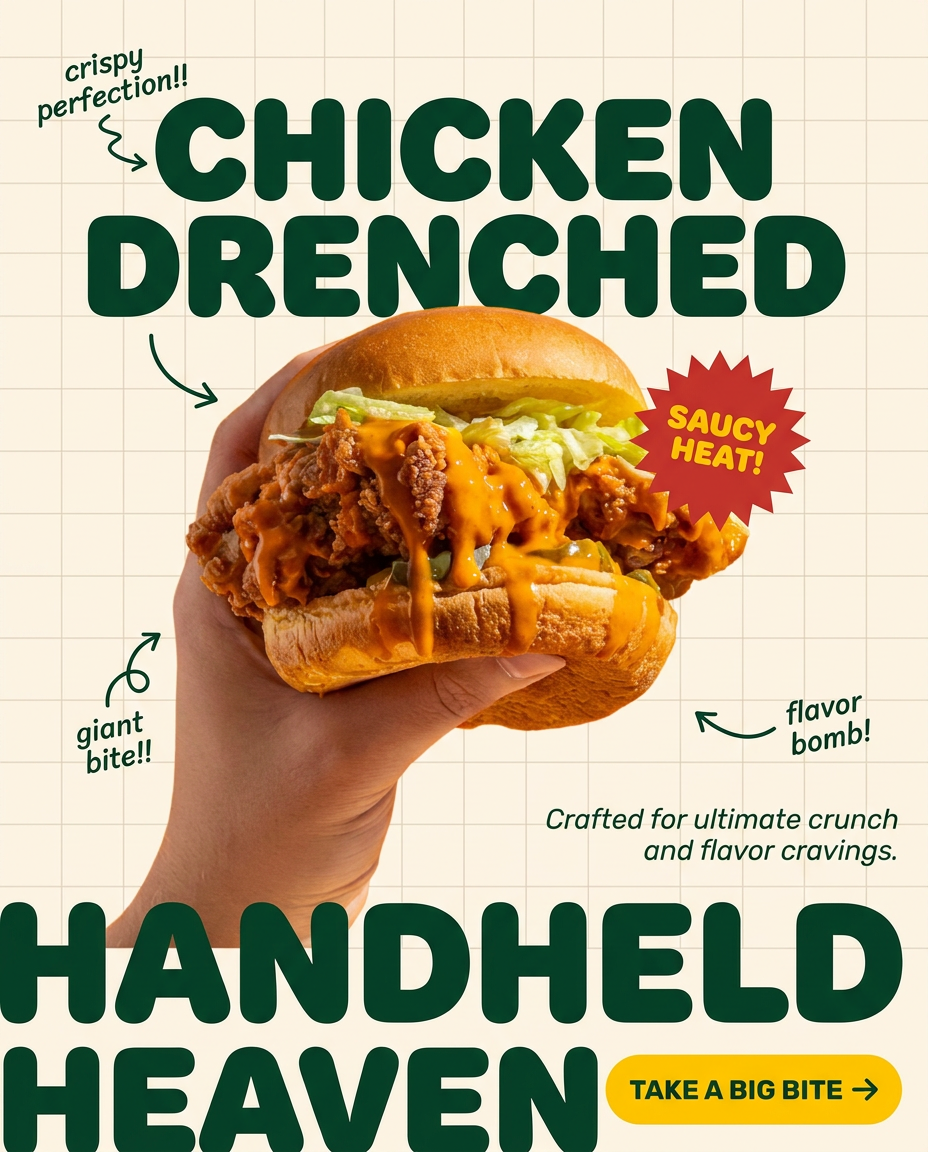
Turn any dish or snack into a bold, playful social ad. It places your food against a soft warm beige background with a subtle grid pattern, topped with chunky rounded headlines. It's clean, friendly, and instantly grabs attention in the feed.
Regenerate using your own assets.
Step 2: Turn your static shots into a dynamic video sequence
Once you have a folder of beautiful, hyper-realistic images for each recipe step, it's time to bring them to life. This is where you introduce motion, but in a controlled, deliberate way. In MyUP, you can use the AI Video tool to animate each still image.
You don't need wild, complex animations. The goal is to replicate the subtle camera moves of a real shoot:
- Slow Zoom In: Apply this to a shot of the finished dish to make it look more appetizing.
- Gentle Pan: Use a slow pan across a flat lay of ingredients to guide the viewer's eye.
- Quick Cut: When you assemble the clips, the transition from one static-but-animated shot to the next creates the energetic, fast-paced feel of a classic Tasty video.
Import your generated images into a MyUP video project. Apply a simple animation to each one, arrange them in the correct recipe order, and set the duration for each clip—usually just 2-3 seconds. Suddenly, your series of still photos becomes a coherent, dynamic video sequence.
Step 3: Add on-brand instructions that look professionally designed
This is the step where most AI-only video workflows fall apart. Generic video tools often have clunky text overlays with limited font choices, forcing you to compromise your brand's visual identity. MyUP solves this with the Brandkit.
Because MyUP saves your brand's specific fonts, colors, and logo, you can apply them to text overlays with a single click. As you add the instructions for each step—"Dice 1 onion," "Sauté for 5 minutes," "Add tomatoes"—MyUP ensures every single text block uses your exact brand typography. This is the difference between a generic AI video and a piece of branded content that looks like it came from your team.
The design of the text matters just as much as the words. You want it to be bold, clear, and stylish. For inspiration on creating compelling, type-driven visuals, you can use a design-focused workflow to see how professionals handle typography in food branding.
Workflow code: #myup-6hp6-zwh2
Minimalist Hand-Lettered Food Brand Poster
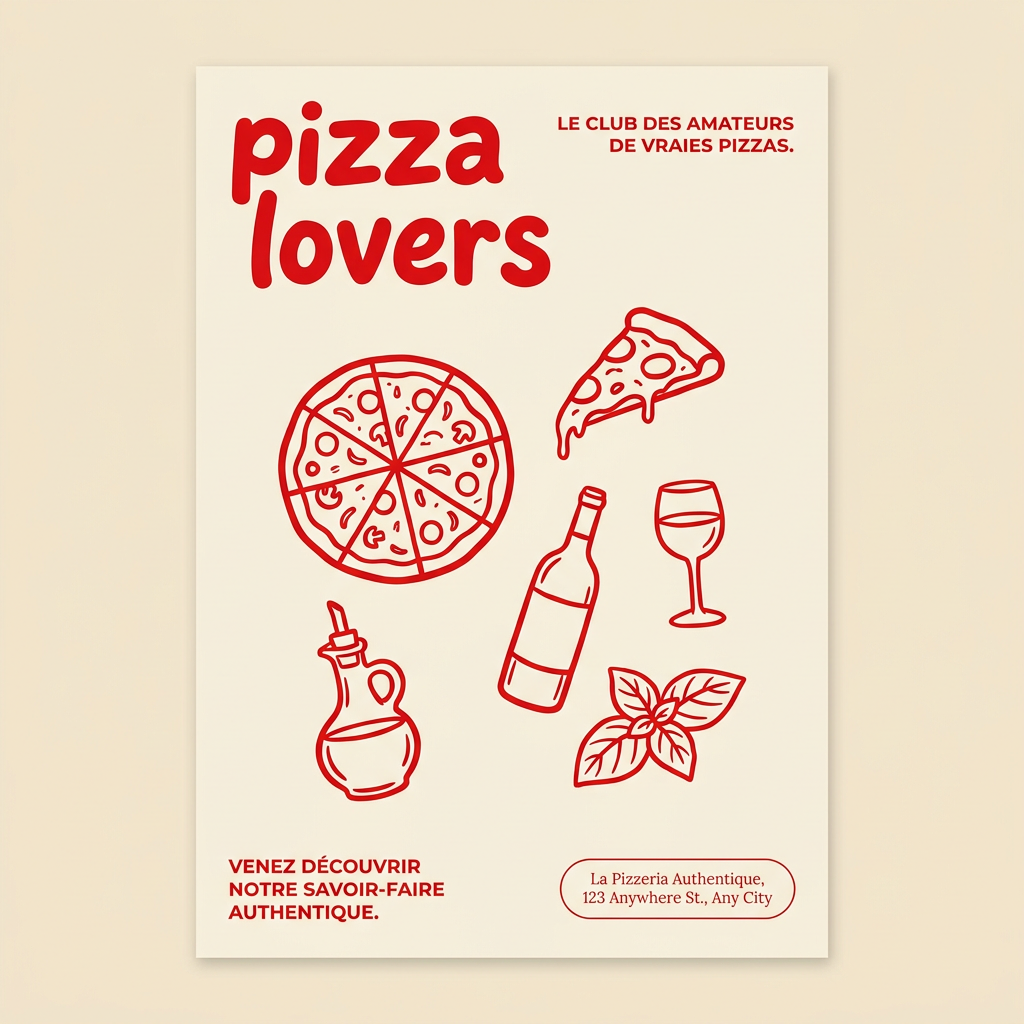
Generate clean, minimal posters for your food brand or cafe. It sets up a soft cream background with tons of breathing room, contrasted by a bold, chunky handwritten title in vivid red. It's a gorgeous editorial layout that makes your brand look instantly high-end.
Regenerate using your own assets.
Step 4: Assemble, add audio, and export your finished video
With your animated clips sequenced and your on-brand text overlays in place, the final steps in MyUP are simple. You can add a royalty-free music track from the built-in library to give your video the upbeat, engaging vibe common in social media recipe content. Adjust the timing of each clip to match the rhythm of the music, and then export the final video.
You now have a high-quality, professional-looking recipe video ready for TikTok, Instagram Reels, or YouTube Shorts—created entirely on one platform, without ever turning on a camera.
The workflow that gives you control over the final dish
Stop trying to find the one perfect prompt that will generate an entire recipe video. The state of AI in 2026 isn't there yet. The viral fails prove it. The path to quality isn't about giving up control to the AI; it's about using a workflow that gives you, the creator, control at every step.
By breaking the process down—generate perfect stills, add simple motion, and lock in branding with a Brandkit—you dictate the outcome. MyUP executes the production, but you validate the results. This workflow lets you create appetizing, on-brand food videos consistently, turning a frustrating AI problem into a reliable content engine.
