You’ve seen the viral threads on X. The ones showing a stunning product photo, claiming it was made with AI. The workflow usually involves four different apps: generate a scene in Midjourney, remove the background with another tool, painstakingly composite your product in Photoshop, then color-grade in Lightroom. The result looks amazing, but for a real business, this hacked-together process is a trap. It’s slow, expensive, and worst of all, it produces random one-offs, not a consistent brand identity.
Creating a single beautiful image is a party trick. Creating a hundred commercially effective, on-brand images for your e-commerce store is a system. This guide lays out that system—a professional, repeatable workflow for AI product photography inside a single platform: MyUP.ai.
The multi-tool AI product photo hack is broken
The promise of AI product photography is to replace expensive, time-consuming photoshoots. But the popular multi-tool method just trades one set of problems for another. Jumping between Midjourney for backgrounds, Photoshop for compositing, and other apps for touch-ups creates three major bottlenecks for any serious brand:
- It kills speed. What starts as a quick idea becomes a multi-hour project navigating different interfaces, subscriptions, and file formats. This doesn't scale when you need to launch a new product line next week.
- It destroys consistency. Midjourney doesn't know your brand colors. Photoshop's AI doesn't understand your brand's lighting style. Every image is a new battle to wrestle the output back toward your brand guidelines, often with inconsistent results.
- It hides costs. Subscriptions to four different specialized tools add up. More importantly, the cost in hours spent by you or your team on manual, repetitive compositing work is a massive hidden expense.
The goal isn't just to make one product photo with AI. It's to build a production engine for your brand's entire visual catalog. That requires a system, not a hack.
Step 1: Build your foundation (the clean plate and the Brandkit)
Every professional photoshoot, virtual or real, starts with two things: a perfect shot of the product and a clear creative brief. In our AI workflow, these translate to a 'clean plate' image and your MyUP Brandkit.
First, the clean plate. This is a high-resolution photo of your product on a neutral, easily removable background (like white or gray). It should be well-lit, in sharp focus, and shot from the angle you intend to use most often. This is your master asset. You only need to shoot this once.
Second, the Brandkit. This is where the magic of consistency happens. Before you generate a single image, you build your Brandkit in MyUP. You can do this automatically by just entering your website URL. MyUP pulls your brand's exact colors, fonts, and logo, and helps you define your visual style—the mood, lighting, and textures that make your brand recognizable. This isn't just a style guide; it's an active ingredient in the generation process. Every image you create from this point on will automatically inherit these brand rules.
Step 2: Generate a library of on-brand scenes
With your Brandkit established, you can now generate an entire library of potential backgrounds and environments for your product. This is where you replace the 'prompt and pray' step in Midjourney with a systematic, brand-aware process in MyUP.
Instead of just prompting for “a sunny kitchen counter,” you can use a MyUP workflow that already understands your aesthetic. It will generate scenes that use your brand's color palette, reflect its minimalist or rustic style, and match the specified lighting conditions. You can create dozens of options in minutes:
- Studio Setups: Clean, abstract backdrops with colored blocks, pedestals, and professional lighting.
- Lifestyle Scenes: Realistic environments where your product would naturally be used, like a bathroom shelf, a coffee table, or a gym bag.
- Textural Backgrounds: Abstract fields of color, fabric, stone, or other materials that align with your brand's texture palette.
Because these are all generated through your Brandkit, they already look like they belong to the same campaign. You're building a cohesive world for your product to live in. To get started creating a versatile poster-style scene, this workflow is the perfect starting point.
Workflow code: #myup-zpby-tzie
Minimal Vibrant Product Advertising Poster

Drop in any product shot and watch it turn into a bold, high-energy square ad. It automatically reads your packaging to pull out the dominant colors and text, then builds a vibrant poster styled perfectly around your brand.
Regenerate using your own assets.
Step 3: Run your virtual photoshoot
This is where the MyUP workflow consolidates the most tedious parts of the manual process—compositing, lighting, and shadowing—into a single step. You have your clean plate product shot and your library of on-brand scenes. Now, you combine them.
In MyUP, you select a product photography workflow. You upload your clean plate image and then either select one of your pre-generated scenes or describe a new one. The workflow automatically:
- Removes the background from your product image.
- Places the product realistically within the chosen scene.
- Analyzes the lighting of the scene and casts accurate shadows and reflections onto your product.
- Color-grades the final image to ensure perfect harmony between the product and its new environment.
This isn't just a simple cut-and-paste job. The AI understands depth, light sources, and perspective, creating a composite that is far more believable than what can be achieved quickly with manual tools. Whether you're creating ads for beverages or fine jewelry, there's a workflow designed for the specific textures and lighting needs of your product category.
Workflow code: #myup-cqnu-i50m
Drink Product Ad
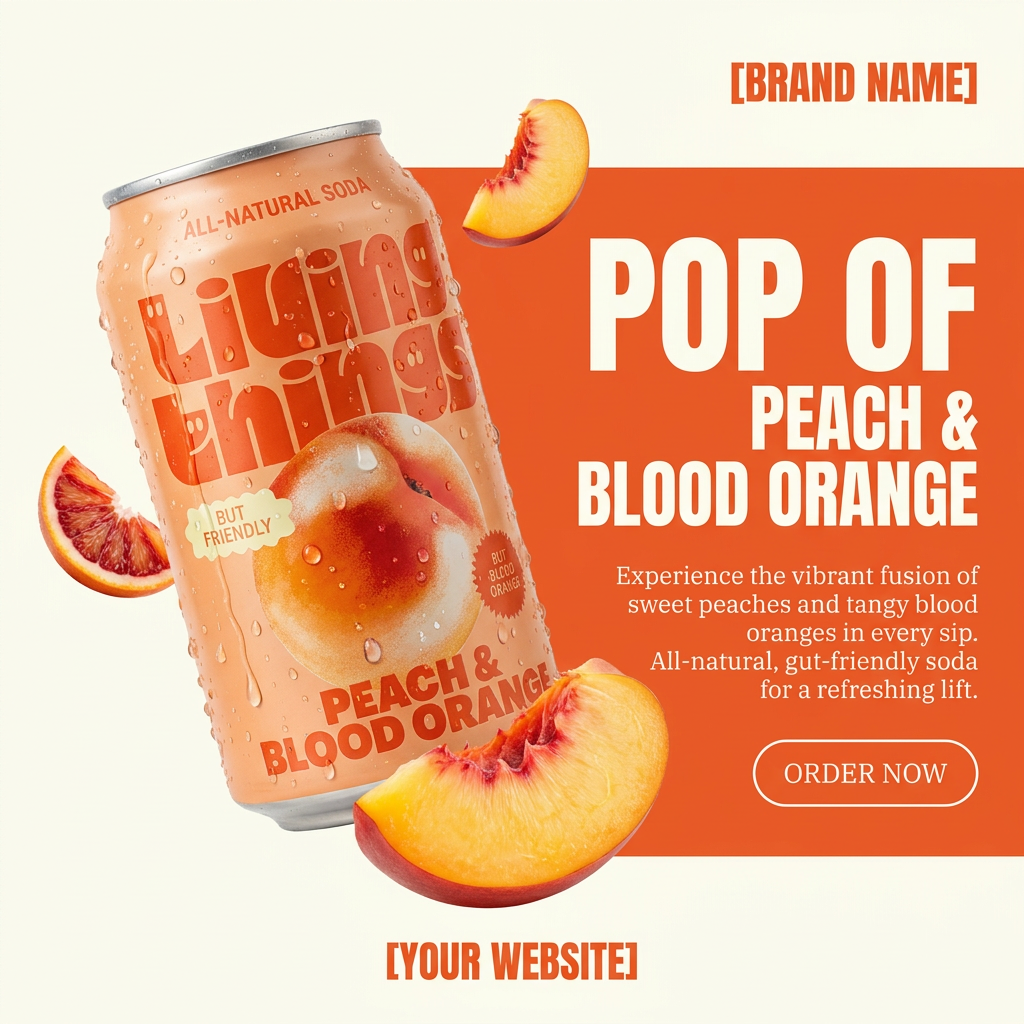
Turn any product photo into a bold, modern ad poster. It automatically frames your item against a split-color background, pairing a clean cream tone with a solid block of your product's dominant color. Super clean, minimal, and ready for social feeds.
Regenerate using your own assets.
Step 4: Scale from a single shot to a full campaign
You now have a proven recipe: one clean plate plus one on-brand scene description equals one perfect product shot. The power of a system is that you can now run this recipe at scale to generate an entire campaign flight.
Need visuals for a holiday promotion? Rerun the workflow with a prompt that adds festive elements to the scene. Launching on a new social channel that requires vertical images? Adjust the aspect ratio and generate a new batch. You can create dozens of variations for A/B testing ad creative, all while maintaining perfect visual consistency. This is how you move from making a single image to running a full-funnel visual strategy, all from a single starting point. You can even use this approach as the basis for generating an entire ad campaign from a single prompt.
For example, you can take your core product and generate specific ad formats for different contexts, like a high-end jewelry ad, with just a few clicks.
Workflow code: #myup-qtty-nngw
Jewerly Product Ad
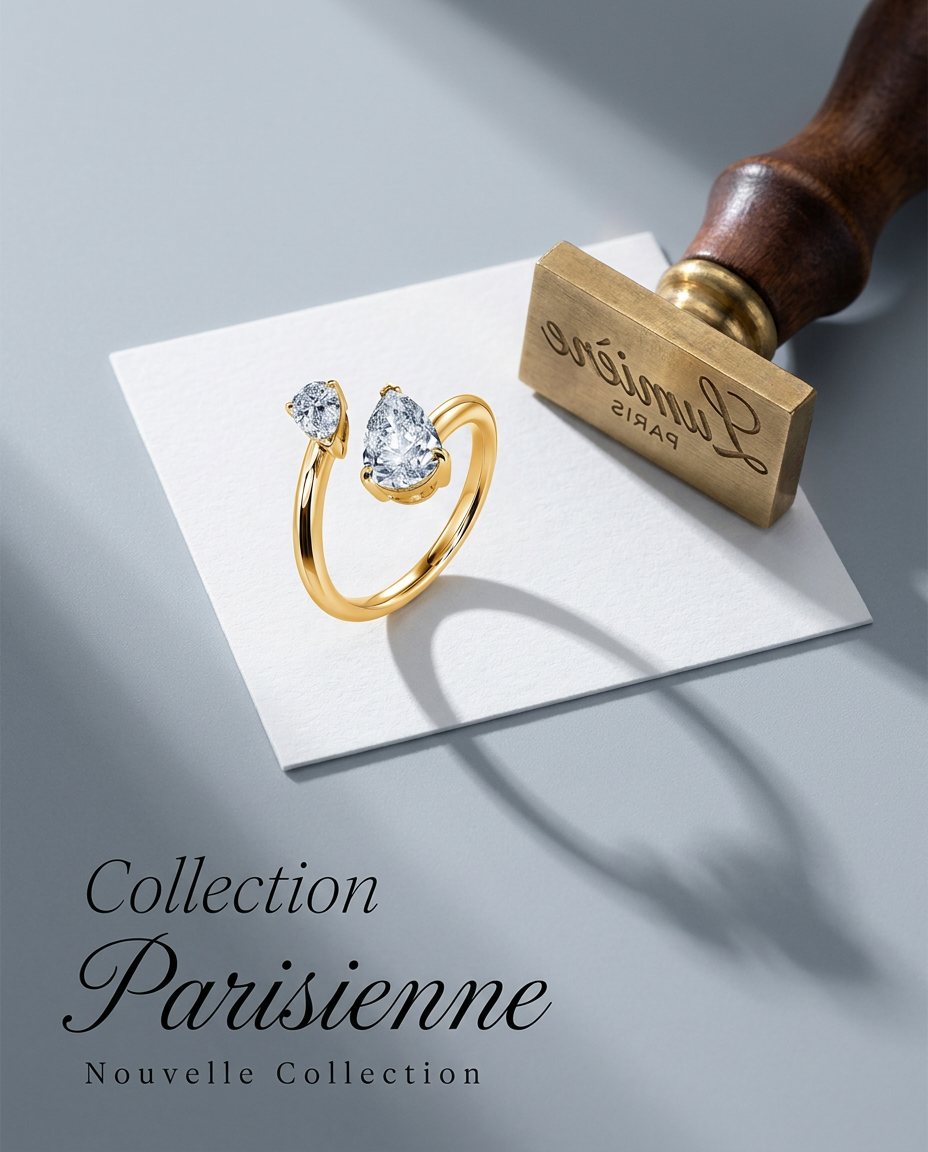
Turn any product into a high-end editorial shot. It drops your item into a clean, flat-lay setup with soft directional light and elegant long shadows against a cool matte gray background.
Regenerate using your own assets.
The final step: Human validation
The MyUP workflow is designed to handle 90% of the production labor, but the final 10% is where your expertise comes in. AI executes—you validate. MyUP will generate a batch of stunning, on-brand options, but you are the creative director. You make the final selection, choosing the images that are not only beautiful but also commercially smart. Does this shot highlight the key feature? Does this angle evoke the right emotion? AI provides the options at an unprecedented scale, but your human insight makes the final decision that drives the sale.
Why a system beats a hack, every time
The viral, multi-app AI product photo hacks are interesting experiments, but they aren't a business process. They don't scale, they don't guarantee brand consistency, and they consume far too much time for the value they deliver.
A true AI workflow, built on a platform like MyUP, is different. By starting with your Brandkit, you ensure every single asset is on-brand by default. By using integrated workflows, you replace hours of manual compositing with a single click. You move from being a random image generator to a systematic director of your brand's visual universe. This is how you leverage AI to not just make pictures, but to build a stronger, more consistent, and more profitable brand. Ready to build your system? Create your free MyUP account and Brandkit today.
