
In the last 48 hours of June 2026, the world of AI product photography got a massive upgrade. Midjourney released a new photorealism style. Adobe launched 'Generative Match' for brand consistency. And new single-purpose tools like Booth.ai hit the market, promising one-click lifestyle shots. The tools are better than ever, but they've created a new problem for e-commerce owners: chaos. Jumping between platforms gives you a collection of images, not a cohesive catalog. Your studio shots from one tool don't match the lifestyle scenes from another, and brand consistency is lost. This is where a workflow beats a tool. Instead of chasing features, this guide gives you a repeatable system inside MyUP.ai to turn one simple product photo into an entire, on-brand catalog—from clean studio shots to compelling lifestyle scenes—all from a single platform.
Step 1: Build your virtual studio with a MyUP Brandkit
Before you generate a single image, the most critical step is to define what 'on-brand' means for your store. This is the difference between creating random pretty pictures and building a scalable asset library. In MyUP, you do this with a Brandkit. Instead of describing your style in every prompt, you build your visual identity once. MyUP analyzes your website URL to automatically pull your logos, color palette, and fonts. You can then refine this by adding stylistic keywords that define your brand's mood—like 'bright and airy', 'minimalist and clean', or 'dark and moody'. This Brandkit becomes the foundation for every image you create. It’s your virtual photo studio, ensuring that every background, prop, and lighting setup automatically aligns with your brand aesthetic. This front-loads the work of maintaining consistency, so you can focus on creativity, not correction.
Step 2: Master the essentials with perfect studio shots
Every e-commerce store needs clean, high-quality studio shots. This is your digital shelf, and clarity is non-negotiable. Forget spending hours with a background removal tool only to get a flat, lifeless image. With MyUP, you can transform a basic smartphone photo into a professional studio portrait in seconds. Start with a clear, well-lit photo of your product. It doesn't need to be perfect, but the product itself should be in focus. Upload it to MyUP and use a workflow designed for studio shots. The platform isolates your product and places it on a clean, brand-consistent background with professional lighting and realistic shadows. The AI doesn't just cut out the background; it re-lights the product to fit the new scene, giving it depth and making it look like it was shot by a professional. The user validates the result, and MyUP handles the production. For a classic, clean look that works for any catalog, this template is the perfect starting point.
Workflow code: #myup-u4lt-o0ho
Studio Product Ad

Drop in a single product photo to instantly build a cohesive visual identity. It automatically samples your item's dominant colors to generate a beautifully matched mosaic moodboard, giving your brand an instant, polished aesthetic.
Regenerate using your own assets.
Step 3: Create lifestyle scenes that actually sell
Studio shots show what a product is, but lifestyle images show what a product does for the customer. They create context and desire. This is where tools like Booth.ai focus, but they often offer a limited set of generic scenes. Your brand isn't generic. With MyUP, your Brandkit ensures your lifestyle scenes are uniquely yours. You can generate images of your skincare bottle on a minimalist marble vanity that matches your brand's color palette, or your coffee beans next to a warm, sunlit window that evokes the feeling of a slow morning. The process is simple: using the same initial product photo, you select a lifestyle workflow. The prompt might be as simple as 'A bottle of our face serum on a bathroom counter, with soft morning light and a white orchid nearby.' Because the workflow is connected to your Brandkit, MyUP already knows your visual style—the type of marble, the color temperature of the light, the overall mood. This creates an endless supply of on-brand scenes that feel authentic to your store, not pulled from a stock photo library. To create elegant, minimalist scenes that put the focus on your product, the following workflow is ideal.
Workflow code: #myup-fy77-jljs
Minimalist Elegant Product Advertising Poster

Turn any product shot into a high-end editorial ad. It places your item against a soft cream background with airy spacing and adds elegant, small serif typography at the top. Great for wellness or luxury brands wanting a calm, minimal aesthetic.
Regenerate using your own assets.
Step 4: The workflow for tricky products: jewelry, glass, and metallics
AI image generators have historically struggled with reflective, transparent, and metallic surfaces. Jewelry, glassware, and chrome products often come out looking like distorted, smudged plastic. This has locked entire e-commerce categories out of using AI for their core product photography. However, recent model improvements have made generating these materials possible, if you have the right workflow. The key is in the details. When prompting for these items in MyUP, be hyper-specific about materials and lighting. Use terms like 'hard reflections', 'crisp caustics', 'polished sterling silver', and 'studio lighting with a softbox'. For example, instead of 'a gold necklace', prompt 'a close-up product shot of a delicate 18k gold necklace, intricate chain links, sharp focus, on a black velvet display, with dramatic studio lighting creating brilliant highlights'. Combining a detailed prompt with a workflow built for luxury goods gives the AI the specific instructions it needs to render these complex surfaces realistically. This workflow is specifically tuned to capture the shine and detail of jewelry.
Workflow code: #myup-qtty-nngw
Jewerly Product Ad
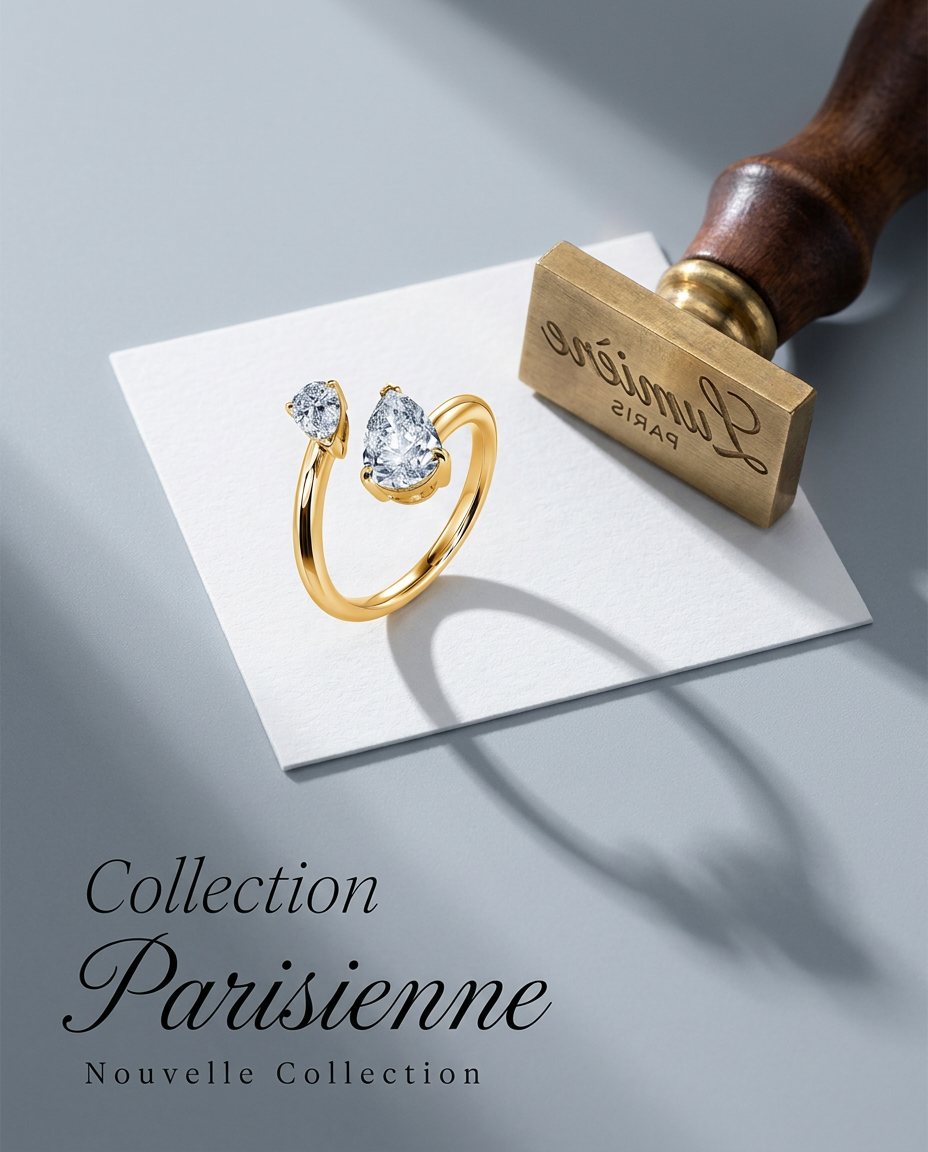
Turn any product into a high-end editorial shot. It drops your item into a clean, flat-lay setup with soft directional light and elegant long shadows against a cool matte gray background.
Regenerate using your own assets.
Step 5: From a single image to a full collection
You’ve created the perfect studio shot and a set of lifestyle images for one product. Now what about the other nine products in the collection? This is where a system truly outshines a one-off tool. In MyUP, you can save the exact workflow you just used—the prompts, the style, the lighting, the composition—and re-apply it to your other products. Simply swap the input image to your next product and run the saved workflow. The result is a completely consistent product line. Every item will look like it was photographed by the same person, in the same studio, on the same day. This level of consistency across an entire catalog builds immense brand trust and professionalism. It turns your AI product photography from a creative experiment into a reliable, scalable production line, letting you photograph an entire new product launch in an afternoon, not a week. This is how you go from creating a single ad to building an entire visual brand, as detailed in our one-photo ad campaign workflow.
Your product catalog, endlessly reimagined
Your product photos are your most valuable digital asset. They are your storefront, your salesperson, and your brand story all in one. Settling for generic background removal or a handful of inconsistent AI images is a missed opportunity. By using a workflow-driven platform like MyUP, you're not just making pictures; you're building an intelligent, on-brand, and infinitely scalable virtual photo studio. You get the creative control to define your aesthetic and the production speed to execute it across your entire business. Start with one photo, build your Brandkit, and see how quickly you can generate a full catalog of professional images ready to convert.
