If you've tried to create a mockup for your app or website recently, you've likely felt stuck between two bad options: the same sterile, overused templates everyone else uses, or the chaotic randomness of a raw AI image generator. You either look generic, or you waste hours trying to prompt an AI to place a phone in a user's hand without it having seven fingers.
But the ground has shifted. The technology for controlling AI image composition—made mainstream by features like Adobe's Structure Reference in July 2026—has finally matured. The era of wrestling with prompts for basic layouts is over. Now, it’s possible to generate unique, photorealistic lifestyle scenes and place your product into them with precision. This isn't about one-off hero images; it's about a reliable production workflow. MyUP is the platform that makes this new power practical for brand builders.
Why most AI mockups still look fake or off-brand
The core problem isn't the AI, it's the workflow. Most tools force you into one of two traps that scream 'fake' to your audience.
The Template Trap: Tools like Placeit offer consistency but at the cost of originality. Your unique app ends up in the exact same stock photo of a person holding a phone in a generic cafe as a dozen of your competitors. These templates are clean but lifeless, and they fail to capture the specific context and emotion of your brand.
The Generator Trap: Tools like Midjourney offer infinite creativity but zero control. You can generate a beautiful scene, but getting it to include a correctly-proportioned laptop on a specific type of desk, held at the right angle, is a battle of prompt engineering. You get originality without consistency, and the results often feel disconnected from your brand's actual visual identity. You spend more time prompting than producing.
Both approaches fail because they don't connect the mockup's environment to your brand's identity. MyUP solves this by integrating your brand directly into the generation process, giving you the best of both worlds: unique scenes with brand-aware consistency.
The 3-step workflow for realistic, on-brand mockups
Instead of fighting with a generic tool, you can use a dedicated workflow in MyUP that understands your goal from the start. The process is simple: you direct the creative vision, and MyUP handles the complex production. It breaks down into three straightforward steps.
Step 1: Generate a scene that understands your brand
Your mockup's background isn't just a backdrop; it's an extension of your brand story. A fitness app needs a different environment than a B2B SaaS tool. This is where MyUP's Brandkit changes the game. Before you even write a prompt, MyUP already knows your brand's colors, fonts, and overall aesthetic, learned from your website URL.
When you prompt for a scene like 'A woman in a bright, modern kitchen using a tablet to look at a recipe,' the Brandkit ensures the generated image's lighting, color palette, and mood align with your brand. The result isn't a random stock photo; it's a custom-shot scene that feels like it was art-directed specifically for you. You get a unique, high-quality lifestyle photo that already feels on-brand, without the cost of a photoshoot. The user validates the creative direction, and MyUP handles the production.
To get started with a photorealistic scene, this workflow is the perfect starting point.
Workflow code: #myup-seli-mtp0
Photo Product Ad
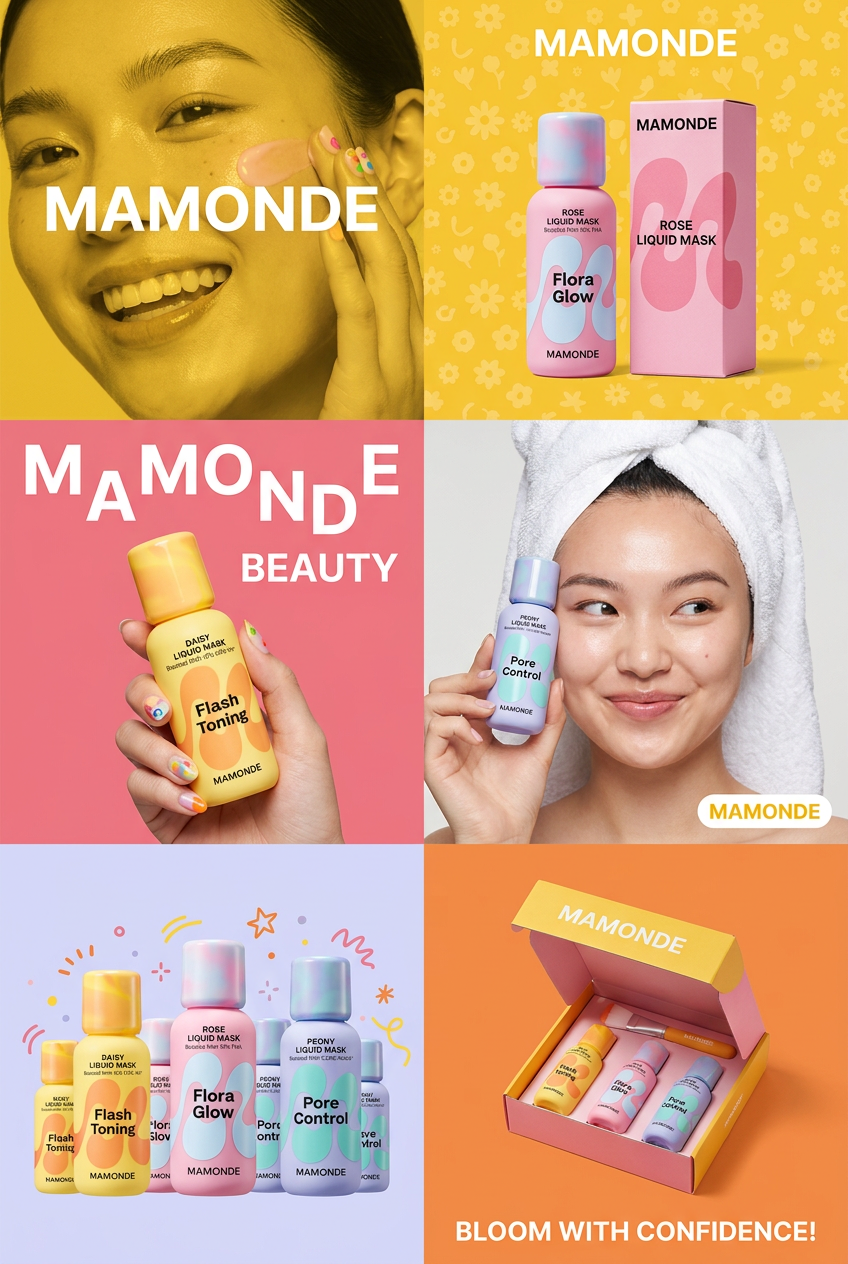
Get that high-end editorial look with a stacked, multi-panel campaign layout. It slices your brand visuals into a bold three-tier grid, pairing tight product close-ups right next to lifestyle shots for a cohesive, modern beauty poster.
Regenerate using your own assets.
Step 2: Place your screenshot with precision
Once you have your on-brand scene, the next step is placing your app or website into it. This is where other AI tools stumble, struggling with perspective, reflections, and lighting. The MyUP workflow is designed for this specific task. You simply upload a screenshot of your product's UI.
The workflow intelligently composites your screenshot onto the device screen within the generated image. It automatically adjusts for the correct perspective, matches the lighting of the scene, and even adds subtle reflections to make the placement look natural and believable. You don't need Photoshop or any technical skills. You upload the UI, and MyUP seamlessly integrates it into the environment. This is the control you've been missing—the ability to place your product precisely within a unique, AI-generated world.
For a clean, studio-style mockup with perfect lighting, this alternative workflow is ideal.
Workflow code: #myup-u4lt-o0ho
Studio Product Ad

Drop in a single product photo to instantly build a cohesive visual identity. It automatically samples your item's dominant colors to generate a beautifully matched mosaic moodboard, giving your brand an instant, polished aesthetic.
Regenerate using your own assets.
Step 3: Scale from one mockup to a full campaign
A single great mockup is good, but a successful marketing campaign needs dozens of them. You need visuals for different features, A/B ad tests, various social media formats, and blog posts. Replicating quality and consistency at this scale is where template-based tools become repetitive and raw AI generators become impossible to manage.
Because MyUP uses a repeatable workflow, you can easily generate endless variations. Want to showcase a new feature? Just upload a new screenshot into the same workflow. Need a version for Instagram Stories? Adjust the prompt for a vertical aspect ratio. The Brandkit ensures every single variation remains perfectly on-brand. You can build out an entire library of unique, compelling marketing assets in the time it would take to hunt for a single decent stock template. This moves you from creating single images to building a scalable system for visual content production, an approach we detail in our guide to creating AI ad variations that convert.
To turn your new mockup directly into a finished social media graphic, use the Product Post workflow.
Workflow code: #myup-gxue-opd0
Product Post

Turn a single product shot into a cohesive six-part Instagram story campaign. It mixes tactile crumpled paper textures with bold, stacked typography and custom mascot spots in your brand's signature colors.
Regenerate using your own assets.
Stop prompting, start producing
The conversation around AI mockups is no longer about whether it's possible. The new question is how to do it reliably, controllably, and on-brand. The answer isn't a better prompt; it's a better workflow. By separating scene generation from product placement and grounding the entire process in your brand's identity, MyUP gives you a factory for producing unique, high-quality marketing visuals.
Your app is unique. It's time your mockups were, too. Stop wrestling with generic tools and start directing your brand's story. MyUP will handle the production.
