
You have the perfect AI-generated logo. It's sharp, it's modern, and it captures your vision. Now what? You're likely looking at a single PNG file, wondering how to turn that one image into a cohesive brand identity that works across social media, ads, and every piece of content you create. This is where most AI logo generators leave you stranded.
Even with recent advancements like Midjourney's new --brand parameter, which aims to influence stylistic consistency, you're still primarily dealing with aesthetic influence rather than a truly integrated brand system. A style guide is helpful, but it doesn't build your assets for you. What you need isn't just a logo; you need a living, breathing brand system that can be deployed consistently, at scale, without constant manual adjustments. That's precisely the problem MyUP.ai solves.
Your AI logo is just a file. Here's what you're actually missing.
A logo, no matter how well-designed by AI, is merely a visual identifier. A brand, however, is a comprehensive system. It's the consistent application of your logo, color palette, typography, imagery style, and overall tone across every touchpoint. Without this system, your single, impressive AI logo becomes just another image lost in a sea of inconsistent content.
The real cost of this missing system isn't just aesthetic; it's operational. Every new social post, ad, or video you create requires a manual effort to match colors, find the right fonts, and align the overall style. This leads to brand drift, wasted time, and a fragmented brand perception that undermines trust and recognition. While tools like Midjourney are exploring new ways to guide style, they don't offer the integrated workflow to build and deploy a full brand system from your logo.
The 3-step workflow: from logo file to deployed brand system
MyUP.ai transforms your AI-generated logo from a static image into an active, repeatable brand system. This isn't about endless prompting or chaining together disparate tools. It's about building a central Brandkit that automates consistency across all your content. Here's the straightforward, three-step workflow:
- Build your Brandkit: Upload your logo, extract colors, and define fonts within MyUP.
- Stress-test your identity: Apply your new Brandkit to a professional template to see it in action.
- Generate on-brand assets: Produce a suite of diverse content, all automatically styled to your brand.
This workflow ensures that every piece of content you create, from a quick social post to a full marketing campaign, adheres to your brand guidelines, with MyUP handling the production and you providing the creative direction and final approval.
Step 1: Build your Brandkit from your logo in MyUP
The foundation of a consistent brand system in MyUP.ai is the Brandkit. This is where your AI-generated logo truly comes to life as part of a larger identity. The process is designed to be quick and intuitive, taking the guesswork out of brand guideline creation.
First, upload your preferred AI-generated logo file directly into MyUP. Our platform will automatically analyze your logo to suggest a primary color palette, extracting key hues that form the core of your visual identity. You can then refine these suggestions, adding secondary colors or adjusting tones to perfectly match your brand's personality.
Next, select your primary and secondary brand fonts. MyUP offers a wide selection of typefaces, allowing you to choose fonts that complement your logo and communicate your brand's message effectively. Once defined, these elements—your logo, colors, and fonts—are saved as your Brandkit, ready to be applied with a single click across all future creations. This one-time setup saves countless hours of manual design work and ensures visual harmony.
Step 2: Stress-test your new brand identity instantly
Once your Brandkit is established in MyUP.ai, the next crucial step is to see it in action. Does your logo look good on a professional graphic? Do the colors and fonts feel right together? Instead of guessing, you can immediately apply your Brandkit to a pre-designed template to get instant, real-world proof.
For example, let's say you're looking to hire and need a professional announcement. You can use the Modern Hiring Poster template to instantly visualize your brand identity on a ready-to-publish asset. MyUP automatically integrates your logo, brand colors, and chosen fonts into the template, generating a polished design in seconds. This allows you to validate your choices and make any necessary adjustments before committing to full-scale content production. It's about empowering you with control, while MyUP handles the execution.
Workflow code: #myup-eiob-7tbc
Modern Hiring Poster

Turn your open roles into stylish social announcements. It sets your hiring details against a soft, textured paper background with clean, editorial typography. Perfect for giving your brand a polished, modern look when you're looking to hire.
Regenerate using your own assets.
Step 3: Generate your first set of on-brand assets
With your Brandkit validated, it's time to move from testing to full production. The real power of MyUP.ai lies in its ability to generate diverse, on-brand assets from a single source of truth—your Brandkit. This eliminates the need to recreate brand elements for every new piece of content.
Imagine you need a compelling advertisement for a new product. You can select a template like the Drink Product Ad. MyUP will take your product image, automatically apply your Brandkit's colors and fonts, and generate a professional ad that aligns perfectly with your established visual identity. This seamless integration means you can produce a variety of marketing materials—social posts, banners, product ads, and more—all while maintaining impeccable brand consistency.
Workflow code: #myup-cqnu-i50m
Drink Product Ad
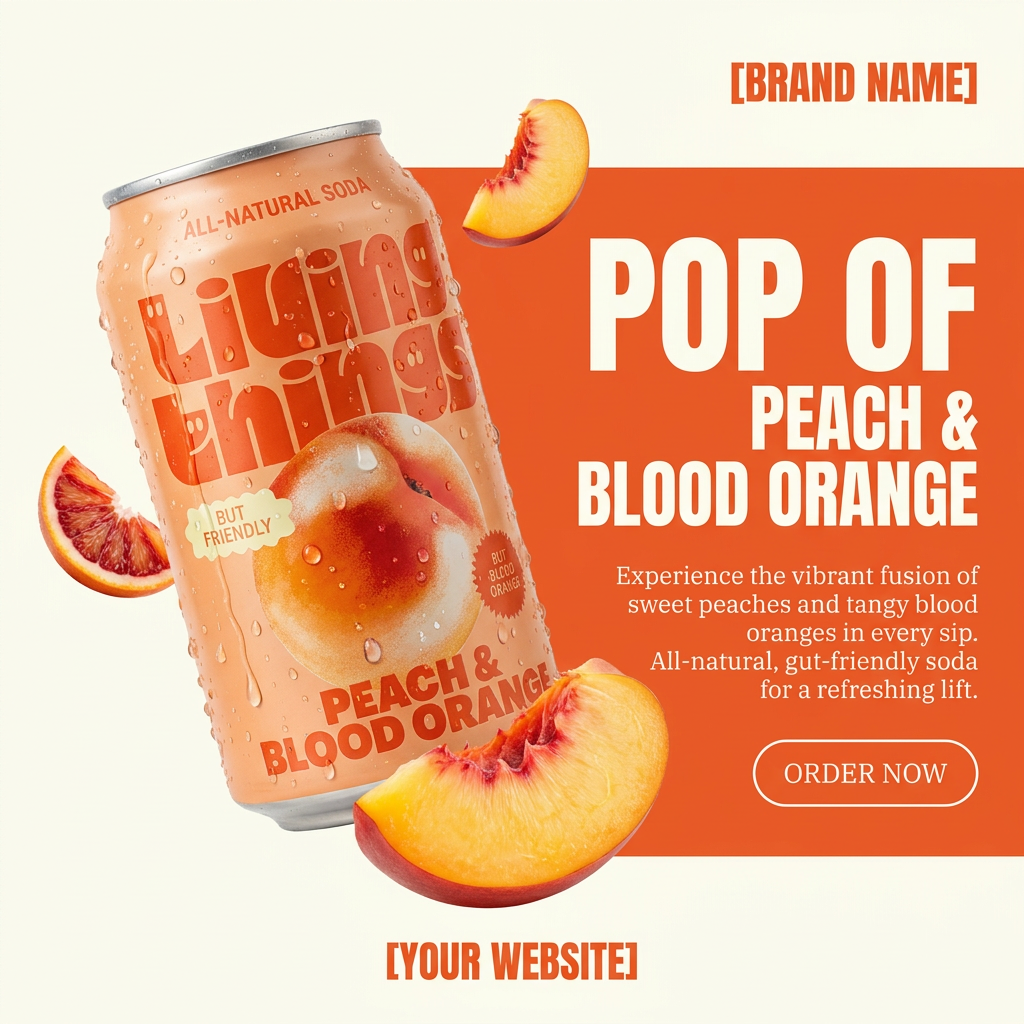
Turn any product photo into a bold, modern ad poster. It automatically frames your item against a split-color background, pairing a clean cream tone with a solid block of your product's dominant color. Super clean, minimal, and ready for social feeds.
Regenerate using your own assets.
Scaling up: from a Brandkit to repeatable content production
The true advantage of building a Brandkit in MyUP.ai becomes apparent when you need to scale your content production. Once your brand system is in place, every subsequent creative task becomes faster, more consistent, and less prone to error. You're no longer starting from scratch or manually adjusting elements; you're activating a pre-built system.
Consider creating a high-end visual for a fashion editorial. With your Brandkit, you can simply apply it to a template like the High-End Editorial Fashion Magazine Cover. MyUP will ensure that your brand's aesthetic, from the logo placement to the color scheme and typography, is perfectly maintained. Similarly, for a minimalist social post, using the Minimalist Poster template with your Brandkit ensures clean, gallery-like aesthetics with structured typography and soft, neutral backgrounds that are always on-brand. This level of automation and consistency frees up your time to focus on creative strategy, knowing that MyUP is handling the visual execution.
Workflow code: #myup-yk1h-uqy8
High-End Editorial Fashion Magazine Cover

Drop in any portrait and turn it into a high-end editorial magazine cover. It frames your subject beautifully with relaxed, high-fashion posing and soft styling for a polished print aesthetic.
Regenerate using your own assets.
Workflow code: #myup-k4td-9k6z
Minimalist Poster

Give your social feed a clean, gallery-like aesthetic. This layout frames your images with structured mono typography and soft, neutral backgrounds for a high-end editorial look. It's perfect for minimal product launches or brand announcements.
Regenerate using your own assets.
For more on creating a full social campaign from a single prompt, check out our article: From one prompt to a full social campaign: the multi-format AI workflow.
A logo is a file; a brand is a workflow
An AI-generated logo is a powerful starting point, but it's just that—a start. True brand building in the age of AI isn't about generating a single image; it's about establishing a robust, repeatable system that ensures consistency across every piece of content you produce. MyUP.ai provides that system, transforming your logo into a dynamic Brandkit that automates visual identity and empowers you to create on-brand assets at speed.
Stop wrestling with inconsistent visuals and fragmented content production. Take control of your brand's future by building a Brandkit that works for you. Create your free MyUP.ai account today and turn your AI logo into a complete, deployable brand system.
