
You’ve probably seen the new wave of specialized AI tools, like the recently launched SceneCraft AI, that promise to place your product into any lifestyle scene imaginable. The promise is huge: infinite product photos without a single photoshoot. But the reality often falls short. You end up with a high-res product photo that looks like it was cut and pasted onto a stock image, with lighting that doesn’t match and shadows that feel painted on.
The problem is that these tools are fundamentally background removers on steroids. They swap one sterile background for another, more interesting one. But they don't generate a cohesive world. To get believable results, you don’t need a better background remover. You need a world generator.
Why most AI product photos still look fake
When an AI-generated product shot looks off, it’s almost always for one of three reasons rooted in physics. The AI fails to understand how your product should interact with its new, artificial environment. This is the core challenge that new models, like the open-source Reflectance-SD, are trying to solve at a technical level.
For creators, the practical failures are obvious:
- Mismatched Lighting: Your product was shot under bright, white studio lights, but the AI places it in a scene with warm, low-angle morning sun. The result is jarring. The specular highlights on your product don't match the light source in the scene, and there's no sense of ambient light wrapping around the object.
- Unnatural Shadows: The AI drops a generic, soft shadow under your product, regardless of the scene's lighting. It doesn't cast long shadows from a side light source or create complex contact shadows that show the product is truly sitting *on* the surface. The object feels like it's floating.
- Poor Material Reflections: This is the ultimate giveaway. A glass bottle placed on a wooden table should have faint, distorted reflections of the wood grain. A chrome appliance on a marble countertop should reflect the veins in the stone. Most AI tools ignore this completely, breaking the illusion of a single, unified photograph.
Fixing these issues with a chain of different tools—one for background generation, another for shadow correction, and a third for manual reflection painting—is a slow, fragmented process that defeats the purpose of using AI in the first place.
The one-shot lifestyle photo workflow
Instead of compositing layers, a modern workflow generates the entire scene around your product in a single step. The AI doesn’t just add a background; it analyzes your product's lighting and shape and builds a new, physically consistent world to contain it. The user’s job isn’t to be a digital painter, but a creative director—validating and guiding the AI’s output.
In MyUP, this is an integrated workflow that uses your Brandkit as the source of truth.
Here’s how it works:
- Upload your product to the Brandkit. Start with a clean product photo, ideally on a neutral background. This becomes a reusable asset in your Brandkit, available for any workflow.
- Describe the world. Use a 'Product in Scene' prompt to define the environment, mood, and lighting. Don't just say 'on a table.' Be specific: 'A skincare bottle on a wet, dark slate countertop next to a sprig of eucalyptus, with soft morning window light from the left.'
- Generate and validate. MyUP's AI renders the complete scene. It doesn't just paste your product; it re-lights it, casts accurate shadows based on the new light source, and generates plausible reflections on its surface. Your role is to approve the composition and aesthetic, regenerating or refining the prompt as needed.
This process moves you from fixing technical errors to making creative choices. The physics are handled automatically, leaving you to focus on the story you want the image to tell.
Workflow in action: generating scenes for difficult products
The real test of any AI product photography workflow is how it handles difficult materials. Shiny metals, transparent glass, and reflective gems are where most tools fail.
Case Study 1: Reflective Jewelry
Jewelry is notoriously hard. You need to capture the sparkle of the metal and the clarity of the stones, all while placing it in a context that feels luxurious. A simple cut-and-paste job will never work because the reflections are key. The metal must reflect the environment it's in.
With a 'Product in Scene' workflow, you can take a studio shot of an earring and place it on a velvet cushion, and the AI will generate subtle reflections of the velvet's texture in the gold. This is the detail that sells the illusion.
Workflow code: #myup-qtty-nngw
Jewerly Product Ad
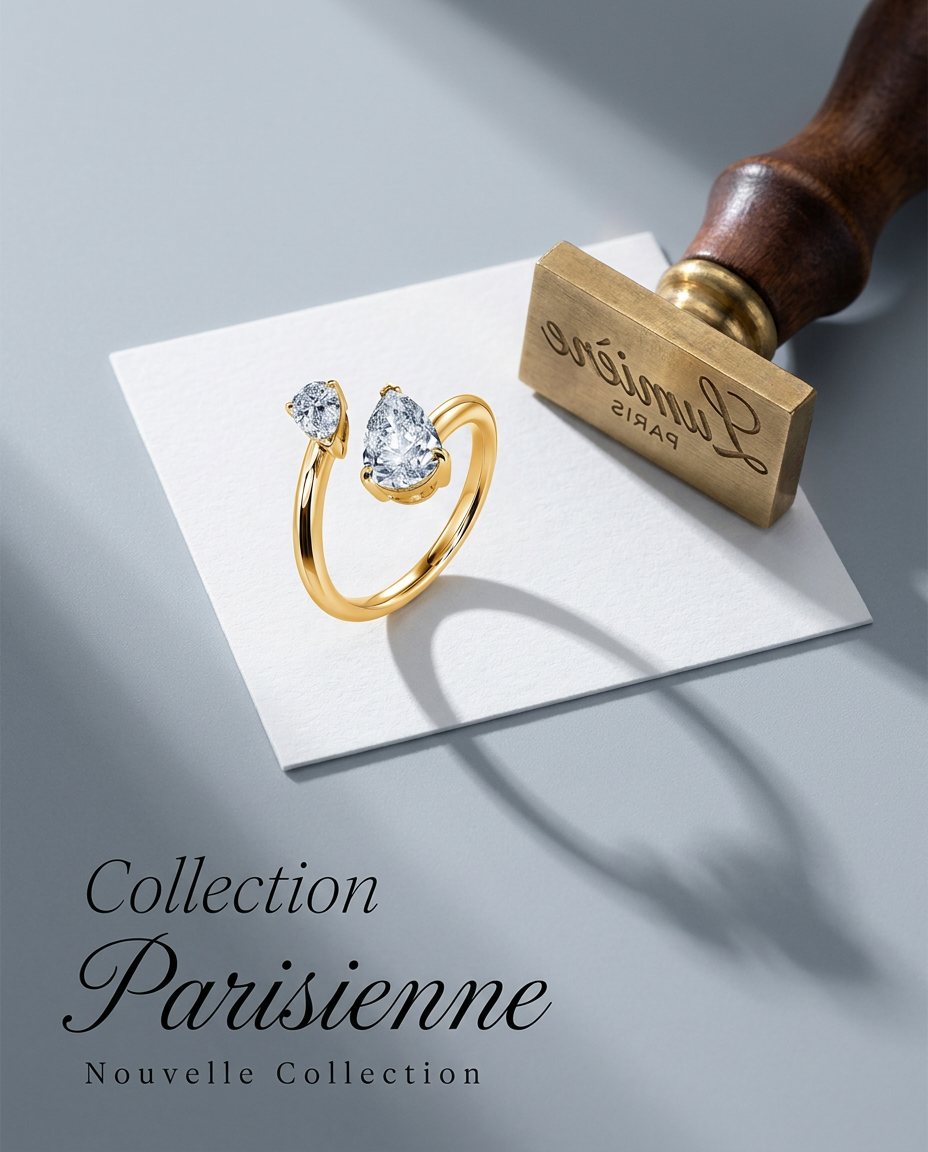
Turn any product into a high-end editorial shot. It drops your item into a clean, flat-lay setup with soft directional light and elegant long shadows against a cool matte gray background.
Regenerate using your own assets.
Case Study 2: Beverages in Glass or Cans
Placing a beverage can or bottle into a scene requires the AI to understand transparency, condensation, and metallic reflections. When you place a can of soda on a bed of ice, you expect to see condensation on the can and reflections of the individual ice cubes on its surface.
By prompting for a specific context—'A vibrant soda can nestled in a bucket of crushed ice, with condensation droplets catching the light'—the workflow generates these details automatically, creating a believable image that would typically require a complex physical photoshoot. For a full guide on this, see our article on the complete workflow for e-commerce brands.
Workflow code: #myup-cqnu-i50m
Drink Product Ad
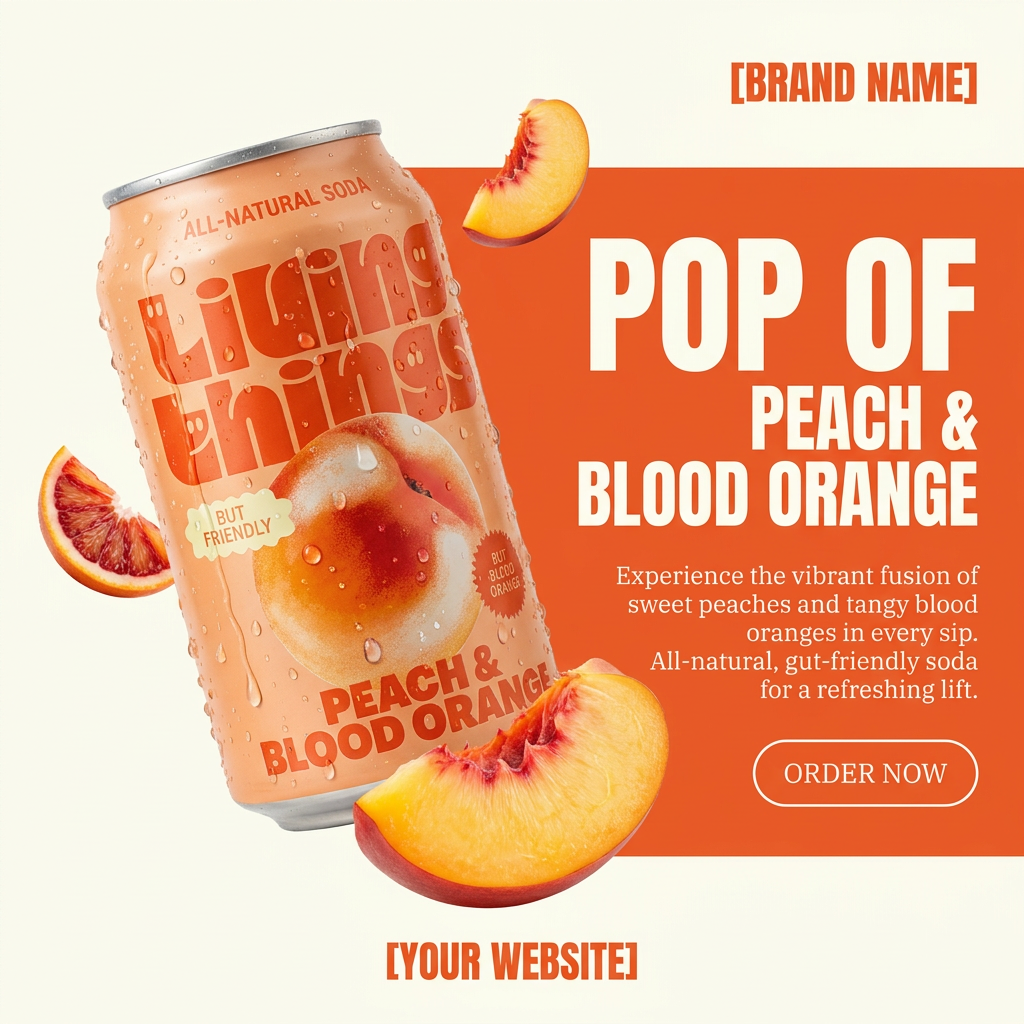
Turn any product photo into a bold, modern ad poster. It automatically frames your item against a split-color background, pairing a clean cream tone with a solid block of your product's dominant color. Super clean, minimal, and ready for social feeds.
Regenerate using your own assets.
Beyond a single shot: creating a full campaign from one photo
The real power of this workflow isn't just creating one perfect image; it's creating an infinite supply of on-brand assets from a single product photo. Your product detail page needs more than one hero shot. Your social media calendar needs fresh content daily. A traditional photoshoot delivers a finite set of images, but an AI workflow delivers endless possibilities.
Using the same product photo from your Brandkit, you can generate a dozen unique lifestyle scenes in minutes:
- On a minimalist concrete shelf for your website's hero image.
- On a sunny cafe table for an Instagram post.
- In a user's hand for a testimonial graphic.
- Against a vibrant, abstract background for a paid ad.
Because you're starting from the same Brandkit asset and can apply consistent stylistic prompts, every image feels like it's part of the same campaign. You're not just changing the background; you're exploring every possible context for your product, ensuring you have the perfect visual for every marketing channel. This is the principle behind the viral 'one-shot' product photography method.
Workflow code: #myup-zpby-tzie
Minimal Vibrant Product Advertising Poster

Drop in any product shot and watch it turn into a bold, high-energy square ad. It automatically reads your packaging to pull out the dominant colors and text, then builds a vibrant poster styled perfectly around your brand.
Regenerate using your own assets.
From generated scene to finished ad
Generating the perfect lifestyle photo is only half the job. In a fragmented workflow, you would now export that image and take it to another design tool to add your logo, headline, and call to action. This is another opportunity for brand inconsistency to creep in—using the wrong font weight, the wrong color hex code, or an outdated logo file.
An integrated platform solves this. Once you've approved a generated scene in MyUP, you're still within your brand's ecosystem. Your Brandkit, which contains your approved fonts, colors, and logos, is right there. You can immediately layer on your brand-approved typography and logos to turn the photorealistic image into a finished, ready-to-publish social media post, display ad, or website banner.
MyUP handles the production; you validate the result. This keeps the entire process, from world generation to final export, in one place, ensuring every asset you create is not only beautiful but perfectly and effortlessly on-brand.
