
You know the production drill. You need a five-slide Instagram carousel for a campaign launch. Slide one comes from an AI generator. Slide two, after ten rerolls, looks kind of similar. By slide five, your main product is lit differently and the background style has drifted completely. Then you drag the whole inconsistent mess into Canva to spend 20 minutes manually aligning your logo and typing out headlines. The result is a Frankenstein's monster of a post, and the time you 'saved' with AI was lost to manual rework.
This isn't a tool problem. It's a workflow problem. As of mid-2026, with models like Stability AI's Stable Diffusion 3.2 finally cracking the code on clean text-in-image generation, we have the technology to do better. The missing piece has been a system that can manage consistency and branding across a multi-part creative asset. Here's that system.
The two failures of most AI carousel generators
The 'generate-then-edit' process most creators use is inefficient because it fails in two critical ways, creating hours of low-value work.
1. Visual Chaos: Generating images one by one, even with the same prompt, guarantees style drift. AI models introduce subtle variations in lighting, color, composition, and character features with each generation. When stitched together, the result looks unprofessional and disjointed, breaking the narrative flow that makes a carousel effective.
2. The Text Overlay Problem: Most AI image tools are just that—image tools. They have no concept of your brand's typography, logo placement, or color palette. This forces you into a second, manual production step in a design tool, which is a major bottleneck. You're not just adding text; you're doing repetitive design work that should be automated.
Solving these two issues in a single, repeatable process is the key to producing high-quality carousels at scale.
The fix: An integrated workflow powered by your Brandkit
A great carousel tells a story. That story falls apart if every slide looks like it came from a different universe. The solution is to stop thinking about generating individual images and start thinking about producing a complete, brand-aware asset.
In MyUP.ai, this is accomplished with an integrated workflow powered by a Brandkit. Your Brandkit is the single source of truth for your visual identity. It stores your logos, color palette, fonts, and even your core visual style prompts. It acts as the visual narrator for your content, ensuring every part of your story feels connected and coherent.
Instead of applying your brand as a final, manual step, a MyUP workflow uses your Brandkit from the very beginning. It informs the style of the image generation and then automatically applies the correct text overlays and layouts. This turns a multi-tool, multi-step headache into a single, unified workflow.
Step 1: Define your visual narrator with a Brandkit
Before you generate a single slide, you give MyUP your brand's DNA. This is a one-time setup that pays dividends on every piece of content you create. You can build a Brandkit in minutes by simply providing your website URL. MyUP automatically extracts your logo, colors, and fonts.
You can then refine it by adding specific style prompts that define your aesthetic—like 'bright and airy product photography' or 'moody, cinematic lighting'. This Brandkit is now the foundation for every workflow, ensuring consistency is the default, not an accident.
Step 2: Generate a consistent image sequence
With your Brandkit active, you can now run a workflow designed to produce a series of images, not just one. MyUP workflows use techniques to maintain consistency across a batch, ensuring your character, product, and environment remain stable from slide to slide.
You simply define the core subject and the narrative points for each slide. The workflow handles the rest, referencing your Brandkit's style prompts to create a visually cohesive set of images. This is perfect for product showcases, where every item needs to be presented in the same high-quality, on-brand style. For a clean, elegant product series, this template is an ideal starting point.
Workflow code: #myup-fy77-jljs
Minimalist Elegant Product Advertising Poster

Turn any product shot into a high-end editorial ad. It places your item against a soft cream background with airy spacing and adds elegant, small serif typography at the top. Great for wellness or luxury brands wanting a calm, minimal aesthetic.
Regenerate using your own assets.
Step 3: Apply on-brand text and layouts automatically
This is where the 'Canva tax' disappears. The same workflow that generated your consistent visuals now applies your branded text overlays. Because it's connected to your Brandkit, the workflow already knows to use your primary headline font, your brand's accent color for call-outs, and where to place your logo on each slide.
You provide the text for each slide, and MyUP handles the design execution. This transforms the most tedious part of carousel creation into an automated step, ensuring your typography is as consistent as your imagery. For a carousel that relies on strong headlines and a clean grid, a text-forward workflow is essential.
Workflow code: #myup-n0bi-2wzk
Bold Editorial Grid Poster

Create striking 2x3 editorial posters with six seamless, flat-color square cards in a perfect 4:5 grid. There are absolutely no gaps between the blocks, giving your content a bold, high-contrast magazine layout. It looks incredibly clean on any social feed.
Regenerate using your own assets.
Step 4: Assemble your story with a template
Different stories require different structures. A tutorial carousel is linear, a listicle is modular, and a brand story might be more abstract. MyUP templates provide pre-built structures for these common narrative formats. While the visual principles are similar to those for creating on-brand LinkedIn carousels, Instagram allows for more visually expressive layouts.
You can choose a workflow that generates a classic slide-by-slide sequence or one that creates a more complex, magazine-style mosaic. The user approves and adjusts the high-level story; MyUP handles the production of the final, ready-to-post asset.
Workflow code: #myup-aktp-7jq0
Food Magazine Mosaic Cover
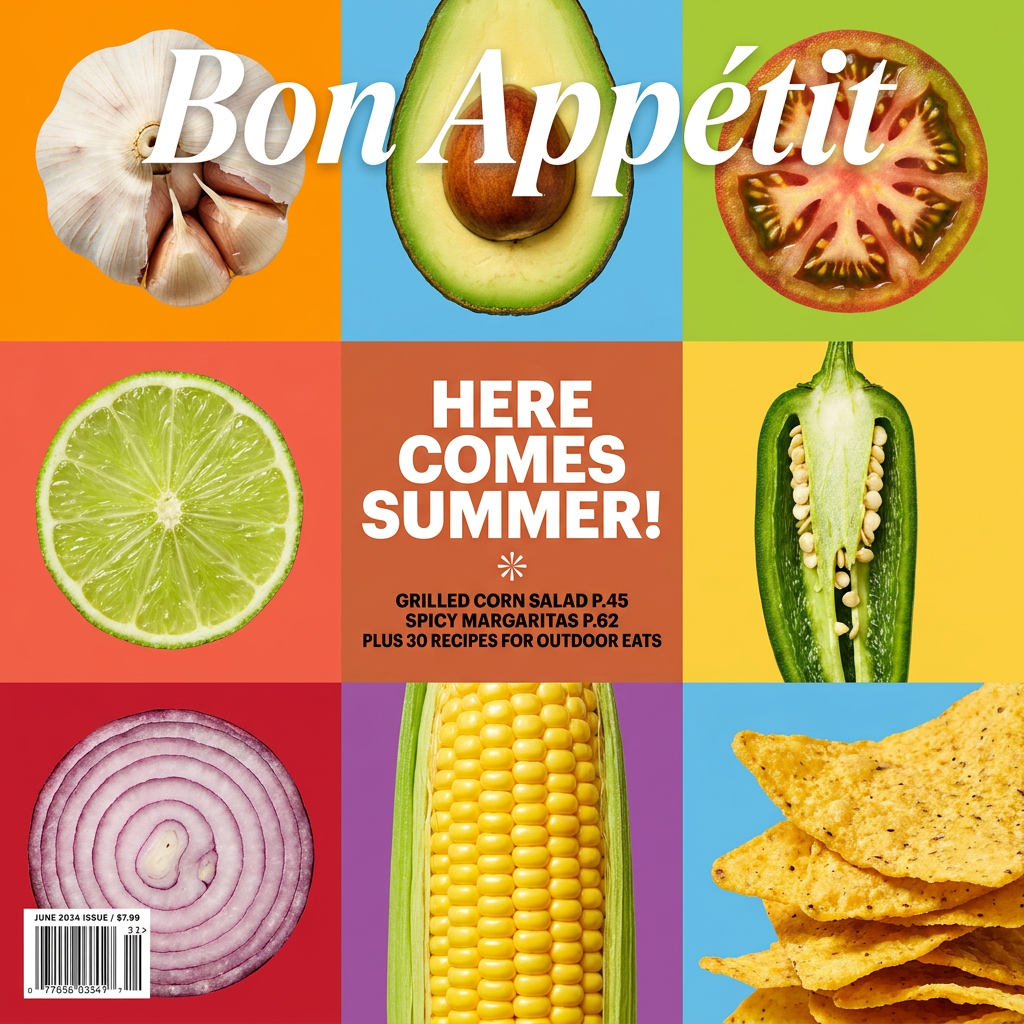
Turn your food shots into a bold, high-end editorial cover. It takes extreme close-ups of your dishes or ingredients and arranges them into a vibrant 3x3 grid that looks straight out of a premium food magazine.
Regenerate using your own assets.
From a dozen clicks to one workflow
The old process for creating an Instagram carousel with AI was a chain of compromises: visual consistency sacrificed for speed, and that speed negated by manual design work. It involved stitching together assets from different tools, hoping the final product looked coherent.
The MyUP workflow is a true production system. By putting your brand identity at the start of the process, not the end, it produces a complete, on-brand carousel in a single, repeatable operation. You get better, more consistent content in a fraction of the time. Stop stitching, and start storytelling.
