You’ve tried it. You prompted for a “photorealistic gourmet burger” and got back an image that was technically perfect but emotionally void. The bun has an unnatural sheen, the cheese looks like plastic, and the whole scene feels sterile, like a 3D render from a decade ago. It’s clean, it’s sharp, but it’s not delicious. It has no soul.
This is the core frustration for any restaurant, food brand, or marketer trying to use AI for photography. You’re saving on shoot costs, but you’re losing the one thing that sells food: appetite appeal. The problem isn’t the AI. It’s the process. One-off prompting is a lottery; a professional workflow is a recipe for success.
Why most AI food photography looks unappetizingly fake
Before fixing the problem, we have to diagnose it. Generic AI food images fail for three specific reasons that a professional food photographer would spot instantly.
1. The lighting is sterile
Most AI models default to flat, even, commercial lighting. It’s the kind of light you’d use for a product shot of a watch, not a steaming bowl of pasta. Delicious food relies on atmosphere. It needs the dramatic shadows from a side-lit window, the warm glow of a restaurant at dusk, or the bright, fresh feel of morning light. Without specific direction, AI gives you a lab specimen, not a meal.
2. The textures are wrong
Real food is perfectly imperfect. It has texture: the glistening droplets on a fresh salad, the crumbly surface of artisan bread, the slight char on a grilled steak. AI, in its quest for perfection, often smooths these details into oblivion, resulting in that tell-tale “plasticky” look. It generates the idea of a croissant, not the flaky, buttery reality.
3. There is no brand soul
A dark, moody photo of a steak followed by a bright, airy photo of a smoothie creates visual whiplash. Generating images one by one with different prompts results in a collection of photos, not a cohesive brand style. For a menu, an ad campaign, or a social media feed, this inconsistency kills brand recognition and looks unprofessional.
The solution: a repeatable 'visual recipe' for your brand
The secret to consistently delicious AI food photography isn't a single magic prompt. It's a system—a 'visual recipe' that defines your brand's unique photographic style and can be applied to any dish you create. This is what separates amateur results from professional production, and it's exactly what MyUP.ai is built to do.
Instead of starting with a blank prompt every time, you build a workflow that controls for the key ingredients of a great photo: lighting, camera angle, composition, and styling. This becomes your signature style, ensuring every image feels like it came from the same photoshoot.
The foundation of this system in MyUP is the Brandkit. Before you generate a single image, you can set up your Brandkit by simply providing a URL. MyUP automatically extracts your brand's colors, fonts, and logo. This ensures that when you later turn your food photos into ads or social posts, every element is already on-brand, creating a seamless production line from image to finished asset.
Step 1: Master the photographic ingredients in your prompt
To create a great visual recipe, you need to speak the language of photography in your prompts. Stop using generic terms like “photorealistic” and start directing the AI like a photographer.
- Direct the Light: Don't just ask for light, define it. Use terms like “dramatic side lighting from a large window,” “soft, diffused morning light,” “hard flash photography with deep shadows,” or “warm, moody, ambient restaurant lighting.”
- Choose Your Camera and Lens: Specify the shot. Are you looking for a “macro shot focusing on the texture of a strawberry,” a “top-down flat lay of a brunch spread,” or a “dynamic 45-degree angle shot”? Mentioning a “shallow depth of field” will blur the background, making your dish the hero.
- Style the Scene with Imperfections: This is the most crucial step for realism. Add the small details that bring a photo to life. Think “scattered flour on a dark wooden table,” “a glistening drizzle of olive oil,” “a single perfect crumb on the plate,” or “delicate steam rising from the hot soup.”
These principles of detailed prompting apply to all kinds of AI visuals, not just food. Mastering them is also the key to creating realistic AI product photos that sell.
Step 2: Create your signature shot with a workflow
Now, let's combine these ingredients to build a signature shot. Instead of a weak prompt like “photo of a pizza,” a professional prompt looks more like this:
“Commercial food photography of a rustic Neapolitan pizza on a wooden peel. Dramatic side lighting highlights the bubbly, charred crust. Shallow depth of field, focus on the glistening melted mozzarella. Fresh basil leaves and a dusting of flour are scattered on the surface. Dark, moody, pizzeria background.”
Crafting this from scratch every time is inefficient. In MyUP, you can use a pre-built workflow that has this expert-level detail already baked in. You simply provide the dish, and the workflow handles the photographic direction. The user validates the result; MyUP handles the production.
For a powerful, high-impact hero shot for an ad or menu cover, you don’t have to start from scratch. This MyUP workflow is built for exactly that purpose.
Workflow code: #myup-xjsb-hirr
Bold Portrait Food Advertising Photo

Get those high-impact, tight action shots of people actually enjoying your food brand. It drops your product right into a messy, realistic close-up bite shot that feels like a premium lifestyle campaign instead of a boring studio packshot.
Regenerate using your own assets.
Step 3: Scale production for your entire menu
One great image is good. Twenty great images that share a consistent visual style are what build a brand. This is where a workflow-based platform like MyUP becomes essential.
Once you’ve perfected your signature shot, you can save that entire prompt structure as a reusable workflow. Now, to photograph your entire menu, you simply run the same workflow and change the one key variable: your dish.
- Run 1: “Neapolitan pizza”
- Run 2: “Bowl of creamy carbonara pasta”
- Run 3: “Slice of rich chocolate lava cake”
The lighting, camera angle, depth of field, and styling remain locked in. The result is a full suite of images that look like they were shot by the same photographer on the same day. This is how you move from being a frantic prompter to a strategic creative director, guiding the AI to produce a consistent, on-brand library of assets.
To see this in action, use MyUP's Food Product Ad workflow. It's designed to create a series of consistent, on-brand images for any dish you're promoting.
Workflow code: #myup-w0vh-abft
Food Product Ad
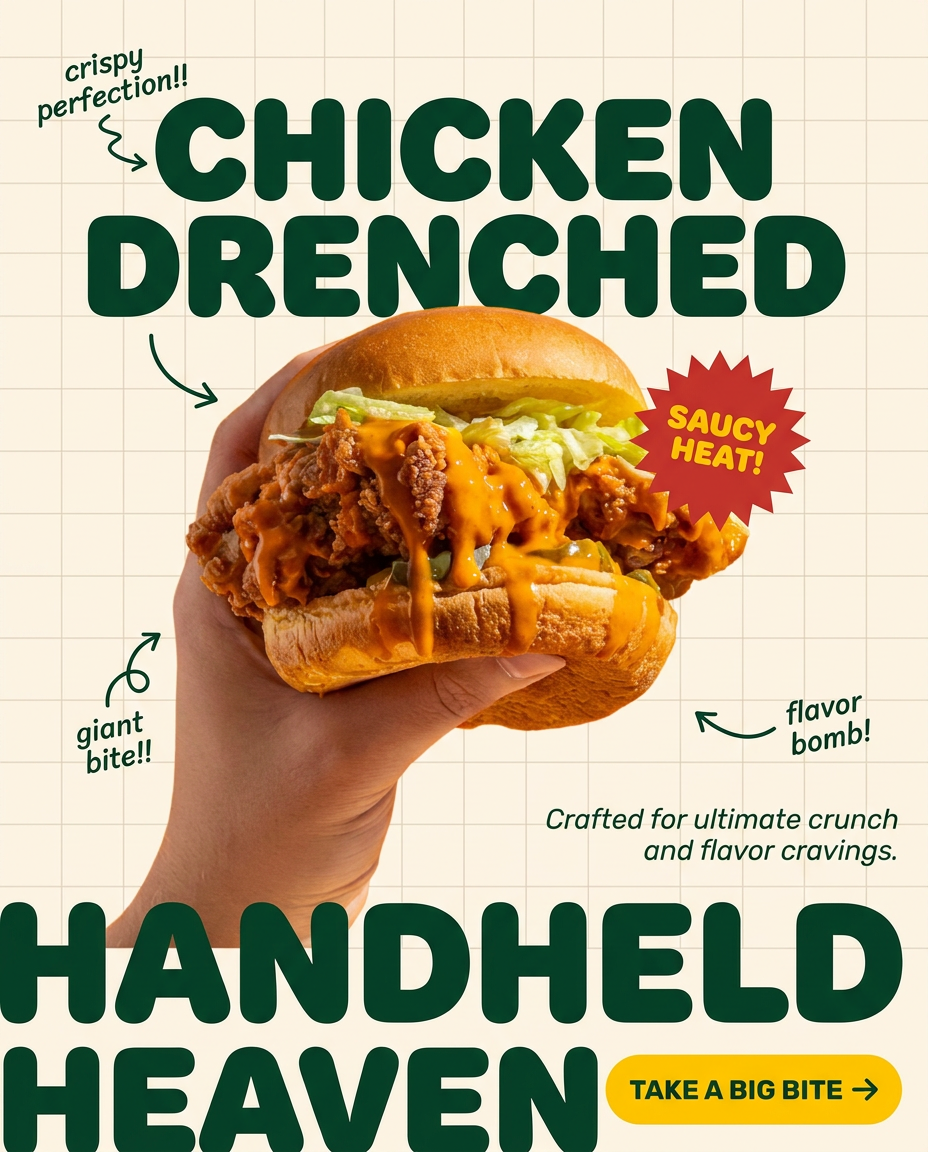
Turn any dish or snack into a bold, playful social ad. It places your food against a soft warm beige background with a subtle grid pattern, topped with chunky rounded headlines. It's clean, friendly, and instantly grabs attention in the feed.
Regenerate using your own assets.
Step 4: Turn your images into on-brand marketing assets
A food photograph is rarely the final product. It’s the primary ingredient for a menu, a social media post, an email newsletter, or a digital ad. The traditional process involves exporting the image and opening it in another design tool to add text, logos, and branding.
MyUP integrates this entire process. Once your image is generated, you can instantly use it in a template for a finished marketing asset. Because you’ve already set up your Brandkit, these templates will automatically apply your brand’s fonts, colors, and logo. There’s no clumsy handoff between tools. You go from a simple idea to a ready-to-publish asset in a single, streamlined workflow.
Once you have your hero shot, the next step is to turn it into a promotional asset. This workflow takes your generated image and builds a complete poster around it, ready for social media or print.
Workflow code: #myup-tbky-nciq
Food Brand Poster

Instantly turn any food or drink product packaging into a bold, vibrant retro poster. The system automatically reads your bottle or box to grab its exact colors and ingredients, then crafts a perfectly coordinated vintage background around it.
Regenerate using your own assets.
Stop prompting, start producing
The difference between fake AI food and mouth-watering AI food photography is the difference between guessing and directing. Stop chasing a lucky result with endless, one-off prompts. Instead, build a system. Define your visual recipe, save it as a repeatable workflow, and scale your production with confidence.
This is the modern workflow for creating brand content. MyUP.ai provides the platform to build that system, giving you the creative control of a photographer and the efficiency of AI. Start building your brand's visual recipe today.
